


Contents
- Quick Summary: 7 Signs of a Good WordPress Developer
- What Separates a Good WordPress Developer From a Freelancer Who Installs Plugins
- What to Look for in a Good WordPress Developer
- Questions That Reveal Real Technical Experience
- Why Most WordPress Performance Problems Are Architectural
- WooCommerce Scaling Realities
- Plugin Development vs Plugin Accumulation
- Plugin-Heavy WordPress vs Structured Custom Development
- How API Integrations Break in Real Production Environments
- Reliable Integration Architecture Usually Includes
- WordPress Monolith vs Headless Architecture
- Traditional WordPress vs Headless WordPress
- Trade-Offs Most Businesses Underestimate
- Security and Maintenance Are Operational Functions
- Common Maintenance Failures
- Skills a Good WordPress Developer Needs in Production
- Technical Skills That Matter More Than Theme Customization
- Cheap Development Usually Creates Expensive Maintenance
- Cheap WordPress Development vs Maintainable Engineering
- Where Filicode Fits Into Complex WordPress Systems
- Signs Your Business Has Outgrown Basic WordPress Development
- Infrastructure Warning Signs
- Operational Warning Signs
- Frequently Asked Questions
- How do I know if a WordPress developer is good?
- What is the average timeline for custom WordPress development?
- Is WooCommerce reliable for high-traffic ecommerce stores?
- Should businesses use many plugins or build custom functionality?
- What are the risks of hiring cheap WordPress developers?
- When should a business consider headless WordPress?
- Conclusion
A good WordPress developer helps prevent the performance, integration, security, and maintenance problems that appear as a WordPress site grows.
Traffic increases. Marketing tools stop syncing correctly. WooCommerce checkout latency spikes during campaigns. Plugin updates break custom workflows. Cron jobs fail silently. Search indexing becomes inconsistent. Admin dashboards slow down because too many plugins are competing for database queries.
That is normally the point where businesses realize the difference between someone who can “build a website” and a good WordPress developer who understands production systems.
The biggest problems rarely come from visual design. They come from architecture decisions that create long-term maintenance costs:
- tightly coupled plugins
- poor database usage
- unmanaged technical debt
- no caching strategy
- weak deployment workflows
- unreliable API integrations
- unmanaged hosting infrastructure
- plugin conflicts during updates
- no observability or rollback strategy
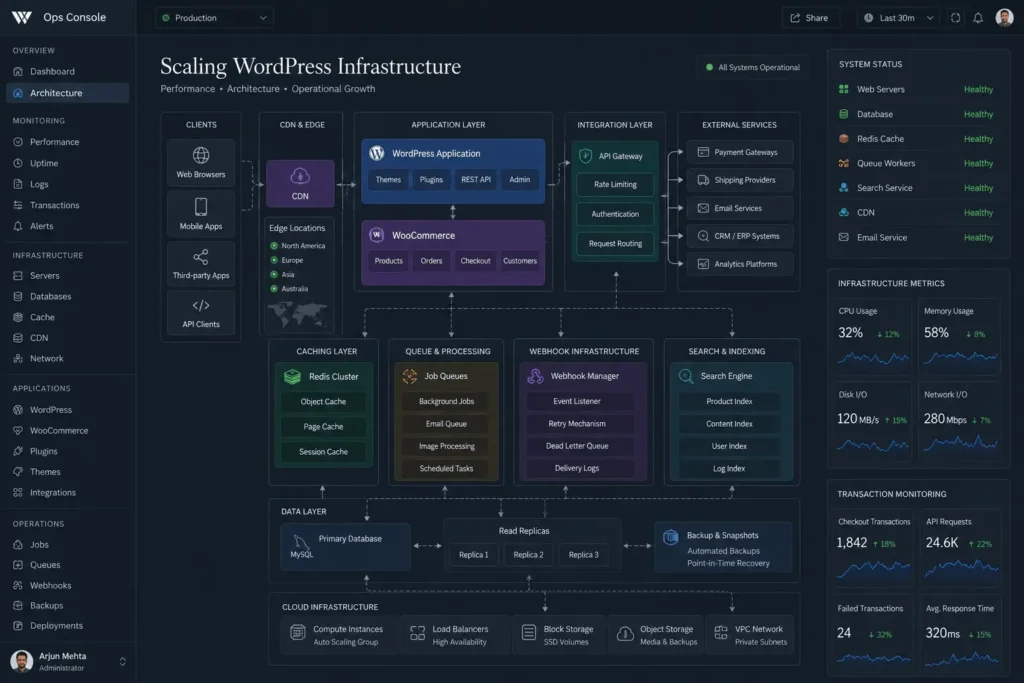
A scalable WordPress platform is not just a CMS installation. It becomes an operational system connected to CRMs, payment providers, analytics pipelines, automation layers, customer support tooling, and internal business workflows.
That requires engineering discipline, not just page builders.
Quick Summary: 7 Signs of a Good WordPress Developer
- Plans for maintainability: A good WordPress developer thinks about future updates and technical debt before adding functionality.
- Understands performance: They know how caching, database queries, plugins, hosting, and frontend assets affect site speed.
- Controls plugin dependencies: They know when to use an existing plugin and when custom development is the safer option.
- Understands WooCommerce scaling: They can identify checkout, database, inventory, and session bottlenecks before traffic becomes a problem.
- Builds reliable integrations: APIs, webhooks, retries, logging, and background processing are planned for real production failures.
- Treats security and maintenance seriously: Updates, backups, permissions, monitoring, and testing are part of the development process.
- Uses professional development workflows: Staging, version control, testing, monitoring, and rollback planning protect production websites.
What Separates a Good WordPress Developer From a Freelancer Who Installs Plugins
Many businesses hire based on portfolio screenshots.
That is usually a mistake.
Production reliability comes from backend decisions:
- how hooks are structured
- how custom post types are indexed
- how background jobs are processed
- how integrations retry failed requests
- how caching invalidation is handled
- how deployments are managed
- how plugin conflicts are isolated
A good WordPress developer understands how WordPress behaves under operational pressure.
That includes:
- database query optimization
- object caching with Redis
- CDN behavior
- queue systems
- REST API architecture
- security hardening
- role-based access control
- multisite trade-offs
- WooCommerce session management
- cron limitations
Most business-critical failures happen in these layers.
What to Look for in a Good WordPress Developer
When evaluating a WordPress developer, look beyond portfolio designs. A good WordPress developer should be able to explain architecture, performance, plugin decisions, deployments, integrations, security, and long-term maintenance.
A reliable WordPress expert should be able to explain:
- how they handle deployments
- how they isolate plugin conflicts
- how they structure custom plugins
- how they monitor failures
- how they optimize WooCommerce queries
- how they manage staging environments
- how they approach backups and rollback procedures
If someone only discusses themes and page builders, they are probably operating at the presentation layer only.
That becomes dangerous once:
- traffic increases
- marketing automation expands
- integrations multiply
- operational workflows become dependent on WordPress
Questions That Reveal Real Technical Experience
Ask about:
- transient caching strategies
- object caching vs page caching
- webhook retry handling
- async processing
- database indexing
- custom REST endpoints
- Action Scheduler in WooCommerce
- plugin dependency isolation
- CI/CD workflows
- infrastructure monitoring
Experienced WordPress development experts answer these directly and practically.
Inexperienced developers usually redirect the conversation toward visual features.
Learn how to identify experienced WordPress developers with the right operational expertise.
Why Most WordPress Performance Problems Are Architectural
Hosting is rarely the only bottleneck.
A poorly engineered plugin stack can overload even expensive infrastructure.
Common production issues include:
- uncached admin AJAX requests
- excessive wp_options autoload usage
- unindexed meta queries
- WooCommerce cart fragmentation
- third-party plugins generating blocking API requests
- oversized page builder DOM output
- synchronous webhook processing
A good WordPress developer reduces operational overhead before scaling infrastructure.
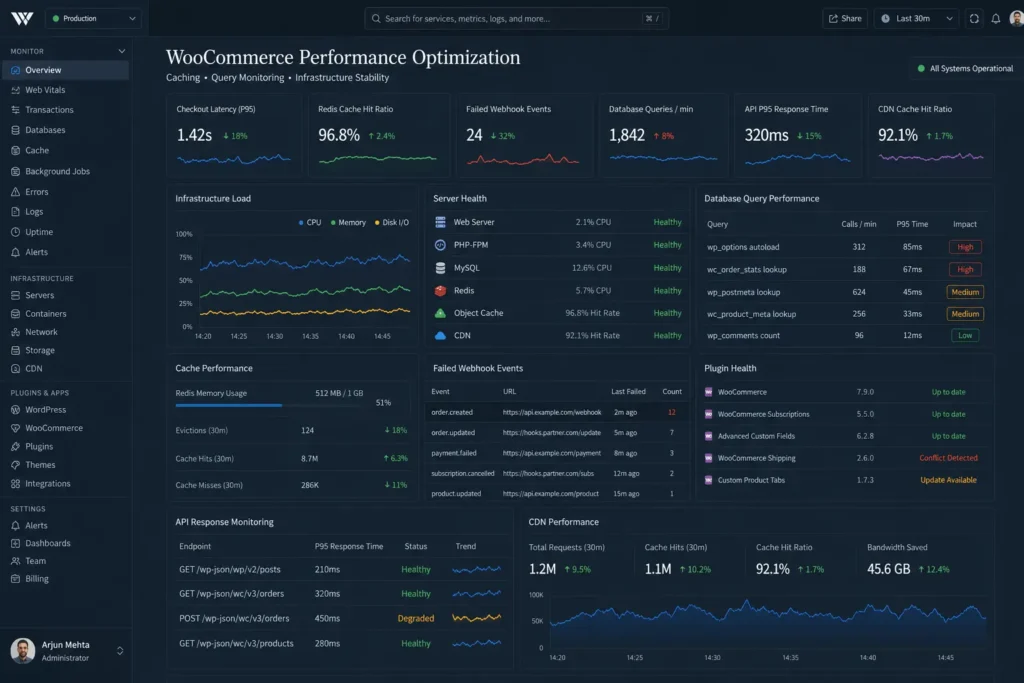
WooCommerce Scaling Realities
WooCommerce works well for many businesses, but large catalogs and high transaction volumes expose limitations quickly.
Typical bottlenecks include:
- checkout session locking
- cart fragment requests
- slow product filtering
- heavy order meta queries
- inventory synchronization delays
- payment webhook failures
- coupon validation overhead
Production-grade WooCommerce development often requires:
- Redis object caching
- optimized database indexing
- external search systems
- queue-based order processing
- CDN optimization
- webhook monitoring
- async email systems
Without those improvements, traffic spikes create operational instability.
Plugin Development vs Plugin Accumulation
There is a major difference between:
- extending WordPress intentionally
- continuously adding plugins until the system becomes fragile
Many businesses accumulate:
- duplicate plugins
- overlapping builders
- conflicting SEO tools
- unmanaged analytics scripts
- abandoned integrations
- excessive admin extensions
Plugin-Heavy WordPress vs Structured Custom Development
| Approach | Short-Term Benefit | Long-Term Operational Impact |
|---|---|---|
| Installing multiple plugins | Faster launch | Higher maintenance overhead |
| Page-builder dependency | Easier visual editing | Performance and DOM bloat |
| Custom plugin architecture | Better maintainability | Lower technical debt |
| Reusable internal systems | Consistent workflows | Easier scaling and debugging |
| Isolated functionality | Cleaner deployments | Reduced plugin conflicts |
| Structured integrations | More stable automation | Better operational reliability |
This creates:
- inconsistent code standards
- security exposure
- upgrade risks
- debugging complexity
- performance degradation
A good WordPress developer usually prefers:
- custom plugin architecture
- isolated functionality
- reusable internal components
- minimal dependency chains
- version-controlled deployments
That approach improves maintainability significantly over time.
In many production environments, custom functionality built through structured WordPress plugin development services creates far fewer operational conflicts than stacking multiple third-party plugins together.
How API Integrations Break in Real Production Environments
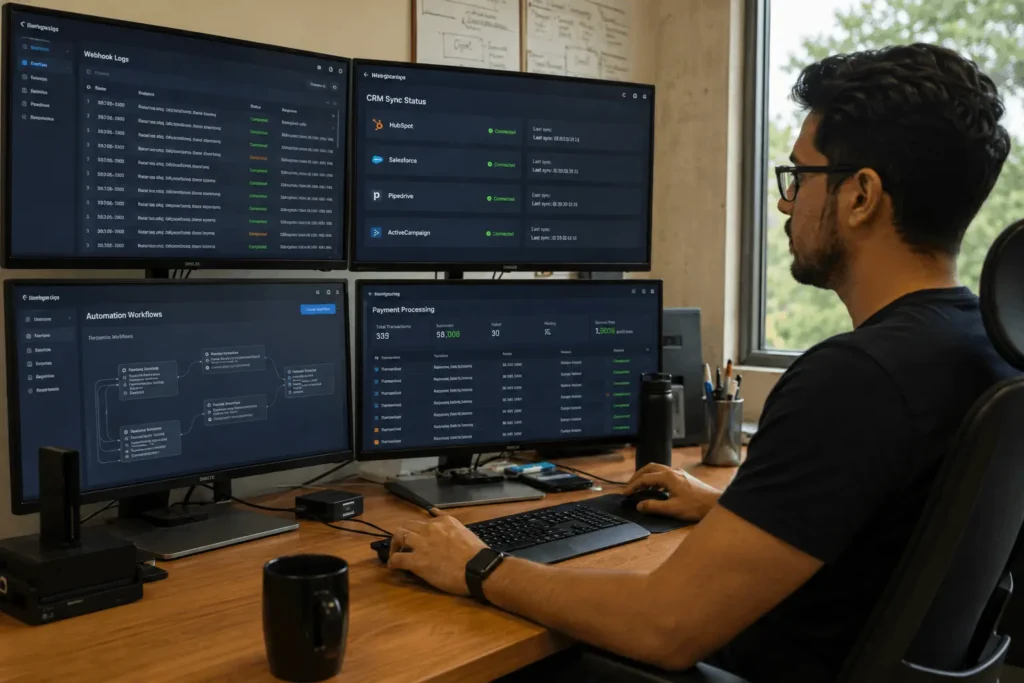
Most integration failures are operational, not technical. As operational workflows become more complex, businesses increasingly combine WordPress infrastructure with CRM orchestration, support systems, and internal tooling through structured AI automation services rather than relying on isolated plugin automations.
For example:
- CRM webhooks timeout during traffic spikes
- inventory sync jobs fail silently
- authentication tokens expire unexpectedly
- payment providers retry duplicate transactions
- marketing automations process incomplete data
- API rate limits block synchronization
A professional WordPress development company plans for failure handling early.
Reliable Integration Architecture Usually Includes
- queue systems for async processing
- webhook signature validation
- retry mechanisms
- dead-letter handling
- idempotent operations
- audit logging
- request monitoring
- alerting systems
Production-grade synchronization workflows normally require dedicated API integration services once payment systems, CRMs, fulfillment tools, analytics platforms, and customer operations become tightly connected.
This matters more than the integration itself.
An API that works in staging but fails under production concurrency becomes an operational liability.
For technical reference on webhook reliability and REST architecture, the documentation around RESTful systems on REST API overview provides useful baseline concepts.
WordPress Monolith vs Headless Architecture
Not every business needs headless WordPress.
In fact, many companies introduce unnecessary complexity by adopting headless systems too early.
A traditional monolithic WordPress stack is often sufficient when:
- editorial workflows dominate
- integrations are limited
- SEO is the primary acquisition channel
- operational teams are small
Headless architecture becomes useful when:
- frontend applications require independent scaling
- multiple platforms consume the same content
- frontend performance requirements become strict
- real-time interfaces are necessary
- engineering teams need deployment separation
As frontend systems become more application-focused, scalable interfaces often require dedicated UI and UX design services alongside backend engineering to maintain usability across complex customer workflows.
Traditional WordPress vs Headless WordPress
| Architecture Type | Best For | Operational Trade-Off |
|---|---|---|
| Traditional WordPress | Content-driven business websites | Easier maintenance workflows |
| WooCommerce monolith | Small to medium ecommerce operations | Faster implementation |
| Headless WordPress | Multi-platform delivery systems | Higher infrastructure complexity |
| API-first architecture | SaaS and application ecosystems | Requires experienced engineering |
| Decoupled frontend systems | Performance-focused applications | More deployment coordination |
| Microservice integrations | Large-scale enterprise workflows | Increased operational overhead |
Trade-Offs Most Businesses Underestimate
Headless systems introduce:
- frontend infrastructure complexity
- API orchestration overhead
- caching coordination problems
- preview workflow complications
- authentication complexity
- deployment synchronization issues
A good WordPress developer evaluates operational impact before recommending architectural shifts.
Not every scalability problem requires microservices.
Security and Maintenance Are Operational Functions
WordPress security is not solved through one plugin.
Real security management includes:
- dependency monitoring
- server hardening
- least-privilege permissions
- WAF configuration
- malware scanning
- credential rotation
- audit logging
- backup validation
- update testing workflows
Many WordPress support services focus only on updates.
That is not enough for production systems handling:
- customer data
- payments
- subscriptions
- operational workflows
- membership systems
- API integrations
Common Maintenance Failures
A typical unmanaged WordPress stack eventually develops:
- orphaned cron jobs
- database bloat
- failed scheduled tasks
- expired API credentials
- broken redirects
- stale caches
- plugin compatibility conflicts
These issues accumulate quietly until they affect revenue operations.
A good WordPress developer treats maintenance as infrastructure management, not plugin updates.
Skills a Good WordPress Developer Needs in Production
The industry changed significantly over the last few years.
A developer focused only on themes and templates will struggle with modern operational requirements.
When evaluating a good WordPress developer today, look for broader systems awareness, including:
- infrastructure fundamentals
- API architecture
- caching systems
- async workflows
- observability
- deployment automation
- database optimization
- cloud hosting environments
- security practices
- automation tooling
Technical Skills That Matter More Than Theme Customization
Strong WordPress developers increasingly work with:
- Docker environments
- Git-based deployment pipelines
- CI/CD workflows
- Redis caching
- Cloudflare optimization
- REST APIs
- GraphQL layers
- webhook systems
- AI automation tooling
- SaaS integrations
The role is becoming closer to application engineering than traditional website development.
That shift is especially visible in enterprise WordPress development and large WooCommerce systems.
Cheap Development Usually Creates Expensive Maintenance
Many businesses optimize for short-term build cost.
For businesses operating beyond brochure-style websites, structured WordPress development services usually become necessary once integrations, performance requirements, and operational workflows start increasing.
That decision often creates:
- fragmented plugin ecosystems
- undocumented customizations
- inconsistent coding standards
- unstable integrations
- slow admin performance
- expensive migrations later
A reliable WordPress development partner focuses on lifecycle cost.
That includes:
- maintainability
- upgrade safety
- operational resilience
- observability
- extensibility
- deployment reliability
Fast delivery without architecture discipline usually transfers cost into future operations.
Cheap WordPress Development vs Maintainable Engineering
| Low-Cost Development | Maintainable Engineering |
|---|---|
| Rapid plugin stacking | Structured architecture planning |
| Minimal documentation | Clear operational workflows |
| Shared unmanaged hosting | Infrastructure-aware deployment |
| No monitoring systems | Observability and alerting |
| Short-term fixes | Long-term scalability planning |
| Frequent plugin conflicts | Controlled dependency management |
Where Filicode Fits Into Complex WordPress Systems
Most businesses do not need custom engineering immediately.
But there is usually a transition point where operational complexity outgrows plugin-driven workflows.
That often happens when:
- WooCommerce operations scale
- integrations become business-critical
- teams require workflow automation
- performance issues affect conversion rates
- multiple SaaS systems require synchronization
- technical debt slows execution
At that stage, engineering decisions become operational decisions.
Filicode works primarily in environments where WordPress behaves less like a brochure site and more like an operational platform.
That includes:
- custom WordPress development
- WooCommerce architecture
- API integrations
- AI automation workflows
- scalable plugin development
- performance optimization
- custom SaaS integrations
- operational tooling
- workflow automation
- infrastructure-aware WordPress engineering
The focus is usually long-term maintainability rather than short-term visual delivery.
Signs Your Business Has Outgrown Basic WordPress Development
Several operational signals usually appear before systems start failing visibly.
Infrastructure Warning Signs
- admin dashboards become slow during traffic spikes
- WooCommerce checkout latency increases
- integrations fail intermittently
- plugin updates regularly break workflows
- marketing tools produce inconsistent data
- cron-based automation becomes unreliable
- support teams manually correct system failures
Operational Warning Signs
- developers avoid updating plugins
- deployments happen directly in production
- no staging workflow exists
- no rollback strategy exists
- integrations lack monitoring
- business logic is scattered across plugins
- reporting data becomes inconsistent
These are not just technical issues.
They become operational bottlenecks affecting marketing, support, finance, and customer retention.
Frequently Asked Questions
How do I know if a WordPress developer is good?
A good WordPress developer should be able to explain architecture, performance, plugin decisions, security, integrations, staging, testing, and maintenance clearly. Look for practical production experience, not only portfolio screenshots.
What is the average timeline for custom WordPress development?
Small business implementations may take 3 to 6 weeks. Larger WooCommerce systems, SaaS integrations, or custom workflow platforms often require several months depending on infrastructure complexity.
Is WooCommerce reliable for high-traffic ecommerce stores?
Yes, but only with proper engineering. Large WooCommerce stores typically require Redis caching, CDN optimization, queue systems, database tuning, and careful plugin management.
Should businesses use many plugins or build custom functionality?
Too many plugins create operational risk. Custom plugin development is usually more maintainable for critical workflows, integrations, and performance-sensitive systems.
What are the risks of hiring cheap WordPress developers?
The most common risks are unstable architecture, unmanaged technical debt, plugin conflicts, poor security practices, and expensive rebuilds later.
When should a business consider headless WordPress?
Usually when frontend scaling, application-like experiences, or multi-platform content delivery become operational priorities. Headless architecture introduces complexity and should not be adopted prematurely.
Conclusion
A good WordPress developer is not defined by visual design alone.
The real differentiator is operational thinking.
As WordPress systems grow, the challenges shift toward:
- scalability
- integration reliability
- performance stability
- deployment safety
- maintainability
- infrastructure coordination
At that stage, infrastructure stability, conversion optimization, and long-term growth execution often need coordination between engineering systems and broader digital marketing services rather than isolated website updates.
Businesses usually notice the problem when operational friction starts increasing:
- slower releases
- broken integrations
- inconsistent reporting
- checkout failures
- escalating maintenance costs
That is normally the point where architecture quality starts affecting revenue operations directly.
If a WordPress platform is becoming tightly connected to sales, automation, fulfillment, analytics, or customer workflows, development decisions should be treated as infrastructure decisions.