React Frontend, WordPress Content Management, and Conversion-Focused Service Journeys

Patronus Clearance Headless WordPress Development Case Study

This headless WordPress development case study explains how FiliCode built a responsive website for Patronus Clearance using HTML, CSS, JavaScript, React, and WordPress. The project separated the customer-facing presentation layer from the WordPress backend, allowing the business to manage service content in a familiar CMS while visitors use a focused, modern frontend designed around document-clearance enquiries.

Visit Patronus Clearance
Project Overview

What Did Patronus Clearance Need From Its Website?

Patronus Clearance supports customers who need help with administrative and document-clearance processes in Bahrain. Its website has to explain several service categories, establish trust quickly, and make it easy for a visitor to move from research to a direct enquiry.

Headless WordPress development uses WordPress for content administration while a separate frontend application renders the public website. In this project, React handled the interface and WordPress remained the content management system. Content could therefore be maintained independently from the frontend components that control navigation, service presentation, responsive layouts, and calls to action.

FiliCode approached the website as both a technical build and a service-business communication project. The architecture had to support clear service pages, practical contact routes, manageable content, and a frontend that could evolve without depending on traditional WordPress themes and PHP templates.

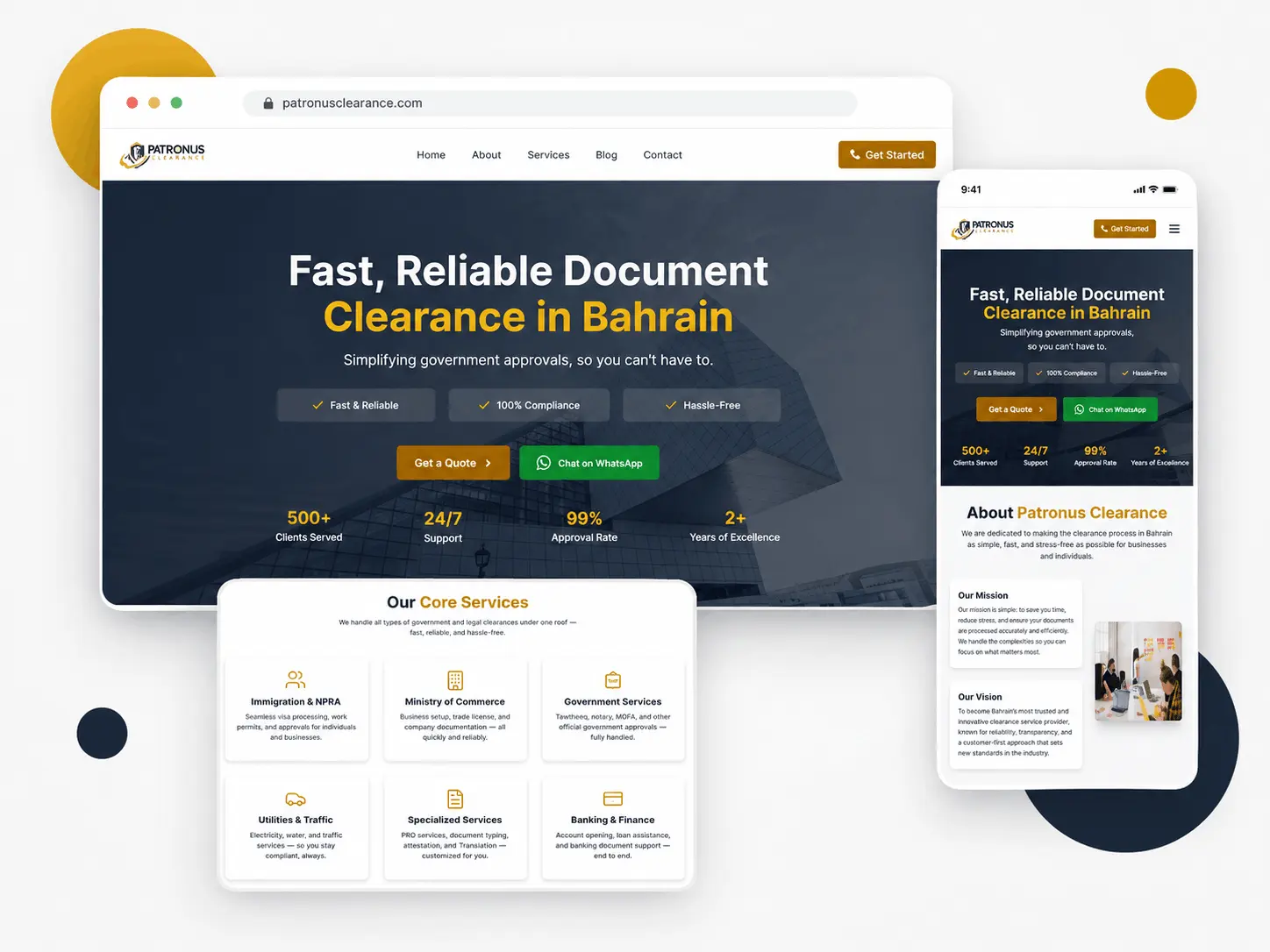
Patronus Clearance website displayed on desktop and mobile screens
Project Scope

Six Connected Parts of the Patronus Website Build

The project combined frontend engineering, WordPress content delivery, service-page planning, responsive design, enquiry journeys, and technical SEO foundations.

React frontend development icon

React Frontend

Reusable React components were used to organize page sections, service information, navigation, contact actions, and responsive interface behavior.

WordPress content management icon

Headless WordPress CMS

WordPress remained the editorial backend, keeping content management separate from the code responsible for the public website experience.

Service website design icon

Service-Led UX

The interface grouped document-clearance services into understandable paths so visitors could identify the right area before making contact.

Responsive user experience icon

Responsive Components

Layouts and interactive elements were adapted for desktop, tablet, and mobile use without hiding essential service or contact information.

Search-friendly page structure icon

Search-Friendly Structure

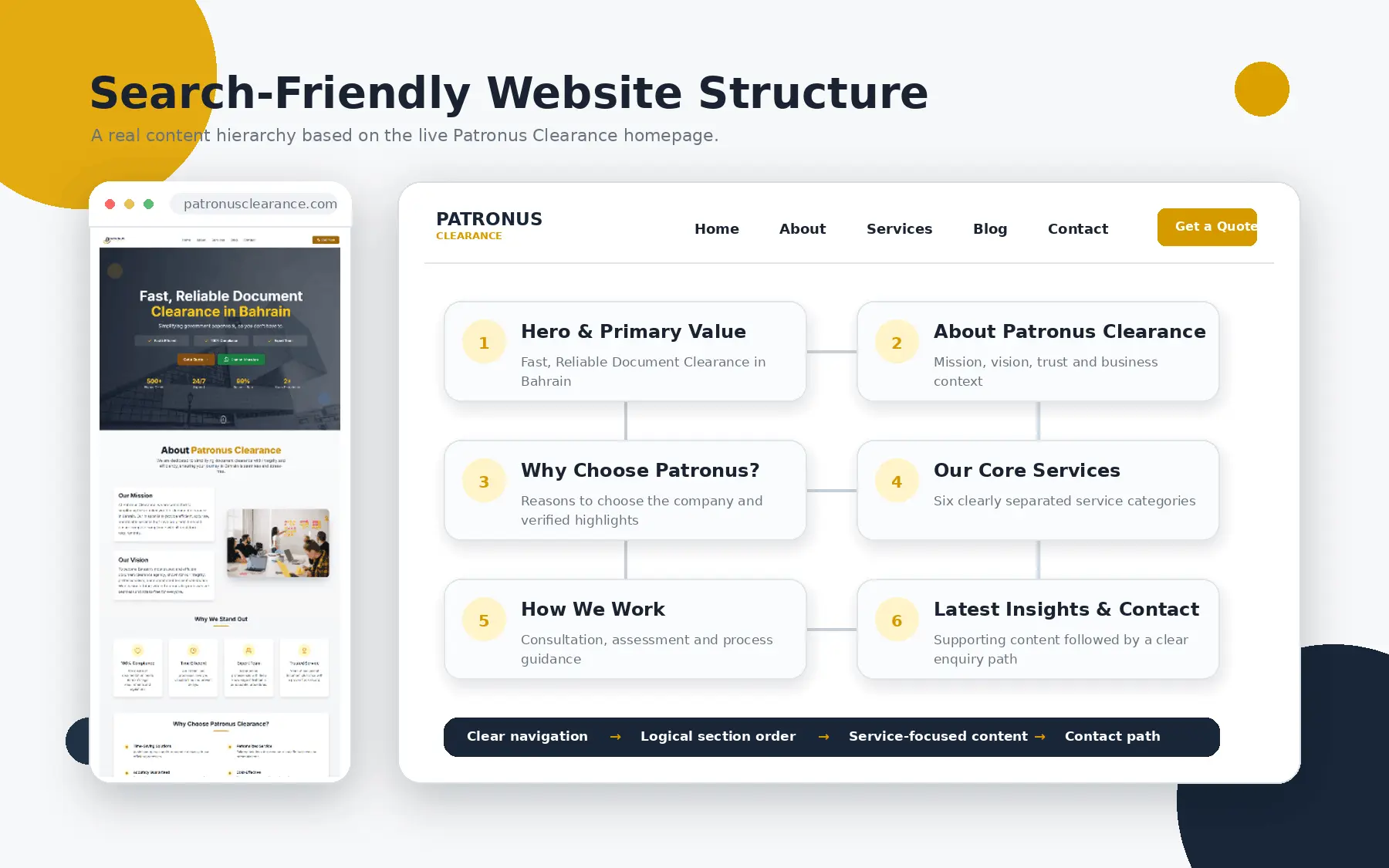
Page hierarchy, internal links, descriptive content, metadata planning, and image descriptions were treated as part of the implementation.

Website enquiry journey icon

Enquiry Journeys

Calls to action were placed around high-intent content so visitors could request assistance without searching through unrelated pages.

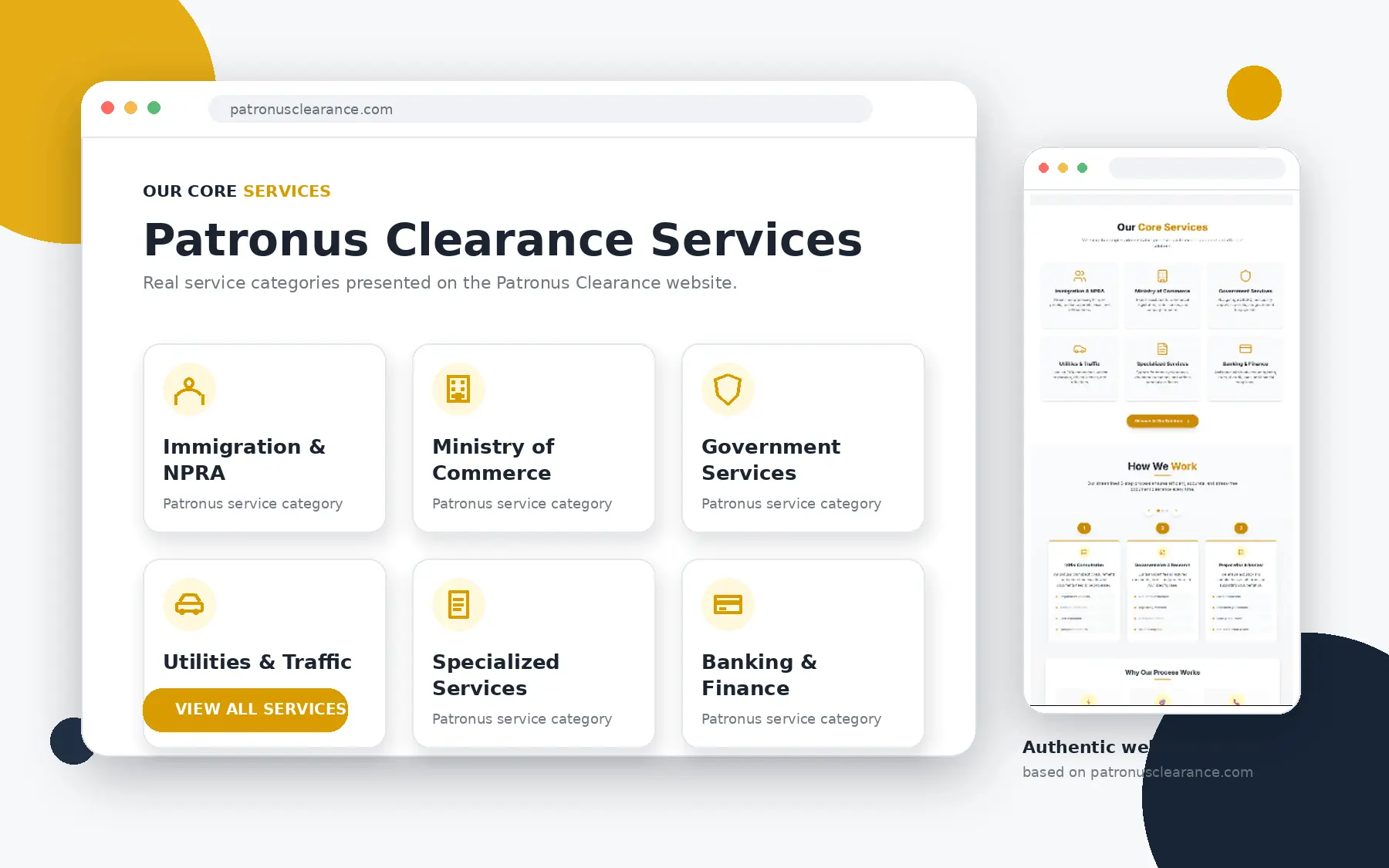
Patronus Clearance service categories and enquiry options
The Business Challenge

How Do You Simplify a Website With Many Administrative Services?

A document-clearance website serves people with different goals. One visitor may need immigration assistance, another may be dealing with company registration, and another may need support with government, attestation, transport, utility, or financial paperwork. Presenting every service with equal weight can create a crowded page and make the next step unclear.

FiliCode organized the frontend around decision-making rather than technical categories. Service summaries introduce the available help, supporting pages provide more detail, and visible contact actions allow customers to continue the conversation when their situation requires individual review.

This type of planning is central to effective website design and development. The interface must communicate what the business does, who it helps, and how to begin, while the underlying system keeps the content maintainable.

Architecture

How Does the React and WordPress Setup Work?

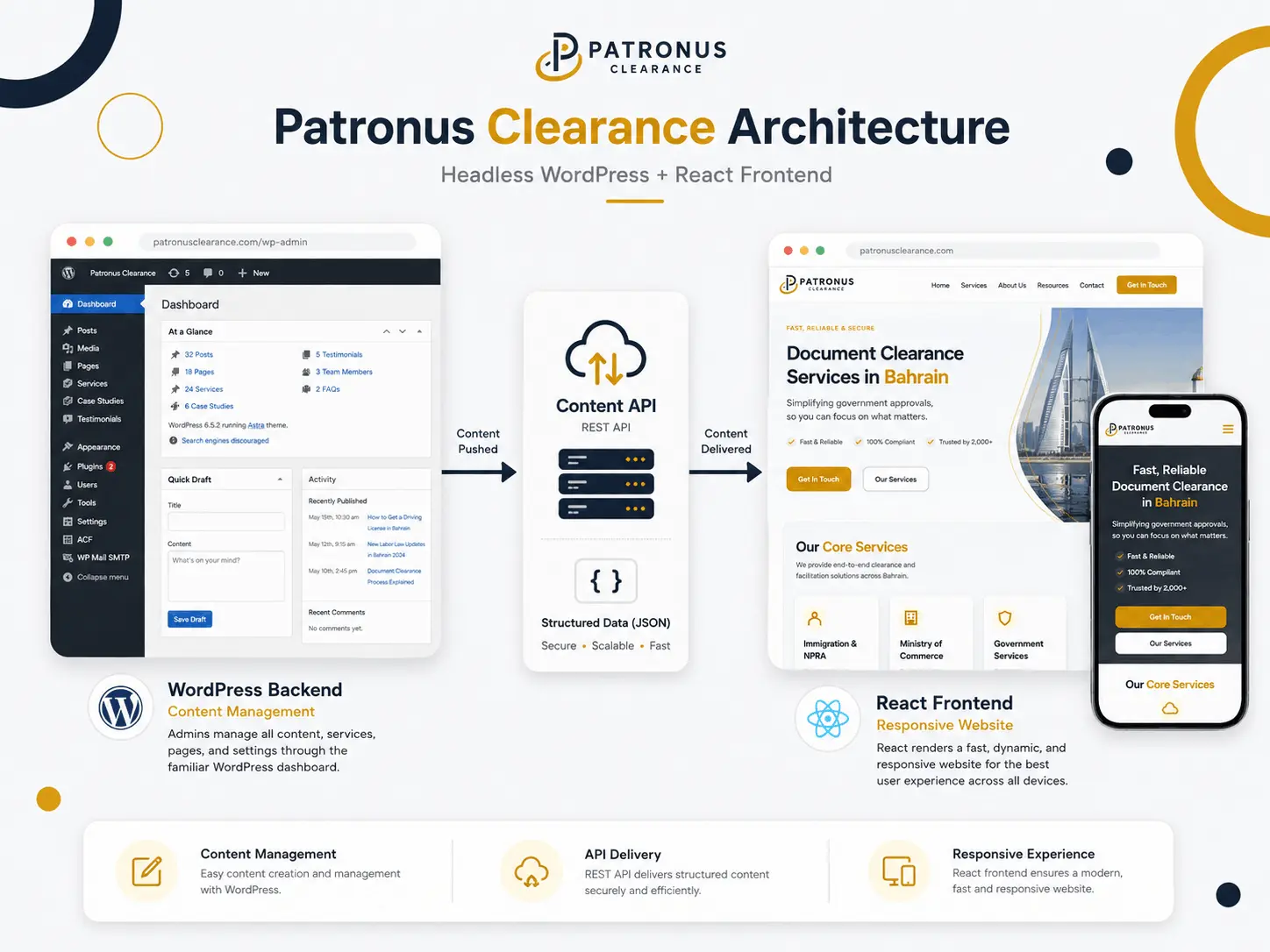
WordPress stores and manages the content. The frontend requests that content through an API, receives structured data, and renders it inside React components.

WordPress Backend

  • Editorial Control

    Authorized users can manage business content in WordPress without working directly inside the React codebase.

  • Structured Content

    Pages, service information, media, custom post types, taxonomies, and metadata can be exposed as structured data when required.

  • API Delivery

    The decoupled architecture delivers content through API endpoints instead of relying on a traditional WordPress theme for presentation.

React Frontend

  • Reusable Presentation Layer

    Components provide consistent layouts for services, page content, contact prompts, navigation, and supporting information.

  • Independent Frontend Releases

    Frontend changes can be planned separately from WordPress content updates, provided the content API remains compatible.

  • Responsive Interaction

    JavaScript behavior and CSS layouts are controlled within the frontend application across important viewport sizes.

Diagram showing WordPress content delivered through an API to a React frontend
Implementation Process

How Did FiliCode Turn the Architecture Into a Working Service Website?

The build followed a four-stage process that connected business content, API planning, frontend development, and quality assurance.

1. Content and Journey Mapping

  • Define Visitor Intent

    Service categories, common questions, trust information, and contact routes were organized around the decisions visitors need to make.

  • Plan CMS Responsibilities

    The team identified which content should remain editable in WordPress and which interface elements belonged in reusable frontend components.

2. Content API Integration

  • Connect Data Sources

    Frontend requests were mapped to the WordPress content needed for pages and supporting sections, avoiding unnecessary data transfer.

  • Handle Missing Content

    Components were planned with sensible states for optional fields, unavailable media, and incomplete API responses.

3. React Component Development

  • Build Consistent Sections

    Content blocks, service cards, navigation, calls to action, and enquiry elements were developed as maintainable frontend components.

  • Adapt Across Devices

    Component spacing, content order, controls, and media presentation were tested for desktop, tablet, and mobile layouts.

4. Launch and Technical Review

  • Check Critical Journeys

    Service discovery, navigation, forms, direct contact actions, and important content routes were reviewed before release.

  • Verify Delivery Foundations

    The review covered metadata, internal links, image descriptions, error handling, responsive output, and frontend-to-CMS communication.

Headless SEO

What Must Be Managed Differently in a Decoupled Website?

Traditional WordPress themes normally generate page titles, headings, canonical tags, internal links, and much of the page markup through PHP. Separating the frontend from the WordPress backend means those responsibilities must be implemented deliberately in the frontend application.

FiliCode treated route-level content and search presentation as part of development rather than a final plugin setting. Each public route needs a clear page topic, accessible content, descriptive links, suitable metadata, correct status handling, and a dependable path for search engines to discover the URL. Rendering strategy, sitemap generation, canonical rules, and social metadata should also match the chosen hosting setup.

Teams planning similar integrations can review FiliCode's API integration services for help connecting content platforms, business tools, and custom frontend applications.

Search-friendly Patronus Clearance page structure with service content and contact links
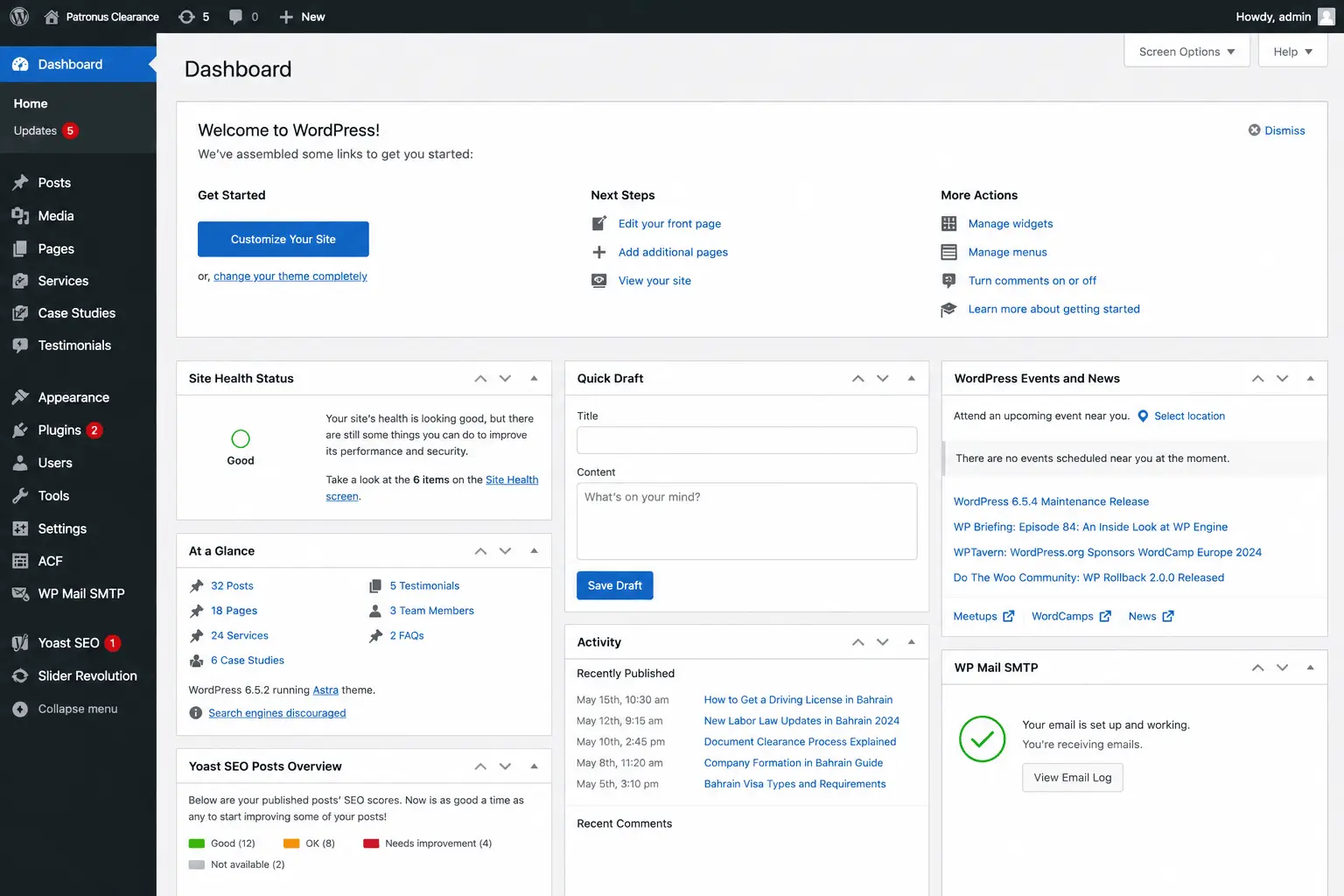
WordPress dashboard used to manage Patronus Clearance website content
Content Operations

How Does WordPress Remain Useful After the Frontend Is Decoupled?

Headless does not remove WordPress from the workflow. It changes WordPress from the page-rendering layer into a content hub. Editors keep a recognizable administration area, while developers define how fields and API responses appear in React.

A dependable editorial workflow requires more than exposing JSON data. Field names, media handling, URL relationships, draft behavior, permissions, and frontend fallbacks must remain coordinated. Changes to the content model can affect the application, so communication between content editors and developers becomes part of routine maintenance.

FiliCode provides custom WordPress development services for backend content structures and can also provide dedicated WordPress developers when a team needs ongoing support for a decoupled platform.

Verified Deliverables

What Did the Patronus Clearance Project Deliver?

The outcomes below describe the implemented website and workflow. They do not claim traffic, ranking, revenue, or conversion increases without supporting analytics.

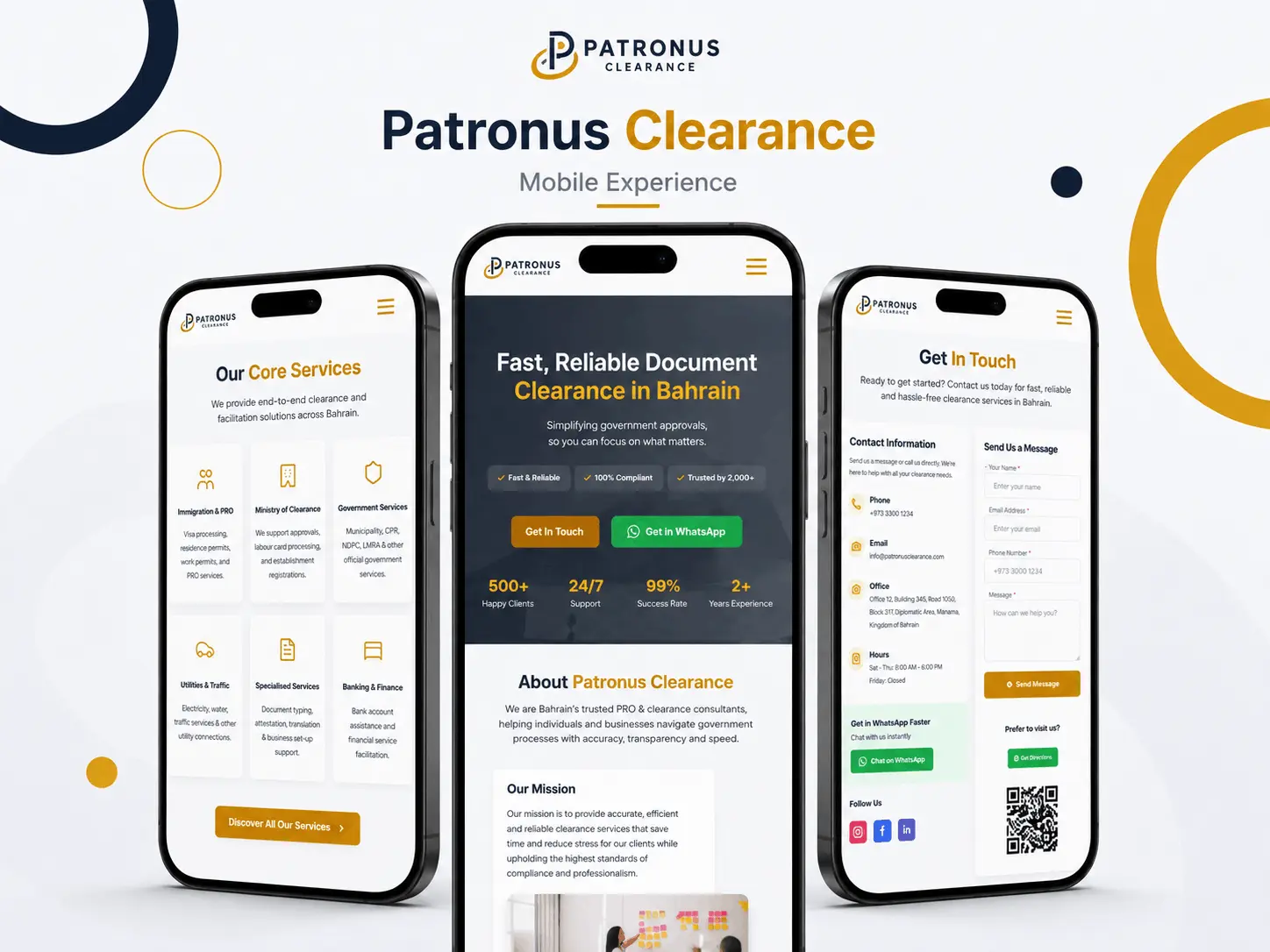
Patronus Clearance service pages shown on mobile devices
Architecture Decisions

When Is Headless WordPress the Right Business Choice?

A decoupled setup makes sense when a business needs a custom frontend, wants to deliver the same content to more than one channel, requires integration with other systems, or expects the presentation layer to evolve independently from the CMS.

It is not automatically the best option for every website. A traditional WordPress build is often simpler when the project depends heavily on theme editing, plugin-driven page output, live visual previews, or a small maintenance budget. Headless projects require separate frontend hosting, API monitoring, JavaScript expertise, and coordination between two systems.

Businesses comparing headless WordPress development services should look beyond framework names and review editorial needs, hosting ownership, API reliability, deployment responsibilities, and support coverage. Outsourcing headless WordPress development can be practical when the external team documents these responsibilities clearly and works with the internal content owners.

A headless WordPress development agency should also explain when decoupling is unnecessary. FiliCode discusses these tradeoffs before recommending an architecture. Businesses that need special data handling can use our WordPress plugin development expertise to extend backend workflows without adding unnecessary complexity to the frontend.

Discuss Your Headless Website
Headless WordPress Questions

Frequently Asked Questions

Cost depends on the content model, number of frontend templates, API requirements, rendering approach, integrations, authentication, hosting, migration work, and editorial workflow. A small marketing website and a multisite or commerce platform have very different technical scopes, so a reliable estimate requires an architecture review.

A project can take several weeks or several months depending on design readiness, content migration, custom fields, API complexity, frontend templates, integrations, review cycles, and testing. The schedule should include discovery, architecture, component development, content integration, quality assurance, deployment, and post-launch checks.

Headless WordPress is better only when its flexibility solves a real project requirement. It can support custom frontend frameworks and multiple delivery channels, but it also introduces separate hosting, API dependencies, more manual SEO work, and greater developer involvement. Traditional WordPress remains practical for many content-led websites.

Maintenance covers WordPress core and plugins, the content API, frontend packages, hosting, security controls, backups, uptime, redirects, forms, caching, and deployment workflows. Updates should be tested because a backend field or API change can affect frontend components even when the public design has not changed.

Yes. FiliCode can review an existing WordPress backend, content model, API endpoints, React application, deployment process, and current technical issues. Support can then be scoped around fixes, new components, content integrations, performance work, SEO implementation, security, or ongoing maintenance.
Plan the Right Architecture

Need a React Frontend Without Giving Up WordPress Content Management?

Tell FiliCode about your current website, editorial workflow, frontend requirements, integrations, hosting preferences, and long-term support needs. We will review whether a traditional, hybrid, or headless approach is the most practical fit before defining the development scope.

We hate spam, and we respect your privacy.

Contact FiliCode about a headless WordPress and React project