WordPress Directory Redesign, Custom Search Filters, and ACF Integration

Find Mentor Website Redesign Case Study

This website redesign case study explains how FiliCode transformed Find Mentor, a WordPress mentor directory built on an existing theme. We converted approved Figma layouts into responsive, SEO-friendly HTML, changed the theme's visual presentation, developed filtering for the mentor search page, created submission fields with Advanced Custom Fields, and made a theme without native ACF support work with the new data structure.

Visit Find Mentor
Project Overview

What Does This Website Redesign Case Study Cover?

A useful website redesign case study explains the original limitations, the technical decisions behind the work, and how design changes connect to real website functions. Find Mentor required that balance because the platform already depended on directory-theme features for profiles, submissions, categories, and search.

FiliCode retained the WordPress foundation while replacing the front-end experience. The work included Figma-to-HTML development, responsive templates, semantic content structure, custom filtering, ACF-powered submission fields, and theme changes so the new data could be saved and displayed correctly.

This is an implementation-focused case study. It documents the work completed and the resulting website structure without claiming unverified increases in traffic, conversions, or engagement. Browse more FiliCode case studies for additional project examples.

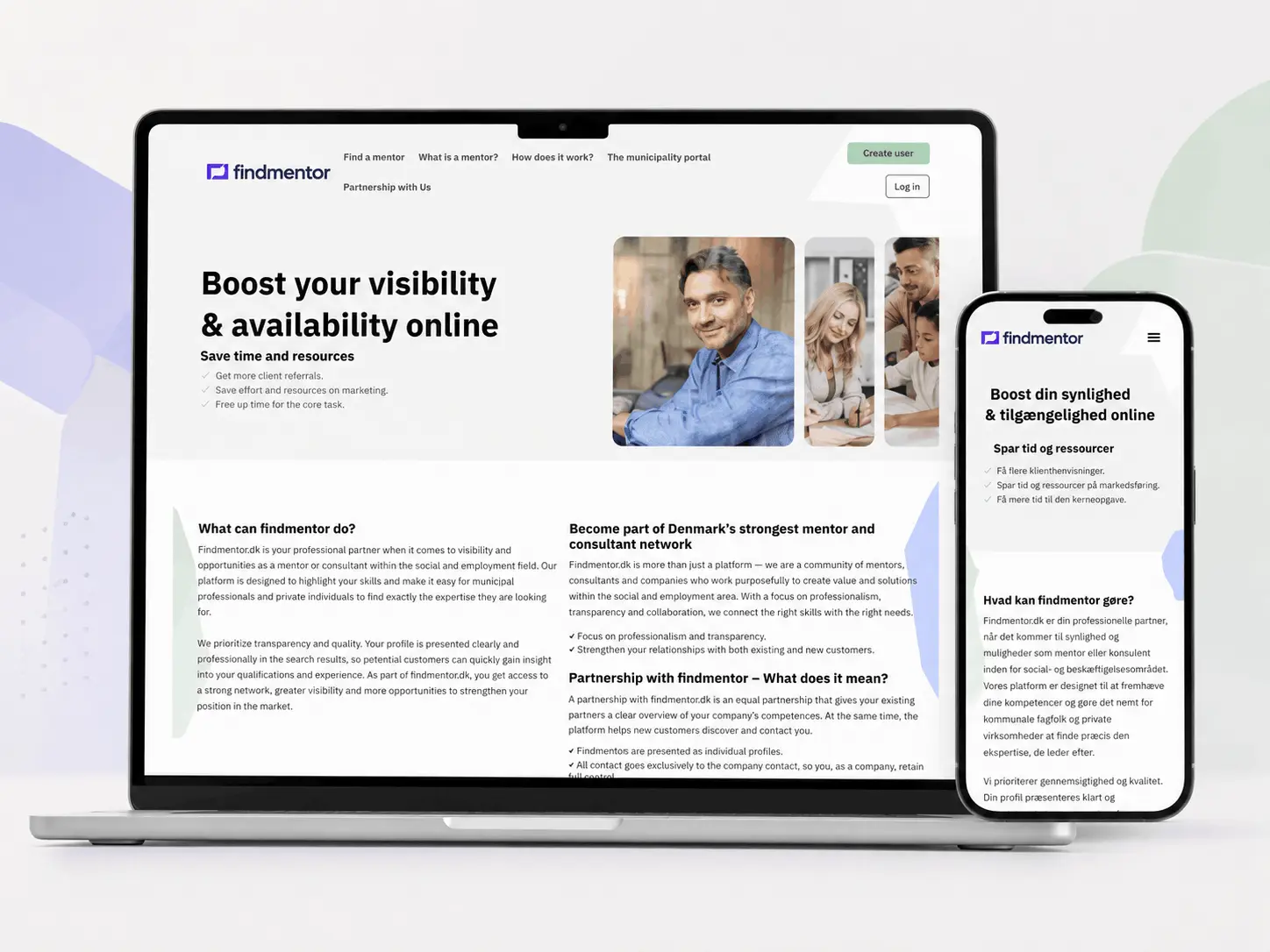
Find Mentor directory website shown on desktop and mobile screens
Project Scope

Six Practical Upgrades Delivered for Find Mentor

The redesign combined visual, structural, and functional work. Each change had to fit the existing directory platform instead of operating as an isolated design layer.

Website visual redesign icon

Complete Visual Redesign

The original theme presentation was replaced with the approved Find Mentor design while preserving the directory features required by the platform.

Figma to HTML development icon

Figma to HTML Conversion

Approved layouts were converted into responsive WordPress templates with cleaner content hierarchy and semantic front-end markup.

SEO-friendly website structure icon

SEO-Friendly Structure

Templates were organized with logical headings, indexable page content, internal navigation, and reusable markup suited to WordPress SEO management.

Mentor search filter development icon

Search Page Filters

Filtering functionality was added to help visitors narrow the directory and move from broad browsing toward relevant mentor profiles.

WordPress ACF integration icon

ACF Theme Compatibility

The existing directory theme was adapted to read, save, and display data created through Advanced Custom Fields.

Custom mentor submission form icon

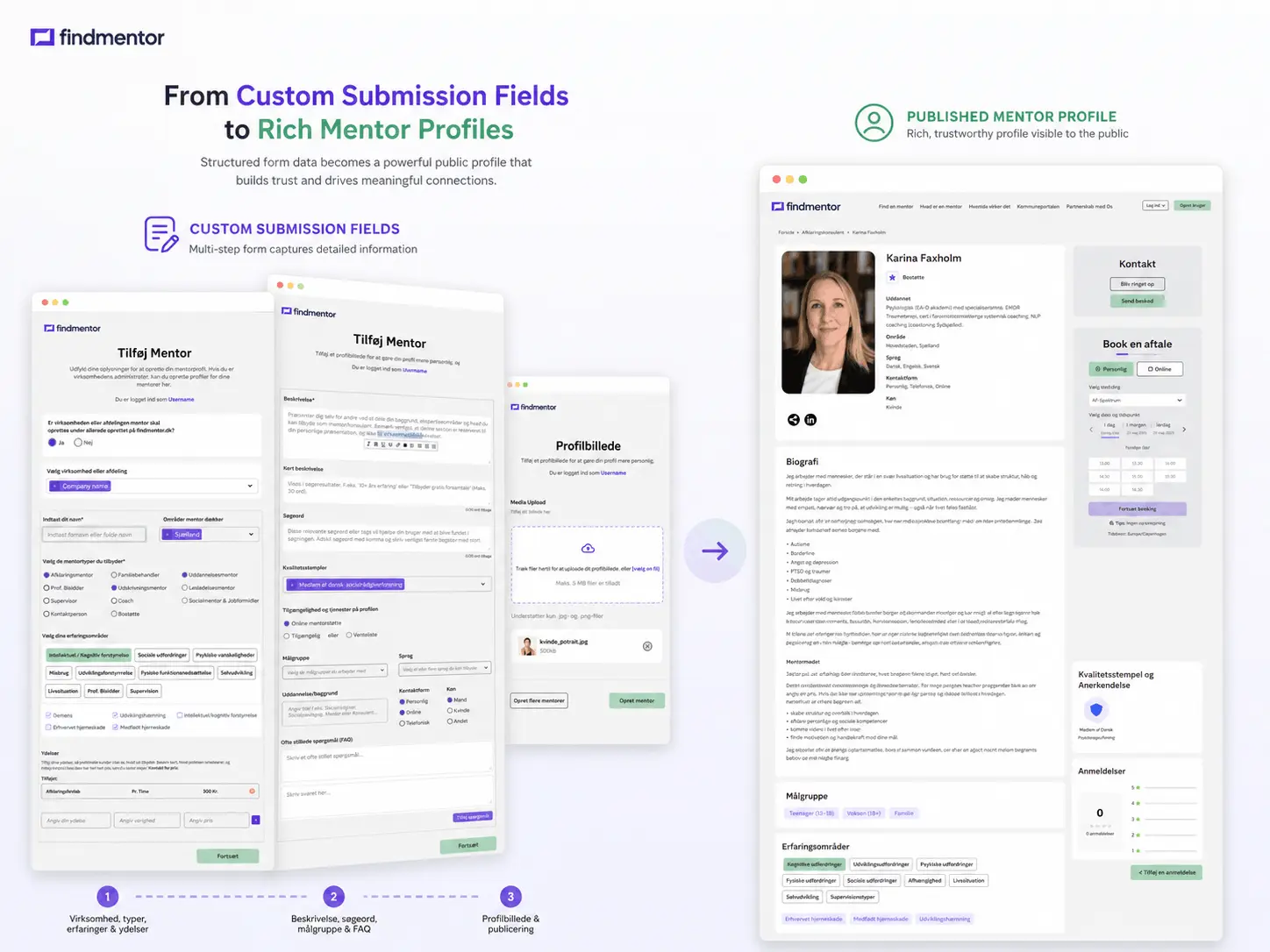
Custom Submission Fields

New mentor-submission fields were created and connected to the profile workflow so administrators could manage the added information consistently.

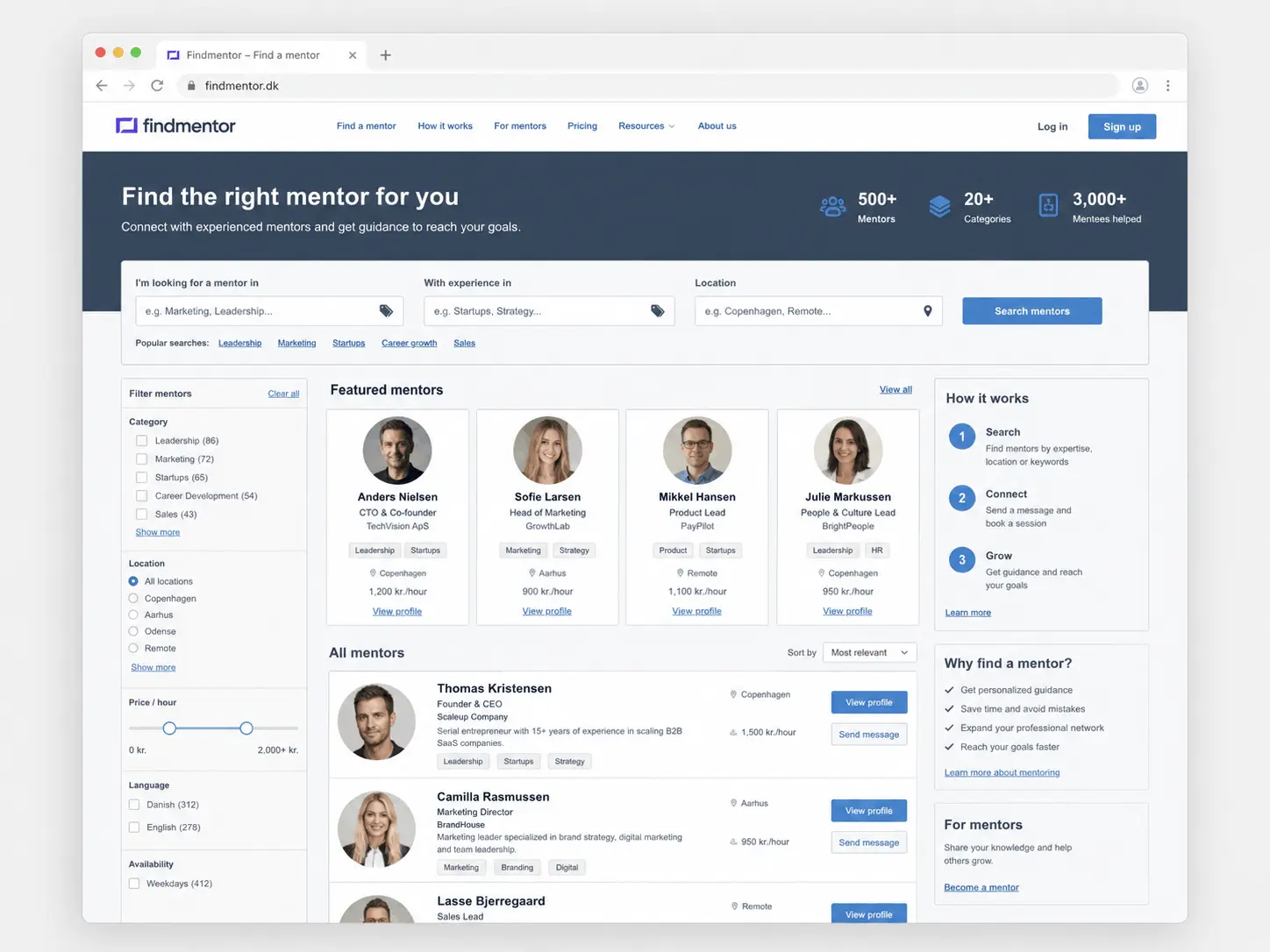
Earlier Find Mentor directory theme layout before the redesign
The Challenge

Why Did the Existing WordPress Theme Need More Than New Styling?

Find Mentor was built on a directory theme that supplied important platform behavior, but its default design did not match the new Figma direction or the desired content presentation. Replacing the theme completely could have meant recreating working directory logic, while styling only the surface would not have solved template, search, and data-management limitations.

The redesign required controlled changes inside the existing architecture. FiliCode identified the templates generating the homepage, search results, profiles, and submission flow, then connected the new HTML without removing required WordPress behavior.

The theme was not designed around ACF fields, so creating fields in the dashboard was only the first step. Submissions, data storage, profile output, and administrative editing also needed to support the new values.

Before and After

What Changed in the Find Mentor Redesign?

This before-and-after website redesign case study compares the practical differences in structure and functionality rather than relying on unsupported performance claims.

Before the Redesign

  • Theme-Led Presentation

    The interface followed the visual and structural limitations of the original directory theme.

  • Restricted Search Experience

    The mentor search page needed additional filtering behavior for more focused directory browsing.

  • No Native ACF Workflow

    The theme did not automatically support the custom submission and profile fields required for the project.

After the Redesign

  • Figma-Based Responsive Templates

    The approved design was implemented across relevant WordPress templates and adjusted for desktop, tablet, and mobile layouts.

  • Custom Directory Filtering

    Visitors gained a clearer way to refine mentor results while remaining inside the existing directory system.

  • Connected ACF Data

    New submission fields could be captured, managed, and displayed through the adapted theme workflow.

Implementation Process

How Did FiliCode Redesign the Site Without Removing Its Core Directory Features?

The work followed a four-stage process that kept design implementation, WordPress functionality, and future maintenance connected.

1. Theme and Template Review

  • Map Existing Functionality

    We reviewed the templates and data flow responsible for profiles, search results, submissions, and directory content.

  • Identify Safe Change Points

    Changes were planned around the parts of the theme that could be customized without unnecessarily rebuilding dependable functions.

2. Figma-to-WordPress Development

  • Build Responsive Components

    Figma sections were translated into reusable HTML structures that worked within the theme's WordPress templates.

  • Preserve Semantic Content

    Headings, links, page copy, profile information, and controls remained available in crawlable page markup.

3. Functional Integration

  • Develop Search Filters

    The filter interface and query behavior were connected to the mentor search-results workflow.

  • Connect ACF Fields

    Custom fields were integrated with submissions, WordPress data storage, administrative editing, and front-end profiles.

4. Responsive and Technical QA

  • Test Key User Flows

    Search, profile viewing, submission fields, navigation, and responsive layouts were checked across important page types.

  • Review SEO Foundations

    Template output was reviewed for heading order, visible content, link behavior, image descriptions, and mobile presentation.

Figma to HTML

How Did the Front-End Redesign Support SEO and Usability?

Converting Figma into WordPress requires flexible templates that can display real titles, categories, profile data, search controls, and administrator-managed content.

FiliCode built the redesigned sections with responsive HTML and integrated them into the theme's PHP output. Content hierarchy was kept explicit so search engines and users could understand page topics, while navigation labels and calls to action were placed around the main directory journeys. Images remain separate from essential text so key information is not hidden inside graphics.

Businesses planning similar work can review our website design and development services and UI and UX design services for the planning and implementation behind responsive website interfaces.

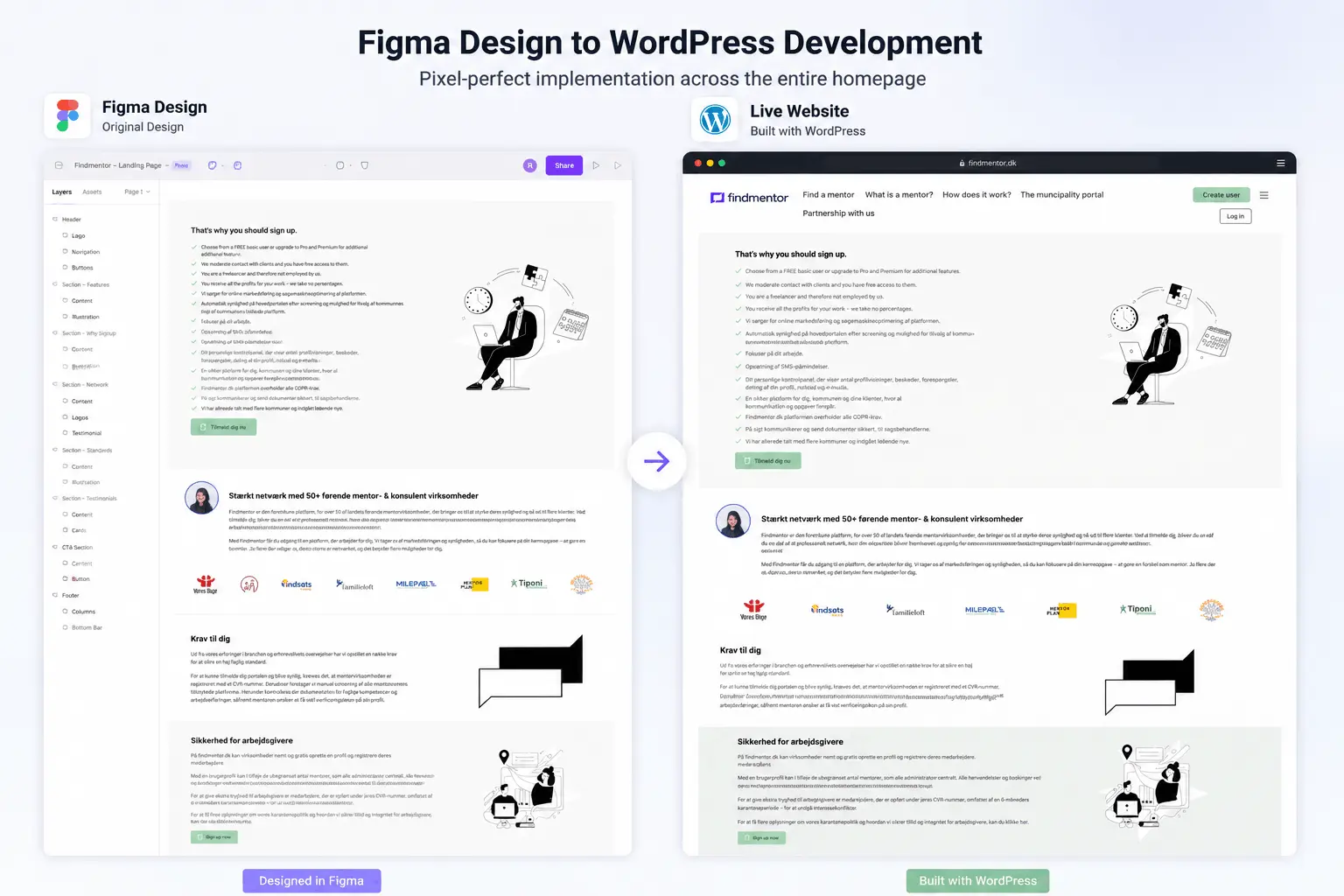
Find Mentor Figma design converted into responsive WordPress templates
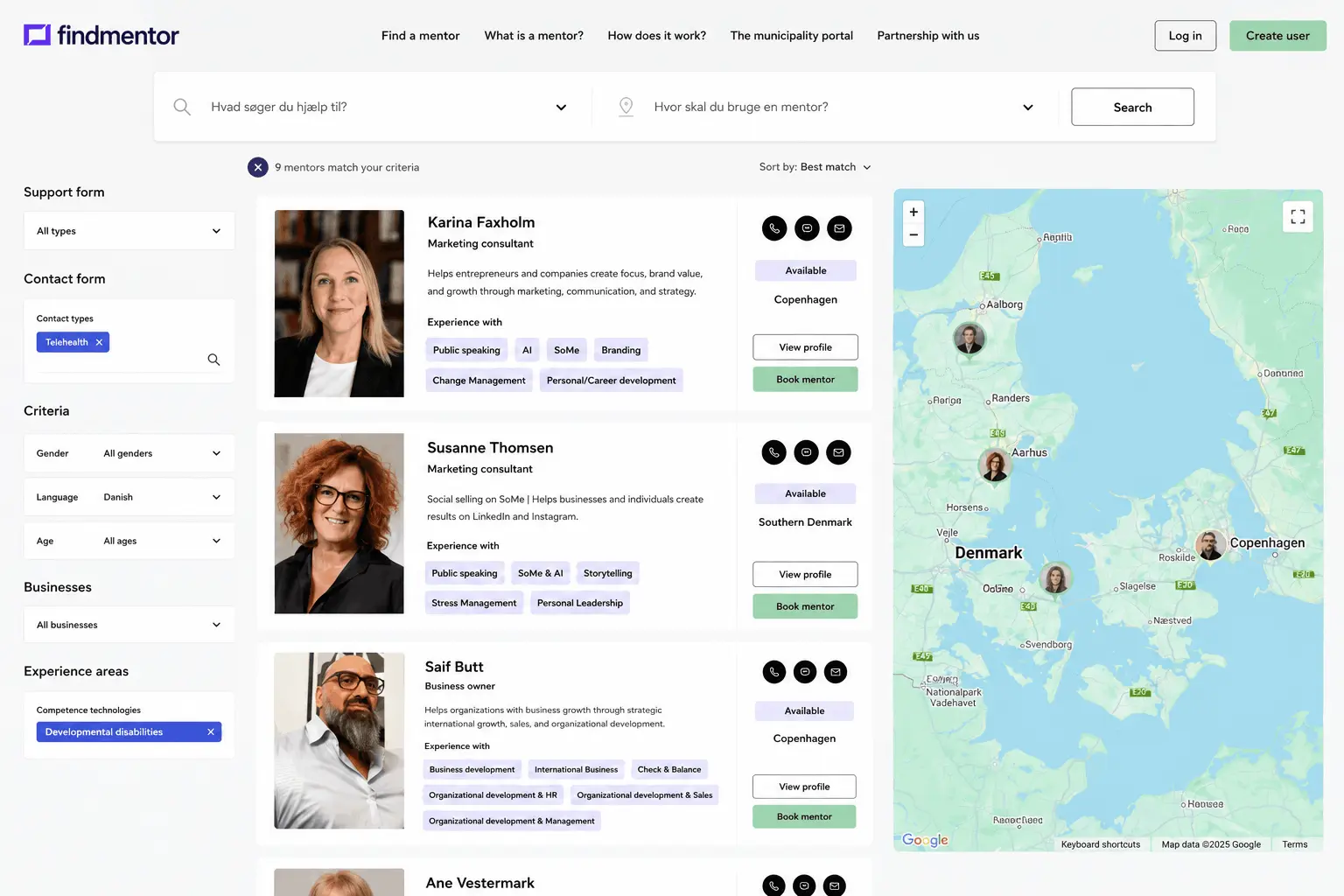
Find Mentor search page with filters for refining mentor results
Search Experience

How Was Custom Filtering Added to the Mentor Search Page?

A directory search page must keep the filter controls, URL or request values, WordPress query, and displayed results synchronized. Adding a visual dropdown alone would not have changed which mentors appeared.

FiliCode connected the filter interface to the search logic used by the existing theme. The implementation considered selected values, result updates, empty-result states, and responsive behavior so the controls remained usable on smaller screens. The goal was a simpler journey from a broad directory view to a more relevant set of profiles.

Search and form changes should be measured after launch using agreed business actions rather than appearance alone. Our conversion optimisation services help teams define and improve those journeys when reliable analytics data is available.

ACF Integration

How Was a Theme Without Native ACF Support Made Compatible?

Advanced Custom Fields can define new WordPress data, but the surrounding theme must still know how to use it. For Find Mentor, FiliCode created the required submission fields and connected them to the existing directory workflow.

That work involved more than displaying values on a page. Field names and storage needed to remain consistent, submitted values needed appropriate handling, and profile templates needed fallbacks when optional information was unavailable. The WordPress administration area also needed to provide a practical way for authorized users to review and update the additional profile data.

The result was an ACF-compatible implementation inside a theme that had not originally been structured for those fields. This approach preserved the platform's working directory foundation while giving the project a more flexible content model.

Custom mentor submission fields managed with Advanced Custom Fields in WordPress
Verified Project Outcomes

What Did the Find Mentor Redesign Deliver?

The outcomes below describe completed design and development changes. They do not present traffic or conversion improvements that were not supplied with the project data.

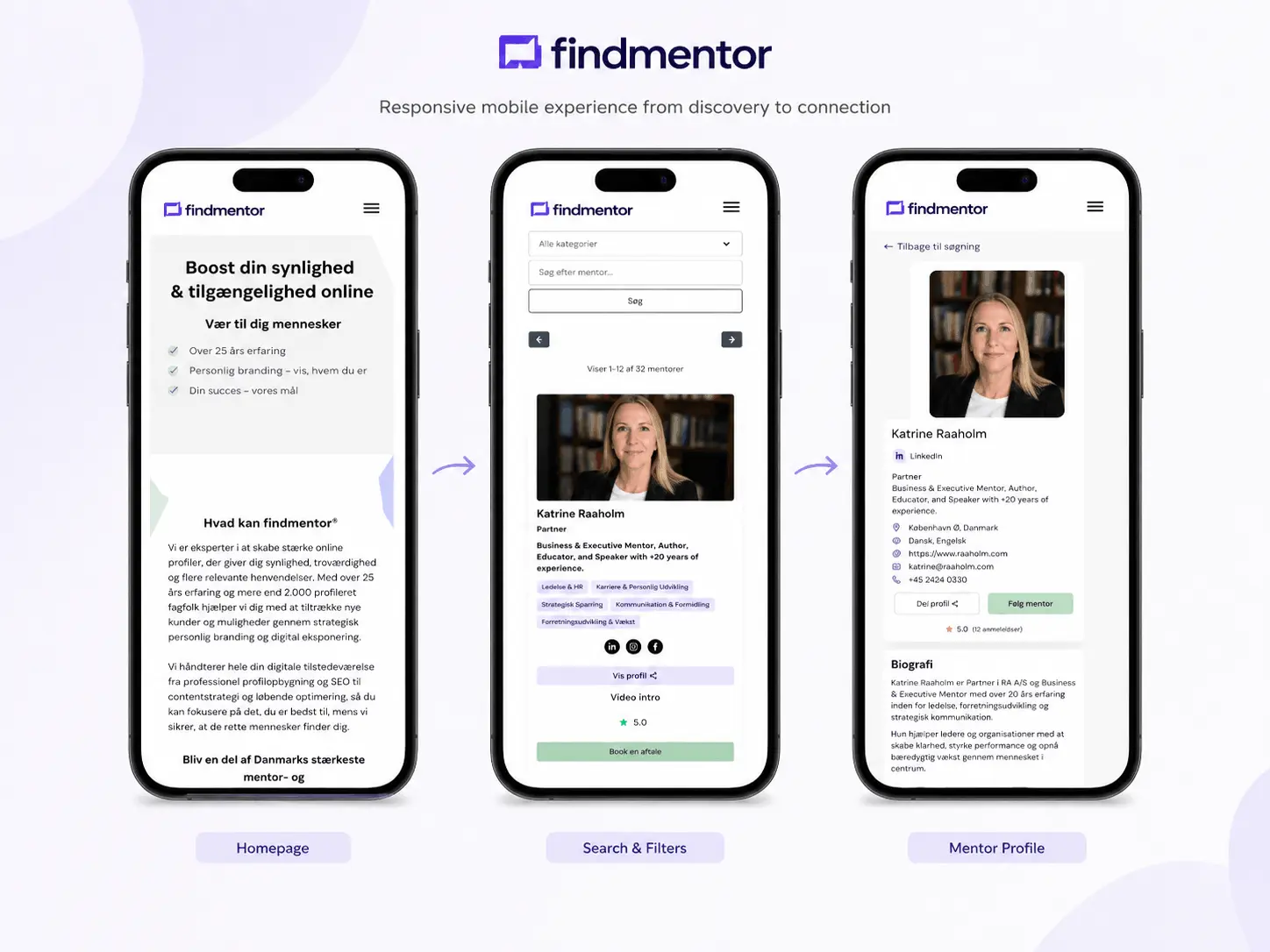
Find Mentor redesigned pages displayed on mobile devices
Long-Term Ownership

What Can Businesses Learn From This WordPress Redesign?

A complete rebuild is not always the most responsible option. When an existing platform still provides dependable business functionality, a focused redesign can preserve that investment while improving its interface, templates, search experience, and content-management workflow.

Design and functionality must be evaluated together. Filters affect queries and responsive controls; form fields affect storage, permissions, templates, and administration; Figma layouts affect dynamic content and mobile behavior.

Ongoing updates should also be planned. WordPress core, plugins, the parent theme, custom templates, and ACF can change over time. FiliCode provides website maintenance and technical support for compatibility reviews, fixes, backups, and controlled improvements after launch.

Discuss Your Website Redesign
Website Redesign Questions

Frequently Asked Questions

A website redesign can take several weeks or several months. The timeline depends on the number of templates, content readiness, custom functionality, integrations, approval cycles, and migration work. Directory websites usually require additional testing for profiles, search, submissions, user roles, and responsive behavior.

Website redesign cost depends on scope rather than appearance alone. Pricing is affected by unique page templates, content migration, CMS customization, search logic, forms, integrations, accessibility requirements, and quality assurance. A reliable estimate requires a review of the existing site and the approved redesign requirements.

A redesign can affect search performance when URLs, content, internal links, metadata, canonical tags, indexation settings, or page delivery change. Risk can be reduced through a content and URL audit, redirect mapping, crawl checks, analytics verification, and post-launch monitoring. Rankings cannot be responsibly guaranteed.

A redesign should be measured against documented baseline data and agreed business goals. Relevant measures may include qualified inquiries, completed submissions, search use, task completion, engagement with priority pages, organic visibility, page speed, and support requests. The selected metrics should match the original reason for the redesign.

Yes, when the existing CMS, theme architecture, and core functionality remain suitable. A redesign can replace templates, styling, navigation, content structure, and selected features while preserving dependable underlying systems. A technical review is necessary because extensive limitations can make a controlled rebuild safer and easier to maintain.
Plan Your Redesign

Need to Modernize a WordPress Site Without Losing Important Functionality?

Tell FiliCode about the current platform, the approved design, the features that must remain, and the technical limitations affecting the project. We will review the requirements and explain whether a focused theme redesign, deeper customization, or controlled rebuild is the most practical direction.

We hate spam, and we respect your privacy.

Contact FiliCode about a WordPress website redesign project