






Contents
- Quick Summary
- What a Website Maintenance Checklist Actually Covers
- Why Maintenance Debt Compounds
- The Website Maintenance Checklist for 2026
- Weekly Tasks
- Monthly Website Maintenance Checklist
- Quarterly Tasks
- Annual Tasks
- Security, Backups, and Recovery
- WordPress and WooCommerce Maintenance Realities
- Reactive vs Scheduled Maintenance
- Turning a Website Maintenance Checklist Into an Operational Plan
- When Maintenance Outgrows a Checklist
- FAQ
- How often should I run a website maintenance checklist?
- How much does website maintenance cost?
- Can I just install plugins to handle maintenance automatically?
- What’s the most commonly skipped maintenance task?
- When should I move from maintenance to a custom build?
- Is WordPress harder to maintain than other platforms?
- Final Thoughts
Most sites do not fail dramatically. They degrade. A plugin update silently breaks a checkout edge case. An SSL certificate lapses over a weekend. A database table grows unbounded until a common query times out under traffic. By the time someone notices, you’re debugging in production while customers watch the page spin.
A disciplined website maintenance checklist exists to catch these failures while they’re still cheap. The work isn’t glamorous, but the cost of skipping it compounds quietly until it surfaces as lost revenue, a security incident, or a weekend rebuild. This guide treats maintenance the way an operations team actually does: scheduled, owned, and measured.
Quick Summary
- Maintenance debt behaves like technical debt invisible until something breaks, then expensive to repay under pressure.
- Group tasks by cadence (weekly, monthly, quarterly, annual) and assign a clear owner to each. Unowned tasks don’t get done.
- Backups you haven’t restored are not backups. Test recovery on a schedule, not after an incident.
- WordPress and WooCommerce introduce specific failure modes plugin conflicts, WP-Cron drift, object-cache invalidation that generic checklists miss.
- Reactive break-fix maintenance is almost always more expensive than scheduled work, both in engineering hours and in downtime.
- A checklist is the starting point. Turning it into a tracked operational plan with monitoring and runbooks is what actually prevents outages.
What a Website Maintenance Checklist Actually Covers
Maintenance is often reduced to “run the updates,” which is the smallest part of it. A complete website maintenance service spans several domains that fail independently of each other.
Security covers patching, dependency updates, access review, and firewall rules. Reliability covers backups, uptime monitoring, and recovery testing. Performance covers page speed, caching, database health, and Core Web Vitals. Content and compliance cover broken links, outdated information, and legal pages. Each domain has its own failure signature, which is why a single quarterly “check the site” pass doesn’t work.
The useful mental model is that your site is a system with moving parts under load, not a brochure. Treating it as a static asset is how teams end up surprised by failures that were predictable months earlier.
Why Maintenance Debt Compounds
Skipped maintenance behaves almost exactly like technical debt. A deferred update isn’t free it accrues interest. The longer you wait, the larger the version jump, the more breaking changes accumulate, and the harder the eventual upgrade becomes.
This is why “if it isn’t broken, don’t touch it” fails in production. Dependencies move underneath you whether you act or not. A PHP version reaches end of life. A payment gateway deprecates an API. A plugin author abandons a project that 40% of your functionality depends on. Doing nothing is itself a decision with a growing bill attached.
The teams that stay stable aren’t the ones that avoid change. They’re the ones that absorb small, frequent changes deliberately instead of large, forced ones during an emergency.
The Website Maintenance Checklist for 2026
The practical way to run this is by cadence. High-risk, fast-moving items get checked often; expensive, slow-moving items get checked rarely. Below is a working website maintenance checklist organized around how frequently each task genuinely needs attention.
Weekly Tasks
These catch the issues that move fast and hurt immediately.
- Confirm backups completed successfully and are stored off the production server.
- Review uptime and error-rate alerts from the past seven days; investigate anomalies.
- Scan for malware and check for unexpected file changes.
- Apply security patches for the CMS, plugins, and dependencies after staging verification.
- Skim Search Console and server logs for new crawl errors or 5xx spikes.
Weekly work is mostly about detection. You’re not optimizing here you’re making sure nothing has silently broken since last week.
Monthly Website Maintenance Checklist
The monthly pass is where you look at trends rather than single events.
- Run a full broken-link audit, including internal redirects and outbound references.
- Review page-speed and Core Web Vitals data for regressions on key templates.
- Check form submissions, checkout flows, and any critical conversion path end to end.
- Audit user accounts and admin access; remove stale credentials.
- Review database size and clean up transients, revisions, and orphaned rows.
A monthly website maintenance checklist is most valuable as a regression check. Performance rarely collapses overnight it drifts, and monthly review is where you catch the drift before users do.
Quarterly Tasks
Quarterly work targets the things that are expensive to verify and slow to change.
- Test a full restore from backup into a staging environment. Time it.
- Review and update plugins or libraries with major version jumps.
- Re-evaluate hosting capacity against current traffic and growth.
- Audit third-party integrations and API keys for deprecation notices.
Annual Tasks
- Reassess the technology stack and end-of-life timelines (PHP, framework, server OS).
- Review legal, privacy, and accessibility compliance against current requirements.
- Renew domains, certificates, and licenses; verify auto-renewal actually works.
- Conduct a deeper security review or penetration test for higher-risk sites.
Here is how the cadence maps together:
| Frequency | Primary focus | Representative tasks | Typical owner |
|---|---|---|---|
| Weekly | Detection | Backups, alerts, malware scan, patches | Ops / support |
| Monthly | Regression | Link audit, speed, conversion paths, DB cleanup | SEO + dev |
| Quarterly | Resilience | Restore test, major updates, capacity review | Lead engineer |
| Annual | Strategy | Stack lifecycle, compliance, security review | CTO / agency |
Security, Backups, and Recovery
The single most common failure I see isn’t a missing backup it’s a backup nobody has ever restored. A backup process that runs successfully but produces an unrestorable archive gives you false confidence, which is worse than no backup at all.
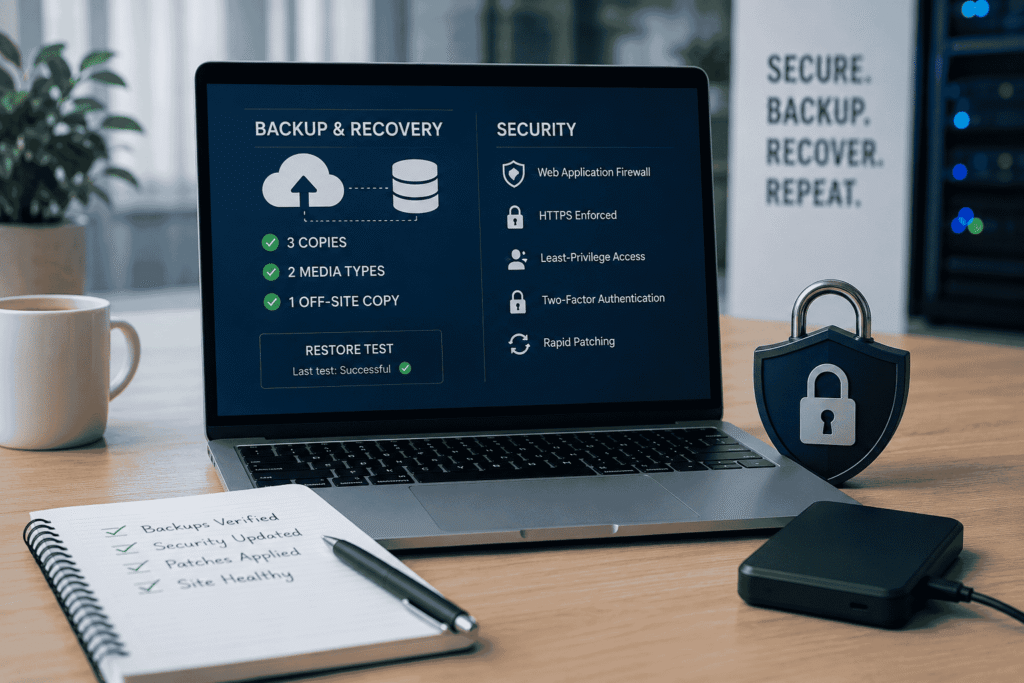
Treat recovery as the thing you’re actually testing. A workable standard is the 3-2-1 approach: three copies, two media types, one off-site. Then verify it by restoring into staging on a quarterly schedule and confirming the site boots, the database is intact, and integrations reconnect.
On the security side, the basics still carry most of the weight: a web application firewall, enforced HTTPS, least-privilege access, two-factor authentication on admin accounts, and rapid patching. Most breaches exploit known vulnerabilities with available patches not novel exploits. The maintenance discipline is what closes that window.
WordPress and WooCommerce Maintenance Realities
Generic checklists ignore the specific ways WordPress and WooCommerce break, and that’s where most real incidents originate.
Plugin conflicts are the dominant cause of unexpected behavior. Two plugins enqueue the same library at different versions, or both hook into the same checkout filter, and the result is intermittent and hard to reproduce. This is why updates belong in staging first an update that’s safe in isolation can break a specific plugin combination that only exists on your site.
WP-Cron is another quiet failure point. It isn’t a real scheduler; it fires on page visits, so on low-traffic sites scheduled jobs drift or don’t run, and on high-traffic sites it adds load to every request. Replacing it with a server-level cron job is a standard hardening step that many sites never take.
On WooCommerce specifically, performance problems concentrate at the cart, checkout, and order-admin pages because those are uncacheable and query-heavy. As order volume grows, the wp_options table and unindexed metadata queries become contention points. Object caching with Redis, careful transient management, and offloading sessions are the levers that keep checkout responsive under load not another page-caching plugin, which can’t cache the dynamic parts that matter.
A WordPress-specific website maintenance checklist therefore adds: staging-first updates, plugin-conflict testing, object-cache verification, real cron, and periodic review of which plugins you still actually need. Every active plugin is attack surface and maintenance load.
Reactive vs Scheduled Maintenance
The choice most businesses make implicitly is between fixing things when they break and maintaining on a schedule. The trade-offs are not close.
| Dimension | Reactive (break-fix) | Scheduled maintenance |
|---|---|---|
| Timing | During an outage, under pressure | Planned, in working hours |
| Cost | High emergency rates, lost revenue | Predictable, budgeted |
| Update size | Large, risky version jumps | Small, low-risk increments |
| Downtime risk | High and customer-facing | Low, often invisible |
| Data loss risk | Real, if backups are untested | Minimal, recovery is verified |
Reactive maintenance feels cheaper because the bill arrives later. In practice the emergency fix, the downtime, and the damaged trust usually cost several times what scheduled prevention would have. Scheduled work converts unpredictable large losses into a small, fixed operating cost. That’s the entire argument.
Turning a Website Maintenance Checklist Into an Operational Plan
A checklist on its own is a list of good intentions. What makes it work is operational structure around it.
Start with ownership. Every recurring task needs a named owner and a deadline, not a team that vaguely shares responsibility. Unowned work is the work that silently stops happening. Pair the website maintenance checklist with a simple tracker that records who did what, when, and what they found.
Then add observability so you’re not relying on manual checks alone. Uptime monitoring, error tracking, and performance alerts catch the things between scheduled passes. The checklist handles the predictable; monitoring handles the unexpected. You need both.
Finally, write runbooks for the failures you can anticipate how to restore from backup, how to roll back a deployment, who to call when the gateway goes down. The middle of an incident is the worst possible time to figure out the procedure for the first time.
When Maintenance Outgrows a Checklist
There’s a point where a site stops being a website and becomes a system, and maintenance stops being a checklist item. It usually shows up as the same problems recurring no matter how diligent the upkeep: checkout that can’t scale past a traffic threshold, a plugin stack so entangled that updates are routinely dangerous, or integrations held together by manual workarounds.
This is where off-the-shelf tooling has reached its limit, and where engineering rather than maintenance is the answer. At Filicode, this is the work we focus on custom WordPress and WooCommerce development, API integrations, SaaS systems, and AI automation built so that maintainability is a design constraint, not an afterthought.
The practical value of architecture-led development is that it reduces future maintenance cost. A system designed with clear boundaries, sane caching, real background processing, and proper observability simply breaks less and is cheaper to keep running. When a platform is fighting its own structure every week, the fix isn’t a longer checklist it’s a better foundation.
FAQ
How often should I run a website maintenance checklist?
Use a layered cadence rather than a single schedule. Run high-risk checks (backups, security patches, alerts) weekly, regression checks monthly, resilience tests quarterly, and strategic reviews annually. A site with transactions or heavy traffic needs the weekly layer to be genuinely weekly.
How much does website maintenance cost?
It ranges widely based on complexity, traffic, and risk tolerance from a few hundred dollars a month for a simple site to several thousand for a transactional platform with custom integrations. The more useful comparison is against the cost of an outage: scheduled maintenance is almost always the cheaper number.
Can I just install plugins to handle maintenance automatically?
Tools help with detection and backups, but they don’t make judgment calls. Automated updates can break a specific plugin combination, and automated scans still need someone to act on the findings. Automation reduces effort; it doesn’t remove the need for ownership.
What’s the most commonly skipped maintenance task?
Restore testing. Many teams back up reliably but never verify the backups are usable. A backup you haven’t restored is an assumption, not a safety net.
When should I move from maintenance to a custom build?
When the same problems recur despite diligent upkeep unscalable checkout, dangerous updates, fragile integrations you’ve outgrown configuration. At that point, engineering effort spent on architecture returns more than effort spent patching symptoms.
Is WordPress harder to maintain than other platforms?
Not inherently, but its plugin ecosystem means your maintenance load scales with how many third-party components you depend on. Disciplined staging-first updates and a lean plugin footprint keep it manageable.
Final Thoughts
A website maintenance checklist is worth far more than the routine it describes. It’s the difference between absorbing small, predictable changes on your own schedule and being forced into large, expensive ones during an outage.
Watch for the signals that maintenance alone is no longer enough: updates that regularly break things, performance that degrades faster than you can patch it, integrations that need manual intervention to stay alive, and incidents that repeat. Those are operational indicators that the system has outgrown its current structure.