







Contents
- Quick Summary
- Why a Shopify Migration Checklist Protects Revenue
- Pre-Migration Shopify Checklist
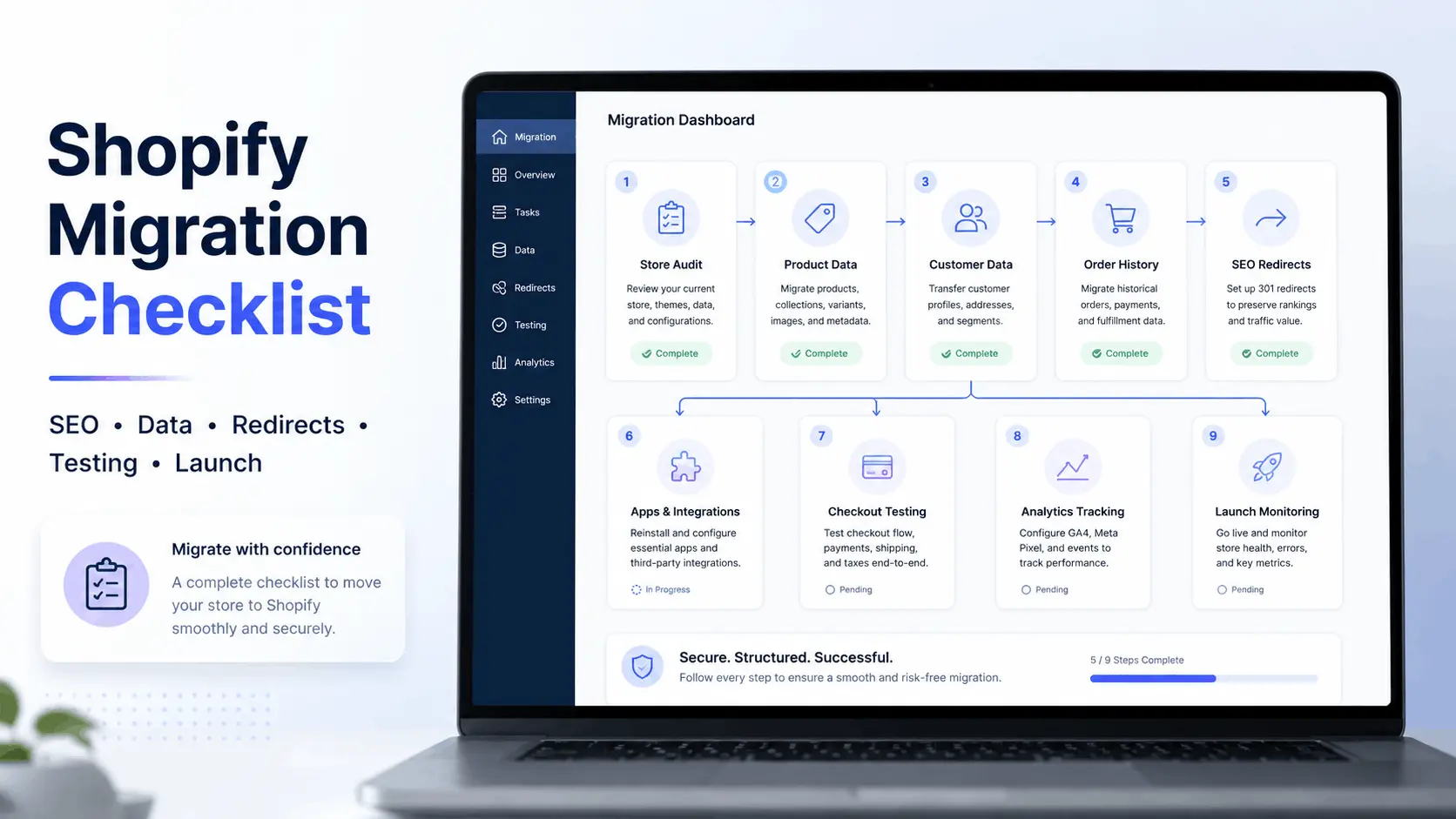
- 7-Step Shopify Migration Checklist
- What Post-Migration Metrics Should I Track in Shopify?
- Shopify Data Migration: Products, Customers, Orders, and Metafields
- Shopify SEO Migration Checklist and Redirect Architecture
- Apps, APIs, Webhooks, and Automation Workflows
- Architecture Trade-Offs During Migration
- Platform-Specific Migration Notes
- Launch Day Control and Rollback Planning
- Where Filicode Fits in Complex Shopify Migrations
- FAQs
- How much does a Shopify migration cost?
- How long does Shopify migration take?
- Is Shopify scalable for growing ecommerce stores?
- Can I migrate from WooCommerce to Shopify without losing SEO?
- What integrations should be checked before launch?
- Do I need Shopify migration checklist services?
- Conclusion
A migration fails when the store looks fine on launch day but the systems behind it are broken. Products import without clean variants. Redirects miss high-value URLs. Tracking fires twice. Payment webhooks are not tested. Orders arrive, but fulfillment, CRM, tax, and reporting workflows no longer match the old business process.
That is why a Shopify migration checklist should not be treated as a content task or theme launch checklist. It is an operational migration plan covering SEO, data, integrations, checkout, analytics, monitoring, and rollback control.
For founders, CTOs, ecommerce managers, and operations teams, the goal is not only to migrate to Shopify. The goal is to move without losing revenue visibility, customer trust, organic traffic, or backend control.
Quick Summary
A Shopify migration checklist should start with data, URLs, tracking, and operations before design.
SEO loss usually comes from weak redirect mapping, missing metadata, changed internal linking, and poor crawl monitoring.
Data migration must cover products, variants, SKUs, inventory, customers, orders, metafields, collections, images, and content pages.
Checkout, payment gateways, tax rules, shipping logic, CRM, fulfillment, and email flows must be tested before launch.
Post-launch monitoring should track rankings, 404s, redirects, conversion rates, revenue, speed, and analytics accuracy.
Why a Shopify Migration Checklist Protects Revenue
The biggest mistake is assuming migration means copying products into a new storefront. A real ecommerce migration touches every revenue path.
A Shopify migration checklist keeps those workflows visible.
In production, small failures compound quickly. A missing product variant can break paid ad landing pages. A changed URL can waste years of SEO value. A checkout tracking issue can make Meta Ads or Google Ads optimization unreliable. A webhook failure can stop inventory from syncing to a warehouse system.
Migration is business continuity work. Design is only one layer.
For stores with custom checkout logic, app dependencies, or complex backend workflows, professional custom Shopify development services can help turn migration planning into a stable technical implementation.
Pre-Migration Shopify Checklist
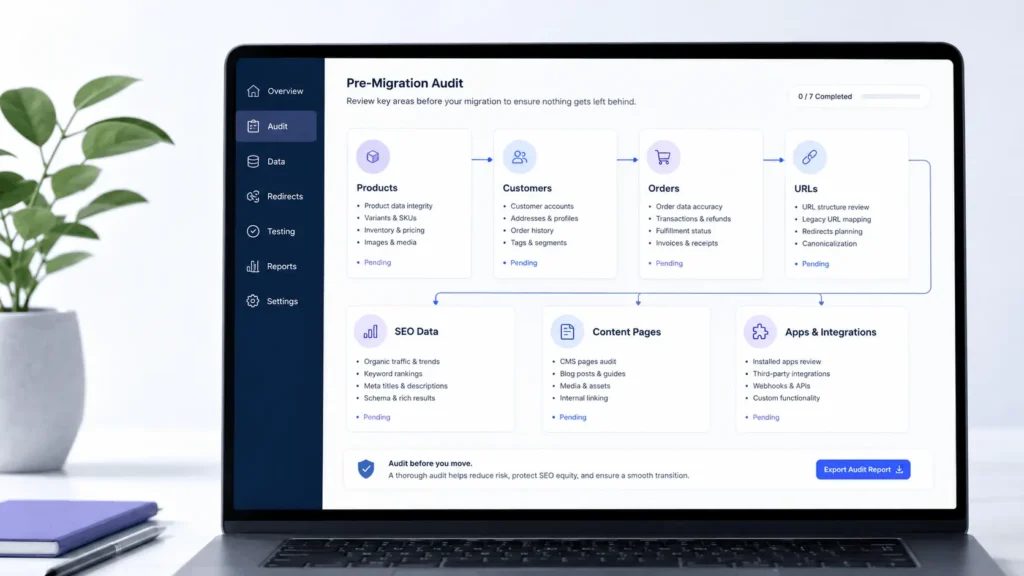
Before moving anything, document the current store in detail. This is where many migrations become either controlled projects or expensive cleanups.
Start with a full audit of the existing platform:
- Product catalog, SKUs, variants, images, tags, categories, and inventory levels
- Customer records, customer accounts, invalid emails, and duplicate profiles
- Order history, refunds, taxes, shipping data, and payment states
- Existing URLs, meta titles, descriptions, H1 tags, canonicals, and image alt text
- Blog posts, landing pages, legal pages, policies, and internal links
- Apps, plugins, third-party integrations, cron jobs, API connections, and automation flows
For WooCommerce, review plugin dependencies, custom hooks, checkout changes, subscriptions, custom fields, and REST API integrations. WooCommerce can be highly customized, so a simple export rarely tells the full story.
For Magento, inspect custom modules, attribute sets, customer groups, multi-store settings, and ERP integrations. Magento to Shopify projects often fail when teams underestimate catalog complexity.
For Wix, Squarespace, GoDaddy, and Square, review URL structure, export limits, content pages, redirects, image paths, and SEO metadata.
7-Step Shopify Migration Checklist
A practical migration should follow a controlled sequence. Skipping steps creates uncertainty during launch.
| Step | Workstream | Business Risk Controlled |
|---|---|---|
| 1 | Audit current store | Prevents missing data and hidden dependencies |
| 2 | Clean and map data | Reduces import errors and catalog confusion |
| 3 | Build Shopify environment | Creates a controlled staging setup |
| 4 | Migrate products, customers, and orders | Preserves operational history |
| 5 | Map URLs and SEO data | Protects rankings and backlinks |
| 6 | Test checkout, apps, and integrations | Reduces revenue and fulfillment failures |
| 7 | Launch, monitor, and fix | Controls post-launch traffic and conversion issues |
This Shopify migration checklist works best when each step has an owner, test cases, and acceptance criteria.
What Post-Migration Metrics Should I Track in Shopify?
Migration success needs measurable signals. Before launch, benchmark organic traffic, top-ranking pages, conversion rate, revenue per channel, checkout completion rate, add-to-cart rate, page speed, and crawl errors.
After launch, monitor:
- 404 errors and redirect failures
- Google Search Console indexing and crawl issues
- GA4 purchase events and ecommerce attribution
- Meta Pixel and Google Ads conversion tracking
- Core Web Vitals and page speed
- Revenue, refunds, abandoned checkout, and conversion rate
- Search rankings for top commercial pages
- Backend failures in fulfillment, CRM, and email automation
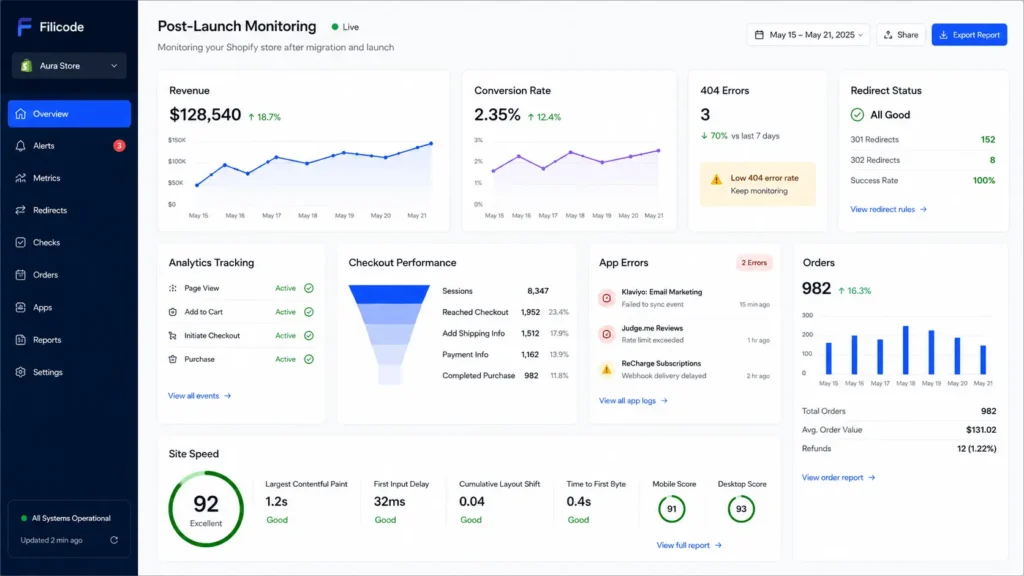
A Shopify migration checklist metrics monitoring plan should cover at least the first 30 days. The first week catches technical failures. The next few weeks show SEO, ranking, and conversion behavior.
Shopify Data Migration: Products, Customers, Orders, and Metafields
Data migration should not start with import tools. It should start with data rules.
Shopify has its own structure for products, variants, collections, metafields, inventory locations, customer records, and orders. If the old platform uses custom fields heavily, those fields must be mapped intentionally.
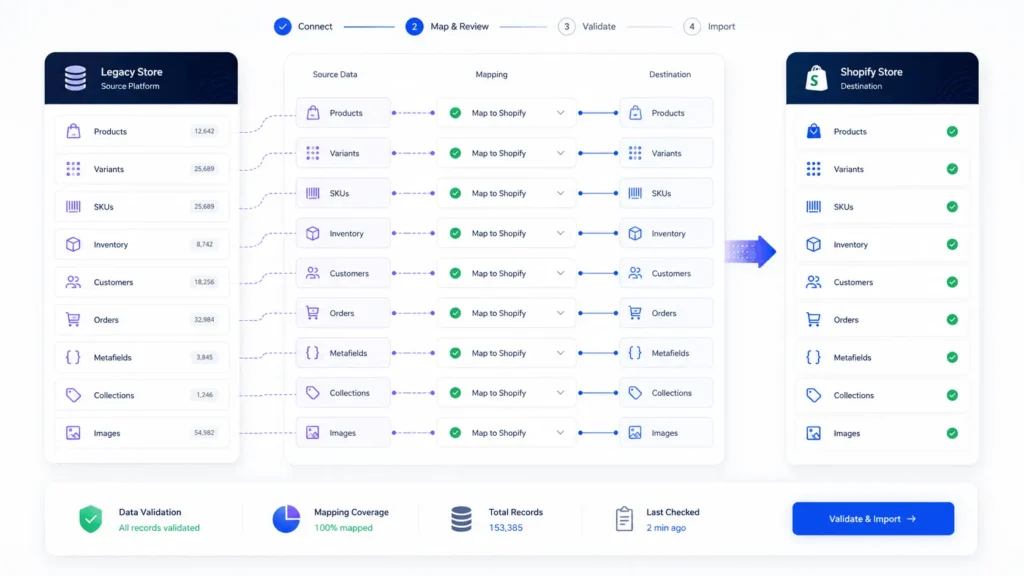
For a WooCommerce to Shopify migration, review how product attributes, custom fields, product tabs, subscriptions, coupons, bundled products, and custom checkout fields will be handled. Some can be mapped into Shopify metafields. Some require apps. Some need custom development.
For a Magento to Shopify migration, pay close attention to configurable products, attribute sets, customer groups, multi-store catalogs, tax rules, and order states.
For a Square to Shopify migration, review POS inventory, location-based stock, customer purchase history, and payment reporting requirements.
Data cleanup matters. Remove duplicate products, outdated inventory, broken images, invalid customer emails, inconsistent SKUs, and unused tags before import. Migrating messy data only moves the problem into a new system.
Shopify SEO Migration Checklist and Redirect Architecture
SEO preservation depends on URL continuity, content parity, metadata, internal linking, structured data, and crawl behavior.
Export the current URL structure before any rebuild. Include product URLs, category pages, blog posts, CMS pages, landing pages, image URLs, and high-backlink pages. Then map old URLs to new Shopify URLs with 301 redirects.
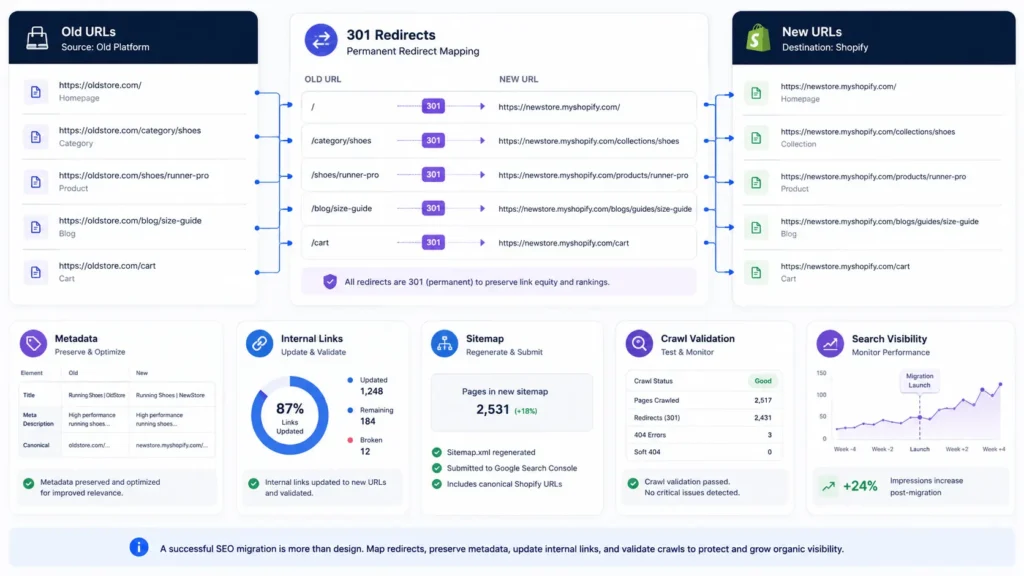
A URL redirection tells search engines where an old page moved.
In Shopify, do not only redirect obvious product URLs. Map top-performing pages, backlink-heavy URLs, filtered pages that receive traffic, old campaign pages, and legacy blog URLs.
Poor redirect planning creates:
- 404 errors
- redirect chains
- lost internal link equity
- ranking drops
- wasted paid traffic
- poor crawl efficiency
A strong Shopify migration checklist includes a full crawl before launch and another crawl immediately after launch. Compare old and new URLs, confirm 301 status codes, check canonicals, test XML sitemap output, and submit the new sitemap in Google Search Console.
Apps, APIs, Webhooks, and Automation Workflows
Most ecommerce stores are no longer standalone websites. They are connected systems.
A Shopify migration checklist should include every integration connected to revenue or operations: payment gateways, shipping providers, tax tools, CRM, ERP, accounting, subscription systems, review platforms, email marketing, SMS automation, inventory systems, warehouse software, analytics tools, fraud tools, and customer support platforms.
Shopify apps solve many use cases, but not every old workflow has a direct app replacement. Some workflows require Shopify Admin API, Storefront API, webhooks, or middleware.
Production workflows often look like this:
A customer places an order. Shopify confirms payment. A webhook sends order data to a fulfillment system. Inventory updates across channels. CRM tags the customer. Email automation sends post-purchase flows. Accounting receives invoice data. Support tools attach order history to the customer profile.
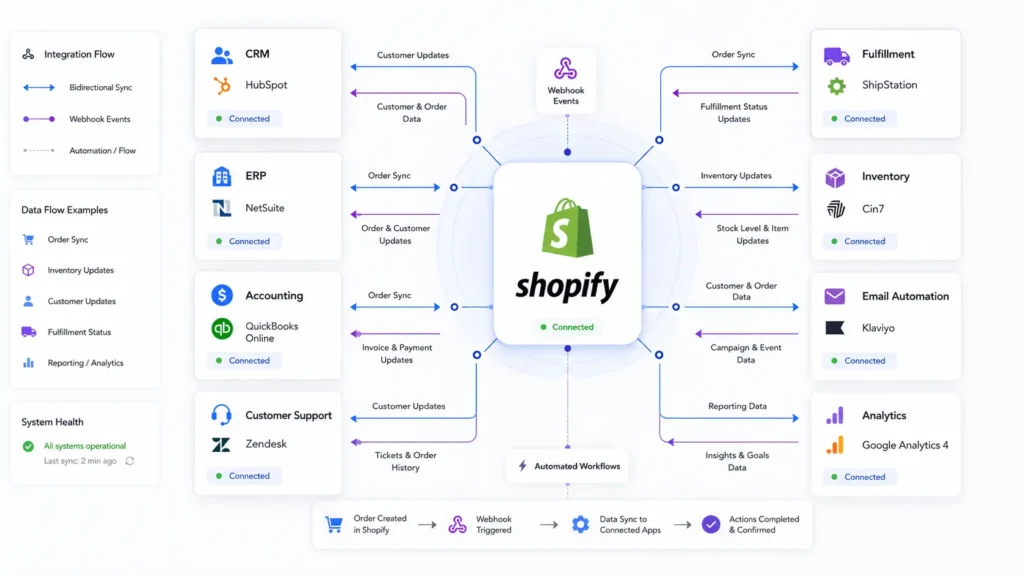
If one webhook fails, the order may exist in Shopify but not in fulfillment. That is why retry logic, logging, alerting, and reconciliation reports matter.
When Shopify needs to connect with ERP, CRM, warehouse, accounting, or custom reporting systems, reliable API integration services become more important than simply installing another app.
Architecture Trade-Offs During Migration
Shopify is a SaaS platform, which means it removes many infrastructure responsibilities but also introduces platform boundaries. That trade-off is usually positive for growing ecommerce teams, but it must be understood.
| Decision Area | Faster Option | More Scalable Option | Production Reality |
|---|---|---|---|
| Theme | Ready-made Shopify theme | Custom optimized theme | Ready themes launch faster but may carry unused code |
| Integrations | App-based setup | API or middleware layer | Apps are faster, custom logic gives more control |
| Content | Shopify pages/blog | Headless CMS or WordPress | Shopify is simpler, headless offers flexibility |
| Data import | CSV/manual tool | Structured migration pipeline | Pipelines are safer for complex catalogs |
| Analytics | Basic app setup | GTM + GA4 event validation | Tracking must be tested against real checkout behavior |
| Operations | Native Shopify workflows | Custom automation and dashboards | Complex teams need visibility beyond the storefront |
A migration is also a good time to rethink store structure, UX flow, and conversion paths. If the old storefront has weak navigation or poor product discovery, working with an ecommerce website design agency can help rebuild the store around SEO, usability, and checkout performance.
For many companies, the right answer is not “custom everything.” It is to keep Shopify simple where the workflow is standard and engineer only where the business has real operational complexity.
Platform-Specific Migration Notes
A Shopify migration checklist should change based on the source platform.
A WooCommerce to Shopify migration should focus on plugin dependencies, custom checkout logic, subscriptions, product metadata, REST API connections, custom post types, object caching, and SEO URL differences.
A Magento to Shopify migration should focus on attribute sets, configurable products, customer groups, multi-store logic, ERP connections, and catalog scale.
A Wix to Shopify migration should focus on content export limits, URL changes, blog migration, image handling, and manual SEO review.
A Squarespace to Shopify migration should focus on pages, collections, blog structure, redirects, and design rebuild.
A GoDaddy to Shopify migration should focus on domain handling, DNS, basic product export, URL cleanup, SSL, and content rebuilding.
A Square to Shopify migration should focus on POS data, inventory locations, customer records, payment reporting, and order history.
Each source platform carries different technical debt. The migration plan should respect that instead of treating every store as a CSV import.
Launch Day Control and Rollback Planning
Launch day should be boring. That only happens when the work is tested before DNS changes.
Before launch, lower DNS TTL, verify domain settings, confirm SSL readiness, disable storefront password at the right time, test payment gateways, verify shipping rates, check transactional emails, and run real checkout tests with sandbox or low-value payments.
The frontend should also be reviewed from a usability perspective, because strong UI and UX design services can reduce friction across product discovery, cart behavior, mobile checkout, and post-purchase flows.
Have a rollback plan. Even if you do not expect to use it, define what happens if checkout breaks, DNS fails, redirects misfire, or tracking becomes unusable.
A practical launch checklist includes:
- final product and collection QA
- redirect import and testing
- GA4 and Meta Pixel validation
- Search Console sitemap submission
- mobile and desktop testing
- order email testing
- payment, refund, and cancellation testing
- inventory sync validation
- customer support readiness
The first 24 hours should be monitored closely. Look at revenue, conversion rate, checkout failures, 404s, app errors, and integration logs.
Where Filicode Fits in Complex Shopify Migrations
After the core planning is clear, the real question becomes execution quality.
Filicode works with businesses that need more than a basic theme setup: custom software development, WordPress development, WooCommerce development, Shopify migration planning, API integrations, AI automation, SaaS development, performance optimization, and system architecture support.
This matters when a business has outgrown disconnected tools. A migration may reveal that reporting is manual, CRM data is unreliable, checkout logic is fragile, fulfillment depends on spreadsheets, or legacy WordPress and WooCommerce workflows need to be preserved through APIs or middleware.
In those cases, scalable architecture decisions reduce future operational costs. Clean data models, maintainable integrations, documented workflows, monitoring, and admin tooling are not extras. They are what keep the new platform stable after launch.
FAQs
How much does a Shopify migration cost?
Cost depends on catalog size, platform complexity, SEO requirements, integrations, custom design, apps, order history, and QA depth. A small store may only need a structured migration. A complex WooCommerce or Magento store may need custom scripts, API work, and post-launch monitoring.
How long does Shopify migration take?
Simple stores can move faster, but serious migrations usually need time for audit, data cleanup, theme setup, redirects, integrations, testing, and monitoring. The timeline should be based on risk, not only page count.
Is Shopify scalable for growing ecommerce stores?
Yes, Shopify can scale well for many ecommerce businesses, especially when theme performance, apps, tracking, inventory workflows, and integrations are managed properly. Scaling problems usually come from poor architecture around the platform, not only Shopify itself.
Can I migrate from WooCommerce to Shopify without losing SEO?
Yes, but only with careful redirect mapping, metadata transfer, content parity, internal link review, sitemap submission, crawl testing, and post-launch monitoring. A Shopify migration checklist should treat SEO as a core workstream.
What integrations should be checked before launch?
Check payment gateways, shipping providers, tax tools, CRM, ERP, email marketing, analytics, ads tracking, inventory systems, review platforms, support tools, and fulfillment workflows. Any system tied to revenue or operations should be tested.
Do I need Shopify migration checklist services?
You need Shopify migration checklist services when the store has strong SEO value, large product data, custom WooCommerce or Magento logic, paid traffic, multiple integrations, or revenue risk. Basic stores may manage with internal planning, but complex stores benefit from technical oversight.
Conclusion
A Shopify migration checklist is not just a sequence of tasks. It is a risk control framework for data integrity, SEO preservation, checkout reliability, integration stability, tracking accuracy, and revenue continuity.
Watch for warning signs: manual data fixes, broken reporting, checkout changes nobody can explain, unsupported plugins, slow pages, inventory mismatches, unreliable tracking, rising support tickets, and unclear ownership of integrations.
Those are signs the business is hitting system limitations.
The practical next step is to audit the current store, map the workflows that affect revenue, document the SEO and data risks, and decide what should be handled by Shopify apps, what needs custom development, and what requires ongoing monitoring. A migration done this way gives the business a cleaner platform, not just a new storefront.
After launch, the work does not stop. Ongoing website maintenance support helps monitor redirects, speed, app conflicts, tracking issues, security updates, and operational errors before they affect revenue.