






Contents
- Quick Summary:
- How To Evaluate Ecommerce Platforms For A Small Business
- Key Ecommerce Platform Decision Factors
- Shopify, WooCommerce, BigCommerce, And Other Platform Trade-Offs
- WooCommerce: Best For WordPress And SEO Control
- Shopify: Best For An Easy, Managed Launch
- Technical Considerations For Growing Ecommerce Stores
- Architecture: Hosted Platform, WordPress, Headless, Or Custom SaaS
- Monolith Vs Microservices In Ecommerce
- Integrations, APIs, Webhooks, And Automation
- SEO, Performance, And Platform Structure
- Choosing A Platform For UK, India, And International Stores
- When Off-The-Shelf Platforms Start To Break
- Practical Platform Recommendation
- FAQs
- Which ecommerce platform is best for a small business?
- Is Shopify or WooCommerce better for a small business?
- Which ecommerce platform is the best for small business scaling?
- How long does ecommerce platform implementation take?
- When should a small business consider custom ecommerce development?
- Conclusion
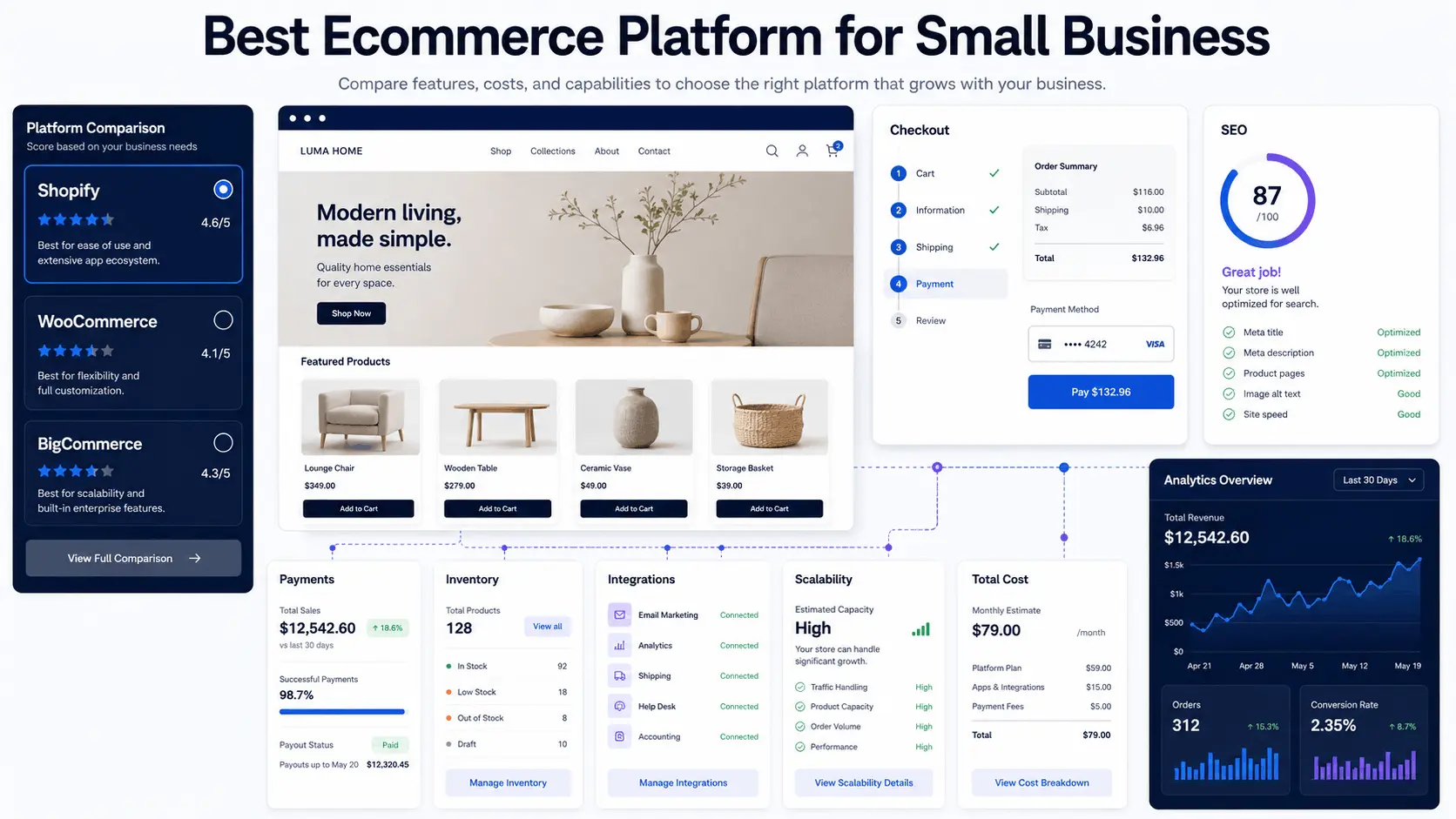
Choosing the best ecommerce platform for small business depends on your budget, technical skills, product catalogue, payment requirements, SEO goals, integrations, and growth plans. For most small businesses, Shopify is the easiest managed option, WooCommerce offers the most WordPress and SEO control, and BigCommerce is a strong fit for growing catalogues. This guide compares the leading options so you can choose the right platform for your business.
A simple store can run on a hosted platform. A growing store may need custom checkout logic, ERP syncing, warehouse rules, subscriptions, B2B pricing, or AI-assisted support workflows. The right choice should support both today’s store and the next stage of growth without creating unnecessary cost or technical debt.
Electronic commerce covers buying and selling over internet-based systems, but the real complexity sits behind the transaction: catalog structure, payment processing, order fulfillment, customer data, and operational reliability.
Quick Summary:
- Shopify is the best starting point for many small businesses that want an easy, managed launch with reliable checkout and minimal technical maintenance.
- WooCommerce is often better for WordPress-led brands that need SEO control, content flexibility, data ownership, or custom functionality.
- BigCommerce is a strong option for growing catalogues, multi-channel selling, and teams that want more built-in commerce features.
- Wix and Squarespace suit smaller, simpler stores where ease of setup matters more than advanced ecommerce workflows.
- The wrong platform usually fails through operations first: slow admin workflows, brittle integrations, checkout errors, poor reporting, inventory mismatches, and expensive workarounds.
How To Evaluate Ecommerce Platforms For A Small Business
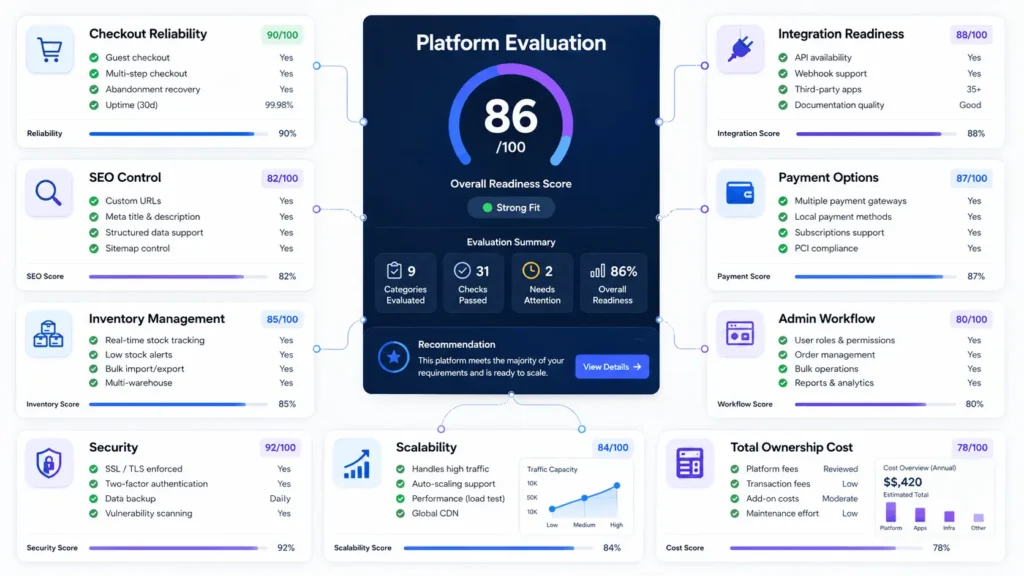
The best ecommerce platform for small business should be judged by how it behaves after launch, not only how quickly the homepage can be designed. A serious ecommerce website design agency will usually review checkout logic, product structure, integrations, SEO, and admin workflows before recommending a platform.
A store has several moving parts:
| Area | What To Check | Why It Matters |
|---|---|---|
| Catalog | Products, variants, SKUs, categories, filters | Poor structure hurts SEO, search, reporting, and inventory |
| Checkout | Payments, shipping, tax, discounts, validation | Small checkout issues directly affect revenue |
| Operations | Orders, refunds, fulfillment, staff permissions | Weak admin tools increase support workload |
| Integrations | CRM, ERP, POS, email, analytics, accounting | Manual syncing creates errors as volume grows |
| Performance | CDN, caching, database load, image delivery | Speed affects conversion and crawl efficiency |
| Ownership | Data export, custom logic, platform lock-in | Migration becomes harder after growth |
A good platform should reduce operational complexity. A bad one hides complexity until traffic, orders, or integrations increase.
Key Ecommerce Platform Decision Factors
When a founder asks, “what is the best ecommerce platform for small business,” the practical answer starts with operations.
Can your team manage technical maintenance? Do you need custom checkout logic, B2B pricing, subscriptions, bundles, quote requests, or multi-location inventory? Will you connect ERP, CRM, shipping, accounting, or marketing automation?
The cheapest platform on day one is not always the lowest-cost system over two years. Compare the total cost of subscriptions, themes, apps, payment fees, development, maintenance, and future migration.
Shopify, WooCommerce, BigCommerce, And Other Platform Trade-Offs
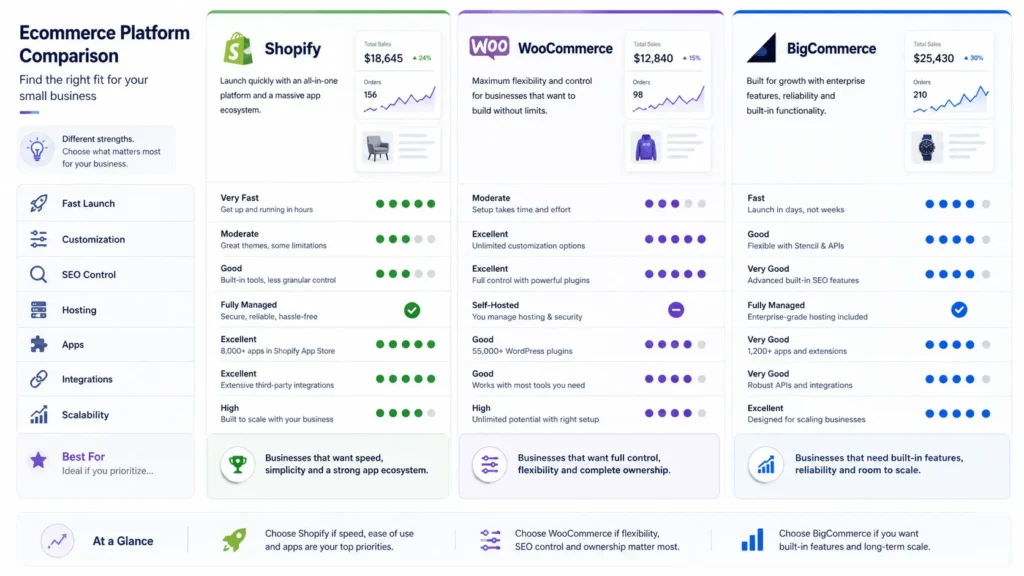
For many stores, the realistic shortlist includes Shopify, WooCommerce, and BigCommerce. Wix, Squarespace, and Square can work well for simpler stores, but may become restrictive when catalogue logic, SEO requirements, or backend workflows become more advanced.
| Platform | Best Fit | Main Strength | Main Limitation |
|---|---|---|---|
| Shopify | Fast-launch DTC stores | Managed hosting, checkout, apps, POS | App dependency, checkout limits, fees with third-party payment providers |
| WooCommerce | WordPress-led stores needing control | Open-source flexibility, SEO control, data ownership | Requires strong hosting, maintenance, and plugin discipline |
| BigCommerce | Growing catalog and multi-channel stores | Built-in commerce features, scalability | Less flexible for WordPress-style content workflows |
| Wix / Squarespace | Small simple catalogs | Easy setup and visual editing | Limited operational depth for complex ecommerce |
| Adobe Commerce / Magento | Enterprise commerce | Deep customization and complex catalogs | High development and maintenance cost |
Quick verdict: choose Shopify for ease of use and a managed launch, WooCommerce for WordPress and SEO control, and BigCommerce for growing catalogues and multi-channel operations. Businesses that need deeper BigCommerce configuration can also review professional BigCommerce development services.
WooCommerce: Best For WordPress And SEO Control
WooCommerce is often the best ecommerce platform for small business when the store depends heavily on content, organic SEO, custom product logic, or WordPress-based marketing pages.
It works well for businesses that need:
- custom product templates
- advanced landing pages
- technical SEO control
- flexible plugins
- custom checkout fields
- CRM and API integrations
- membership, subscription, or quote workflows
- ownership of content and customer data
The trade-off is responsibility. WooCommerce does not remove architecture decisions. It moves those decisions to your hosting, theme, plugins, database, caching layer, and developer workflow.
A poorly built WooCommerce store can become slow because every plugin adds queries, scripts, hooks, or admin overhead. Checkout bottlenecks often come from payment plugins, shipping calculations, abandoned cart tools, analytics scripts, and poorly optimized database tables.
A production-ready WooCommerce build needs disciplined implementation. For stores where checkout, plugins, performance, and integrations are already becoming difficult to manage, experienced WooCommerce developers can help reduce technical debt before it turns into daily operational friction.
For stores already using WordPress content as a growth engine, WooCommerce can be the best ecommerce platform for small business because ecommerce and content live in the same ecosystem.
Shopify: Best For An Easy, Managed Launch
Shopify is often the best ecommerce platform for small business when the company wants a fast launch, managed hosting, reliable checkout, and fewer infrastructure decisions.
It is strong for direct-to-consumer brands, small product catalogs, retail teams, simple subscriptions, social selling, and stores that do not need heavy backend customization.
The operational value is clear: Shopify handles hosting, updates, PCI scope, checkout infrastructure, and a large part of the ecommerce foundation. That reduces the need for internal technical management.
The limitation appears when workflows become specific. Custom B2B pricing, unusual fulfillment rules, advanced product configuration, checkout customization, complex ERP syncs, or strict data ownership requirements may require apps, Shopify Plus, middleware, or custom Shopify development.
Shopify can still scale well, but the architecture becomes more distributed. A growing store may end up with Shopify, multiple apps, email automation, CRM, inventory tools, accounting software, analytics, and custom middleware all exchanging data through APIs and webhooks.
That system needs monitoring. Webhooks fail. APIs rate-limit. Apps change pricing. Sync jobs duplicate orders if idempotency is not handled.
Technical Considerations For Growing Ecommerce Stores
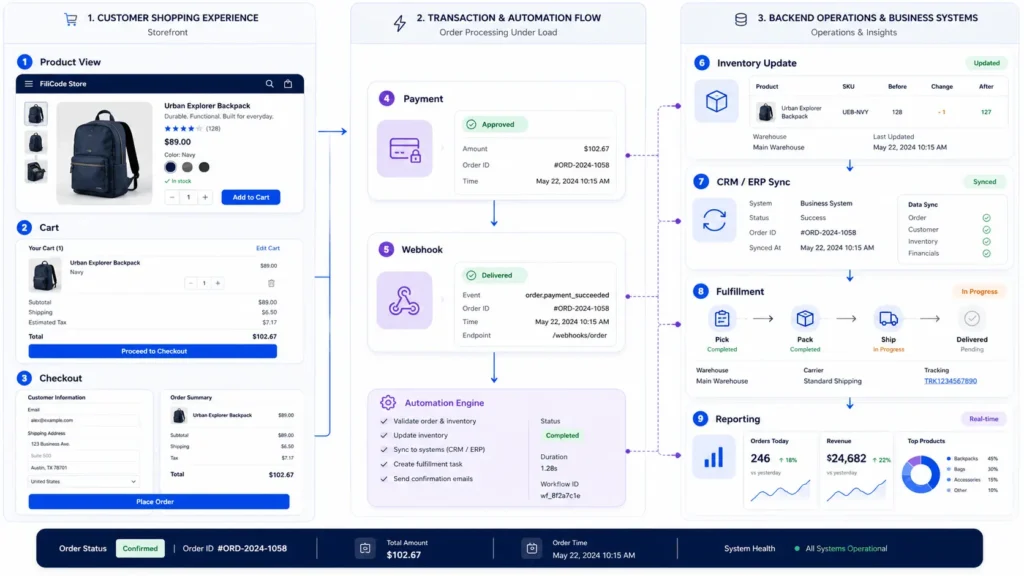
The best ecommerce platform for small business should handle more than a successful test order. It should behave correctly when traffic spikes, payment gateways delay responses, inventory changes during checkout, or third-party APIs fail.
Problems happen when these steps are treated as one perfect chain. Production systems need retries, logging, idempotency keys, queue processing, and failure handling.
Payment webhooks are a common example. A card may be charged, but the store may not receive the confirmation immediately. If the platform marks the order as failed too early, support teams get involved. If it creates duplicate orders on retry, accounting and fulfillment become messy.
The platform choice should support reliable transaction states, refund handling, invoice generation, fraud review, and reconciliation reporting.
Architecture: Hosted Platform, WordPress, Headless, Or Custom SaaS
Choosing the best ecommerce platform for small business is also an architecture choice.
A hosted SaaS platform keeps infrastructure simple. The vendor manages hosting, uptime, checkout infrastructure, and core updates. This works well until the business needs deep customization outside the platform’s intended model.
WooCommerce is closer to a modular monolith. WordPress, WooCommerce, theme code, plugins, custom hooks, database tables, cron jobs, and REST API integrations usually run together. This gives flexibility, but performance discipline matters.
Headless commerce separates the frontend from the backend. A React, Next.js, or similar frontend can consume product and cart data from Shopify, BigCommerce, WooCommerce, or a custom API. This can improve frontend control and performance, but it increases engineering complexity.
Custom SaaS or marketplace systems become relevant when the business model itself is not standard ecommerce. Examples include multi-vendor workflows, tenant isolation, approval systems, subscription billing, role-based dashboards, audit logs, complex commissions, or real-time inventory synchronization.
Monolith Vs Microservices In Ecommerce
A monolith is not automatically bad. For small businesses, a clean monolith is often cheaper, easier to maintain, and faster to improve.
Microservices become useful when separate domains need independent scaling: payments, search, inventory, recommendations, notifications, fulfillment, or reporting. But they introduce deployment complexity, API versioning, observability requirements, and distributed failure modes.
Most small businesses do not need microservices early. They need clean data models, reliable integrations, a maintainable admin experience, and enough abstraction to avoid rebuilding everything later.
Integrations, APIs, Webhooks, And Automation
The best ecommerce platform for small business should connect cleanly with the rest of the company’s operating system.
Common integrations include:
- CRM for customer records
- email marketing for abandoned cart flows
- accounting for invoices and tax reporting
- shipping systems for fulfillment
- ERP for stock and purchasing
- analytics for attribution
- support tools for order visibility
- AI automation for customer service and internal workflows
API architecture matters here. A mature integration should validate payloads, log failures, retry safely, avoid duplicate processing, and alert the team when sync jobs stop working.
AI agents can help with support triage, product recommendations, order status responses, internal reporting, and customer segmentation. But automation should not run without guardrails. Human-in-the-loop review, fallback rules, prompt versioning, and output monitoring are necessary when AI touches customer communication or operational decisions.
A useful ecommerce automation layer does not just “connect apps.” It protects the business from silent failures.
SEO, Performance, And Platform Structure
The best ecommerce platform for small business must support search visibility without forcing technical workarounds.
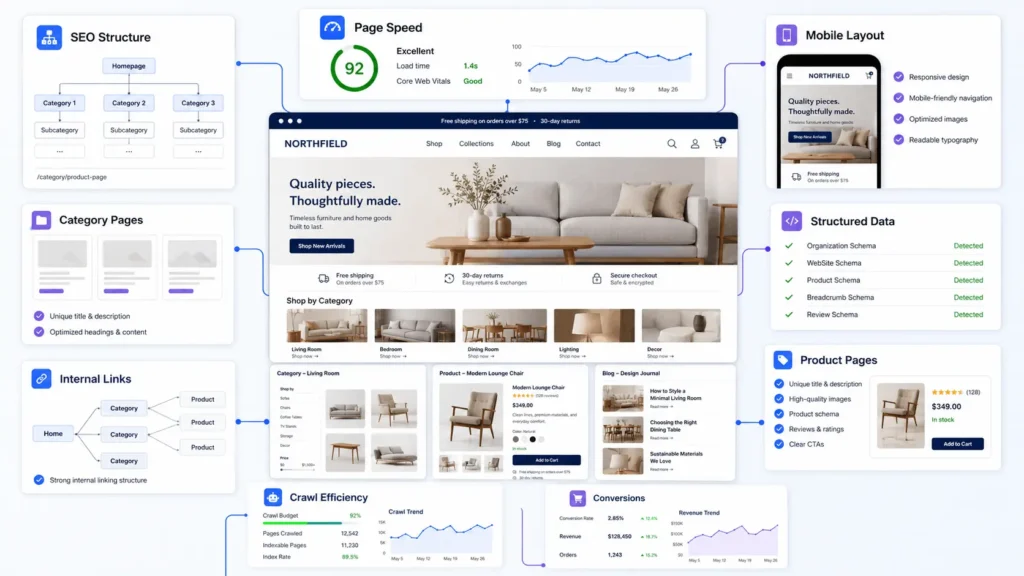
Ecommerce SEO depends on more than product descriptions. It includes URL structure, category architecture, internal links, structured data, product schema, canonical rules, pagination, faceted navigation, redirects, page speed, mobile layout, and crawl efficiency.
WooCommerce gives strong SEO control when built correctly. Shopify provides solid defaults, but some URL and structural limitations may require careful planning. BigCommerce offers commerce-focused SEO features for larger catalogs.
Performance should be designed before the store becomes slow. Large images, app scripts, third-party pixels, unoptimized product filters, and bloated themes can damage both conversion and organic visibility.
Caching also needs care. Full-page caching works well for category and product pages, but cart and checkout pages must stay dynamic. Object caching can reduce database load in WooCommerce. CDN delivery improves global performance. Background jobs should not depend only on unreliable traffic-based cron behavior.
Choosing A Platform For UK, India, And International Stores
The best platform can change by region because payment methods, tax rules, shipping providers, currencies, and customer behaviour differ by market.
For UK stores, VAT handling, local courier integrations, GDPR-aware data practices, and regional payment options matter. For India, UPI support, GST workflows, logistics integrations, COD handling, and mobile-first checkout can influence the platform choice.
International stores should also review multi-currency checkout, localized tax rules, translation workflows, regional inventory, return handling, and customer support automation before choosing a platform.
When Off-The-Shelf Platforms Start To Break
The best ecommerce platform for small business is usually off-the-shelf at the beginning. Custom development becomes practical when the business model stops fitting standard platform behavior.
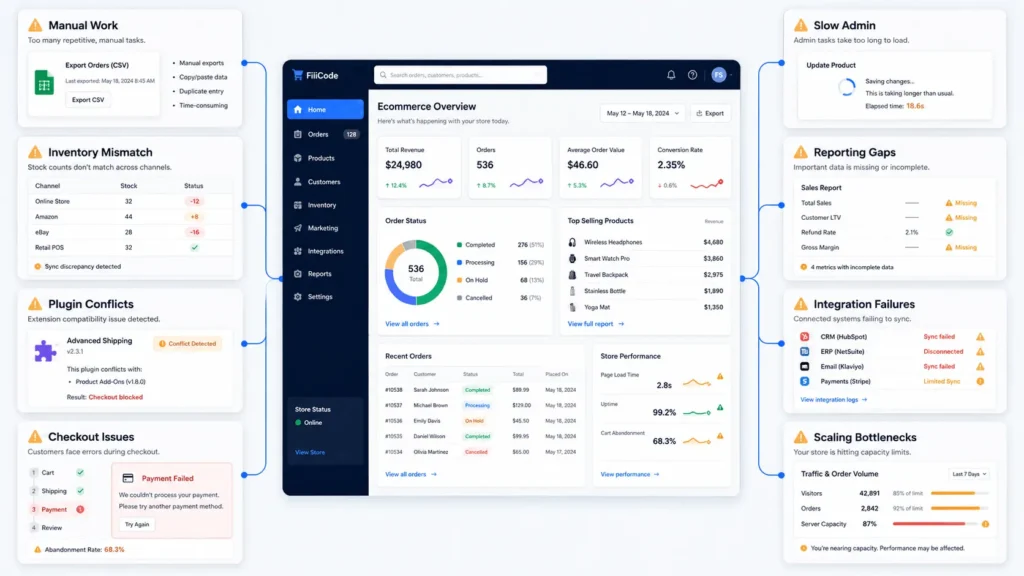
Warning signs include:
- staff exporting CSV files every day
- inventory mismatches between systems
- checkout rules handled through fragile app combinations
- support teams switching between too many dashboards
- slow admin pages
- reporting that cannot answer basic margin questions
- subscription, refund, or invoice workflows needing manual correction
- platform apps creating conflicts or performance problems
This is where Filicode usually becomes relevant. A business may not need a full rebuild. It may need better WooCommerce development, API integrations, checkout optimization, AI automation, custom WordPress architecture, or performance tuning.
The goal is not to over-engineer the store. The goal is to remove operational friction where it damages revenue, support, or growth.
Practical Platform Recommendation
For most small businesses that want a fast, low-maintenance launch, Shopify is the strongest starting point. For WordPress-first businesses, content-heavy brands, SEO-led companies, and stores needing flexible customisation, WooCommerce may be the better choice.
For growing catalogs, multi-channel operations, and teams that want more built-in commerce functionality without managing WordPress infrastructure, BigCommerce is worth serious evaluation.
For marketplaces, SaaS-commerce hybrids, subscription platforms, or complex B2B workflows, custom architecture may be more maintainable than forcing everything into a standard store builder.
The best choice is not simply the most popular platform. It is the one that fits your budget, skills, selling model, and next stage of growth.
FAQs
Which ecommerce platform is best for a small business?
For most small businesses, Shopify is the strongest all-round starting point because it is easy to manage and provides reliable checkout. WooCommerce is better for WordPress and SEO control, while BigCommerce suits growing catalogues and multi-channel commerce.
Is Shopify or WooCommerce better for a small business?
Shopify is usually better for businesses that want a fast, managed launch with less technical maintenance. WooCommerce is better for WordPress-led businesses that need stronger SEO control, content flexibility, data ownership, or custom functionality.
Which ecommerce platform is the best for small business scaling?
For scaling, evaluate performance, API access, inventory handling, checkout reliability, staff permissions, reporting, and integration stability. The best ecommerce platform for small business scaling is usually the one that avoids fragile workarounds as order volume increases.
How long does ecommerce platform implementation take?
A simple store can launch quickly. A serious ecommerce build with product migration, custom design, payment setup, SEO redirects, analytics, testing, and integrations often needs a structured implementation plan. Rushing migration can damage rankings, order accuracy, and customer trust.
When should a small business consider custom ecommerce development?
Consider custom development when platform apps create conflicts, checkout rules become too complex, reporting is unreliable, integrations fail silently, or the team depends on manual work to keep orders, inventory, and customer data aligned.
Conclusion
The best ecommerce platform for small business is the one that fits the store’s budget, skills, sales model, and growth plan. Shopify is usually best for an easy managed launch, WooCommerce for WordPress and SEO control, and BigCommerce for growing catalogues and multi-channel operations.
If orders are growing but the team is fighting slow admin pages, manual CSV exports, broken webhooks, plugin conflicts, missing reports, or checkout limitations, the platform is already showing strain.
That does not always mean rebuilding everything. Sometimes the right step is better WooCommerce development, cleaner API integrations, performance optimization, improved automation, or a more maintainable ecommerce architecture.
Filicode helps businesses evaluate these decisions from a technical and operational perspective: WordPress development, WooCommerce customization, AI automation, API integrations, SaaS architecture, and performance-focused ecommerce systems.
Choose the platform for the business you are building, not only the store you can launch this week.