








Contents
- Quick Summary:
- Why Ecommerce Website Structure Breaks Under Growth
- Ecommerce Website Structure Best Practices for SEO and UX
- Ecommerce Site Structure for SEO: Crawl Paths and Hierarchy
- Core Pages in the Best Ecommerce Website Structure
- Homepage, Categories, and Product Discovery
- Product Pages That Support Decisions, Not Just Descriptions
- Cart and Checkout Structure: Where Architecture Becomes Revenue
- WooCommerce Architecture and Common Bottlenecks
- APIs, Webhooks, Queues, and Backend Workflows
- Monolith vs Headless vs Microservices
- Ecommerce Website Structure Infographic: What to Visualize
- Accessibility, Performance, and Trust Signals
- Where Filicode Fits in Ecommerce Architecture
- FAQs
- What is ecommerce website structure?
- What is the best ecommerce website structure for SEO?
- How much does it cost to improve ecommerce website structure?
- How long does implementation usually take?
- Can WooCommerce support a scalable ecommerce website structure?
- Conclusion
A strong ecommerce website structure helps search engines understand your categories, products, and internal hierarchy while making it easier for customers to find what they need. When the structure becomes messy, filters create crawl waste, important pages lose visibility, and navigation becomes harder to manage as the store grows.
That is where ecommerce site structure becomes an architecture decision, not only a design task. The structure controls how customers browse, how search engines understand products, how checkout behaves, how integrations exchange data, and how future teams maintain the store without breaking production.
For WooCommerce, SaaS commerce, marketplaces, B2B ordering portals, and custom ecommerce platforms, the structure should support product discovery, technical SEO, fast transactions, operational workflows, and reporting from day one.
Quick Summary:
A strong ecommerce website structure connects homepage, category pages, product listing pages, product detail pages, cart, checkout, account areas, and backend systems into one clear operating model.
For SEO, category hierarchy, internal linking, breadcrumbs, schema markup, crawl paths, and filter handling matter more than adding more blog content.
For operations, structure affects inventory sync, payment webhooks, CRM automation, fulfillment, support tickets, refunds, and reporting accuracy.
WooCommerce can scale, but only when caching, checkout logic, plugins, database queries, cron jobs, and third-party integrations are handled carefully.
The best ecommerce website structure is simple for customers, understandable for search engines, and maintainable for engineering teams.
Why Ecommerce Website Structure Breaks Under Growth
Small stores can survive with a basic homepage, a few products, and simple navigation. Growth changes the problem.
More products mean deeper categories. More traffic creates cache pressure. More checkout volume exposes slow payment callbacks. More integrations create webhook failures. More marketing pages increase internal linking complexity. More teams create inconsistent product data.
A weak ecommerce website structure usually shows up through symptoms:
- Customers use search because navigation is unclear.
- Google indexes filter URLs instead of important category pages.
- Product pages compete with each other because attributes are duplicated.
- Checkout becomes slow after adding payment, tax, shipping, and fraud plugins.
- Inventory differs between the website, warehouse, and ERP.
- Support teams cannot trace orders, refunds, or failed payments quickly.
The structure should make the store easier to operate as volume grows. A clean visual layout is useful, but the real value is in predictable flows and maintainable systems.
Ecommerce Website Structure Best Practices for SEO and UX
The homepage should introduce the store, but it should not carry the entire business. Category pages, product listing pages, product detail pages, internal search, cart, checkout, account pages, and support pages all need defined roles.
A practical ecommerce website structure usually follows this path:
Homepage → Parent Category → Subcategory → Product Listing Page → Product Detail Page → Cart → Checkout → Order Confirmation → Account / Support
This looks simple, but the implementation details matter.
Parent categories should map to how customers think, not only how the business organizes inventory. Subcategories should reduce decision friction. Filters should help users narrow products without creating thousands of low-value crawlable URLs. Breadcrumbs should keep users oriented and help search engines understand hierarchy.
For technical accuracy, this overlaps with the discipline of information architecture, which focuses on organizing content so users can find and understand it. In ecommerce, that organization directly affects revenue, indexing, and operational efficiency.
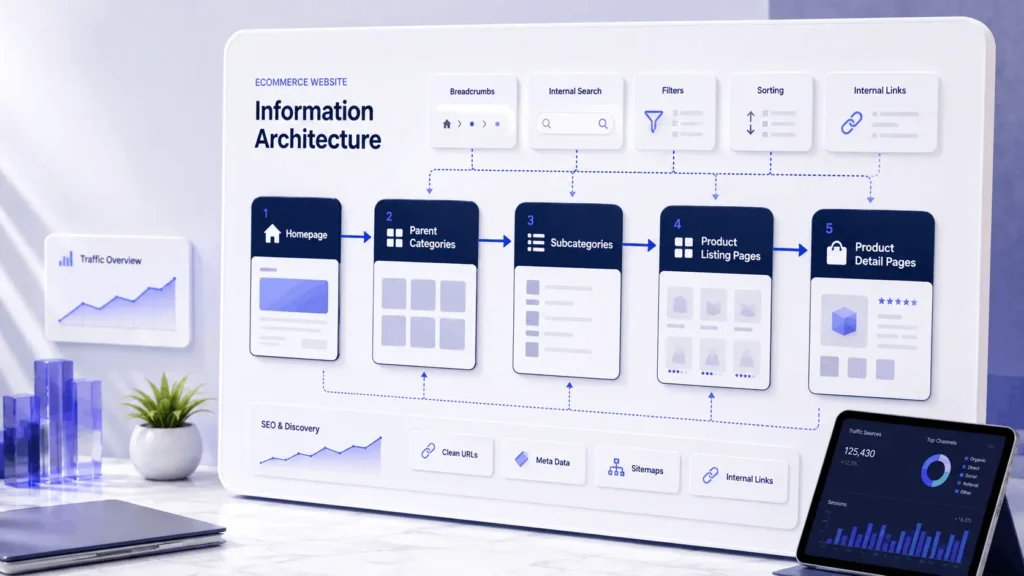
Ecommerce Site Structure for SEO: Crawl Paths and Hierarchy
Search engines need clear signals. Category pages should target commercial search intent. Product pages should target specific product intent. Supporting guides should explain use cases, comparisons, sizing, installation, compatibility, or buying decisions.
A good ecommerce website structure for seo avoids these common mistakes:
- Too many categories with thin content
- Duplicate category pages with similar products
- Filter URLs indexed without control
- Product pages hidden behind JavaScript-only navigation
- Missing breadcrumbs
- Weak internal linking from guides to categories
- Poor handling of discontinued products
- No canonical strategy for variants and parameters
The best ecommerce website structure gives every important page a role. If a URL exists, it should support search visibility, conversion, operations, or customer support.
Core Pages in the Best Ecommerce Website Structure
Every ecommerce site needs a clear page system. The exact model changes by business type, but the core structure stays similar.
| Page Type | Main Role | Operational Risk if Weak |
|---|---|---|
| Homepage | Brand trust, top category access, promotions | Users do not understand what the store sells |
| Parent category | Commercial SEO and product grouping | Keyword cannibalization and poor crawl clarity |
| Subcategory | Product discovery and intent refinement | Users depend too much on search |
| Product listing page | Filtering, sorting, comparison | Low engagement and weak conversion |
| Product detail page | Purchase decision and trust | High bounce rate and low add-to-cart rate |
| Cart | Quantity, price, shipping preview | Cart abandonment and pricing confusion |
| Checkout | Payment, shipping, billing, validation | Failed orders and support load |
| Account area | Orders, invoices, refunds, repeat purchase | More manual support tickets |
A serious ecommerce website structure treats each page as part of a workflow. The product page is not isolated from checkout. Checkout is not isolated from payment gateways. Payment is not isolated from fulfillment and reporting.
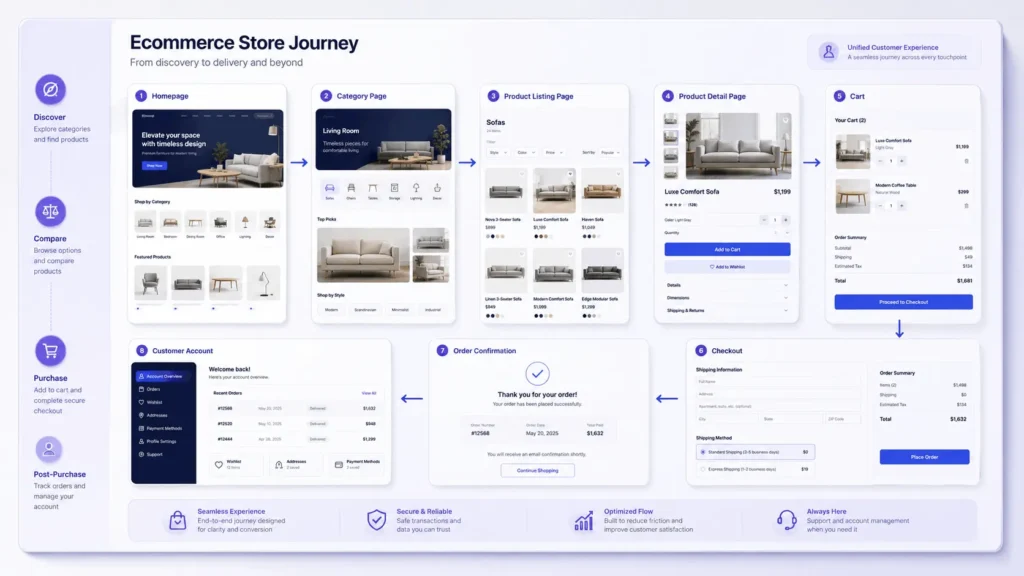
Homepage, Categories, and Product Discovery
The homepage should route users quickly. It should expose major categories, trust signals, popular product groups, search, and current promotions without becoming overloaded.
For a B2B ecommerce store, homepage structure may include industry categories, product applications, quote request flows, and account login. For a B2C store, it may prioritize seasonal collections, best sellers, offers, reviews, and mobile browsing.
Category pages need more discipline. They should include a clear heading, short useful copy, product grid, filters, sorting, breadcrumbs, internal links to subcategories, and enough context to support SEO without blocking users from products.
This is also where design and usability decisions matter. A store may have strong products, but if navigation, spacing, filters, and mobile behavior are weak, users struggle to compare options. Strong UI and UX design services help turn the structure into a shopping experience that feels clear instead of confusing.
Product listing pages should expose useful product differences early:
- Price range
- Stock availability
- Ratings or review snippets
- Key specifications
- Variant options
- Shipping or delivery information
- Quick comparison signals
If every product card looks the same, users have to open multiple tabs just to understand basic differences.
Product Pages That Support Decisions, Not Just Descriptions
Product detail pages should answer practical questions before checkout anxiety starts.
A strong page includes professional images, image zoom, product videos when useful, clear product descriptions, technical specifications, size or compatibility data, customer reviews, delivery information, return policy, stock status, and related products.
For SEO, product pages should have unique content. Manufacturer descriptions copied across hundreds of stores rarely create advantage. Structured data, review snippets, product schema, availability data, and internal links help search engines understand the page. If search visibility is a growth priority, ecommerce architecture should be planned alongside SEO services for small business instead of treated as a post-launch fix.
For operations, product pages also depend on backend quality. If attributes are inconsistent, filters break. If product inventory is delayed, users buy out-of-stock items. If product variants are poorly modeled, reporting becomes unreliable.
A scalable ecommerce website structure keeps product data clean at the database and admin level, not only on the frontend.
Cart and Checkout Structure: Where Architecture Becomes Revenue
Checkout is where business logic becomes visible.
A simple checkout might collect billing information, shipping information, payment method, order notes, and confirmation. A complex checkout may include tax calculation, coupon validation, gift cards, fraud checks, split shipping, subscriptions, B2B approvals, invoice generation, and ERP sync.
Every extra step adds risk. Every plugin can add database queries, external API calls, JavaScript conflicts, or payment validation issues.
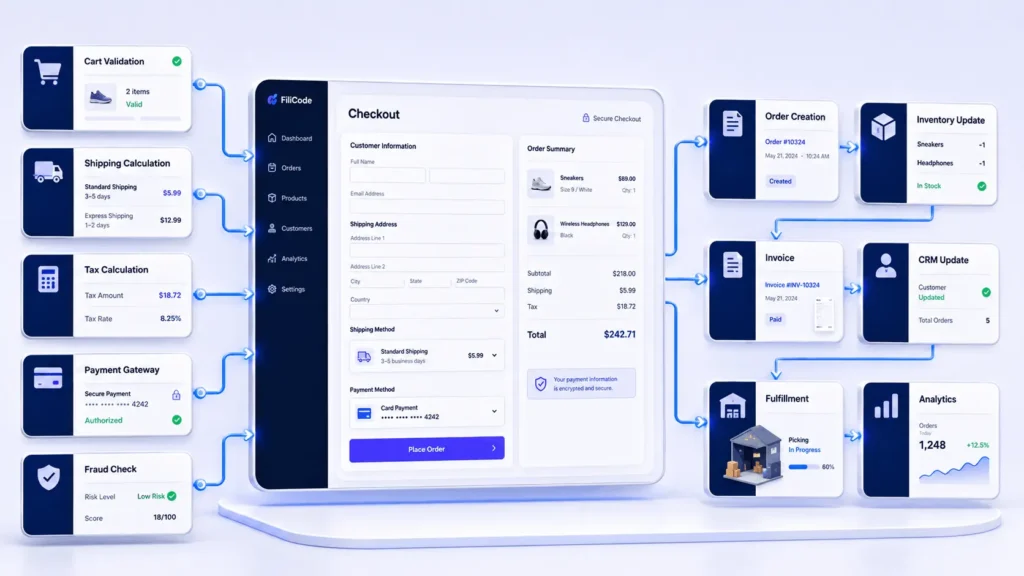
A production checkout workflow usually looks like this:
Customer submits order → server validates cart → tax and shipping are calculated → payment gateway creates transaction → order status is stored → webhook confirms payment → inventory is reduced → invoice is generated → fulfillment receives order → CRM or email automation is triggered → analytics records conversion.
Failures can happen at any point. Payment may succeed while the webhook fails. Inventory may update after the order but before the warehouse sync. Email may send before fraud review. A mature ecommerce website structure accounts for these edge cases.
WooCommerce Architecture and Common Bottlenecks
WooCommerce is flexible because it runs inside WordPress and exposes hooks, filters, templates, REST APIs, custom post types, and plugin extension points. That flexibility is also why poor builds become fragile.
Common WooCommerce bottlenecks include heavy plugin stacks, slow checkout hooks, uncached product queries, inefficient meta queries, large order tables, broken cron jobs, and conflicts between payment, shipping, and subscription plugins.
For growing stores, technical decisions matter:
| Decision Area | Simple Approach | Scalable Approach |
|---|---|---|
| Product data | Manual admin entry | Structured attributes and import workflow |
| Search | Default WordPress search | Indexed product search with filters |
| Caching | Page cache only | Page cache, object cache, CDN, query optimization |
| Checkout | Multiple plugins | Reduced logic, tested hooks, payment monitoring |
| Integrations | Direct plugin-to-plugin sync | API layer, queues, retries, logs |
| Cron jobs | WP-Cron only | Server cron or external job runner |
| Reporting | Basic dashboard | Data pipeline and clean event tracking |
Object caching with Redis can reduce repeated database work. CDN architecture improves asset delivery. Query optimization helps category and filter pages. Checkout pages must be handled carefully because aggressive caching can break carts, sessions, and payment states.
A good ecommerce website structure does not depend on random plugins solving architectural problems.
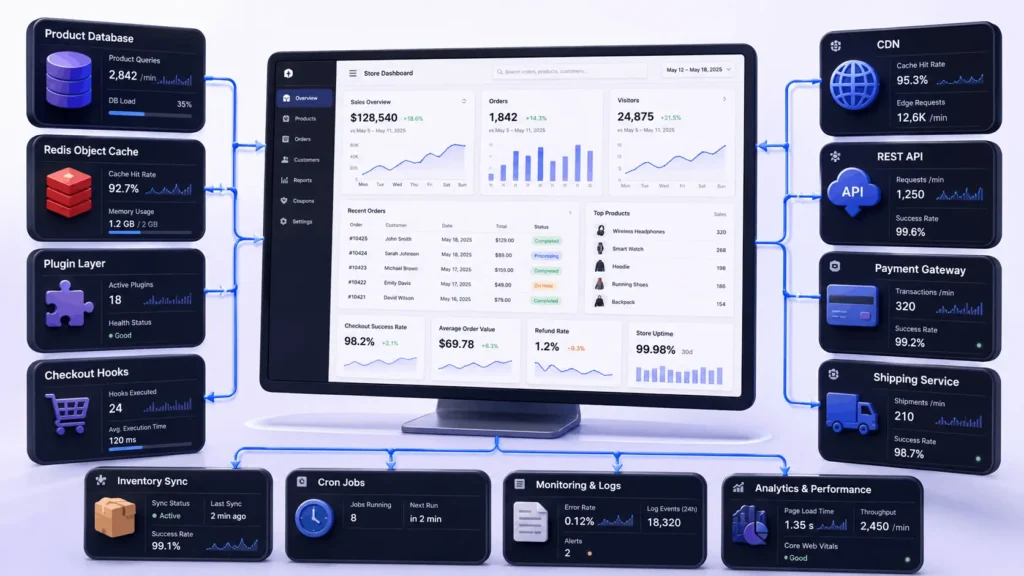
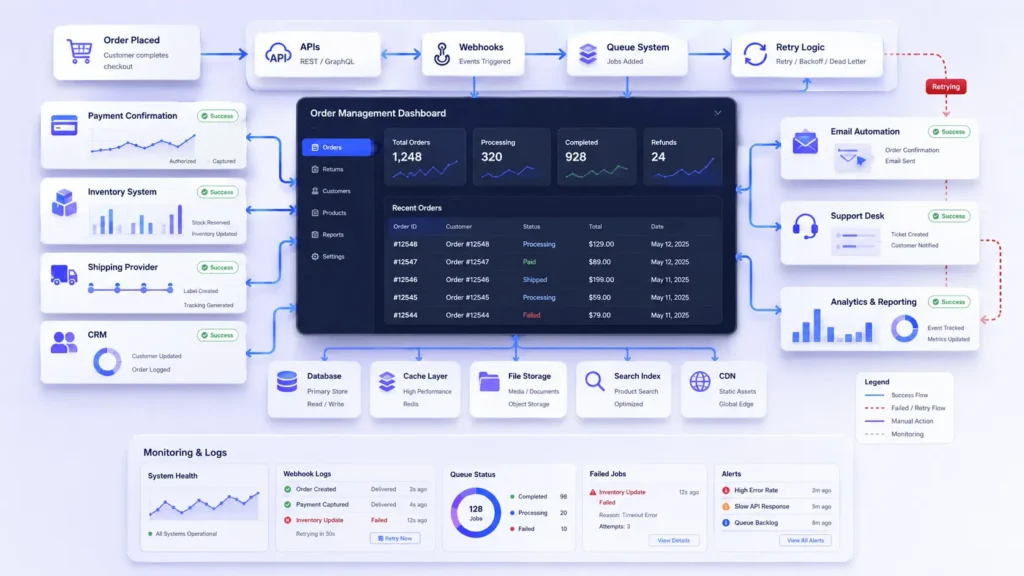
APIs, Webhooks, Queues, and Backend Workflows
Modern ecommerce rarely lives inside one system. Stores connect to payment gateways, shipping providers, ERPs, CRMs, accounting tools, analytics platforms, marketing automation, support desks, and sometimes AI agents.
A stronger architecture separates the user-facing transaction from background work.
For example:
Order is placed → core order data is saved → payment is confirmed → async job sends CRM update → queue pushes fulfillment request → retry handles temporary API failure → logs capture response → monitoring alerts on repeated failures.
This is where ecommerce website structure becomes operational infrastructure.
Monolith vs Headless vs Microservices
Not every store needs microservices. Many businesses damage themselves by adopting complex architecture before they have the team to maintain it.
A WordPress or WooCommerce monolith can work well when the catalog, checkout, content, and admin workflows belong together. It is easier to deploy, easier to manage, and often cheaper to maintain.
Headless WordPress can make sense when frontend performance, custom user experience, or multi-channel content delivery matters. It also adds complexity: preview workflows, authentication, caching, API reliability, and deployment coordination.
The best ecommerce website structure is not the most complex one. It is the structure your business can operate safely.
Ecommerce Website Structure Infographic: What to Visualize
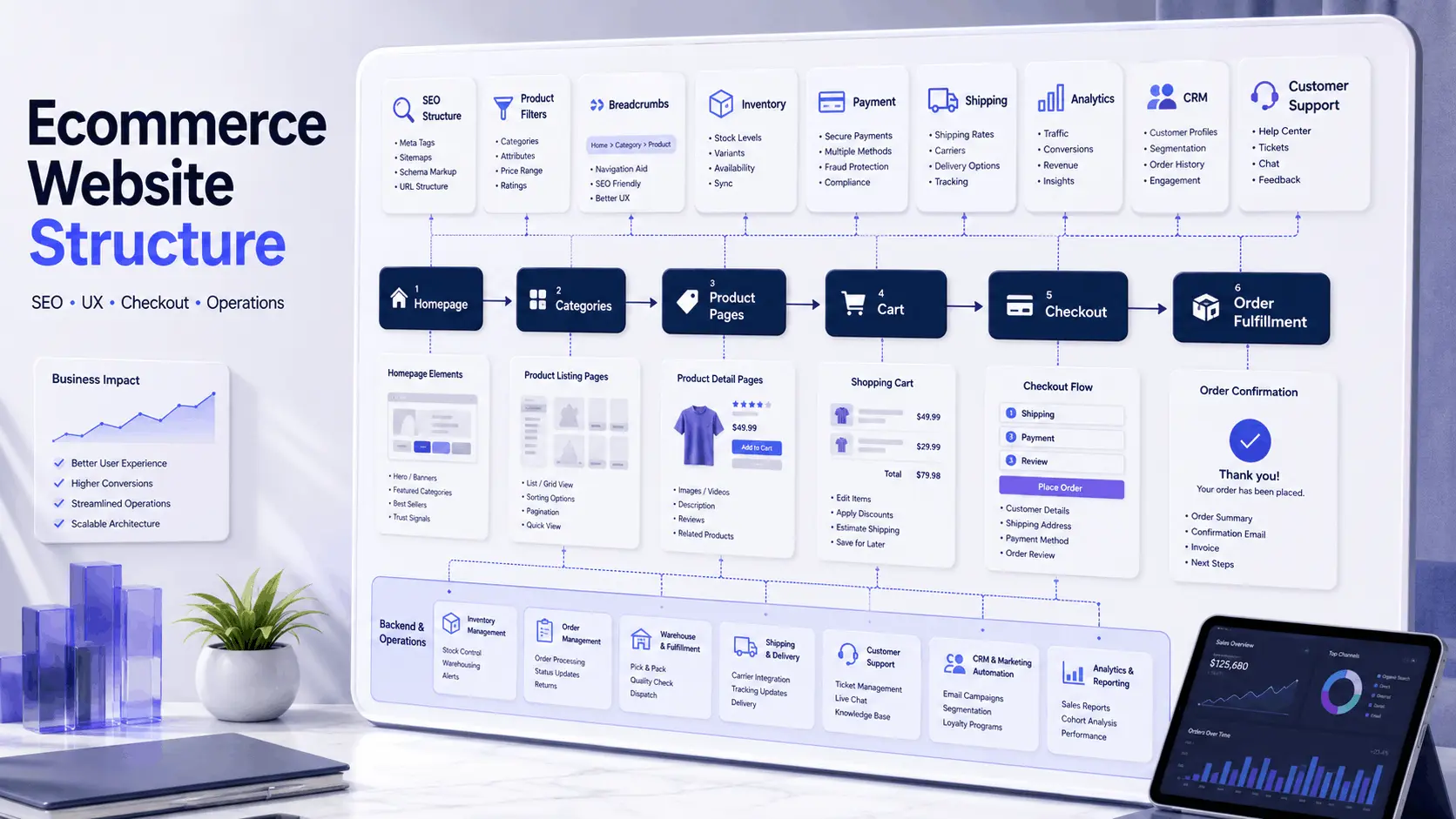
An ecommerce website structure infographic should not only show pages. It should show how users, search engines, and backend systems move through the store.
A useful infographic can include:
- Homepage and major category paths
- Parent categories and subcategories
- Product listing pages with filters and sorting
- Product detail page decision points
- Cart and checkout flow
- Payment, inventory, shipping, CRM, analytics, and support connections
- SEO signals such as breadcrumbs, schema, internal links, and canonical handling
For Filicode-style content, this visual should be clean and operational. The goal is to help founders, CTOs, and product teams understand that store structure affects both customer experience and backend execution.
Suggested image alt text: “ecommerce website structure infographic showing category pages, product pages, checkout, SEO, inventory, CRM, and fulfillment workflows.”
Accessibility, Performance, and Trust Signals
Accessibility is not decoration. Clear labels, keyboard navigation, readable color contrast, logical headings, form validation, and predictable focus states help real users complete purchases.
Performance is equally structural. A store with huge images, render-blocking scripts, slow filters, and overloaded checkout logic will lose users even if the design looks premium.
Trust signals should appear where decisions happen:
- Return policy near product and checkout areas
- Delivery information before payment
- Secure checkout indicators
- Clear business contact information
- Review snippets on product pages
- Privacy policy and support access
- Accurate stock and pricing data
These details reduce uncertainty. They also reduce support tickets.
Where Filicode Fits in Ecommerce Architecture
Filicode works on eCommerce solutions, WordPress development, WooCommerce development, custom software development, API integrations, AI automation, SaaS development, and performance optimization for businesses that need more than a template-based store.
The work usually starts when an ecommerce build begins hitting operational friction: slow checkout, plugin conflicts, poor category logic, broken integrations, weak reporting, unstable imports, or unclear scaling paths.
For businesses still planning the main service page, a focused ecommerce website design agency page can explain the commercial offer, while this supporting guide builds topical depth around structure, SEO, operations, and implementation.
A maintainable ecommerce website structure reduces future costs because teams spend less time fixing avoidable problems. Product managers get clearer workflows. Developers get cleaner extension points. Operations teams get better data. Customers get fewer failed interactions.
Custom development becomes necessary when off-the-shelf tools cannot safely support the business process. For broader site planning, conversion flow, and technical implementation, Filicode’s website design and development work can support the foundation behind the ecommerce system.
FAQs
What is ecommerce website structure?
Ecommerce website structure is the way an online store organizes homepage, categories, product pages, cart, checkout, account areas, SEO paths, and backend workflows. It affects browsing, indexing, conversion, integrations, and maintenance.
What is the best ecommerce website structure for SEO?
The best structure uses clear parent categories, useful subcategories, optimized product listing pages, breadcrumbs, internal links, schema markup, canonical control, and clean filter handling. SEO should be planned with the store architecture, not added later.
How much does it cost to improve ecommerce website structure?
Cost depends on catalog size, platform, checkout complexity, integrations, and technical debt. A small WooCommerce restructure may be modest. A marketplace, B2B portal, or headless build requires deeper architecture, QA, migration, and monitoring work.
How long does implementation usually take?
A focused structural improvement may take a few weeks. A full ecommerce rebuild with category planning, design, WooCommerce customization, API integrations, performance work, and migration can take months. The timeline depends on risk, not only page count.
Can WooCommerce support a scalable ecommerce website structure?
Yes, WooCommerce can scale when product data, caching, database queries, checkout hooks, object caching, CDN setup, cron jobs, and integrations are engineered properly. Problems usually come from poor architecture and plugin overload, not WooCommerce alone.
Conclusion
A strong ecommerce website structure is not only a UX diagram. It is the operating model behind product discovery, SEO, checkout reliability, integrations, inventory, payments, reporting, support, and future scalability.
Warning signs usually appear before failure becomes obvious: filters stop making sense, checkout slows down, teams rely on manual fixes, plugins conflict, Google indexes the wrong URLs, product data becomes inconsistent, and support teams cannot trace operational issues quickly.
That is the point where custom development, better architecture, and cleaner systems should be considered. Start with the structure, map the workflows, identify bottlenecks, and fix the areas that affect revenue, maintenance, and operational control first.