







Contents
- Quick Summary
- Why WooCommerce Performance Optimization Matters Beyond PageSpeed Scores
- Common Root Causes of Slow WooCommerce Stores
- Plugin overload
- Bloated themes
- Database growth
- Dynamic checkout behavior
- WooCommerce Performance Architecture
- Frontend request flow
- Backend processing
- Database operations
- WooCommerce Site Optimization Checklist for Production Stores
- Hosting and Server Environment Optimization
- PHP workers and checkout load
- Caching Strategy for WooCommerce
- Pages that usually should not be fully cached
- What can be cached safely
- WooCommerce Page Speed Optimization for Images and Product Media
- Plugin Load, Hooks, and Conflict Management
- WooCommerce Performance Tuning Through Plugin Audits
- Database Optimization for Large WooCommerce Stores
- Checkout Performance, Payments, and Webhook Reliability
- CDN Architecture and Global Delivery
- Monolith vs Headless WooCommerce vs Microservices
- WooCommerce Speed Optimization Pricing: What Affects Cost?
- Cheap Development vs Maintainable Performance Engineering
- WooCommerce Speed Optimization Guide 2026: Practical Implementation Order
- 1. Measure real performance first
- 2. Fix infrastructure limits
- 3. Clean frontend assets
- 4. Audit plugins
- 5. Configure WooCommerce-safe caching
- 6. Optimize database safely
- 7. Test checkout and integrations
- 8. Monitor after deployment
- When You Need Expert Help to Speed Up WooCommerce
- FAQs
- How much does WooCommerce speed optimization cost?
- How long does WooCommerce speed optimization take?
- Can a WooCommerce speed optimization plugin fix everything?
- Does WooCommerce speed optimization improve SEO?
- Will optimization break checkout?
- Conclusion
WooCommerce speed optimization should focus on real customer journeys, not only homepage scores. Slow product pages, cart updates, checkout requests, plugins, database queries, and third-party APIs can reduce conversions and create operational friction.
A complete WooCommerce performance optimization process reviews frontend assets, hosting, caching, database health, checkout behavior, integrations, and monitoring before changes are deployed.
Quick Summary
WooCommerce performance problems usually come from architecture, not only from page size.
Caching helps, but cart, checkout, account pages, and personalized pricing require careful cache exclusions.
Database growth, order metadata, product variations, and transients can slow down stores even when hosting looks strong.
A proper performance optimization process should include server response time, Core Web Vitals, plugin load, checkout speed, object caching, CDN setup, and monitoring.
Cheap performance fixes often create hidden risks when they break checkout logic, payment callbacks, shipping rules, or tracking scripts.
Growing stores eventually need a maintainable performance strategy, not random plugin stacking.
Why WooCommerce Performance Optimization Matters Beyond PageSpeed Scores
PageSpeed Insights is useful, but it does not show the full business impact. A store can score well on a cached homepage and still feel slow where money is actually made: product search, cart updates, coupon validation, shipping calculation, and checkout submission.
Real store speed improvement focuses on the paths customers use before purchase.
For most stores, the critical performance areas are:
- Homepage and category discovery
- Product detail pages
- Product variation selection
- Add-to-cart actions
- Cart fragments and mini-cart updates
- Checkout field validation
- Payment gateway handoff
- Order confirmation
- Customer account pages
Each step has different technical behavior. A product page may be image-heavy. Checkout may be database-heavy. Cart updates may depend on AJAX. Shipping rates may call external APIs. Payment confirmation may depend on webhooks.
Treating every page the same is one of the fastest ways to break a WooCommerce store.
Common Root Causes of Slow WooCommerce Stores
Most slow WooCommerce websites have more than one bottleneck. The issue is rarely “images only” or “hosting only.” It is usually a stack of small inefficiencies that compound under traffic.
Plugin overload
WooCommerce itself is flexible because it relies heavily on plugin architecture, hooks, filters, actions, and extensions. That flexibility is valuable, but every plugin can add database queries, scripts, styles, admin processes, scheduled jobs, or checkout logic.
A store with 40 plugins is not automatically slow. A store with 12 poorly built plugins can be worse.
The real question is:
Does each plugin load only where needed, or does it inject assets across the whole site?
Bloated themes
Many WooCommerce themes are designed for visual demos, not production performance. They include sliders, animation libraries, layout builders, icon packs, and global CSS that load even when the page does not need them.
A lightweight WooCommerce theme should keep templates clean, avoid excessive DOM size, and support predictable product layouts.
Database growth
As orders, customers, products, coupons, subscriptions, and product variations grow, the database becomes a major performance factor.
WooCommerce stores commonly suffer from:
- Large postmeta tables
- Expired transients
- Old sessions
- Heavy product metadata
- Slow admin order queries
- Too many revisions
- Unoptimized indexes
- Plugin-created tables with poor structure
Database cleanup should be handled carefully. Removing the wrong records can damage order history, analytics, subscriptions, or customer records.
Dynamic checkout behavior
Checkout is one of the hardest areas of WooCommerce performance because it cannot be aggressively cached. It depends on customer session data, cart contents, coupons, taxes, shipping rates, payment methods, user roles, and sometimes CRM or ERP integrations.
A fast homepage does not mean checkout is healthy.
WooCommerce Performance Architecture
A proper performance plan starts with architecture. Before changing plugins or compressing images, the store needs a clear view of how requests move through the system.
Frontend request flow
When a customer opens a product page, the browser requests HTML, CSS, JavaScript, fonts, images, tracking scripts, and sometimes third-party widgets.
A slow frontend may come from:
- Render-blocking CSS
- Heavy JavaScript
- Large product images
- Unused CSS
- External scripts
- Poor lazy loading
- Too many DOM elements
- Font loading delays
This affects Core Web Vitals such as Largest Contentful Paint, Cumulative Layout Shift, and Interaction to Next Paint. Google’s Core Web Vitals documentation is a useful external reference for understanding these user experience metrics: Learn Here
Backend processing
When WooCommerce handles dynamic actions, the server may need to process PHP code, validate sessions, run hooks, query the database, check inventory, calculate tax, request shipping rates, and return a response.
This is where server response time matters.
A backend bottleneck often appears during:
- Product filtering
- Cart updates
- Checkout validation
- Coupon application
- Order creation
- Payment gateway callbacks
- Admin order management
- Subscription renewals
Database operations
WooCommerce relies heavily on WordPress database structures. Products, orders, customer data, and metadata can generate large query loads.
For stores with large catalogs, database optimization is not optional. Product variations, layered navigation, search filters, and custom fields can create expensive queries.
Object caching with Redis can reduce repeated database calls, especially for logged-in users and dynamic store operations. But Redis must be configured correctly. Poor object cache configuration can cause stale data, session issues, or confusing checkout behavior.
WooCommerce Site Optimization Checklist for Production Stores
| Area | What to Check | Production Risk |
|---|---|---|
| Hosting | CPU, PHP workers, memory, TTFB, database resources | Low if tested properly |
| Caching | Page cache, browser cache, object cache, cache exclusions | Medium because checkout can break |
| Images | Compression, WebP, dimensions, lazy loading | Low to medium |
| Plugins | Asset loading, database queries, conflicts | Medium |
| Theme | Template bloat, unused scripts, layout shifts | Medium |
| Database | Transients, postmeta, revisions, indexes, sessions | High if cleaned carelessly |
| Checkout | AJAX calls, payment gateway speed, shipping APIs | High |
| CDN | Static assets, edge caching, image delivery | Medium |
| Monitoring | Logs, uptime, slow queries, failed webhooks | Low |
| Security | Brute force protection, bot traffic, rate limits | Medium |
Hosting and Server Environment Optimization
Hosting is the foundation, but upgrading hosting does not automatically fix a slow WooCommerce store.
A good WooCommerce hosting environment should include:
- Modern PHP version
- Adequate PHP workers
- Strong CPU allocation
- Proper memory limits
- Fast database layer
- Server-side caching
- Object caching support
- HTTP/2 or HTTP/3
- Brotli or GZIP compression
- Stable backup and restore process
The important part is matching infrastructure to workload. A small catalog with low traffic does not need the same stack as a store with thousands of SKUs, real-time inventory sync, subscriptions, and high checkout volume.
PHP workers and checkout load
PHP workers matter because WooCommerce dynamic requests often cannot be served from full-page cache. If too many customers hit cart or checkout at the same time, workers get occupied. Once workers are saturated, the site feels slow even if cached pages are fast.
This is why a professional woocommerce speed optimization service should include server-level review, not only WordPress admin changes.
Caching Strategy for WooCommerce
Caching is powerful, but WooCommerce requires precision.
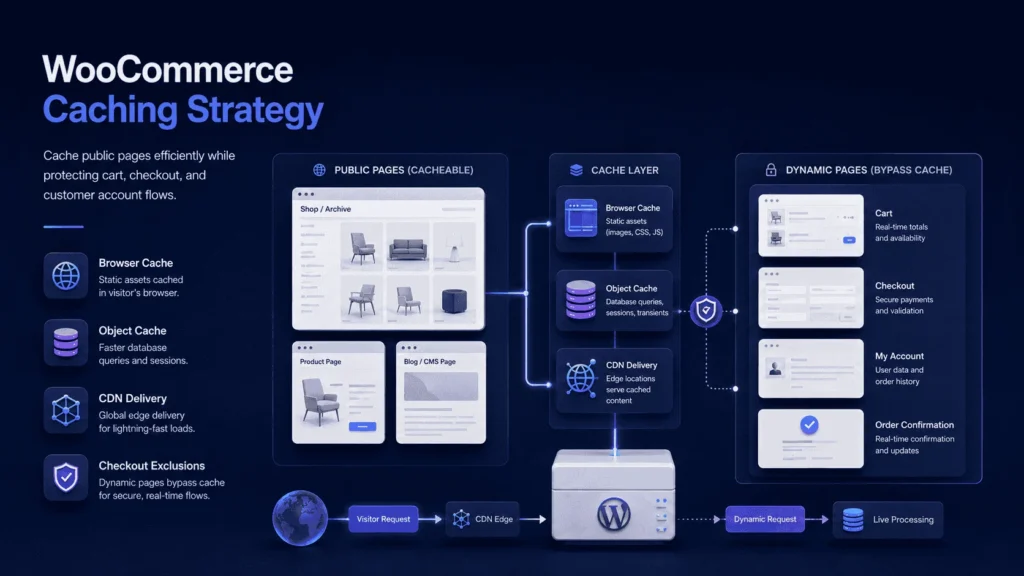
Static content can be cached aggressively. Dynamic pages need protection.
Pages that usually should not be fully cached
- Cart
- Checkout
- My Account
- Order received page
- Pages with user-specific pricing
- Pages with personalized inventory rules
- Subscription account pages
Caching these incorrectly can expose customer data, show wrong cart contents, break payment redirects, or create order confusion.
What can be cached safely
Category pages, product pages, blog content, static landing pages, CSS, JavaScript, fonts, and images can usually benefit from caching.
A strong caching strategy includes:
- Full-page caching for public pages
- Browser caching for static assets
- Object caching for database-heavy operations
- Cache preloading for important pages
- Smart exclusions for cart and checkout
- CDN caching for global asset delivery
This is where many stores make a mistake. They install a woocommerce speed optimization plugin, enable every option, and test only the homepage. The correct test is checkout, cart, product variation logic, coupon application, and payment completion.
WooCommerce Page Speed Optimization for Images and Product Media
Product images are often the largest frontend asset in WooCommerce.
Image optimization should include:
- Correct image dimensions
- WebP format where supported
- Compression without visible quality loss
- Lazy loading for below-the-fold images
- Proper thumbnail generation
- CDN delivery for media-heavy stores
For large stores, media operations should be part of the content workflow. Teams should not upload 5000px product photos directly and expect a plugin to fix everything later.
A cleaner workflow is better:
- Resize images before upload where possible.
- Generate optimized thumbnails.
- Serve modern formats.
- Lazy load gallery images.
- Monitor product page weight over time.
This supports woocommerce speed optimization for seo because faster visual loading improves user experience and Core Web Vitals.
Plugin Load, Hooks, and Conflict Management
WooCommerce performance depends heavily on hooks. Extensions attach logic to actions and filters across product pages, cart, checkout, order creation, email generation, and admin screens.
This is powerful, but it can become expensive.
A payment plugin may load scripts sitewide. A marketing plugin may inject tracking into every page. A shipping plugin may call an external API during checkout. A discount plugin may recalculate rules multiple times.
WooCommerce Performance Tuning Through Plugin Audits
A technical plugin audit should answer:
- Which plugins load frontend assets?
- Which plugins run on checkout?
- Which plugins create database tables?
- Which plugins trigger scheduled tasks?
- Which plugins call external APIs?
- Which plugins overlap in functionality?
- Which plugins are abandoned or poorly maintained?
The goal is not to remove everything. The goal is to reduce unnecessary execution.
For stores that need ongoing technical support, working with freelance WooCommerce developers can help balance plugin usage, custom code, checkout stability, and long-term maintainability.
Database Optimization for Large WooCommerce Stores
Database performance becomes critical as stores scale.
A simple WooCommerce store may run well with default settings. A serious store with thousands of orders, product variations, coupons, memberships, subscriptions, and integrations needs deeper database care.
Common database bottlenecks include:
- wp_postmeta growth
- Product variation queries
- Order lookup performance
- Expired sessions
- Action Scheduler backlog
- Transient accumulation
- Search and filter queries
- Reporting queries during business hours
WooCommerce stores also use Action Scheduler for background tasks. If scheduled actions fail or pile up, order processing, subscriptions, emails, stock sync, and integrations can lag.
Database optimization should be tested on staging first. Never run aggressive cleanup directly on production without backups and rollback planning.
Checkout Performance, Payments, and Webhook Reliability
Checkout speed is where performance becomes revenue.
A customer clicking “Place order” may trigger several operations:
- Validate customer fields
- Validate cart contents
- Apply tax rules
- Calculate shipping
- Check coupons
- Create pending order
- Send data to payment gateway
- Wait for payment response
- Update transaction state
- Reduce stock
- Send order emails
- Trigger CRM or ERP sync
- Fire analytics and conversion events
This is not a simple page load. It is a business transaction.
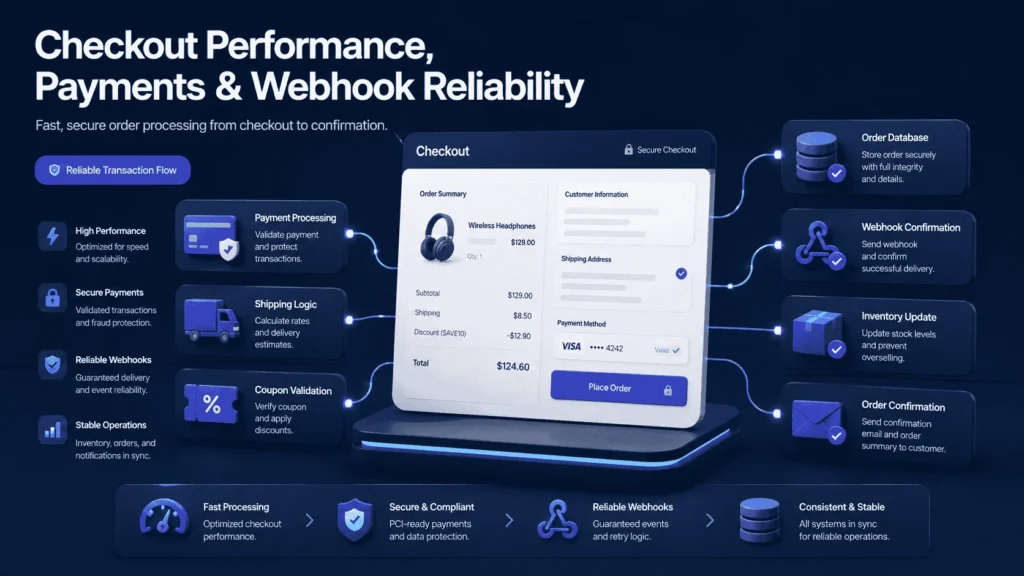
Payment gateways introduce another layer. Webhooks confirm payment status, refunds, failed transactions, disputes, subscription renewals, and invoice updates. If webhooks fail, the store may show wrong order states.
A mature woocommerce speed optimization project should check payment workflow reliability, not only visual speed.
CDN Architecture and Global Delivery
A content delivery network helps reduce latency by serving static assets closer to users.
For WooCommerce, a CDN is useful for:
- Product images
- CSS files
- JavaScript files
- Fonts
- Downloadable static assets
- Media-heavy landing pages
A CDN should not blindly cache dynamic customer pages. The configuration must respect WooCommerce sessions, cookies, cart fragments, and logged-in user behavior.
For global stores, CDN optimization can make a significant difference. For local stores, hosting quality and database performance may matter more than CDN complexity.
Monolith vs Headless WooCommerce vs Microservices
Not every WooCommerce store needs headless architecture or microservices. Many stores perform well with an optimized WordPress setup, clean code, strong caching, and reliable integrations.
| Approach | Best For | Trade-Off |
|---|---|---|
| Standard WooCommerce | Small to mid-size stores with manageable catalog and traffic | Fast to launch, but can become plugin-heavy |
| Optimized WooCommerce Monolith | Growing stores needing better speed and maintainability | Requires engineering discipline |
| Headless WooCommerce | Stores needing custom frontend performance and complex UX | More expensive and operationally complex |
| Microservices Around WooCommerce | Stores with ERP, inventory, subscription, or marketplace complexity | More scalable, but requires strong architecture |
| SaaS Ecommerce Platform | Teams wanting less infrastructure ownership | Less flexible for custom workflows |
For most businesses, the best first step is not moving everything headless. It is improving the current WooCommerce architecture, removing bottlenecks, and separating only the parts that truly need it.
WooCommerce Speed Optimization Pricing: What Affects Cost?
WooCommerce speed optimization pricing depends on store complexity, not just page count.
A small store may need image cleanup, caching, plugin review, and hosting adjustments. A larger store may need database optimization, custom code refactoring, Redis, CDN configuration, checkout profiling, API review, and monitoring setup.
Cost usually depends on:
- Number of plugins
- Theme complexity
- Catalog size
- Order volume
- Hosting environment
- Checkout customizations
- Payment gateways
- Third-party integrations
- Database condition
- Security issues
- Required testing depth
Serious WooCommerce speed optimization services should include staging, backups, regression testing, rollback planning, and post-deployment monitoring not only plugin configuration.
Cheap Development vs Maintainable Performance Engineering
| Cheap Fix | Maintainable Approach |
|---|---|
| Install another optimization plugin | Audit bottlenecks before adding tools |
| Compress images only | Optimize full asset delivery workflow |
| Cache everything | Use WooCommerce-safe cache rules |
| Ignore database growth | Monitor queries, transients, sessions, and order tables |
| Add plugins for every request | Use custom code where it reduces complexity |
| Test homepage only | Test product, cart, checkout, and payment flow |
| No staging process | Validate changes before production |
| No monitoring | Track slow requests, errors, and failed jobs |
WooCommerce Speed Optimization Guide 2026: Practical Implementation Order
A realistic woocommerce speed optimization guide 2026 should follow a careful order.
1. Measure real performance first
Start with PageSpeed Insights, Lighthouse, GTmetrix, server logs, hosting metrics, database query analysis, and checkout testing.
Do not optimize based only on homepage scores.
2. Fix infrastructure limits
Review PHP version, memory limit, PHP workers, database performance, caching layer, and CDN readiness.
3. Clean frontend assets
Reduce unused CSS, delay non-critical scripts, optimize fonts, compress images, and remove unnecessary theme features.
4. Audit plugins
Identify high-impact plugins, overlapping features, abandoned extensions, and sitewide scripts.
5. Configure WooCommerce-safe caching
Cache public pages, exclude dynamic pages, enable browser caching, and consider Redis object caching.
6. Optimize database safely
Clean expired transients, old sessions, revisions, and unused data after backup and staging validation.
7. Test checkout and integrations
Check shipping APIs, payment gateways, tax rules, CRM sync, email triggers, and analytics events.
8. Monitor after deployment
Performance work should not end at launch. Watch logs, Core Web Vitals, checkout errors, failed webhooks, and slow admin actions.
When You Need Expert Help to Speed Up WooCommerce
After basic speed fixes, some WooCommerce stores still struggle because the real problem involves architecture, plugin conflicts, database load, checkout logic, background jobs, or unreliable integrations.
FiliCode supports stores that need freelance WooCommerce developers , custom integrations, checkout improvements, database optimization, or performance engineering beyond standard plugin configuration.
FAQs
How much does WooCommerce speed optimization cost?
Pricing depends on store complexity. A simple optimization may cover caching, images, and plugin cleanup. A larger store may require database work, checkout profiling, Redis, CDN setup, integration testing, and monitoring.
How long does WooCommerce speed optimization take?
Small fixes can be completed quickly, but production-level optimization usually needs audit, staging changes, testing, deployment, and monitoring. Stores with custom checkout, subscriptions, or ERP integrations need more careful testing.
Can a WooCommerce speed optimization plugin fix everything?
No. A woocommerce speed optimization plugin can help with caching, minification, lazy loading, and asset handling, but it cannot fully solve poor hosting, database bloat, plugin conflicts, slow APIs, or bad checkout architecture.
Does WooCommerce speed optimization improve SEO?
Yes. Faster pages can improve user experience, Core Web Vitals, crawl efficiency, and conversion behavior. WooCommerce SEO performance works best when technical speed, content quality, internal linking, and structured product data are improved together.
Will optimization break checkout?
It can if done carelessly. Checkout pages, cart pages, sessions, payment gateways, shipping APIs, and order confirmation pages need special testing. This is why WooCommerce-safe cache exclusions and staging validation matter.
Conclusion
A slow WooCommerce store is often a warning sign that the business has outgrown quick fixes. The symptoms are easy to recognize: checkout delays, plugin conflicts, slow product filtering, admin lag, failed background jobs, poor Core Web Vitals, unreliable integrations, and support teams spending time on preventable issues.
Good WooCommerce performance work is not only about faster pages. It is about cleaner architecture, safer checkout behavior, stronger database performance, better caching decisions, reliable APIs, and systems that can handle growth without constant firefighting. For businesses that need long-term WordPress, WooCommerce, and automation support, Filicode can help connect performance work with practical business architecture.