




Contents
- Quick Summary:
- Why WooCommerce Plugin Development Matters After Basic Store Setup
- Custom WooCommerce Plugin Development vs Ready-Made Plugins
- WooCommerce Plugin Development for Checkout and Order Workflows
- Key Architecture Decisions in WordPress WooCommerce Plugin Development
- WooCommerce Plugin Development Best Practices for Maintainability
- WooCommerce Hooks, Filters, APIs, and Data Flow
- WooCommerce Integration Development for APIs and Automation
- Payment Gateways, Webhooks, and Transaction Reliability
- Performance Bottlenecks in WooCommerce Plugin Development
- WooCommerce Plugin Development Guide for Production Systems
- WooCommerce Plugin Development Example
- Security, RBAC, and Compliance in WooCommerce Plugins
- HPOS Compatibility and WooCommerce Data Changes
- When to Hire a WooCommerce Plugin Specialist or Development Company
- Common Mistakes in WooCommerce Plugin Development
- WooCommerce Plugin Development Services and Timeline
- FAQs About WooCommerce Plugin Development
- How much does WooCommerce plugin development cost?
- How long does custom WooCommerce plugin development take?
- Is WooCommerce plugin development scalable for high-order stores?
- Can a custom plugin integrate WooCommerce with a CRM or ERP?
- Is a WooCommerce plugin development tutorial enough for business use?
- Conclusion: When WooCommerce Plugin Development Becomes Necessary
A WooCommerce store usually becomes difficult to manage when business logic grows faster than the site architecture. Checkout rules become complex, payment webhooks fail quietly, CRM records do not match orders, inventory updates need manual correction, and support teams keep fixing the same problems again and again.
That is where woocommerce plugin development becomes useful. A custom plugin can protect business logic, automate workflows, connect external systems, and reduce plugin overload. This is also where growing stores often need to hire WooCommerce developers with real checkout and integration experience.
For founders, CTOs, product managers, and operations teams, the real question is not only whether a feature can be built. The real question is whether that feature will stay reliable when order volume, integrations, customer rules, and operational pressure increase.
Quick Summary:
- Custom WooCommerce plugins are useful when ready-made plugins cannot match real business workflows.
- Poor plugin architecture can slow checkout, create conflicts, and increase database load.
- Good woocommerce plugin development separates checkout logic, admin settings, API integrations, security, logging, and background jobs.
- Payment gateways, CRM sync, inventory updates, and reporting need retry handling and monitoring.
- A production-ready plugin should include testing, documentation, deployment planning, and maintenance.
- WooCommerce integration development should include secure APIs, background processing, retry handling, logs, and duplicate prevention.
- Experienced WooCommerce plugin developers should plan for HPOS compatibility, performance, security, testing, and future platform updates.
Why WooCommerce Plugin Development Matters After Basic Store Setup
WooCommerce works well for many stores because it is flexible. It supports products, carts, checkout, coupons, payments, shipping, customer accounts, and order management. The problem usually starts when a store moves beyond basic selling.
A growing store may need:
- wholesale pricing
- custom checkout fields
- product restrictions
- advanced shipping rules
- ERP integration
- subscription logic
- marketplace features
- custom reporting
- AI-based automation
At that stage, installing one more plugin for every requirement can create more problems than it solves.
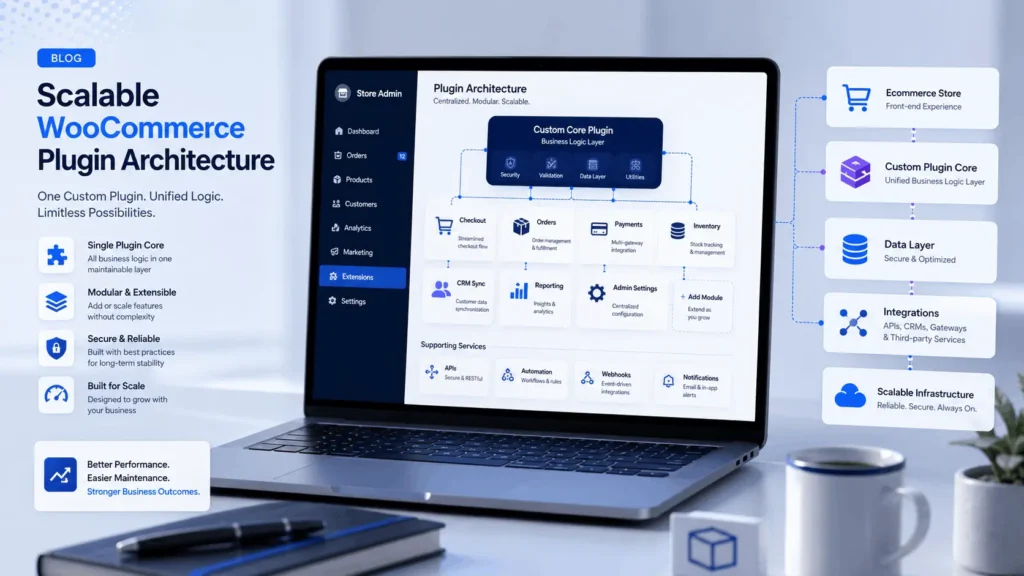
WooCommerce plugin development gives the store a controlled place for custom business logic. Instead of spreading rules across theme files, code snippets, and several plugins, the custom plugin becomes the structured layer where important workflows live.
Common use cases include:
- custom checkout validation
- payment gateway adjustments
- CRM integration
- inventory synchronization
- role-based pricing
- admin workflow automation
- custom order statuses
- advanced reporting
A serious store should not depend on scattered logic that nobody can safely maintain.
Custom WooCommerce Plugin Development vs Ready-Made Plugins
Ready-made plugins are useful when the requirement is common. Custom plugins are better when the workflow is specific to the business.
Many stores become slow because they install several plugins to solve one operational problem. Each plugin may work alone, but together they can add scripts, database queries, cron jobs, checkout hooks, and compatibility risks.
| Option | Best Use Case | Main Risk |
|---|---|---|
| Ready-made plugin | Common store features | Bloat, conflicts, limited control |
| Custom WooCommerce plugin | Business-specific logic | Needs proper engineering |
| Code snippet | Small isolated change | Hard to test and document |
| SaaS automation | External workflow support | Limited WooCommerce control |
A custom plugin is not always the first answer. But when a feature affects revenue, fulfillment, reporting, compliance, or customer experience, engineered control becomes more valuable than plugin stacking.
WooCommerce Plugin Development for Checkout and Order Workflows
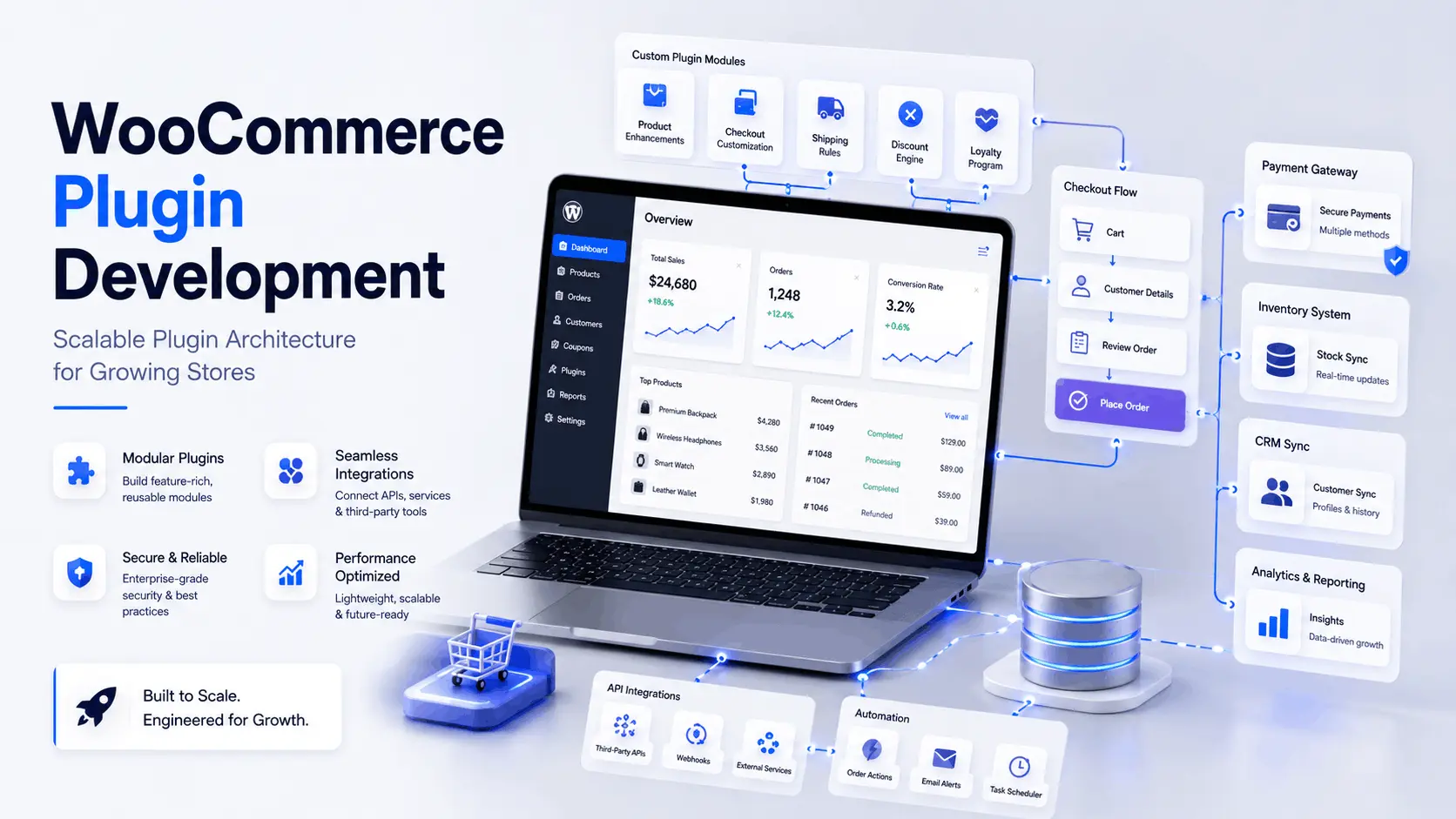
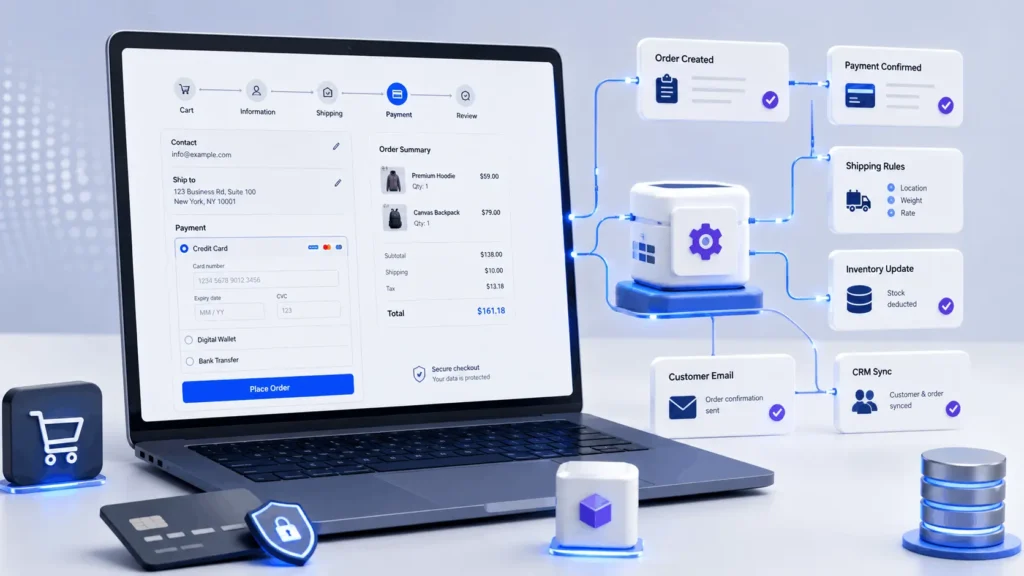
Checkout is the most sensitive part of a WooCommerce store. It touches cart data, customer fields, taxes, coupons, shipping rates, payment gateways, order creation, emails, stock reduction, analytics, and webhook triggers.
A poorly built plugin can slow checkout by:
- running heavy queries during checkout
- calling external APIs during page load
- validating too many rules on every request
- loading unnecessary scripts
- depending on weak order status logic
A better plugin separates the workflow clearly:
- frontend handles customer interaction
- backend validates input
- WooCommerce calculates totals
- order is created
- payment gateway confirms the transaction
- webhook updates payment status
- inventory, CRM, email, and reporting systems are updated after the order event
This is why woocommerce plugin development needs production thinking. Checkout behavior should be fast, predictable, and recoverable when one external system fails.
For example, a store may need a delivery rule based on product category, customer location, user role, and available stock. That rule should not sit inside a theme file. It should be isolated, tested, documented, and connected to the correct WooCommerce hooks.
Key Architecture Decisions in WordPress WooCommerce Plugin Development
A good plugin is not only one PHP file with hooks. It needs the same structure used in professional WordPress plugin development.
For wordpress woocommerce plugin development, a maintainable plugin usually includes:
- main plugin file
- admin classes
- public-facing classes
- service classes
- API clients
- asset files
- language files
- installation routines
- uninstall handling when needed
Developers should avoid putting all logic into one file. That may work in a basic woocommerce plugin development tutorial, but it becomes painful when the plugin grows.
This follows the same modular thinking used in a software plugin model, where separate components extend a core system without changing the core itself.
The plugin should respect:
- WordPress coding standards
- WooCommerce data methods
- user capabilities
- nonces
- sanitization
- escaping
- backward compatibility
WordPress plugins are part of a wider open-source ecosystem, and the general idea of a plugin architecture is explained well by Wikipedia’s overview of software plugins.
A strong architecture makes future changes easier. A weak architecture makes every new requirement risky.
WooCommerce Plugin Development Best Practices for Maintainability
The most useful woocommerce plugin development best practices are practical.
A maintainable plugin should:
- use WooCommerce CRUD methods instead of direct order table writes where possible
- keep external API calls away from customer-facing page loads
- use background processing for slow sync tasks
- validate all customer input
- escape output in admin and frontend templates
- check user capabilities before admin actions
- use nonces for forms and AJAX requests
- keep logs for failed payment, inventory, webhook, and CRM events
The plugin should also include version checks. WooCommerce, WordPress core, PHP, payment gateways, and third-party APIs change over time. Compatibility is part of the product, not a final cleanup task.
WooCommerce Hooks, Filters, APIs, and Data Flow
WooCommerce exposes many hooks, filters, templates, REST API endpoints, and data objects. These tools are powerful, but they need careful use.
Some hooks run often. Some run only during checkout. Some affect frontend performance. Some are safe for admin processes but dangerous inside high-traffic customer flows.
A typical woocommerce plugin development workflow may include:
- cart validation
- checkout field validation
- order creation
- payment confirmation
- webhook processing
- inventory adjustment
- CRM sync
- email triggers
- reporting updates
If one step fails, the system should not silently lose data. It should log the issue, retry when safe, and show enough information for an admin or developer to investigate.
That is the difference between a feature that works in a demo and a plugin that works in production.
WooCommerce Integration Development for APIs and Automation
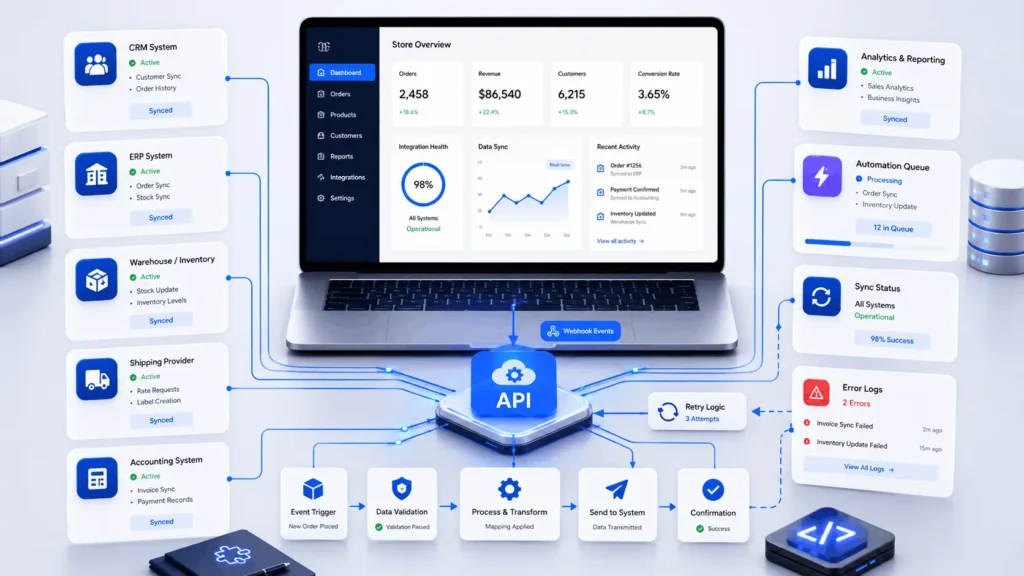
Growing stores depend on external systems. CRM tools, accounting software, ERP platforms, warehouse systems, shipping providers, marketing platforms, analytics tools, and AI automation layers all need reliable data.
API integration is rarely just “send data to another app.” Real integration needs:
- authentication
- field mapping
- rate-limit handling
- retry logic
- duplicate prevention
- logging
- reconciliation
A strong custom woocommerce plugin development project may include REST API connections, API key authentication, webhook listeners, background queues, admin sync controls, error logs, and manual retry actions.
For example, when a paid order is created, the plugin may send customer data to a CRM, update inventory in an ERP, trigger a shipping workflow, and notify support. If the CRM is temporarily unavailable, the order should not be lost. The failed sync should be stored, retried, and logged.
Payment Gateways, Webhooks, and Transaction Reliability
Payment workflows need careful engineering because they involve money, customer trust, accounting records, and order states.
A payment-related plugin may need to handle gateway API requests, refunds, failed payments, webhook verification, order reconciliation, fraud signals, invoices, and reporting data.
The common mistake is assuming the payment page response is the final source of truth. In production, the webhook often confirms the real payment status.
Reliable woocommerce plugin development service quality becomes important here. The plugin should verify webhook signatures, avoid duplicate processing, update order statuses safely, and log gateway responses.
Performance Bottlenecks in WooCommerce Plugin Development
A plugin can be functionally correct and still hurt store performance.
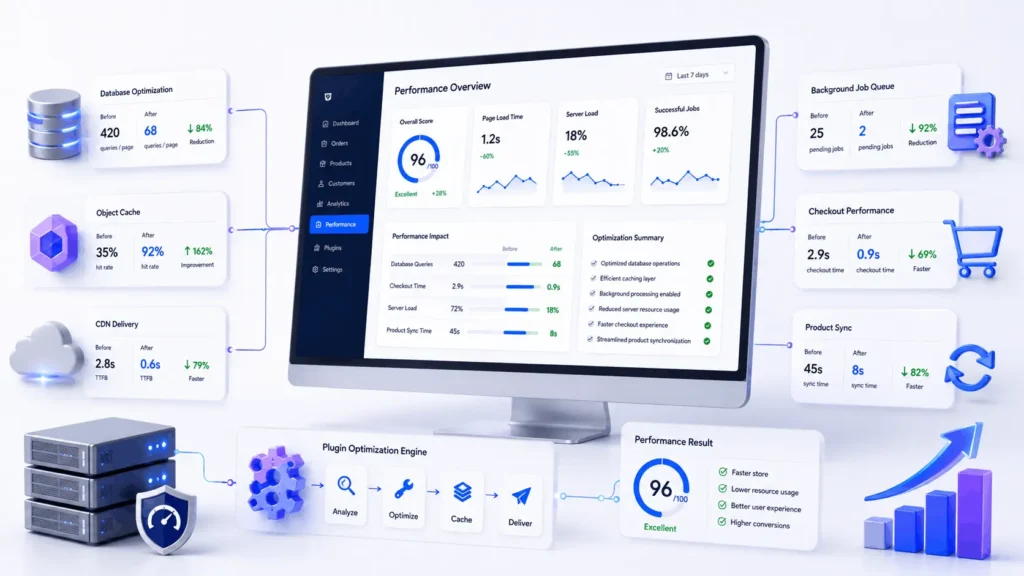
WooCommerce already handles cart sessions, product queries, tax calculations, coupon checks, customer metadata, order data, and stock handling. Adding inefficient plugin logic can make the store slower.
Common bottlenecks include heavy database queries, sitewide asset loading, API calls during checkout, excessive postmeta storage, too many scheduled events, no object caching strategy, and large imports processed in one request.
A scalable plugin should load only what it needs. Admin scripts should not load on product pages, and checkout logic should not run on unrelated pages.
Object caching, CDN optimization, and queue systems can reduce pressure on customer-facing requests.
WooCommerce Plugin Development Guide for Production Systems
A real woocommerce plugin development guide should go beyond creating a folder and adding a plugin header. That is only the starting point.
A production-ready process usually includes:
- requirements discovery
- technical architecture
- data model planning
- plugin structure
- local development
- staging testing
- integration testing
- security review
- deployment planning
- monitoring after launch
The development environment should include Git, a local server, debugging tools, and a staging site close to production.
For larger plugins, tools like PHPUnit, PHP_CodeSniffer, Query Monitor, Xdebug, Postman, and WooCommerce system logs are useful.
WooCommerce Plugin Development Example
A practical woocommerce plugin development example is a wholesale pricing workflow.
The store needs different prices for approved wholesale customers. A buyer submits a request. The admin reviews it. The user role changes after approval. Pricing logic applies only to eligible products.
A clean plugin would include:
- admin settings
- user role checks
- pricing filters
- approval status metadata
- email notifications
- audit logs
- fallback pricing
The weak approach is adding random conditions inside theme files. That may work for one customer group, but it becomes fragile when the store later adds regional pricing, bulk discounts, minimum order quantities, and CRM sync.
A maintainable plugin keeps this logic organized and extendable.
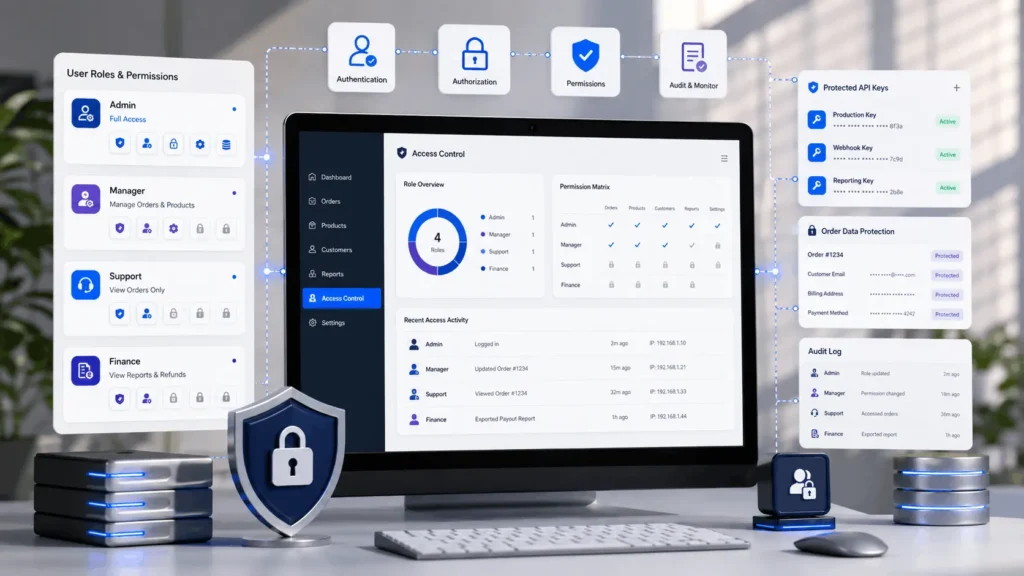
Security, RBAC, and Compliance in WooCommerce Plugins
WooCommerce plugins often touch customer data, addresses, emails, invoices, order history, and payment-related metadata. Security cannot be added at the end.
A plugin should handle:
- sanitization
- escaping
- nonce verification
- user capability checks
- role-based access control
- safe database queries
- protected API credentials
- audit logging for critical actions
Admin panels also need protection. Real stores have support agents, warehouse users, marketers, contractors, and managers with different access needs.
A warehouse user may need fulfillment access but not pricing settings. A support agent may need order notes but not API credentials. An operations manager may need sync controls but not developer settings.
Good woocommerce plugin development respects these boundaries.
HPOS Compatibility and WooCommerce Data Changes
High-Performance Order Storage, often called HPOS, changes how WooCommerce stores order data. Older plugins that depend directly on post and postmeta behavior can run into compatibility problems.
Modern plugins should use WooCommerce order APIs and CRUD methods where possible. This reduces future maintenance risk as WooCommerce improves order storage and performance.
HPOS compatibility matters for stores with:
- high order volume
- heavy reporting
- advanced fulfillment
- custom admin workflows
- complex order automation
This is also where woocommerce plugin development documentation becomes important. Developers should document data storage decisions, hooks used, settings, compatibility notes, and integration behavior.
When to Hire a WooCommerce Plugin Specialist or Development Company
A business should consider a woocommerce plugin development company when the requirement affects revenue, operations, data accuracy, or long-term scalability.
Small visual tweaks may not need a full engineering team. But payment workflows, inventory sync, custom checkout logic, reporting systems, marketplace features, and automation layers should be handled carefully.
Filicode works on custom software development, WordPress development, WooCommerce development, AI automation, API integrations, SaaS architecture, and performance optimization. The focus is not only building features, but reducing operational friction and making systems easier to maintain.
A good technical partner should ask about order volume, checkout behavior, business rules, third-party systems, hosting stack, admin workflows, and support pain points before writing code.
Common Mistakes in WooCommerce Plugin Development
The most expensive mistakes usually look harmless at first.
A developer adds custom code to functions.php. Another plugin adds checkout fields. A third plugin changes order statuses. Someone adds a cron job for inventory sync. Later, the store grows, and nobody knows which part controls the workflow.
Common mistakes include:
- skipping staging
- avoiding logs
- using direct database writes unnecessarily
- ignoring HPOS compatibility
- calling APIs during checkout
- loading assets everywhere
- skipping documentation
- ignoring plugin conflicts
- launching without rollback planning
A cheap plugin can become expensive when it blocks checkout, corrupts order metadata, breaks during a WooCommerce update, or silently fails to sync data.
Good woocommerce plugin development tips are usually simple: plan the architecture, test before launch, log failures, document decisions, and avoid unnecessary complexity.
WooCommerce Plugin Development Services and Timeline
The timeline depends on scope. A small admin tool may take a few days. A custom checkout workflow can take longer. A payment integration, ERP sync, marketplace feature, or AI automation layer may need deeper planning and staged rollout.
Reliable woocommerce plugin development services should include:
- discovery
- architecture
- development
- testing
- deployment support
- maintenance planning
A serious implementation should define:
- scope
- data mapping
- integration rules
- testing scenarios
- deployment steps
- rollback planning
- documentation
- support handoff
The goal is not only to launch a plugin. The goal is to keep the store stable after the plugin becomes part of daily operations.
FAQs About WooCommerce Plugin Development
How much does WooCommerce plugin development cost?
The cost depends on scope, integrations, testing needs, and business risk. A small plugin may be affordable, while payment workflows, ERP sync, marketplace logic, or advanced automation require more architecture and quality assurance.
How long does custom WooCommerce plugin development take?
Simple plugins can be completed quickly, but production-grade work usually needs discovery, development, staging tests, integration checks, and deployment planning. Complex projects may need phased delivery.
Is WooCommerce plugin development scalable for high-order stores?
Yes, if the plugin is built with performance, caching, queues, HPOS compatibility, and database behavior in mind. Scalability depends more on architecture than on the plugin concept itself.
Can a custom plugin integrate WooCommerce with a CRM or ERP?
Yes. A plugin can connect WooCommerce with CRM, ERP, shipping, accounting, marketing, and reporting systems. The important parts are authentication, mapping, retries, logs, and duplicate prevention.
Is a WooCommerce plugin development tutorial enough for business use?
A tutorial is useful for learning basics, but business-critical plugins need stronger structure, security, testing, documentation, and compatibility planning. Production stores need more than sample code.
Conclusion: When WooCommerce Plugin Development Becomes Necessary
A store usually needs woocommerce plugin development when standard plugins no longer match the business process.
Custom development should not make the store unnecessarily complex. It should make business logic clearer, safer, faster, and easier to operate.
The practical next step is to review where the store is losing time or accuracy. Look at checkout behavior, payment states, inventory sync, CRM updates, fulfillment delays, reporting gaps, and admin workload.
When the cost of manual fixes, plugin conflicts, and operational confusion becomes higher than the cost of proper engineering, woocommerce plugin development becomes a business decision, not only a technical upgrade.