








Contents
- WordPress Website Cost: Quick Answer
- WordPress Website Price: 2026 Cost Ranges
- The Biggest Factors That Affect WordPress Website Pricing
- Design System and Page Templates
- Content Structure and Backend Editing
- Integrations and Automation
- One-Time Build Cost vs Ongoing WordPress Website Cost
- How Much Does a WordPress Website Cost by Project Type?
- Basic WordPress Website
- Professional Small-Business WordPress Website
- Custom WordPress Website
- WooCommerce Website
- Enterprise or High-Traffic WordPress Website
- Hidden Costs That Make Cheap WordPress Builds Expensive
- How Architecture Changes the Cost of a WordPress Website
- Production Workflow Behind a Serious WordPress Build
- Freelancer vs Agency vs Internal Team
- How Much Does a WordPress Website Cost in India, the UK, and Other Markets?
- When a Higher WordPress Budget Is Worth It
- How Filicode Looks at WordPress Website Cost
- FAQ
- How much does a WordPress website cost?
- How much should I pay for a WordPress website?
- What is the average cost to build a WordPress website?
- How much does it cost to build a WordPress website?
- How much does it cost to maintain a WordPress website?
- How much does it cost to host a WordPress website?
- How much does it cost to run a WordPress website?
- Conclusion: How Much Does a WordPress Website Cost When the Site Must Scale?
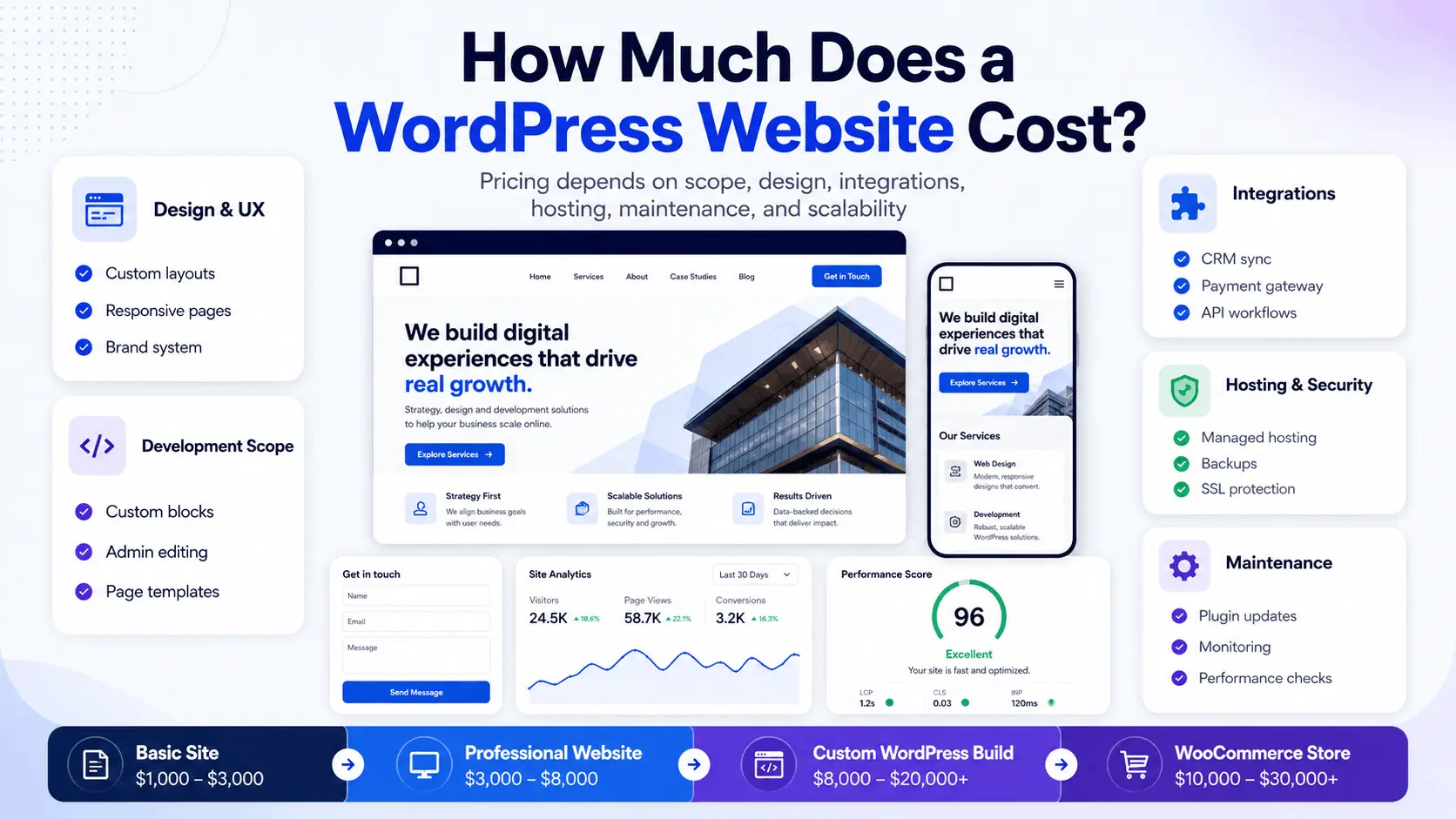
How much does a WordPress website cost? In 2026, a DIY website may cost $100–$1,000+, a basic small-business website $1,500–$5,000+, and a professional business website $5,000–$15,000+. Custom WordPress, WooCommerce, and enterprise projects can range from $8,000 to $150,000+ depending on design, functionality, integrations, performance requirements, and ongoing support.
WordPress software itself is free, but a complete website still requires a domain, hosting, design, plugins, development, security, and maintenance. The final price depends on scope, performance, and what the site must support after launch.
WordPress Website Cost: Quick Answer
A basic WordPress website costs less but usually offers limited scalability and content control. A professional business website costs more because it includes planning, UX, technical SEO, performance work, QA, and launch support.
Custom WordPress development becomes worthwhile when workflows, integrations, WooCommerce, membership areas, or automation matter.
The cheapest quote often excludes migration, plugin licenses, security, backups, analytics, redirects, testing, and post-launch support.
WordPress Website Price: 2026 Cost Ranges
There is no fixed price because WordPress can support anything from a small marketing site to a WooCommerce store or high-traffic publishing system. Realistic ranges still help with planning.
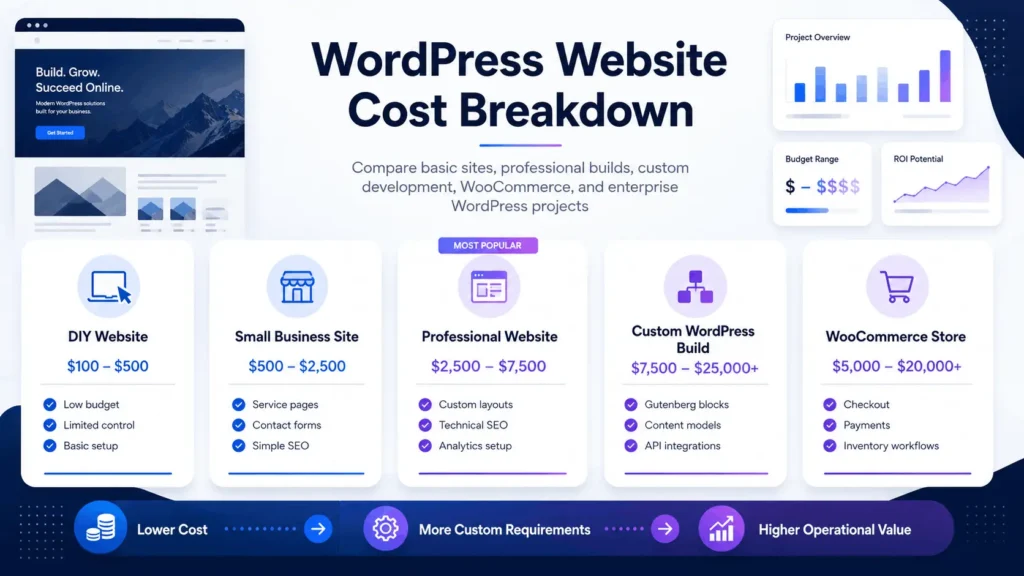
| Website Type | Typical Cost Range | Best Fit | Main Risk |
|---|---|---|---|
| DIY WordPress site | $100–$1,000+ | Testing an idea or very small site | Weak structure, poor SEO setup, plugin overload |
| Basic small-business site | $1,500–$5,000+ | Simple service business website | Limited scalability and generic templates |
| Professional business website | $5,000–$15,000+ | Lead generation, brand credibility, structured content | Scope creep if requirements are unclear |
| Custom WordPress website | $10,000–$40,000+ | Custom UX, content models, integrations, workflows | Requires strong technical planning |
| WooCommerce website | $8,000–$50,000+ | Online stores, subscriptions, catalogs, checkout flows | Checkout, inventory, tax, shipping, and plugin conflicts |
| Enterprise WordPress build | $40,000–$150,000+ | High traffic, multisite, advanced permissions, integrations | Infrastructure and governance complexity |
Pricing note: These are planning ranges rather than fixed market prices. Actual costs depend on project scope, team location, design requirements, functionality, content, integrations, testing, and post-launch support.
These ranges vary by country, team quality, requirements, and operating model. The cost of a WordPress website in the UK may differ from the same project quoted in the United States, India, Pakistan, or Eastern Europe. Location affects hourly rates, but architecture quality affects long-term cost more than geography.
The Biggest Factors That Affect WordPress Website Pricing
The cost to build a WordPress website depends on what the site must do, not only how it should look. A homepage, service pages, and contact form are straightforward. Custom filters, CRM sync, gated content, WooCommerce checkout, analytics attribution, and admin dashboards require deeper engineering.
Design System and Page Templates
A low-cost build often uses a prebuilt theme with minor color and logo changes. That can work for simple websites, but it becomes restrictive when marketing needs reusable sections, landing pages, and consistent conversion blocks.
A professional build usually includes custom templates, Gutenberg blocks, responsive behavior, navigation structure, accessibility considerations, and brand-specific components. This costs more, but it creates a maintainable content system.
Content Structure and Backend Editing
WordPress cost rises when the admin experience must match real workflows. A service business may need location pages, case studies, testimonials, comparison pages, and resource hubs. Each content type needs fields, templates, schema, and internal linking support.
This is where custom WordPress development becomes valuable. Instead of forcing everything into generic pages, the website can be structured around how the company sells, publishes, and updates content.
Integrations and Automation
Integrations are one of the most underestimated pricing factors. A contact form that sends an email is simple. A form that validates data, routes leads by service, pushes records into a CRM, triggers notifications, stores consent, tracks source attribution, and handles failed API requests is a workflow.
Production integrations need authentication, logging, retries, rate-limit handling, webhook validation, and fallback behavior. Without those details, the website may appear complete but silently lose leads or create duplicate records.
One-Time Build Cost vs Ongoing WordPress Website Cost
When people ask how much a WordPress website costs, they often focus on the first invoice. That is only part of the budget because WordPress has both build costs and operating costs.
One-time costs usually include discovery, design, development, content entry, migration, testing, and launch. Ongoing costs include hosting, domain renewal, plugin licenses, security monitoring, backups, updates, performance checks, bug fixes, and content support.
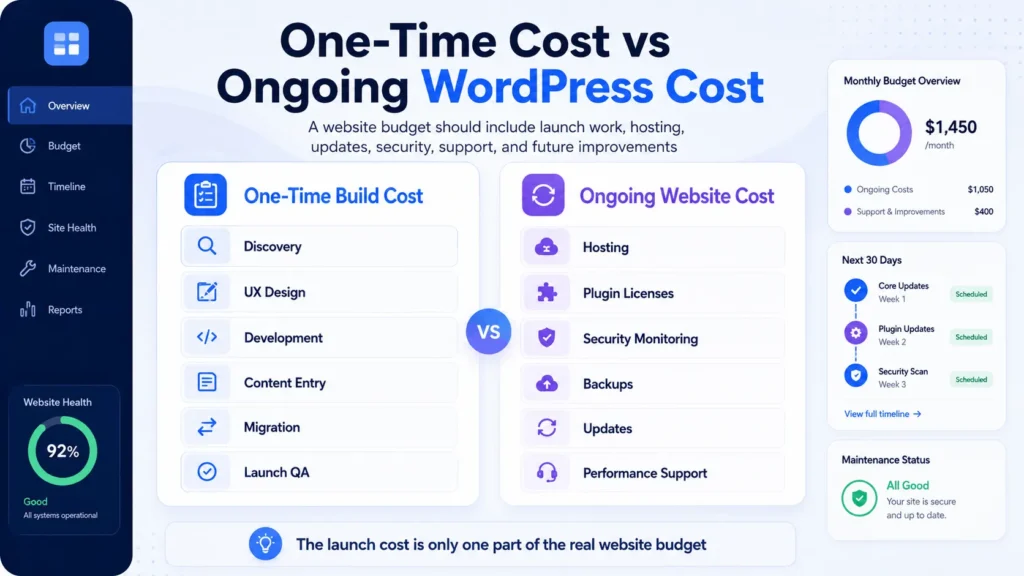
| Cost Area | One-Time or Ongoing? | Why It Matters |
|---|---|---|
| Domain name | Ongoing | Annual renewal required for ownership |
| Hosting | Ongoing | Affects speed, uptime, backups, and scaling |
| Theme or design | Mostly one-time | Controls frontend quality and editing flexibility |
| Premium plugins | Ongoing | Many licenses renew yearly |
| Custom development | Mostly one-time | Builds features that generic plugins cannot handle well |
| Maintenance | Ongoing | Reduces update risk, downtime, security issues, and technical debt |
| SEO migration | One-time with monitoring | Protects rankings, redirects, metadata, and indexation |
For an operational business, ongoing maintenance is not optional. A WordPress site is a living system. Plugins change. PHP versions change. Payment gateways update APIs. Search engines recrawl pages. Security risks evolve. Budgeting only for launch creates future instability.
How Much Does a WordPress Website Cost by Project Type?
Basic WordPress Website
A basic WordPress website usually includes a homepage, about page, services page, contact page, and a few standard sections. It may use a commercial theme and common plugins. This can be enough for a small online presence.
The trade-off is limited control. Template-heavy builds can create slow pages, messy shortcodes, duplicated layouts, and difficult redesigns later. If the site must support SEO growth, paid campaigns, or structured landing pages, a basic build becomes limiting.
Professional Small-Business WordPress Website
A professional site adds better planning. It usually includes custom page layouts, conversion-focused sections, technical SEO foundations, analytics setup, mobile testing, image optimization, speed improvements, and a cleaner admin experience.
For businesses comparing local agency options, a focused WordPress partner such as a Denver WordPress agency can help translate business requirements into a practical build scope instead of only quoting page count.
Custom WordPress Website
A custom WordPress website is not just a visual design. It may include custom post types, Advanced Custom Fields, Gutenberg blocks, reusable components, API integrations, role-based permissions, custom dashboards, search filters, automation workflows, and structured content models.
The cost of a custom WordPress website depends heavily on engineering decisions. A clean custom build may cost more upfront, but it can reduce plugin bloat, support faster editing, improve performance, and make future changes safer.
WooCommerce Website
WooCommerce cost depends on product complexity, checkout logic, tax rules, shipping, inventory, payment gateways, product feeds, subscriptions, memberships, and third-party integrations.
Stores often run into bottlenecks around checkout speed, order processing, stock synchronization, refunds, and reporting. A serious store may need custom hooks, optimized queries, object caching, payment webhook monitoring, and integration support.
If the project involves catalog structure, checkout improvements, or store expansion, experienced WooCommerce developers can help avoid plugin-heavy architecture that becomes fragile under real order volume.
Enterprise or High-Traffic WordPress Website
Enterprise WordPress pricing increases because the website becomes part of a larger operating environment. Requirements may include multisite, CDN strategy, object caching, custom roles, editorial workflows, single sign-on, audit logging, staging, and monitoring.
At this level, the question becomes less about WordPress pages and more about infrastructure, governance, deployment risk, and maintainability.
Hidden Costs That Make Cheap WordPress Builds Expensive
A low quote can be valid when the scope is small. The problem starts when hidden work is excluded from the estimate. Many businesses discover the real cost after launch.
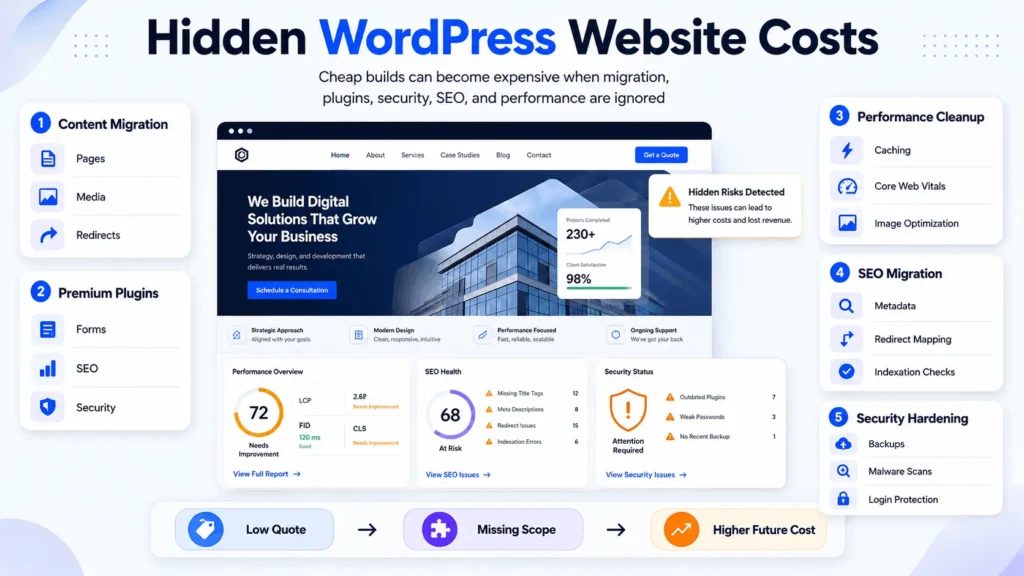
Content migration is one hidden cost. Moving pages, media, metadata, redirects, and internal links takes planning; if rushed, rankings and user experience can suffer. Premium forms, SEO tools, caching, security, multilingual, membership, booking, and page-builder plugins may also carry annual renewals.
Performance cleanup and security hardening add cost too. Cheap themes can create heavy CSS, unused JavaScript, slow queries, and poor Core Web Vitals, while backups, malware scanning, login protection, permissions, and update testing require ongoing attention.
WordPress is an open-source content management system, but a production-ready business website includes far more than installing the software.
How Architecture Changes the Cost of a WordPress Website
Architecture decides whether a website stays manageable after launch. A small WordPress site can run as a traditional monolith, where the frontend, backend, database, plugins, and admin all live together. That is often the correct choice for small and mid-sized websites.
Headless WordPress can make sense when the frontend needs a separate React, Next.js, or mobile app layer. It adds API complexity, deployment pipelines, caching, preview handling, authentication concerns, and extra maintenance.
For most businesses, the best architecture is not the most complex one. It is the simplest architecture that supports the required workflows, expected traffic, editing needs, integrations, and maintenance model.
Production Workflow Behind a Serious WordPress Build
A real WordPress system has several moving parts. A visitor loads the frontend through a CDN. WordPress renders templates, queries the database, checks cached objects, loads assets, and sends tracking events.
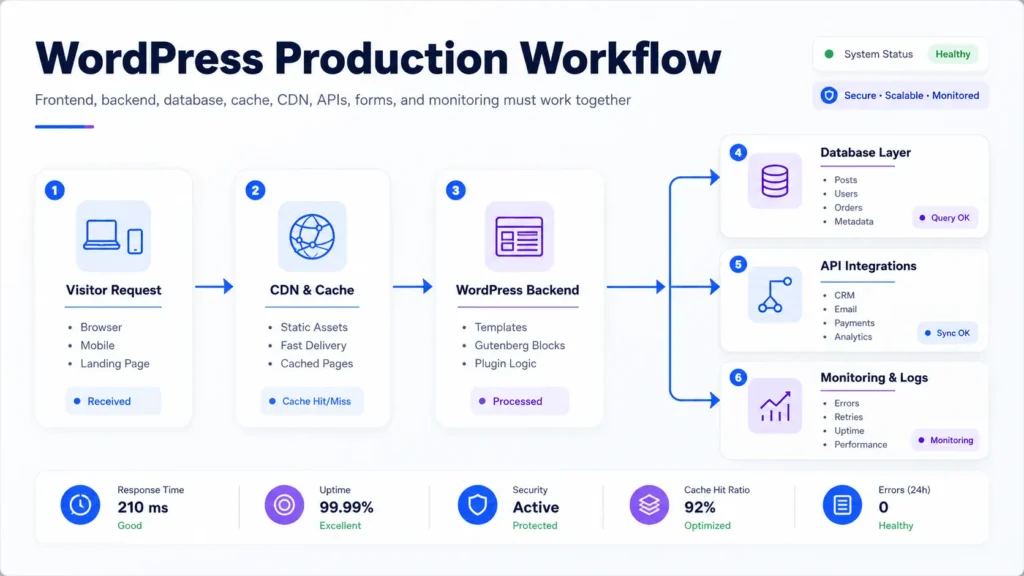
A form submission validates fields, blocks spam, stores data, sends emails, pushes information to a CRM, and logs the result. If an API call fails, the system should retry, log the failure, alert the right person, or store the lead for review.
This kind of failure handling rarely appears in low-cost website quotes, but it matters in production.
For advanced projects, WordPress development services should include planning around caching, deployment, plugin selection, database behavior, security, and post-launch support rather than only theme implementation.
Freelancer vs Agency vs Internal Team
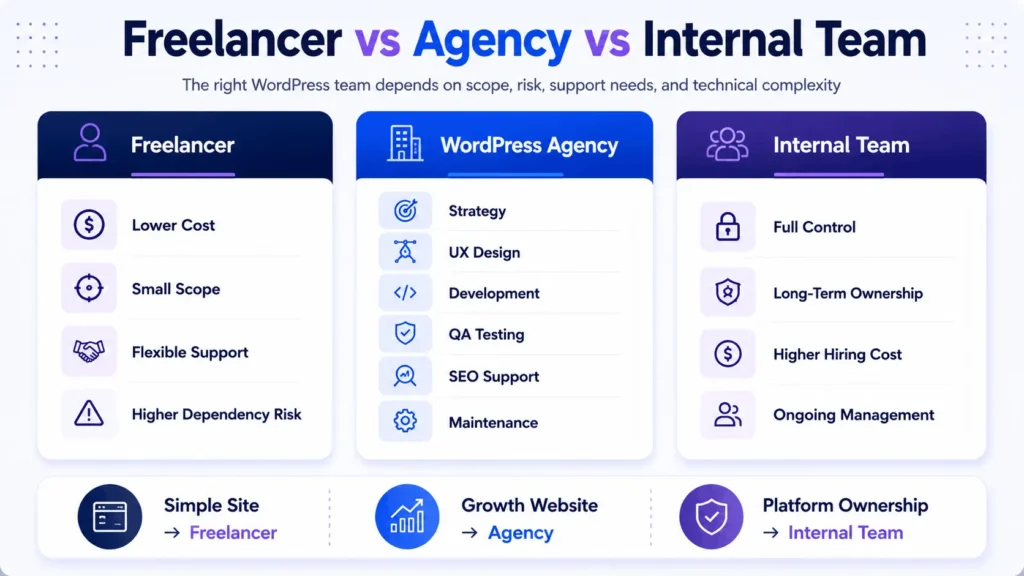
The team you hire affects cost and risk. A freelancer can suit a clear project. An agency costs more but may cover strategy, UX, development, QA, SEO, management, and support. An internal team offers control but adds hiring and retention costs.
Overseas developers may reduce hourly cost, but the final outcome depends on communication, technical leadership, documentation, testing, version control, security practices, and accountability.
A low hourly rate does not help if the build needs rework six months later.
When comparing quotes, look for assumptions. Does the quote include responsive QA? Redirects? Plugin licenses? Staging? Forms? Analytics? Speed optimization? Security setup? Documentation? Post-launch fixes? Without those details, two quotes are not comparable.
How Much Does a WordPress Website Cost in India, the UK, and Other Markets?
Many companies compare WordPress website costs in India and other offshore markets. India, Pakistan, Eastern Europe, the UK, and the US can all produce strong WordPress work. The difference is usually not country alone; it is process maturity.
A cheap offshore build may be fine for a small template site. For a business-critical platform, the deciding factors should be technical discovery, code quality, communication, testing, version control, deployment workflow, security practices, and support model.
The same applies to WordPress website costs in the UK. UK-based teams may charge higher rates because of local operating costs, but that does not automatically guarantee better architecture. Review the scope, not just the region.
When a Higher WordPress Budget Is Worth It
A higher budget is justified when the website affects revenue, operations, customer experience, or internal efficiency. A site that supports paid traffic, organic search, WooCommerce orders, customer accounts, or integrations is not a disposable design asset.
Custom development is worth considering when your team keeps fighting the page builder, plugins overlap or slow important pages, or forms and CRM workflows require manual cleanup.
It also becomes valuable when WooCommerce checkout, inventory, or payment logic needs reliability, or when SEO growth requires structured content, schema, speed, and stronger internal linking control.
For broader planning, website design and development should connect visual design with content structure, conversion paths, technical SEO, speed, and long-term maintainability.
How Filicode Looks at WordPress Website Cost
Filicode approaches WordPress cost from an architecture and operations perspective. The right build should match the business model, not just the design style. A startup, service company, WooCommerce store, SaaS team, and enterprise content team all need different levels of structure.
For some projects, a clean WordPress website with custom Gutenberg sections is enough. Others may require WooCommerce, API integrations, CRM automation, performance optimization, or custom admin tools.
The goal is not to make every project complex. The goal is to avoid avoidable rebuilds. Good architecture reduces future support burden, lowers operational friction, and gives teams more control over content, reporting, and customer workflows.
After launch, website maintenance support helps protect that investment through updates, backups, monitoring, security checks, and practical improvements.
FAQ
How much does a WordPress website cost?
The cost of a WordPress website depends on scope. A basic site may cost $1,500–$5,000+, while a professional business site may cost $5,000–$15,000+. Custom WordPress, WooCommerce, and enterprise builds can cost much more when advanced design, integrations, performance, or workflows are required.
How much should I pay for a WordPress website?
A simple small-business WordPress website may cost $1,500–$5,000+, while a professionally designed business website commonly requires $5,000–$15,000+. Custom functionality, ecommerce, and integrations can increase the price.
What is the average cost to build a WordPress website?
There is no single average because requirements vary. A practical budget ranges from under $1,000 for a DIY site to $5,000–$15,000+ for a professional business website. Custom WordPress and WooCommerce projects usually cost more.
How much does it cost to build a WordPress website?
The price depends on design, page count, content structure, custom functionality, plugins, integrations, testing, and launch support. A realistic quote should clearly explain what is included and optional.
How much does it cost to maintain a WordPress website?
Maintenance may range from a small monthly fee to several thousand dollars per month for business-critical sites. Cost depends on updates, backups, security, performance work, content support, uptime monitoring, and development availability.
How much does it cost to host a WordPress website?
Basic hosting may cost under $20 per month. Managed WordPress, VPS, cloud, or enterprise hosting can cost much more depending on traffic, security, backups, staging, caching, and support.
How much does it cost to run a WordPress website?
Running costs include hosting, domain renewal, premium plugins, security, backups, maintenance, content updates, technical support, and improvement work. A business website should be budgeted annually, not only at launch.
Conclusion: How Much Does a WordPress Website Cost When the Site Must Scale?
How much does a WordPress website cost? The answer is simple only when the website has simple requirements. Once the site supports lead generation, ecommerce, integrations, automation, technical SEO, or internal workflows, the price depends on architecture and operational risk.
Warning signs include slow pages, plugin conflicts, lost form leads, fragile WooCommerce checkout, difficult content updates, and manual reporting. These are not only design problems; they are system problems.
At that point, custom development should be considered carefully. A maintainable system can reduce future cost, improve reliability, and give the business cleaner control over growth.
If your WordPress website needs better structure, performance, integrations, WooCommerce stability, or long-term technical ownership, you can discuss your project with Filicode and get a practical view of the next step before committing to a full rebuild.