
Contents
- Quick Summary: 7 Proven Benefits of Custom WordPress Development
- What Are Custom WordPress Development Services?
- Why Templates Become a Growth Problem
- Custom WordPress Development vs Template Websites
- What Custom WordPress Development Services Include
- Custom Theme Development
- Custom Plugin and Functionality Development
- WooCommerce and Commerce Workflows
- How Custom WordPress Development Works in Production
- Architecture Decisions That Affect Speed, Security, and SEO
- When Do You Need Custom WordPress Development Services?
- The Custom WordPress Development Process
- Discovery, Architecture, and Scope
- UI/UX Design and Content Structure
- Development, Integration, and Testing
- How to Choose a Custom WordPress Development Company
- Custom WordPress Development Cost: Cheap vs Maintainable Builds
- Custom WordPress Development Services by Filicode
- FAQs
- What are custom WordPress development services?
- How much do custom WordPress development services cost?
- How long does custom WordPress development take?
- Are custom WordPress development services better than templates?
- Can WordPress support API integrations and automation?
- Do custom WordPress websites need maintenance?
- Final Thoughts
Custom WordPress development helps businesses solve performance, integration, maintenance, and scalability problems that appear as WordPress websites grow.
A slow WordPress site rarely fails because of one visible issue. Problems usually come from bloated themes, overlapping plugins, forms that break after updates, fragile checkout extensions, and backends that become difficult for teams to manage. A custom build addresses these issues around business workflows, content structure, performance needs, and long-term scalability instead of forcing everything into a generic template.
Custom WordPress development services include custom theme development, plugin functionality, WooCommerce customization, API integrations, technical SEO setup, speed optimization, security hardening, and post-launch support. The goal is not only a better design. The goal is a WordPress system that is easier to maintain, faster to load, safer to operate, and more useful for marketing, sales, and operations.
If your website is expected to generate leads, manage content, support integrations, process transactions, or scale with traffic, a basic template can become a bottleneck. A custom build gives your business more control over architecture, user experience, backend workflows, and future expansion.
Quick Summary: 7 Proven Benefits of Custom WordPress Development
- Faster performance: Custom development can reduce unnecessary theme, plugin, and page-builder overhead.
- Better scalability: The website can be structured around future traffic, content, integrations, and business growth.
- Greater design control: Custom themes provide more flexibility than fixed pre-made templates.
- Stronger SEO structure: Developers can better control headings, schema, internal links, URLs, speed, and indexable templates.
- Custom integrations: WordPress can connect with CRMs, APIs, booking systems, WooCommerce, ERP platforms, and automation workflows.
- Easier maintenance: Cleaner architecture and fewer unnecessary dependencies can make updates and debugging easier.
- Better backend workflows: Custom fields, reusable blocks, and structured editing can make WordPress easier for marketing and content teams to manage.
What Are Custom WordPress Development Services?
Custom WordPress development services are professional development services used to build a WordPress website, theme, plugin, or workflow around specific business requirements. WordPress is a flexible content management system, but its real value depends on how the theme, plugins, database structure, hosting, caching, and integrations are planned.
A custom WordPress build may include custom post types, Gutenberg blocks, reusable templates, plugin development, WooCommerce features, CRM integration, ERP integration, third-party API connections, lead capture workflows, booking systems, dashboards, and technical SEO foundations.
The difference is control. A template gives you a fixed structure. Custom WordPress development services give you a website structure designed around your business model, users, content workflow, and growth plan.
Why Templates Become a Growth Problem
A template can be useful for a quick launch, but it often brings technical baggage. Many themes include unused layouts, heavy page builder assets, extra JavaScript, duplicate styling, and plugin dependencies that stay active even when the website does not need them.
That creates operational issues. Pages become slower. Editors struggle with cluttered backend controls. Developers hesitate to update plugins because one change may break the layout. SEO teams cannot easily control schema, heading hierarchy, or page speed. Marketing teams wait for development help for small changes.
A template website is not automatically bad. It becomes a problem when the business expects it to behave like a scalable system.
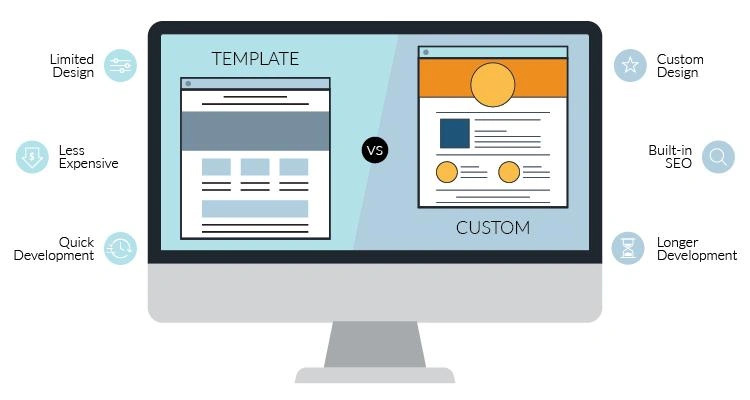
Custom WordPress Development vs Template Websites
| Area | Template Website | Custom WordPress Development Services |
|---|---|---|
| Design | Uses pre-built layouts that may look similar to other websites | Uses a custom interface built around brand, users, and content flow |
| Performance | Often loads unused scripts, page builder files, and theme assets | Can be built with lean code, caching, image optimization, and CDN planning |
| SEO Structure | Usually provides basic SEO settings only | Allows better control over headings, schema, URLs, internal links, and indexable templates |
| Backend Control | Can become difficult for editors because of bloated controls | Can provide clean content fields, reusable blocks, and role-based editing |
| Scalability | Limited by theme structure and plugin compatibility | Can support future landing pages, integrations, WooCommerce, and custom workflows |
| Maintenance | Updates may create conflicts between theme, builder, and plugins | Cleaner architecture makes debugging and maintenance easier |
What Custom WordPress Development Services Include
Good custom WordPress development services should not start with coding. They should start with architecture. The team needs to understand how the website will be used, who will manage content, what systems need to connect, and what can break under real traffic.
Custom Theme Development
A custom theme controls layout, styling, templates, Gutenberg blocks, and frontend behavior. Instead of editing a commercial theme, developers build the structure around your content types, design system, and performance goals.
This is where clean HTML, CSS, PHP, JavaScript, semantic markup, accessibility checks, and responsive layouts matter. A strong custom theme reduces unnecessary assets and makes future design changes easier.
Custom Plugin and Functionality Development
Some business logic should not live inside a theme. Pricing calculators, booking workflows, CRM sync, user dashboards, membership logic, and data processing are often better handled through custom plugins or structured modules. If your website needs deeper functionality, this guide on custom WordPress plugin development explains when building is better than buying.
Custom plugin work can use WordPress hooks, filters, REST API routes, scheduled jobs, and admin screens. The goal is to keep business logic maintainable and separate from design code.
WooCommerce and Commerce Workflows
WooCommerce can support serious commerce, but it needs planning. Checkout speed, inventory sync, payment gateway reliability, shipping rules, tax logic, coupon behavior, refunds, abandoned carts, and reporting should be tested before launch.
Custom WordPress development services for WooCommerce may include checkout customization, product data structure, custom order statuses, ERP sync, payment webhook handling, and performance tuning for product-heavy stores.
How Custom WordPress Development Works in Production
In production, a WordPress website is more than pages and plugins. A visitor interacts with the frontend. The request reaches hosting infrastructure. WordPress loads the theme, plugins, database queries, cached objects, media files, and third-party scripts. Forms may trigger email services, CRM updates, webhook calls, or database writes.
When a site is built poorly, every request does too much work. The database gets overloaded. Plugins make duplicate queries. Forms fail silently. Cron jobs do not run on time. Checkout slows down when traffic increases.
A better architecture separates concerns. Caching handles repeat requests. A CDN serves static assets. Object caching such as Redis reduces database load. Queues or background jobs handle slow tasks like CRM sync, email delivery, imports, exports, and webhook retries.
For teams planning a full website build, this deeper guide on custom WordPress website development explains how architecture decisions affect scalability and growth.
Architecture Decisions That Affect Speed, Security, and SEO
Custom WordPress development services should include technical decisions that affect the whole lifecycle of the website. These decisions are not always visible in the design, but they decide how stable the site feels six months after launch.
| Decision | Weak Approach | Stronger Approach |
|---|---|---|
| Plugin Usage | Install a plugin for every small feature | Use plugins selectively and build custom logic when needed |
| Caching | Depend only on one cache plugin | Use page cache, object cache, CDN, and hosting-level optimization |
| Integrations | Call APIs directly during user actions without fallback | Use validation, logs, retries, queues, and failure handling |
| Security | Rely only on plugin updates | Use input validation, sanitization, least privilege access, backups, and monitoring |
| Content Management | Force editors to use messy page builder layouts | Use custom fields, reusable blocks, templates, and clear editing rules |
| SEO | Add SEO plugin settings after development | Plan indexable pages, schema, internal links, metadata, speed, and redirects from the start |
When Do You Need Custom WordPress Development Services?
You need custom WordPress development services when your website has moved beyond simple publishing. Common signs include slow pages, poor Core Web Vitals, too many plugins, weak technical SEO, broken forms, limited design control, difficult backend editing, or recurring problems after updates.
You may also need a custom build when your website depends on CRM automation, API integrations, WooCommerce workflows, booking systems, member portals, course platforms, multilingual content, or advanced lead generation.
Another sign is team friction. If marketing cannot create landing pages without breaking layouts, developers cannot update plugins safely, and operations cannot trust form or payment data, the website has become an operational risk.
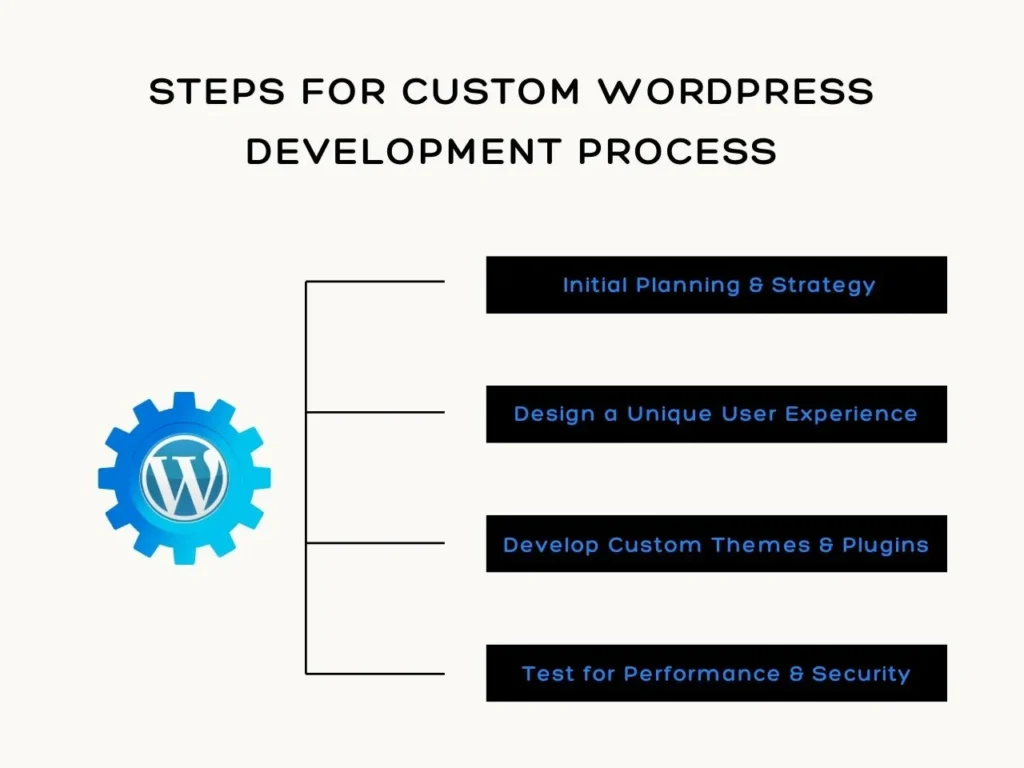
The Custom WordPress Development Process
Discovery, Architecture, and Scope
The process starts with business requirements, current website issues, content structure, user journeys, technical constraints, integration needs, and SEO goals. A serious team will review what exists before giving an estimate.
This phase usually defines sitemap structure, content types, design requirements, user roles, third-party systems, technical risks, migration needs, and project milestones.
UI/UX Design and Content Structure
Design should support action. It should help users understand the offer, compare options, submit forms, request quotes, purchase products, or move through a workflow without confusion.
For content teams, the backend should be clean. Custom Gutenberg blocks, reusable patterns, structured fields, and clear templates reduce editing mistakes.
Development, Integration, and Testing
Developers build the theme, configure WordPress, create custom functionality, connect APIs, test forms, optimize speed, and prepare the staging site. For larger builds, this may also include authentication flows, role-based access control, webhook systems, background jobs, audit logs, and admin tooling.
Testing should include responsive behavior, browser compatibility, accessibility, security, performance, redirects, metadata, schema, analytics, payment flows, and post-live checks. Skipping QA usually creates support burden after launch.
How to Choose a Custom WordPress Development Company
A custom WordPress development company should be able to explain its development process, not only show visual examples. Ask how they manage staging, version control, plugin selection, database changes, backups, testing, redirects, performance, and post-launch fixes.
Also ask who owns the final codebase. Your business should understand whether custom code, design files, theme assets, and plugin logic are fully owned by you or controlled through a license.
If you are comparing internal hiring with agency support, this guide on how to hire a WordPress developer can help you evaluate technical fit, communication, and project risk.
Good developers ask about maintenance. Weak developers only talk about launch. A website that cannot be updated safely is not finished.
Custom WordPress Development Cost: Cheap vs Maintainable Builds
Cheap WordPress work usually looks affordable because hidden costs are moved into the future. You may pay less upfront, but later you pay through slow pages, broken templates, plugin conflicts, unclear ownership, poor SEO structure, and expensive debugging.
Custom WordPress development costs vary based on design complexity, custom functionality, WooCommerce requirements, API integrations, migration, testing, and ongoing support.
Maintainable custom WordPress development services focus on clean code, fewer dependencies, documented decisions, tested workflows, secure access, and clear handoff. That approach may take more planning, but it reduces operational friction later.
If you already have a developer or plan to hire one, this breakdown of important WordPress developer skills explains what technical capabilities matter for scalable website growth.
Custom WordPress Development Services by Filicode
Filicode works on WordPress development, WooCommerce development, custom software development, API integrations, SaaS systems, AI automation, performance optimization, and technical SEO implementation. The focus is practical architecture, maintainability, and business workflows rather than template-heavy delivery.
For businesses that have outgrown off-the-shelf tools, Filicode can help plan custom WordPress development services around content operations, lead generation, integrations, admin workflows, and long-term scalability.
The right build depends on the problem. A simple brochure website does not need enterprise architecture. A WooCommerce store with inventory sync, payment workflows, automation, and reporting needs stronger planning. A lead generation website competing in organic search needs speed, structure, content control, and clean technical SEO.
If you are evaluating technical support, this guide on choosing a good WordPress developer can help you avoid common hiring and project mistakes.
Need a WordPress website built around your business workflows, integrations, and growth plans? Filicode provides custom WordPress development services for custom websites, themes, plugins, WooCommerce, API integrations, performance optimization, and technical SEO.
FAQs
What are custom WordPress development services?
Custom WordPress development services include custom theme development, plugin functionality, WooCommerce customization, API integrations, performance optimization, technical SEO setup, security hardening, and ongoing support for WordPress websites.
How much do custom WordPress development services cost?
The cost depends on project scope, design complexity, page count, WooCommerce needs, custom functionality, integrations, content migration, testing requirements, and support needs. A small custom website costs less than a large platform with APIs, payments, dashboards, and automation.
How long does custom WordPress development take?
A small custom WordPress website may take a few weeks, while a larger build with WooCommerce, CRM integration, API workflows, migration, custom dashboards, or advanced SEO structure can take longer. Timeline should be based on scope, testing, and launch risk.
Are custom WordPress development services better than templates?
Custom WordPress development services are better when a business needs stronger performance, cleaner SEO structure, unique design, custom functionality, safer updates, and better scalability. Templates are acceptable for simple websites with limited operational needs.
Can WordPress support API integrations and automation?
Yes, WordPress can support API integrations and automation through REST API endpoints, webhooks, custom plugins, scheduled jobs, CRM connections, payment workflows, and third-party services. Reliable integrations need validation, logging, retry handling, and monitoring.
Do custom WordPress websites need maintenance?
Yes, custom WordPress websites need maintenance for plugin updates, security checks, backups, uptime monitoring, performance reviews, PHP version updates, compatibility testing, and post-launch improvements. Maintenance reduces downtime and prevents small issues from becoming expensive failures.
Final Thoughts
A template can publish pages. Custom WordPress development services can build a website that supports real operations.
If your site is slow, difficult to update, dependent on too many plugins, weak in SEO structure, or unable to support integrations, the issue is not only design. The issue is architecture.
Start with a technical review of your current website, plugin stack, performance, content structure, analytics, integrations, and update risks. If the website is already creating operational friction, custom development should be considered before more short-term fixes make the system harder to maintain.