







Contents
- Quick Summary: What Decision-Makers Should Prioritize
- What Makes School Websites Operationally Strong?
- Architecture for Scalable School Websites
- WordPress architecture for school websites
- How School Websites Work Under Production Load
- Publishing Workflow, Integrations, and Failure Handling
- Accessibility Is Architecture, Not a Plugin
- School Websites: SaaS Builder vs Custom WordPress
- Security and Maintenance for School Websites
- When Beautiful School Websites Still Underperform
- Where Filicode Fits When Off-the-Shelf Tools Stop Working
- FAQ About School Websites
- How much do school websites cost?
- How long does a school website redesign take?
- Can WordPress scale for school websites?
- What integrations are common for school websites?
- What are the main migration risks for school websites?
- How often should school websites be maintained?
- Conclusion: Build School Websites for the Work They Must Do
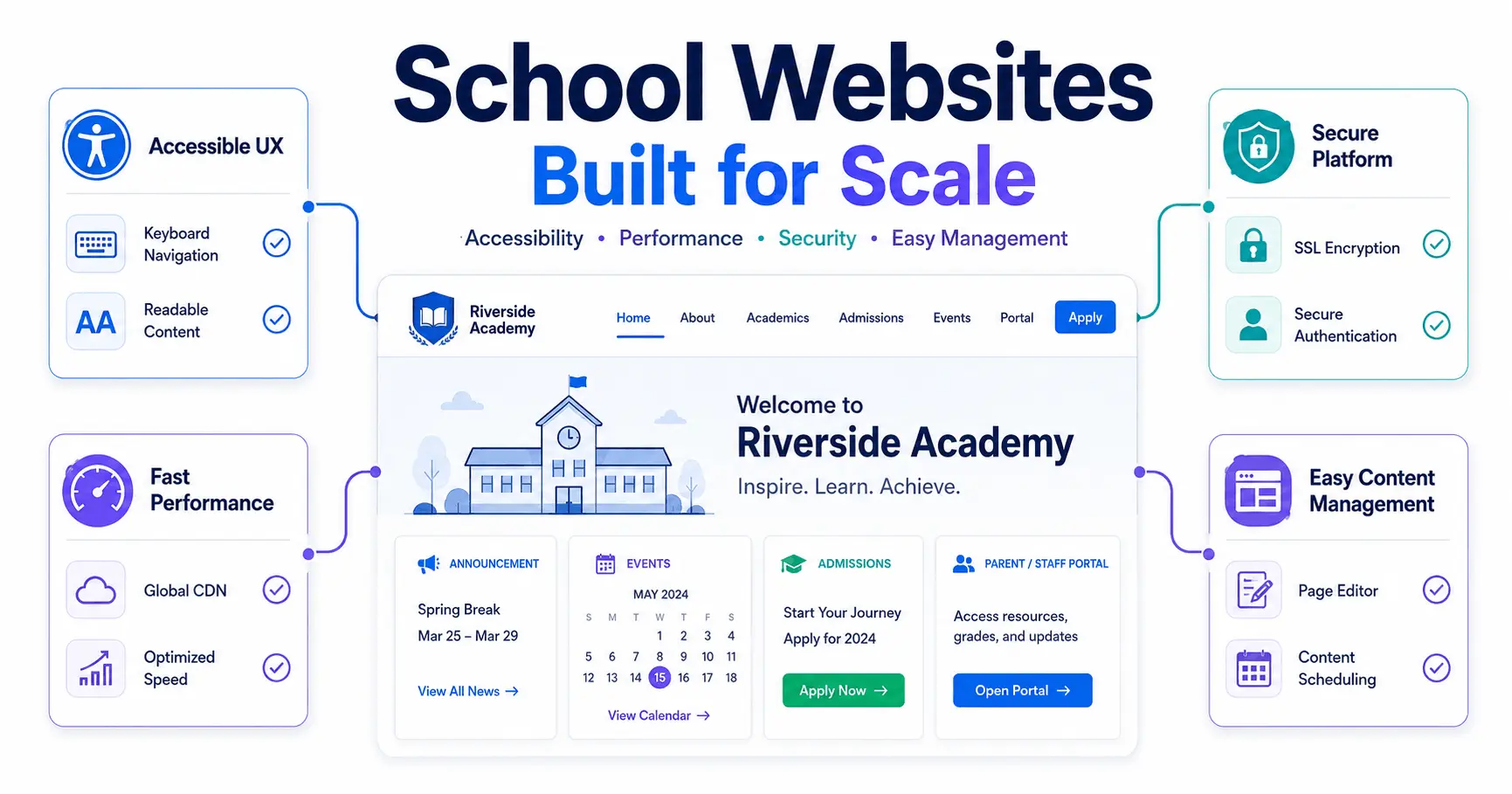
School websites usually fail operationally before they fail visually. A site can look polished while staff struggle to publish updates, parents cannot find urgent information, forms break after plugin changes, and mobile performance degrades during enrollment or weather events. Well-engineered school websites solve those problems through clear information architecture, reliable content workflows, accessibility, security, and maintainable platform choices.
A strong school website is a production system used by administrators, teachers, families, applicants, students, and community members with different priorities and permissions. It should support routine publishing and remain usable when traffic spikes during admissions deadlines, closures, or crisis communications.
Quick Summary: What Decision-Makers Should Prioritize
- School websites should be designed around operational workflows, not only homepage aesthetics, because publishing speed and content ownership affect long-term reliability.
- WordPress is a practical fit for many schools when roles, plugins, backups, security hardening, caching, and update governance are treated as architecture decisions.
- Accessibility must be built into templates, navigation, forms, media, and editorial workflows rather than added as a final compliance pass.
- Multisite can reduce duplication across districts or school groups, but centralized architecture also increases the impact of configuration mistakes and plugin failures.
- Headless or custom architectures can improve flexibility at scale, but they add development, deployment, preview, and integration complexity that many school teams do not need.
- The best school websites reduce support burden by making high-frequency tasks predictable for both visitors and staff.
What Makes School Websites Operationally Strong?
Operationally strong school websites make common actions fast and obvious: checking calendars, finding staff, accessing forms, reviewing admissions information, locating emergency updates, and publishing new content without developer involvement. The design matters, but the workflow behind the design matters more over a five-year lifecycle.
Information architecture should separate high-frequency current-family tasks from prospective-family content. Mixing admissions, transportation, policies, fundraising, athletics, and classroom updates into one navigation layer creates friction even when the design looks polished.
The CMS should enforce useful structure. Editors should not rebuild layouts for every page. Gutenberg patterns, reusable blocks, controlled templates, and sensible user roles reduce formatting drift while keeping staff independent.
Schools planning a redesign should also review what is causing the current support load. Broken page ownership, outdated content, inconsistent menus, duplicated forms, and inaccessible PDFs are often bigger problems than the theme itself. A structured website redesign checklist helps identify these operational issues before development begins.
Architecture for Scalable School Websites
Most school websites do not need microservices. A well-designed WordPress monolith is usually easier to operate because content, permissions, media, templates, and editorial workflows stay inside one platform. Complexity should be added only when a specific requirement justifies it.
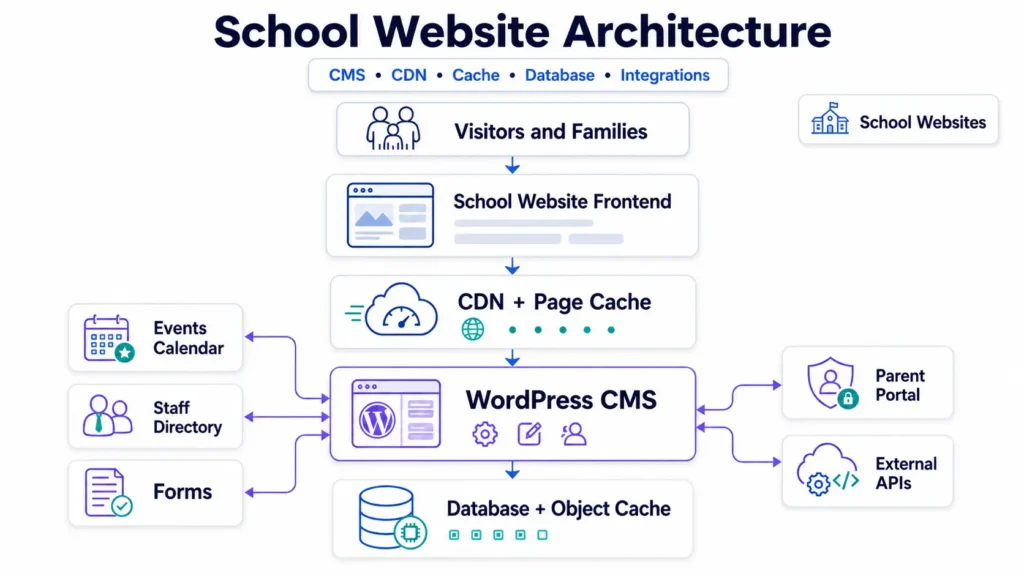
WordPress architecture for school websites
A production WordPress setup should separate content logic from presentation as much as practical. Custom post types can model staff, campuses, programs, events, and announcements. Reusable Gutenberg blocks can standardize calls to action, contact panels, emergency notices, and admissions sections without forcing editors to work with raw HTML.
Plugins are dependencies, not decorations. Every added plugin expands the update surface and can change database or frontend behavior. In production, routine updates often expose conflicts when multiple plugins touch scripts, forms, caching, or editor behavior.
For organizations with multiple campuses, WordPress Multisite can centralize governance while allowing each school its own content area. Shared themes, plugins, authentication rules, and updates can reduce repetitive work. The trade-off is blast radius: one incompatible network-level change can affect many sites at once.
Schools that need custom workflows, role models, or integrations beyond generic themes can use custom WordPress development for scalable growth to keep the system maintainable instead of layering more plugins onto an increasingly fragile stack.
For teams evaluating local implementation support, a Minneapolis web design and engineering partner can also help connect UX decisions with hosting, integrations, performance, and long-term maintenance.
| Feature | Standard WordPress | Headless WordPress |
|---|---|---|
| Editorial workflow | Simple, native preview and publishing | Requires preview and deployment integration |
| Frontend performance | Strong with caching and CDN configuration | Potentially excellent with static or edge delivery |
| Development complexity | Lower for typical K-12 requirements | Higher because frontend and CMS are separate |
| Integration flexibility | Good through REST APIs, plugins, and custom code | High, especially across multiple channels |
| Maintenance burden | Usually lower | Higher due to multiple applications and deployments |
How School Websites Work Under Production Load
A normal page request should be inexpensive. The browser connects through a CDN or reverse proxy, cached assets are served near the visitor, and WordPress handles only requests that require dynamic processing. Database queries retrieve page content, menus, options, and structured records. Object caching can prevent repeated queries for frequently requested data.
During a closure notice, admissions deadline, or major announcement, traffic can concentrate on a few pages. If every request reaches PHP and MySQL without page caching, a normally fast site can slow down precisely when families need it most.
Good school websites therefore use layered caching: browser caching for static assets, CDN caching for public pages, server-side page caching where appropriate, and object caching for repeated database lookups. Redis may help larger installations, but it is not automatically beneficial if the bottleneck is unoptimized templates, oversized media, third-party scripts, or slow external APIs.
Async work should stay out of user-facing requests where possible. Feed imports, media processing, synchronization, and reports belong in scheduled or queued jobs. WP-Cron is traffic-triggered, so time-sensitive workloads may be more reliable on real server cron or managed background processing.
Publishing Workflow, Integrations, and Failure Handling
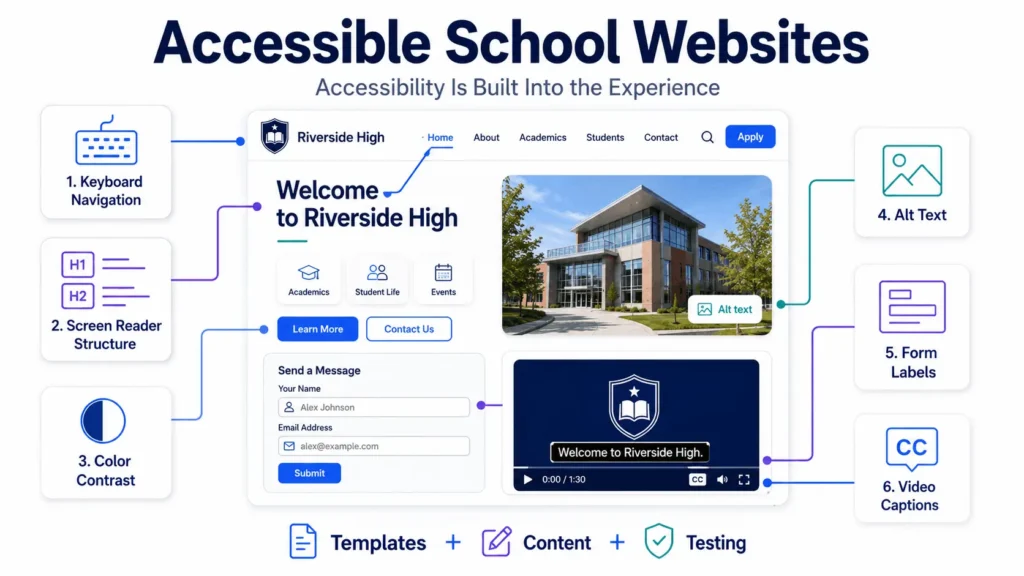
Publishing starts with authentication and permissions. Teachers, department editors, and administrators need different scopes. Role-based access control should prevent users from changing areas they do not own while keeping the workflow simple enough to avoid shared administrator accounts.
External integrations add another failure surface. School websites may connect to calendars, student information systems, forms, email platforms, donation systems, or directories. API calls should be validated, rate limits respected, and failures exposed in logs rather than silently producing empty sections.
Webhook-based integrations should verify signatures where supported, store event identifiers, and be safe to retry. If a remote platform sends the same event twice, the website should not create duplicate records. Idempotency is especially important for payment, form, and synchronization workflows.
Monitoring should include uptime, application errors, failed scheduled jobs, backup status, security events, and form delivery. In production, the expensive failures are often not total outages. They are partial failures: a calendar stops syncing, a form submits without sending notifications, or a staff directory silently loses data after an API change.
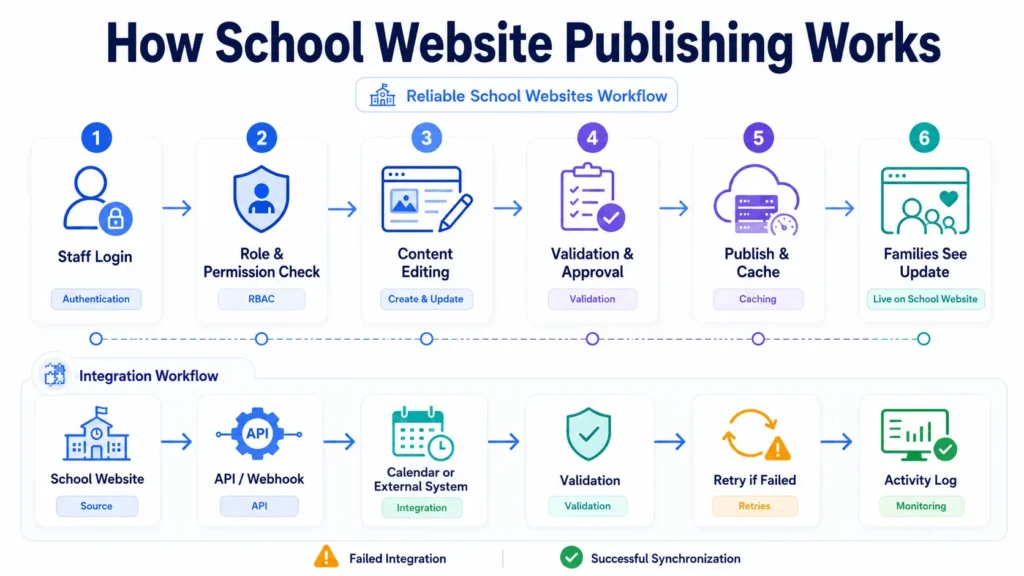
Accessibility Is Architecture, Not a Plugin
School website accessibility depends on templates, editor behavior, navigation, media, forms, and content governance. A plugin may flag some issues, but it cannot reliably fix ambiguous link text, incorrect heading hierarchy, missing captions, poor form labels, inaccessible documents, or confusing keyboard behavior.
The practical baseline is to design against the Web Content Accessibility Guidelines and test real workflows with keyboard navigation and screen-reader-friendly markup. Schools should also define editorial rules for alt text, video captions, document publishing, color contrast, and heading structure.
Accessibility reviews belong in release and content workflows. Filicode’s website accessibility checklist helps teams audit recurring template and content issues instead of treating accessibility as a one-time launch task.
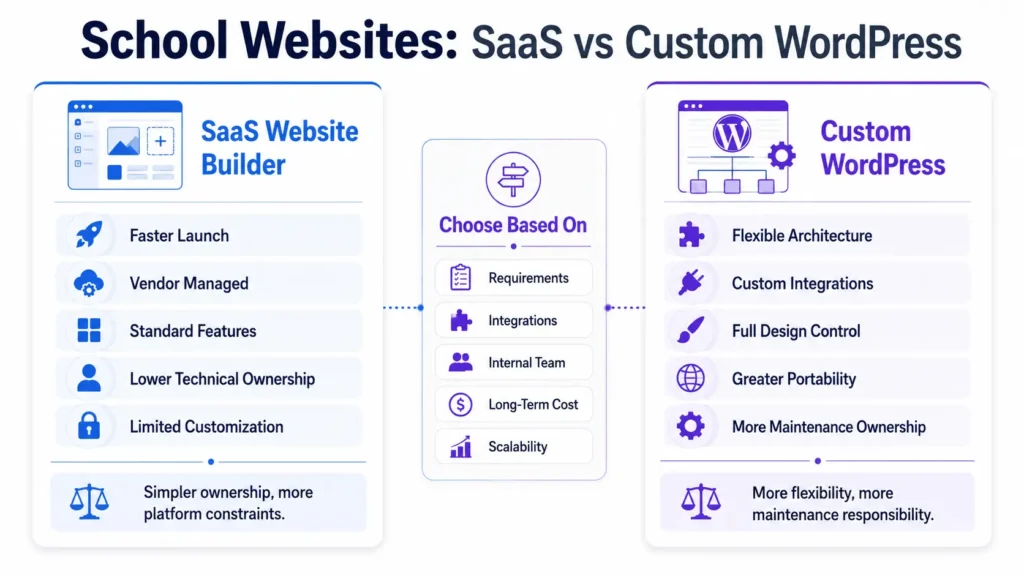
School Websites: SaaS Builder vs Custom WordPress
Hosted school website builders can be a good choice when the priority is fast deployment, predictable support, and a standardized feature set. Custom WordPress is stronger when branding, integrations, data models, publishing workflows, or multi-site governance require more control.
| Feature | SaaS School Website Builder | Custom WordPress |
|---|---|---|
| Launch speed | Usually faster with predefined templates | Longer when discovery and custom development are required |
| Design control | Limited by platform patterns | High when templates and blocks are custom-built |
| Integrations | Depends on vendor-supported connectors | Flexible through APIs, webhooks, and custom development |
| Portability | Can be constrained by vendor export options | Greater ownership of code, content, and hosting choices |
| Maintenance | Vendor handles more platform maintenance | School or development partner owns more technical responsibility |
The cheapest implementation is not always the lowest-cost system. A low initial price becomes expensive when integrations need workarounds, simple changes require support tickets, or the platform forces an early rebuild.
Custom WordPress has its own limitation: flexibility creates responsibility. Someone must own updates, backups, security, testing, hosting, and technical decisions. Schools comparing costs should evaluate the full operating model, not just build price. A detailed breakdown of what a WordPress website costs should include maintenance and infrastructure, not only initial development.
Security and Maintenance for School Websites
Security starts with reducing unnecessary privilege. Administrator accounts should be limited, two-factor authentication should be used for sensitive roles, and former staff accounts should be removed promptly. Plugins and themes should be maintained on a controlled schedule with staging tests for higher-risk updates.
Backups must be restorable, not merely present. Encrypted off-site backups, tested restore procedures, firewall rules, malware scanning, audit logging, and managed hosting controls all reduce recovery time when something goes wrong. Maintenance plans should also include PHP and database compatibility reviews because platform upgrades can expose old custom code.
A practical website maintenance checklist should cover software updates, forms, integrations, backups, certificates, performance, security scans, content quality, and monitoring. The objective is predictable operations, not reactive troubleshooting.
When Beautiful School Websites Still Underperform
Beautiful school websites can still perform poorly if the design hides information behind oversized visual sections, slow video backgrounds, weak mobile navigation, or vague calls to action. The best school websites balance school branding with task completion.
Prospective families need clear admissions pages, program information, tuition or fee context where applicable, campus details, and strong next steps. The best private school websites make those decision paths especially clear. Current families often need calendars, portals, forms, directories, announcements, and policies. Those user journeys should be measured separately because they have different goals.
Photography and video can strengthen school identity, but media should be compressed and accessible. Games on school websites, student blogs, class pages, and interactive learning content can add value when they serve a clear educational purpose without competing with essential navigation or performance.
Where Filicode Fits When Off-the-Shelf Tools Stop Working
Schools and education organizations usually need custom development when platform limits start creating recurring operational work: manual data duplication, fragile integrations, inconsistent content models, permission problems, performance bottlenecks, or repeated vendor workarounds.
Filicode approaches school websites as maintainable systems rather than isolated design projects. That can include custom WordPress development, API integrations, multisite architecture, performance optimization, workflow automation, security hardening, and structured content models.
Custom engineering is not automatically the right answer. If a school has simple requirements, limited internal ownership, and no unusual integrations, a supported SaaS platform may reduce risk. The case for custom work becomes stronger when repeated operational limitations cost more than the added technical ownership.
FAQ About School Websites
How much do school websites cost?
School websites can range from a few thousand dollars for a templated build to tens of thousands for custom design, migrations, integrations, multisite requirements, accessibility work, and long-term support. The meaningful number is total cost of ownership across roughly 3 to 5 years, including hosting, maintenance, updates, and vendor support.
How long does a school website redesign take?
A focused redesign may take 8 to 16 weeks, while larger district or multisite projects can take several months. Timeline depends heavily on content migration, stakeholder approvals, integrations, accessibility remediation, and how quickly the school can supply accurate content.
Can WordPress scale for school websites?
Yes. WordPress can support school websites from a single campus to multisite networks when caching, CDN delivery, database health, security, update governance, and hosting are engineered properly. Scaling problems usually come from inefficient plugins, uncached dynamic work, large media, or poorly designed integrations rather than WordPress alone.
What integrations are common for school websites?
Common integrations include calendars, student information systems, CRM platforms, email tools, forms, staff directories, payment gateways, donation systems, maps, and authentication providers. Reliable integrations should include validation, logging, retry handling, and protection against duplicate webhook events.
What are the main migration risks for school websites?
The biggest migration risks are broken URLs, lost metadata, missing files, accessibility regressions, inaccurate redirects, and disrupted integrations. A migration should include a URL inventory, 301 redirect map, content validation, form testing, analytics checks, and post-launch crawl review.
How often should school websites be maintained?
Critical security updates should be reviewed promptly, while structured maintenance is commonly performed weekly or monthly depending on site risk and update volume. Backups, forms, integrations, uptime, certificates, performance, and failed scheduled jobs should be monitored continuously or through automated alerts.
Conclusion: Build School Websites for the Work They Must Do
The warning signs are usually operational: content updates require technical help, integrations fail silently, pages slow down during traffic spikes, staff share elevated accounts, accessibility issues keep returning, or every new requirement needs another plugin. Those are system limitations, not cosmetic problems.
School websites should make routine work predictable for staff and critical information easy to reach for families. When the current platform cannot support that without repeated workarounds, custom development becomes a practical option. Start by documenting publishing workflows, integration dependencies, traffic patterns, accessibility gaps, ownership, and maintenance burden. Those facts will tell you whether to refine the existing system, migrate platforms, or invest in a more scalable architecture.