




Contents
- Quick Summary: What Decision-Makers Should Prioritize
- What Does a Website Accessibility Checklist Actually Cover?
- Website Accessibility Checklist 2026: Standards and Scope
- Architecture Before Remediation: Follow the Failure to Its Source
- Website Accessibility Checklist for Frontend, Backend, and Integrations
- Perceivable Content: Text, Images, Color, Media, and Documents
- Operable Interfaces: Keyboard, Focus, Timing, and Navigation
- Understandable Forms, Authentication, Errors, and Transactions
- Robust Code and Assistive Technology Compatibility
- Website Accessibility Testing Checklist: A Production Workflow
- Run Tests in This Order
- Website Accessibility Audit Checklist: Prioritize by User Impact
- WordPress and WooCommerce Accessibility in Production
- Monolith, Headless, and Microservices: Accessibility Trade-Offs
- AI Automation Can Support Testing, but It Needs Guardrails
- When Off-the-Shelf Tools Stop Being Enough
- Website Accessibility Checklist UK Considerations
- Frequently Asked Questions
- How much does a website accessibility audit cost?
- How long does website accessibility remediation take?
- Can automated tools complete a website accessibility checklist?
- Does accessibility testing slow down product releases?
- What is the biggest migration risk during an accessible redesign?
- How often should a website accessibility audit be repeated?
- Conclusion: Treat Accessibility as a System Quality Signal
Accessibility problems rarely start as one dramatic failure. They accumulate through design systems, CMS templates, third-party widgets, checkout flows, PDFs, JavaScript components, and release processes that were never tested with keyboard-only navigation or assistive technology. A useful website accessibility checklist is therefore not a cosmetic review. It is a repeatable engineering and operational process for finding barriers, fixing root causes, validating changes, and preventing regressions.
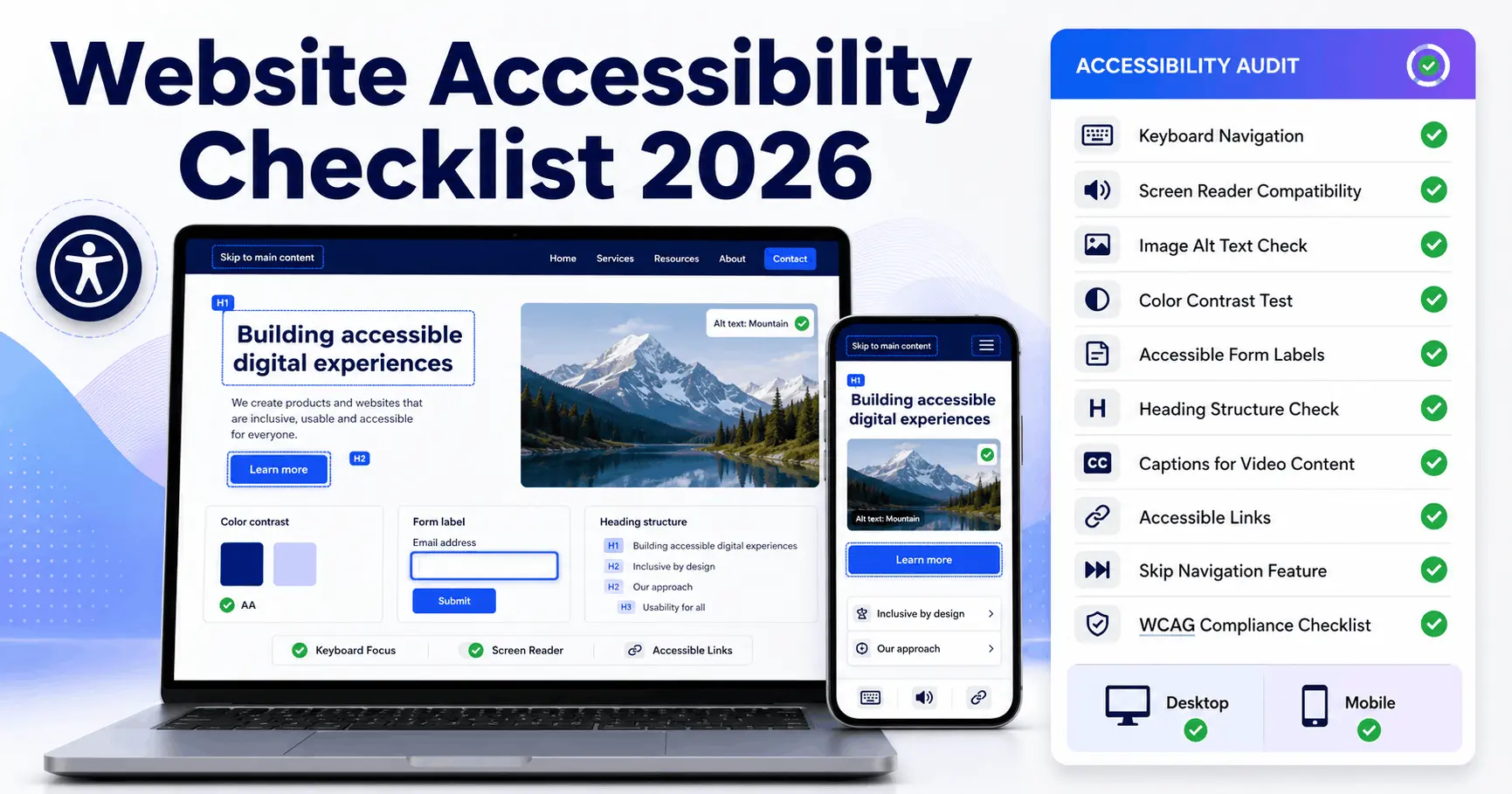
A website accessibility checklist should verify that people can perceive content, operate every workflow, understand forms and feedback, and use the interface with browsers and assistive technologies. The checklist must combine automated scanning, manual interaction testing, screen reader checks, code review, content review, and production monitoring. No single scanner can prove conformance on its own.
Quick Summary: What Decision-Makers Should Prioritize
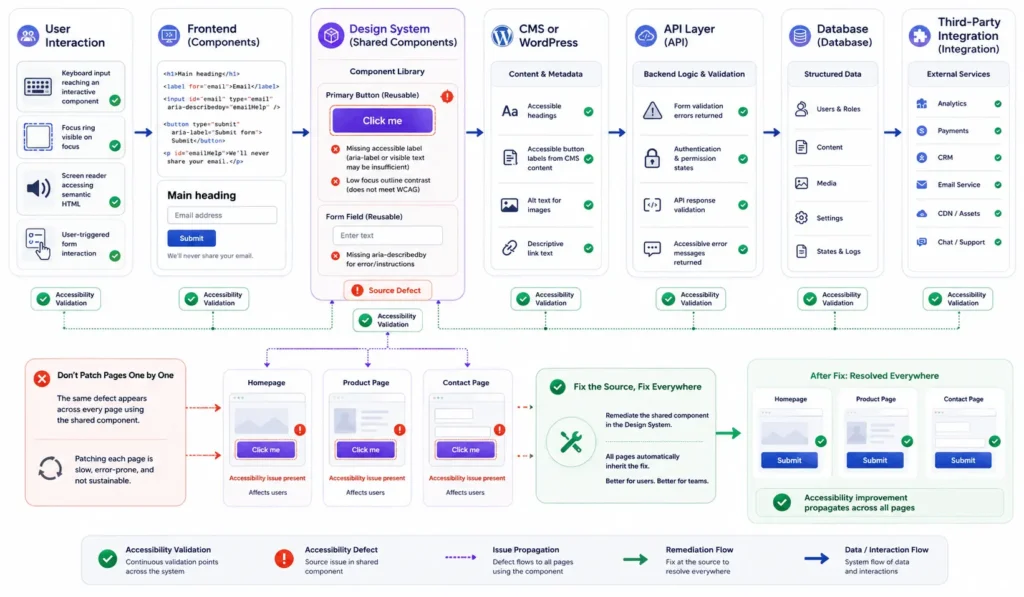
- Accessibility defects should be fixed at the component or template level whenever possible, because patching individual pages creates recurring maintenance cost.
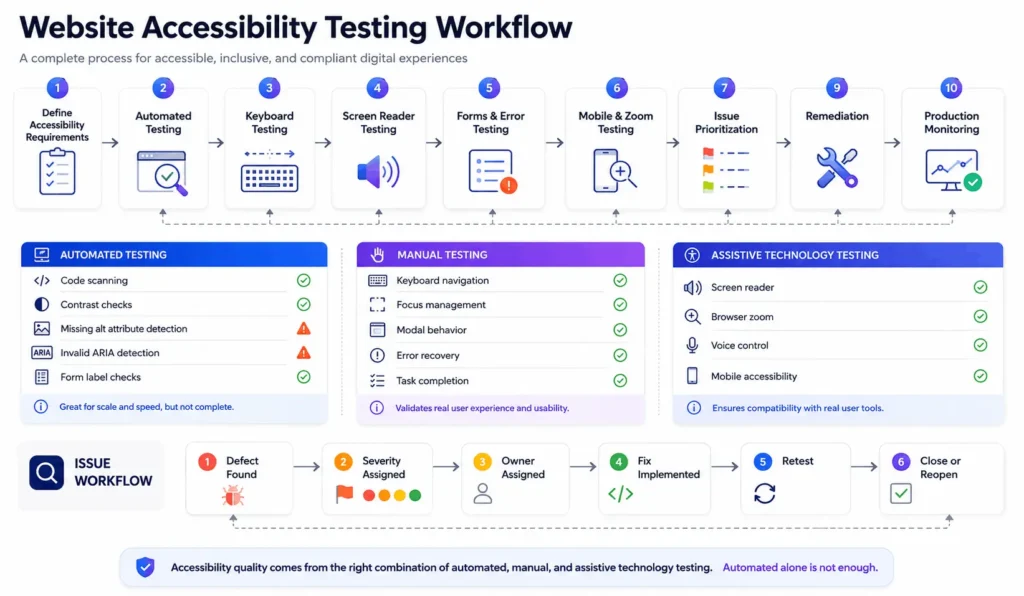
- Automated tools are useful for repeatable detection, but manual keyboard, focus, screen reader, zoom, and workflow testing remain necessary for meaningful accessibility evaluation.
- WCAG conformance is a product lifecycle concern that spans design, frontend code, backend validation, content operations, third-party integrations, and release governance.
- Critical revenue and service flows such as registration, checkout, booking, login, payment, and support should receive risk-based testing before lower-impact brochure pages.
- Accessibility monitoring works best when defects enter the normal engineering backlog with severity, ownership, regression tests, and release acceptance criteria.
What Does a Website Accessibility Checklist Actually Cover?
The strongest checklist maps practical tests to the four WCAG principles: perceivable, operable, understandable, and robust. WCAG 2.2 contains testable success criteria across Levels A, AA, and AAA. For most commercial programs, teams typically use Level AA as the operational target unless a contract, law, procurement rule, or policy specifies something different.
The official WCAG 2.2 quick reference is the correct technical source for success criteria and techniques. A production checklist translates that standard into ownership and test actions that designers, developers, QA engineers, content editors, and product managers can actually execute.
Website Accessibility Checklist 2026: Standards and Scope
A current website accessibility checklist WCAG program should use WCAG 2.2 as its technical reference where appropriate. Teams should also identify the legal and contractual context that applies to the organization. In the United States, ADA obligations and Section 508 requirements are not interchangeable. In the UK, public-sector websites and mobile apps are expected to meet WCAG 2.2 AA and publish an accessibility statement, subject to the applicable regulations and exceptions.
Do not scope only public HTML pages. Include authenticated dashboards, account areas, search filters, modal dialogs, customer support widgets, downloadable documents, embedded video, payment screens, error states, and mobile breakpoints. Accessibility barriers often hide in workflows that automated crawlers cannot reach.
Accessibility also belongs in redesign planning. When teams rebuild information architecture or components, they should combine accessibility acceptance criteria with the broader website redesign checklist rather than waiting for a separate audit after launch.
Architecture Before Remediation: Follow the Failure to Its Source
Production systems generate accessibility outcomes through layers. A button may be rendered by a design-system component, populated from a CMS field, gated by an RBAC rule, and triggered through a REST API. Fixing only the visible page can leave the underlying component defective across dozens of routes.
Website Accessibility Checklist for Frontend, Backend, and Integrations
- Frontend: semantic HTML, heading order, landmarks, visible focus, keyboard navigation, target size, reflow, contrast, text resizing, and meaningful alternative text.
- Backend: equivalent validation messages, persistent error context, accessible authentication recovery, predictable session handling, and authorization failures that do not trap the user.
- Integrations: accessible payment widgets, consent tools, chat systems, maps, booking engines, video players, and embedded documents.
- Operations: release gates, regression tests, defect ownership, monitoring, accessible support channels, and a maintained accessibility statement or policy where required.
This architectural view is especially useful for custom builds and regional service sites. During Virginia web design and development planning, for example, accessibility decisions should be made at the template, component, content model, and QA workflow level, not added as a final visual polish task.
Perceivable Content: Text, Images, Color, Media, and Documents
Begin with information users must perceive before they can act. Every meaningful image needs alternative text that communicates its function or information. Decorative images should not create noise for screen reader users. Complex charts need a concise text alternative plus access to the underlying insight or data where the visual carries decision-critical information.
For multimedia, provide captions for spoken content where required and appropriate alternatives such as transcripts or audio description based on the content. For PDFs, test the document itself rather than assuming the linked HTML page makes the file accessible. Tagged structure, reading order, headings, table semantics, document language, link purpose, and form fields all need review.
Operable Interfaces: Keyboard, Focus, Timing, and Navigation
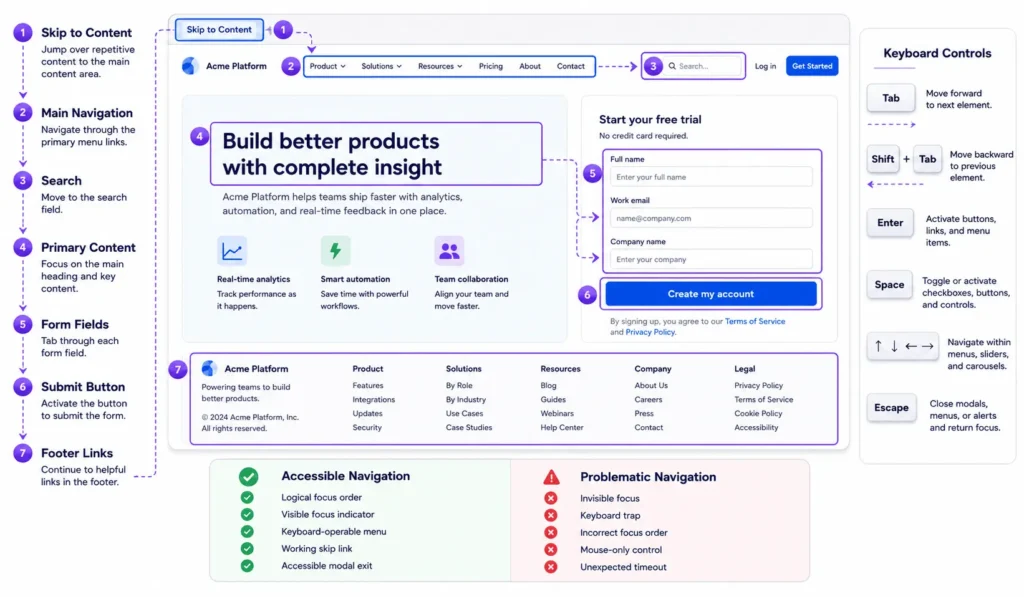
A keyboard test should follow real tasks, not random tabbing. Start at the browser address bar and complete registration, navigation, search, filtering, checkout, and account management without a mouse. Confirm that focus order follows the visual and logical sequence, focus never disappears, and modal dialogs return focus to the triggering control when closed.
Skip navigation links, landmarks, descriptive page titles, useful headings, and consistent navigation reduce repeated effort. Custom menus, carousels, tabs, accordions, date pickers, and drag-and-drop interfaces deserve extra attention because their keyboard behavior and state communication are commonly incomplete.
Understandable Forms, Authentication, Errors, and Transactions
Forms fail in production when labels, instructions, validation, and backend responses are treated as separate concerns. Each input needs a programmatic name. Required formats should be explained before submission. When validation fails, identify the field, describe the problem, preserve entered data where safe, and allow the user to recover without restarting the process.
Authentication flows deserve special review because CAPTCHA, one-time codes, password rules, device verification, and session timeouts can create barriers even when the rest of the site is well structured. Ongoing website support and technical remediation should include testing these access points after updates, integrations, and authentication changes.
Robust Code and Assistive Technology Compatibility
Semantic HTML remains the most maintainable accessibility layer. Native buttons, links, inputs, headings, lists, and tables already expose expected roles and interaction patterns. ARIA is useful when native semantics cannot represent a component, but incorrect roles and state attributes can make an interface harder to use.
Website Accessibility Testing Checklist: A Production Workflow
A mature accessibility testing process combines repeatable automation with human evaluation. This approach also fits into a broader website maintenance and support workflow, where release checks, regression testing, monitoring, and post-deployment validation help prevent resolved issues from returning.
Run Tests in This Order
- Define representative templates, components, user roles, devices, and business-critical workflows.
- Run automated scans in CI and against deployed environments to catch repeatable code-level failures.
- Perform manual keyboard, zoom, reflow, focus, content, and screen reader testing on critical journeys.
- Log defects against the source component or system owner, not only against the page where the issue was observed.
- Retest the fix, add regression coverage where practical, and monitor future releases for recurrence.
| Feature | Automated Testing | Manual Testing |
|---|---|---|
| Coverage speed | Fast across many pages | Slower and task-focused |
| Code-level rules | Strong for detectable patterns | Useful for confirming context |
| Keyboard workflow | Limited simulation | Essential for real task completion |
| Screen reader experience | Cannot judge full usability | Required for meaningful evaluation |
| Release monitoring | Good for regression alerts | Best for scheduled deep reviews |
Website Accessibility Audit Checklist: Prioritize by User Impact
Do not prioritize only by defect count. One inaccessible checkout submit button can have more operational impact than fifty missing labels on low-use decorative controls. Rank issues by blocked task, user impact, frequency, business criticality, affected templates, legal or contractual exposure, and remediation complexity.
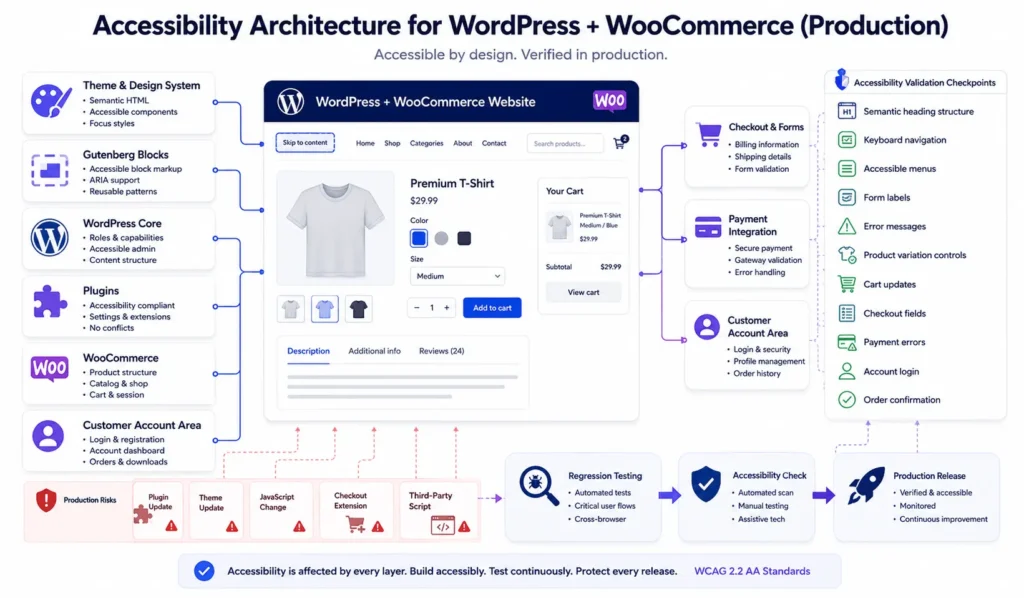
Then separate root causes from instances. A heading hierarchy problem caused by one Gutenberg block pattern should be fixed in the pattern, not manually on every page. A missing accessible name generated by a shared React component belongs in the component library backlog. A third-party widget failure may require vendor escalation, replacement, or an accessible alternative path.
WordPress and WooCommerce Accessibility in Production
Use Gutenberg patterns and custom blocks to encode correct heading structure, link behavior, button labels, form instructions, and media defaults. Review plugin output before adoption. Plugin conflicts can alter focus order, inject duplicate IDs, replace native controls, or create modal traps. Updates require regression testing because markup and JavaScript behavior can change between releases.
Ongoing checks belong in the same operating rhythm as updates and backups. The website maintenance checklist is a useful companion for release review, plugin updates, form testing, monitoring, and post-deployment verification.
Monolith, Headless, and Microservices: Accessibility Trade-Offs
Architecture changes the location of risk, not the requirement to manage it. A WordPress monolith can centralize templates and content governance, making component-level remediation efficient. A headless build can provide stronger frontend control but introduces client-side routing, hydration, API failure states, and duplicated governance across the CMS and application layer.
| Feature | Integrated Monolith | Headless or Distributed Platform |
|---|---|---|
| Accessibility ownership | More centralized | Shared across teams and services |
| Component consistency | Usually easier to enforce | Requires strong design-system governance |
| Failure states | Fewer network boundaries | More API and synchronization states |
| Release testing | Simpler deployment surface | Needs cross-service regression coverage |
| Scaling control | Lower operational complexity | Greater flexibility with higher coordination cost |
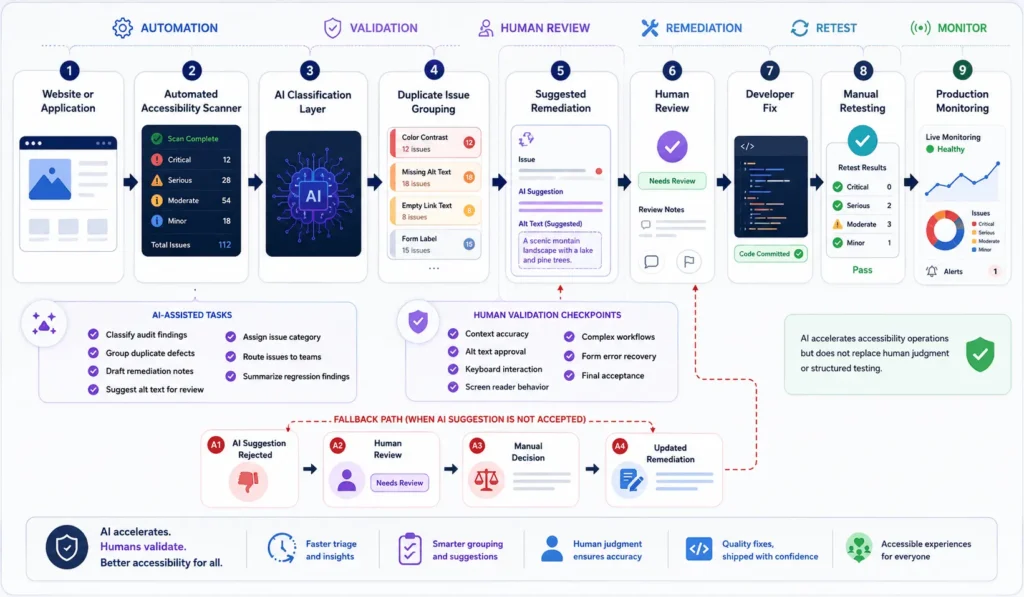
AI Automation Can Support Testing, but It Needs Guardrails
AI systems can help classify audit findings, draft remediation notes, identify duplicate defects, propose alternative text for editorial review, and route issues to the correct team. They should not be treated as autonomous conformance authorities.
When Off-the-Shelf Tools Stop Being Enough
Filicode works across custom software development, WordPress and WooCommerce engineering, API integrations, SaaS architecture, performance optimization, and controlled automation. In accessibility work, the useful question is not whether a tool can produce a report. It is whether the system can be changed at the correct layer and maintained without recreating the same barrier in the next release.
Custom development becomes reasonable when accessibility fixes require changes to shared components, authentication, role-based access control, third-party workflows, checkout logic, data synchronization, or operational tooling. Good architecture reduces future remediation cost because accessibility behavior becomes part of reusable components, validation contracts, test suites, and release controls.
Website Accessibility Checklist UK Considerations
For a website accessibility checklist in the UK, teams should first identify whether the service falls under public-sector accessibility regulations, other legal duties, procurement requirements, or contractual standards. GOV.UK guidance states that public-sector websites and mobile apps should meet WCAG 2.2 AA and publish an accessibility statement, while acknowledging that specific legal exceptions can apply.
Smaller teams can coordinate accessibility review with a small business SEO checklist, while keeping accessibility acceptance criteria separate from search requirements.
Frequently Asked Questions
How much does a website accessibility audit cost?
Accessibility audit cost depends on site size, number of unique templates, authenticated workflows, ecommerce complexity, third-party integrations, document volume, and the depth of manual assistive technology testing. A small brochure site and a multi-role SaaS platform should not be scoped as the same type of audit.
How long does website accessibility remediation take?
Remediation can take from a few development cycles to several months depending on whether defects are isolated content issues or systemic problems in themes, component libraries, checkout flows, authentication, and third-party integrations. Fixing root components is usually faster to maintain than patching pages individually.
Can automated tools complete a website accessibility checklist?
No. Automated tools can detect many repeatable code-level issues, but a complete website accessibility checklist also needs manual keyboard testing, focus review, zoom and reflow checks, content evaluation, and assistive technology testing for critical workflows.
Does accessibility testing slow down product releases?
Accessibility testing can add work when introduced late, but integrating checks into design systems, pull requests, QA plans, and release gates reduces repeated remediation. The operational goal is to prevent defects at the component level rather than rediscover them after every launch.
What is the biggest migration risk during an accessible redesign?
The biggest migration risk is losing validated accessibility behavior when templates, components, navigation, forms, or JavaScript frameworks are replaced. Preserve acceptance criteria, retest critical journeys, compare old and new workflows, and monitor production after launch.
How often should a website accessibility audit be repeated?
Run automated checks continuously or on each release where practical, perform manual regression testing on changed critical workflows, and schedule broader audits based on release frequency, platform risk, and organizational requirements. Major redesigns and integration changes should trigger additional review.
Conclusion: Treat Accessibility as a System Quality Signal
A website accessibility checklist is most valuable when it exposes how the organization builds and operates software. Repeated focus traps, unlabeled controls, inaccessible authentication, broken transaction feedback, and recurring plugin regressions are not isolated content mistakes. They are signs that component governance, testing, ownership, or release controls need improvement.
The next step is to map critical user journeys, identify shared root causes, establish a mixed automated and manual testing workflow, and put remediation into the normal engineering backlog. When off-the-shelf tools prevent control over templates, integrations, transaction states, or testing, custom development should be considered as an architecture decision, not as a cosmetic rebuild.