



Contents
- Quick Summary: What Decision-Makers Should Know
- When Does Custom CRM Development Make Business Sense?
- Custom CRM Development Architecture: What Holds Up in Production?
- Custom CRM Development Workflow from UI to Async Jobs
- Integrations Are Usually the Hardest Part of the CRM
- Where AI Automation Fits Without Making the CRM Fragile
- Data Migration, Testing, and Launch Risk
- Custom CRM Development Cost, Timeline, and Maintenance Trade-offs
- Scaling the CRM Without Creating Operational Debt
- When to Use a Custom CRM Development Company
- Custom CRM Development FAQs
- How much does custom CRM development cost?
- How long does custom CRM development take?
- Can custom CRM development scale to enterprise usage?
- How should CRM integrations handle failures?
- What is the biggest risk in CRM data migration?
- What maintenance does a custom CRM require?
- Conclusion: Build When the Operational Limits Are Measurable
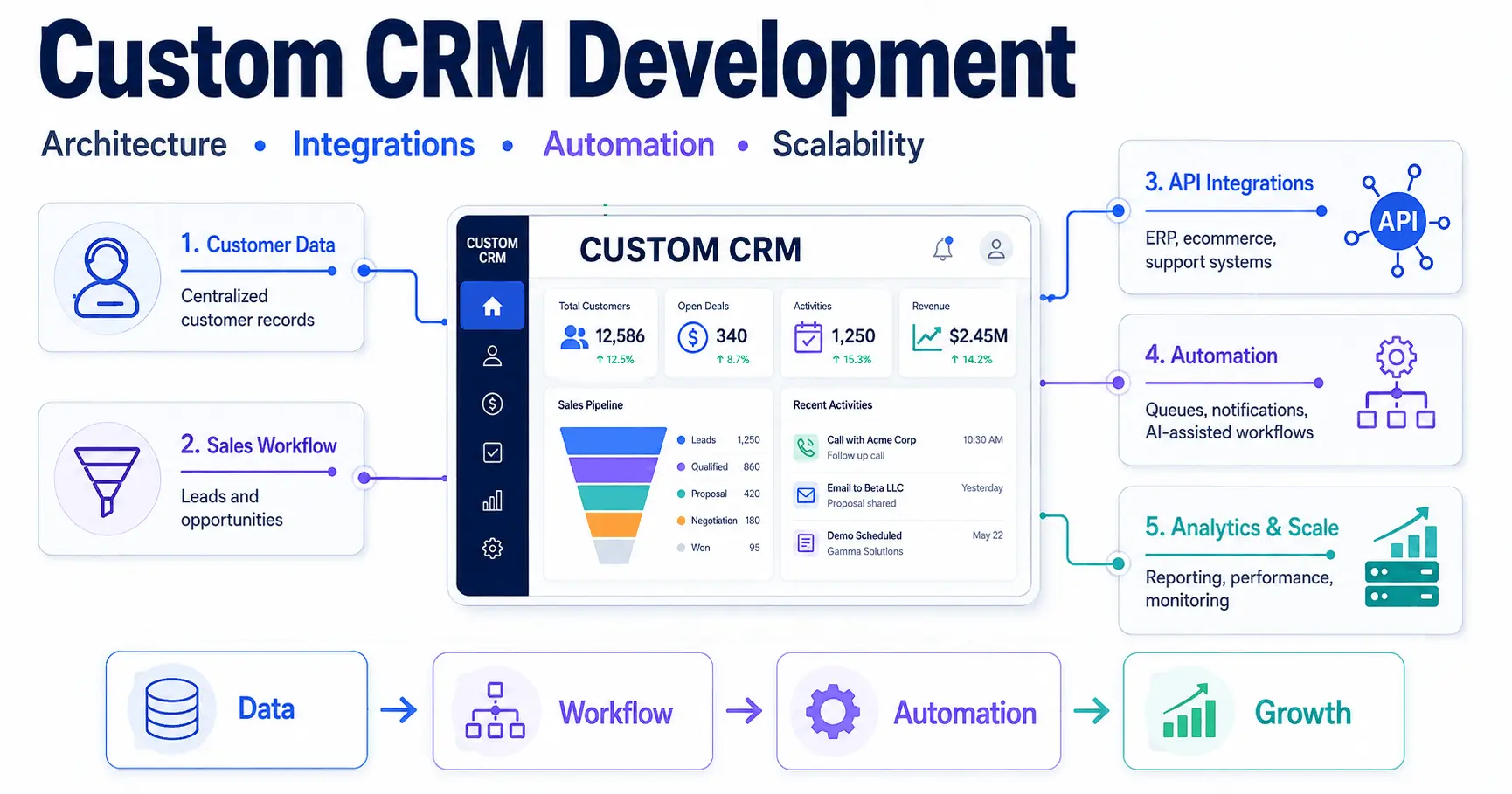
A sales team can tolerate spreadsheets, disconnected inboxes, and manual handoffs for a while. The breaking point arrives when customer data stops matching across systems, lead ownership becomes ambiguous, reporting takes days, or a single integration failure blocks revenue operations. Custom CRM development addresses that problem by turning customer workflows, permissions, integrations, automation, and reporting into one controlled system designed around how the business actually operates.
A custom CRM is an operational application that coordinates customer data, sales states, service activity, approvals, external systems, and audit history. Good custom CRM development reduces process friction without replacing every surrounding platform.
Quick Summary: What Decision-Makers Should Know
- Custom CRM development is justified when platform constraints create measurable operational cost, integration risk, or reporting gaps that configuration cannot solve.
- The architecture should match transaction volume and team maturity; a well-structured monolith is often safer than premature microservices.
- Reliable integrations require idempotent APIs, durable queues, retry policies, reconciliation jobs, and observability rather than simple webhook handlers.
- Data migration is a product workstream, not a final import task; cleansing, field mapping, duplicate resolution, and user acceptance testing determine launch quality.
- Automation should remove repeatable work while preserving validation and human approval for high-impact actions.
- Total cost of ownership includes maintenance, monitoring, security, support, and future change, not only the initial build price.
When Does Custom CRM Development Make Business Sense?
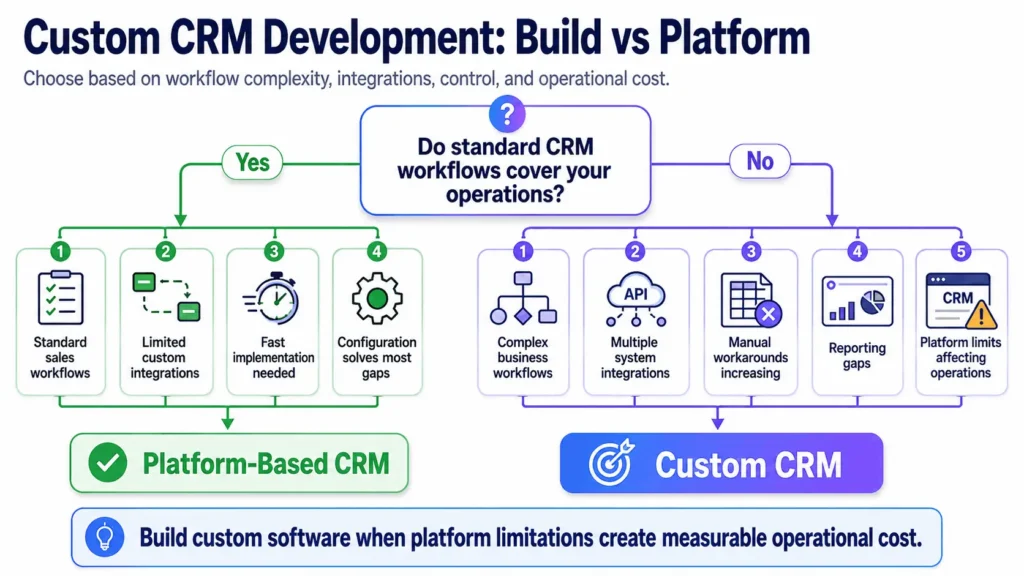
The decision is usually custom CRM development versus extending Salesforce, Microsoft Dynamics 365, HubSpot, Zoho, or another CRM platform. Off-the-shelf systems are usually better when standard pipeline, contact, automation, and support workflows cover most requirements.
Custom software becomes reasonable when the business keeps building workarounds around the CRM: duplicated data entry, external spreadsheets, manual approvals, brittle middleware, or external reporting logic. At that stage, process delays, support burden, and integration failures can matter more than licensing fees.
| Decision Area | Platform-Based CRM | Custom CRM Development |
|---|---|---|
| Time to launch | Fast when workflows are standard | Slower because discovery, engineering, migration, and testing are required |
| Workflow fit | Strong within supported configuration patterns | Can model specialized sales, service, approval, or account processes |
| Integration control | Depends on vendor APIs, limits, and marketplace apps | Direct control over API architecture, queues, data models, and reconciliation |
| Cost model | Recurring per-user or feature-tier licensing | Higher upfront engineering with ongoing maintenance cost |
| Vendor lock-in | Higher when automation and data models are platform-specific | Lower at the application layer, but the business owns technical responsibility |
A common mistake is funding custom CRM development because users dislike a commercial product. The stronger case is when the system blocks a revenue, service, compliance, or scaling workflow. If configuration and a stable integration solve the gap, customization is usually cheaper.
Custom CRM Development Architecture: What Holds Up in Production?
Architecture should start with domain boundaries, not infrastructure fashion. Accounts, contacts, opportunities, activities, tickets, documents, permissions, and audit events need clear ownership. The data model should separate business state from presentation logic so the CRM can evolve without every UI change becoming a database migration.
For many teams, a modular monolith is the best first production architecture. It keeps deployment and debugging simpler while enforcing boundaries between sales, support, identity, automation, and integrations. Microservices help when independent scaling, deployment ownership, or fault isolation is required, but they add network failures, distributed tracing, more CI/CD pipelines, and operational overhead.
| Architecture Factor | Modular Monolith | Microservices |
|---|---|---|
| Deployment | Single application pipeline is easier to operate | Independent services allow isolated releases |
| Data consistency | Transactions are simpler inside one database boundary | Cross-service consistency often requires events and compensating logic |
| Scaling | Scale the application as a unit until hotspots justify separation | Scale high-load services independently |
| Observability | Central logs and traces are easier to correlate | Distributed tracing and service-level monitoring become mandatory |
| Team fit | Strong for small and mid-sized product teams | Better when multiple teams own distinct domains and operational maturity is high |
Authentication should be centralized, with multi-factor authentication where risk warrants it and role-based access control enforced on the backend. OAuth integrations should follow the OAuth 2.0 authorization framework rather than storing third-party credentials in code. Sensitive writes should be auditable.
In production, permissions often fail at the edges: exports, bulk updates, admin tools, background jobs, or API endpoints. A polished frontend does not compensate for missing server-side authorization. Custom CRM development should treat identity and access management as part of the domain model, not an afterthought.
Custom CRM Development Workflow from UI to Async Jobs
Consider a salesperson converting a qualified lead. The frontend submits a validated request to the backend. The application checks permissions, validates the current lead state, writes the opportunity transaction, records an audit event, and returns the new state to the user. That synchronous path should stay short.
Secondary work belongs in a queue: warehouse updates, notifications, document generation, ERP synchronization, or marketing automation. If a downstream API is unavailable, the job should retry with backoff and preserve an idempotency key so one event cannot create duplicate invoices, contacts, or tasks.
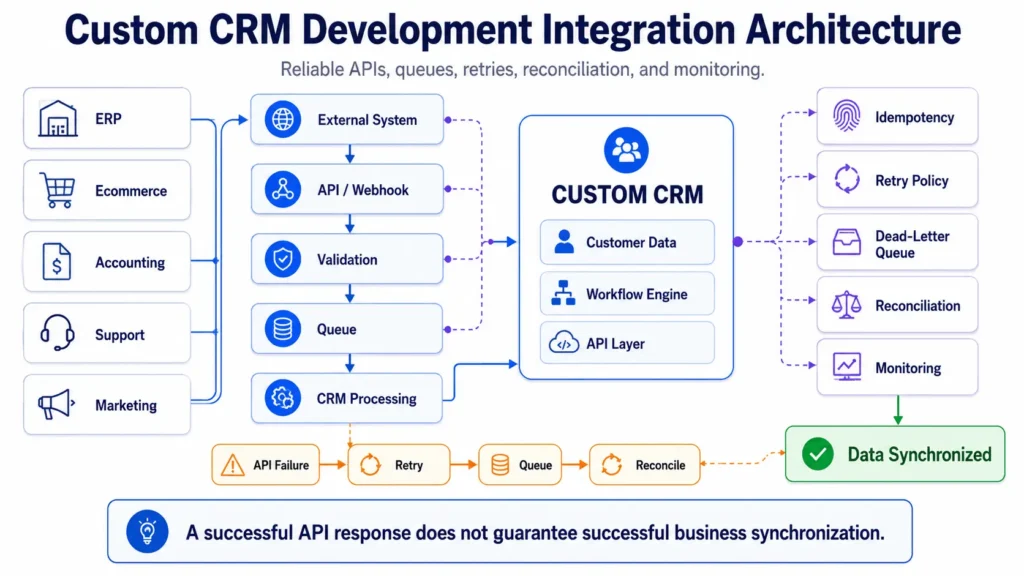
We have seen integrations appear healthy because an HTTP request returned 200 while the business record never reached its final state. Production custom CRM development needs dead-letter handling, structured logs, correlation IDs, alerts, and reconciliation jobs. For integration-heavy environments, real-time data synchronization strategies are as important as the API endpoints.
Caching should be selective. Reference data and expensive read models may benefit from Redis, but live opportunity state should not sit behind long cache lifetimes. A stale dashboard is inconvenient; stale approval state can create operational errors.
Integrations Are Usually the Hardest Part of the CRM
Most custom CRM development projects become integration projects in production. ERP, accounting, ecommerce, email, telephony, identity, analytics, and support systems all have different rate limits, data models, authentication methods, and failure behavior.
The integration layer should normalize those differences. Webhooks handle near-real-time events, reconciliation catches missed events, and queues absorb spikes. Record ownership must also be explicit. If both the CRM and ERP can update billing addresses, conflict rules are required or the systems will overwrite each other.
WooCommerce can be a customer and order source, but an external CRM should not query the WordPress database directly. Use stable REST APIs or purpose-built endpoints. When store workflows need domain-specific behavior, the decision process in custom WordPress plugin development applies: extend only where the platform boundary is maintainable.
For commerce operations that synchronize inventory, fulfillment, and finance, the same principles used in a WooCommerce ERP integration apply to CRM integration: define the source of truth, version mappings, queue writes, and reconcile failures. By this stage, Filicode’s custom web development capability becomes relevant when the CRM, customer portal, and integration layer must be engineered as one maintainable system.
Where AI Automation Fits Without Making the CRM Fragile
AI agents can classify inbound requests, summarize account activity, draft follow-ups, or enrich records. They should not become the source of truth for customer state. Custom CRM development should place an orchestration layer between model output and business actions, with schema validation, permission checks, confidence thresholds, and human review for high-impact decisions.
An LLM may propose a lead category, but deterministic logic should validate that the category exists and the user can apply it. A failed model call should fall back safely rather than block core CRM operations. This separates useful enterprise workflow automation from another fragile production dependency.
Teams need to track model latency, failures, rejected outputs, overrides, and downstream errors. For agent-driven workflows, AI agent orchestration and workflow controls should be designed with the same rigor as integration state machines.
Data Migration, Testing, and Launch Risk
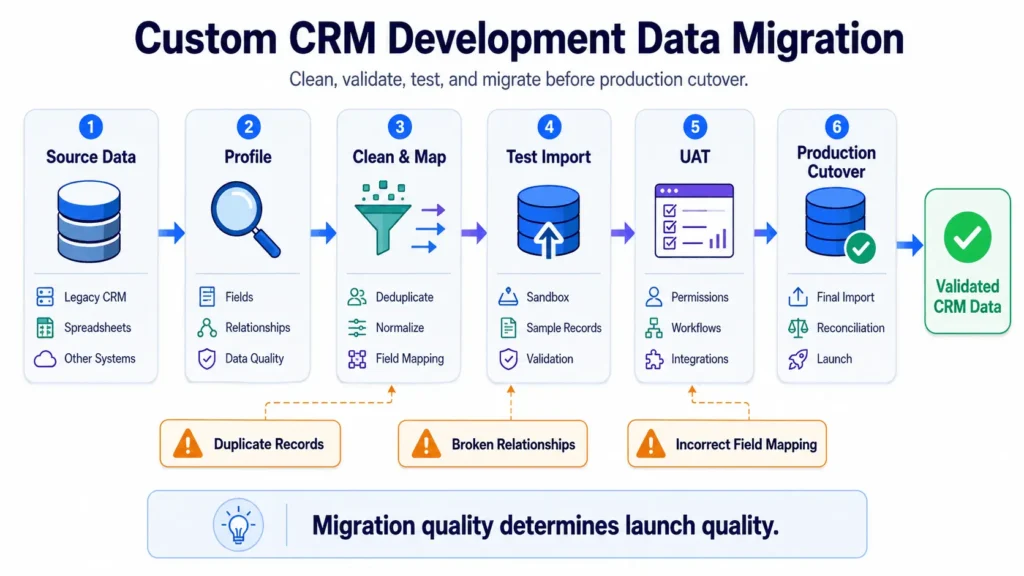
Data migration is where optimistic plans become real. Legacy CRMs contain duplicates, obsolete fields, inconsistent values, invalid emails, and records with unclear ownership. Moving that data unchanged recreates the old operational problem in a new interface.
A safer custom CRM development process uses staged migration: profile source data, define mapping rules, cleanse and deduplicate, run test imports, validate relationships, then rehearse cutover. User acceptance testing should cover business scenarios such as lead conversion, reassignment, failed integrations, permissions, imports, notifications, and rollback behavior.
Production releases should use CI/CD, automated tests, database migration controls, and a rollback plan. A recurring failure is changing a field or workflow without checking dashboards, integrations, or scheduled jobs that depend on it. Schema changes are operational changes.
Custom CRM Development Cost, Timeline, and Maintenance Trade-offs
Custom CRM development cost depends less on screen count than on workflow complexity, integrations, migration, security, reporting, and operational tooling. A focused MVP may take roughly 8 to 16 weeks. A multi-department platform with complex migration, analytics, and several external systems can take 4 to 9 months or longer.
Budgeting should include discovery, design, front-end and back-end development, testing, deployment, monitoring, documentation, and support. A $40,000 build that needs constant repair can have a higher total cost of ownership than a $90,000 system with clean boundaries, tests, observability, and maintainable integrations. Exact budgets depend on scope and region, so estimates should follow requirements gathering.
Cheap development commonly removes work users do not see: tests, audit logging, queue monitoring, security hardening, deployment controls, and migration rehearsal. Those omissions surface later as technical debt. A maintainable custom system requires more discipline upfront and an ongoing maintenance obligation that a SaaS vendor would otherwise absorb.
Scaling the CRM Without Creating Operational Debt
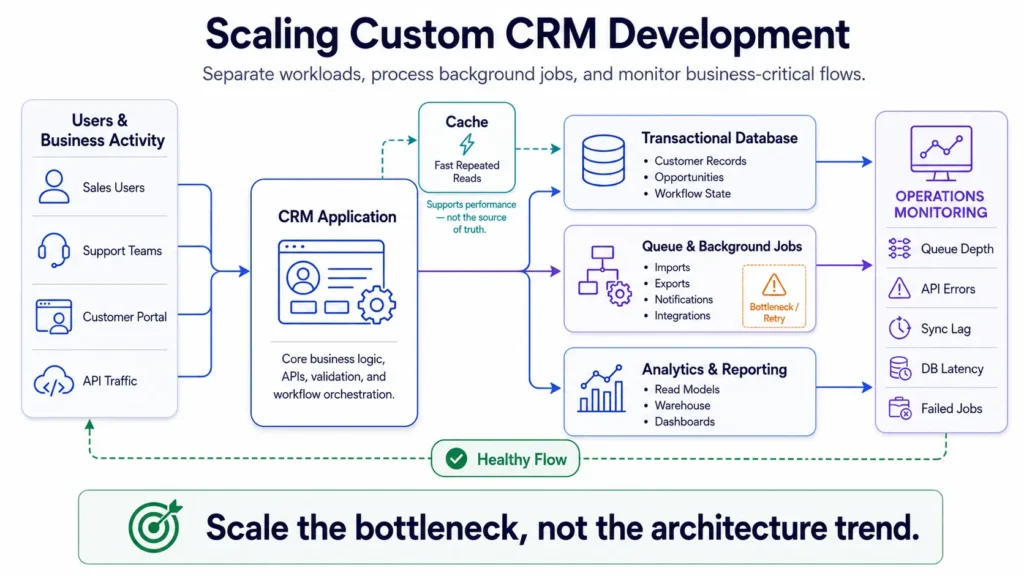
Scale means more users, records, automation, permissions, integration events, and exceptions. Database contention often appears around reporting queries, bulk imports, shared counters, and long transactions before raw request volume becomes the main problem.
Custom CRM development should separate transactional and analytical workloads where necessary. Read replicas, indexed reporting tables, background exports, and warehouse pipelines keep dashboards from competing with live sales writes. A CDN helps static assets and distributed frontends; it does not fix slow relational queries.
Observability should connect technical metrics to business operations. Track queue depth, API errors, sync lag, database latency, retries, stuck opportunities, duplicate records, and reconciliation mismatches. An infrastructure dashboard that looks green while revenue workflows are blocked is incomplete monitoring.
When to Use a Custom CRM Development Company
A custom CRM development company is most useful when the challenge crosses product design, architecture, migration, integrations, and long-term operations. A team that only builds screens may leave source-of-truth conflicts, failure handling, and maintainability unresolved.
Filicode approaches custom software, WordPress, WooCommerce, SaaS systems, API integrations, performance, and automation as connected architecture problems. That matters when a CRM sits between customer-facing and back-office systems and must remain maintainable as workflows change.
The right custom CRM development service should also be willing to recommend against custom code when platform configuration is sufficient. Building less is often the better architectural decision. The objective is not ownership of more software; it is a system that reduces operational friction without creating unnecessary support burden.
Custom CRM Development FAQs
How much does custom CRM development cost?
A focused CRM MVP can start in the tens of thousands of dollars, while complex enterprise builds can exceed $100,000. The main cost drivers are integrations, migration, security, reporting, workflow complexity, and post-launch support rather than screen count alone.
How long does custom CRM development take?
A focused MVP commonly takes about 8 to 16 weeks, while multi-department CRM programs can take 4 to 9 months or longer. Discovery, data migration, integration testing, and user acceptance testing are usually the schedule-critical workstreams.
Can custom CRM development scale to enterprise usage?
Yes, if the system is designed for database growth, queue-based background work, controlled caching, observability, and independent scaling of real bottlenecks. Enterprise scalability depends on workload patterns and operational maturity, not simply whether the application uses microservices.
How should CRM integrations handle failures?
Use durable queues, idempotency keys, bounded retries, dead-letter handling, structured logs, and reconciliation jobs. A webhook response alone is not proof that the downstream business record reached the correct final state.
What is the biggest risk in CRM data migration?
The biggest risk is transferring poor source data without cleansing or mapping rules. Run at least one rehearsal import, validate record counts and relationships, resolve duplicates, and test business workflows before final cutover.
What maintenance does a custom CRM require?
A custom CRM needs security updates, dependency maintenance, monitoring, backups, integration reviews, performance tuning, and corrective, adaptive, perfective, and preventive maintenance. Teams should plan a recurring support budget from launch rather than treating maintenance as optional.
Conclusion: Build When the Operational Limits Are Measurable
The strongest warning signs are concrete: customer data disagrees across systems, teams maintain shadow spreadsheets, integration failures require manual repair, permissions are too coarse, reporting is unreliable, or platform limits force recurring workarounds. Those are operational indicators that the current CRM strategy is creating cost.
Custom CRM development should be considered when those constraints persist, valuable workflows cannot be modeled safely, and the organization is prepared to own software over time. Start with workflow mapping, source-of-truth decisions, integration inventory, migration risk, and a narrow MVP boundary. Architecture should follow business constraints, not the other way around.