






Contents
- Quick Summary: 15-Point Small Business SEO Checklist
- Small Business SEO Checklist: Start With Your Website System
- Small Business SEO Checklist 2026: Match Search Intent First
- Technical SEO Checklist for Small Business Websites
- Production Workflow Behind Technical SEO
- On-Page SEO Checklist for Small Business Service Pages and Blogs
- Local SEO Checklist for Small Business Visibility
- Small Business SEO Checklist for Reviews and Reputation
- Content Checklist That Supports Commercial Pages
- Comparison Table: Basic SEO Tasks vs Scalable SEO Operations
- Schema and Internal Linking Checklist
- SEO Tracking Checklist: GSC, Analytics, and Leads
- Website Architecture Checks That Affect SEO
- Where AI Automation Fits Into Small Business SEO
- When Technical SEO Support Becomes Necessary
- 30-Day Small Business SEO Checklist Execution Plan
- Week 1: Audit and Baseline
- Week 2: Technical and On-Page Fixes
- Week 3: Local SEO and Reputation
- Week 4: Content and Reporting
- FAQs
- How much does SEO cost for a small business?
- How long does a small business SEO checklist take to implement?
- Can SEO scale with WordPress?
- Do small businesses need technical SEO or only local SEO?
- What are the biggest SEO mistakes small businesses make?
- When should a business hire professional SEO support?
- Conclusion: Turn the Small Business SEO Checklist Into Action
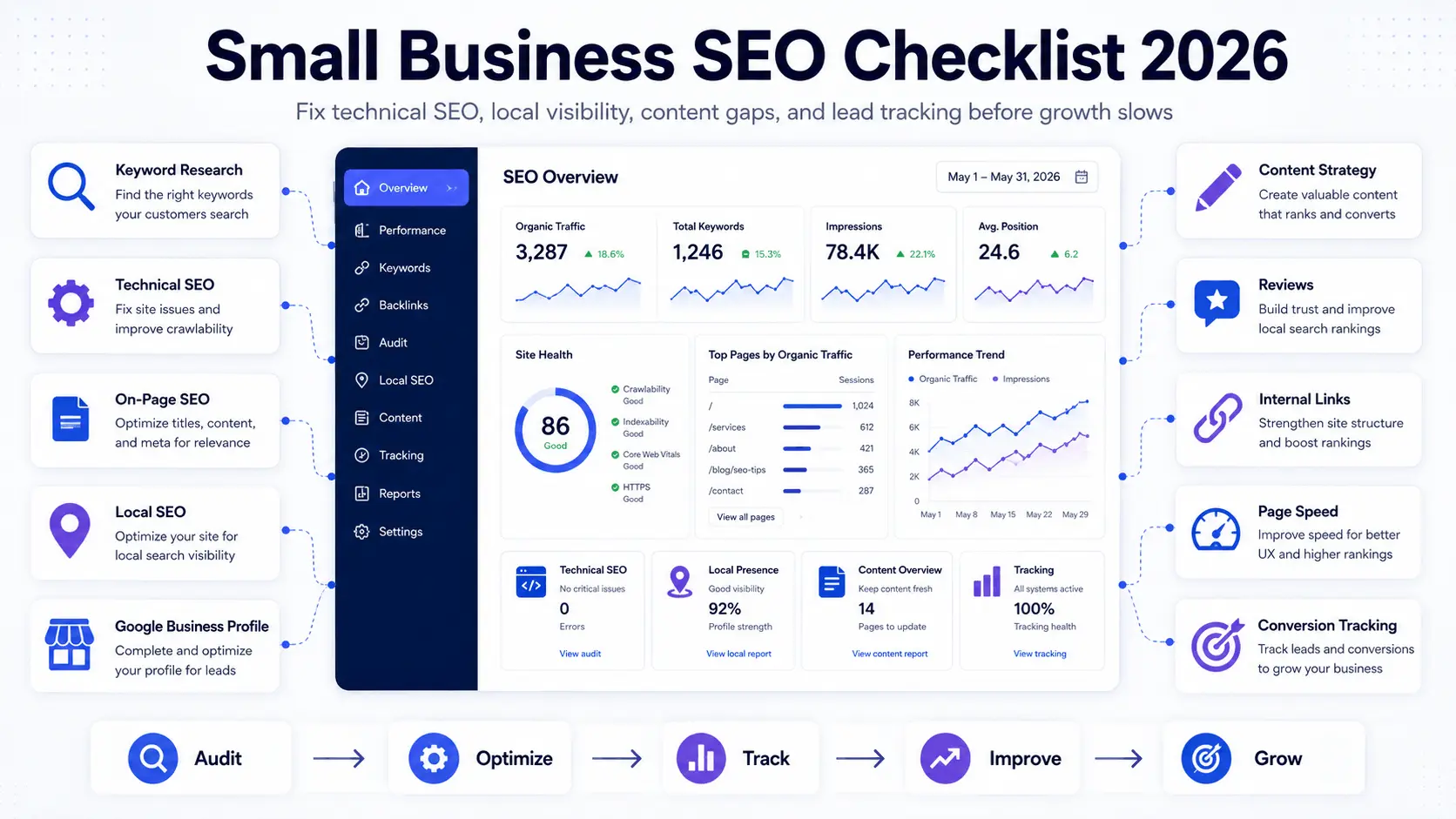
This small business SEO checklist gives you a practical framework to improve rankings, search visibility, and qualified leads. A small website can become hard to rank long before it looks broken. Service pages compete with blog posts, plugins slow down Core Web Vitals, location pages become thin, Google Business Profile data turns inconsistent, and search queries generate impressions without enough clicks.
For small business owners, founders, marketers, and operations teams, SEO is more than a content task. It connects crawl paths, page templates, structured data, analytics, local signals, conversion tracking, and maintenance workflows. When that system is weak, rankings fluctuate, traffic becomes noisy, and qualified inquiries decline.
Quick Summary: 15-Point Small Business SEO Checklist
- Match one clear search intent to each important page.
- Prioritize keywords by relevance, difficulty, and conversion potential.
- Check XML sitemaps, robots.txt, and page indexability.
- Fix broken links, redirect chains, and crawl issues.
- Improve mobile performance and Core Web Vitals.
- Write SEO titles and meta descriptions for search intent and CTR.
- Use one clear H1 with logical H2 and H3 headings.
- Strengthen internal links between blogs and service pages.
- Optimize Google Business Profile information.
- Keep NAP details and citations consistent.
- Improve useful, unique location pages.
- Build a consistent review and reputation process.
- Publish content that supports commercial pages.
- Use accurate schema, image alt text, and structured page data.
- Track GSC queries, clicks, CTR, leads, and conversions.
Small Business SEO Checklist: Start With Your Website System
A useful small business SEO checklist starts with how the website behaves under real business conditions. New locations, service pages, product categories, plugins, and CRM connections can all affect crawl depth, internal authority, page speed, analytics, and conversion attribution.
Before changing page titles, map the system:
- Which pages generate qualified leads?
- Which pages are indexed but not ranking?
- Which templates are slow or duplicated?
- Which forms, calls, and bookings are tracked?
- Which locations or services need stronger authority?
This is also where local and service-page strategy matters. For example, a business targeting New Jersey customers should connect blog content to relevant service pages such as New Jersey SEO company support instead of publishing isolated articles that do not strengthen commercial pages.
Small Business SEO Checklist 2026: Match Search Intent First
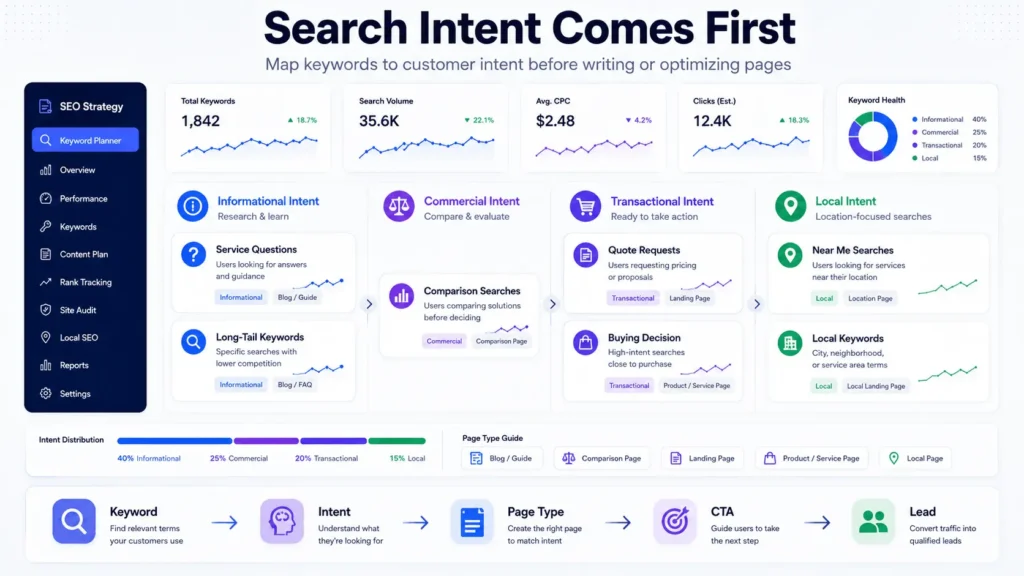
The small business SEO checklist 2026 should begin with intent, not keyword volume. High-volume keywords with weak relevance can waste time, while lower-volume queries with clear intent can produce better leads.
Group keywords by how customers make decisions:
- Informational intent: users researching problems, costs, comparisons, or checklists.
- Commercial intent: users comparing services, agencies, packages, or providers.
- Transactional intent: users ready to request a quote, book a call, or buy.
- Local intent: users looking for nearby service providers, city pages, or Google Maps results.
For a service business, keyword research should include seed keywords, long-tail keywords, local modifiers, service questions, and competitor gaps. A WordPress development company may target “WooCommerce speed optimization,” “custom WordPress plugin development,” and “website support services” because each query reflects a specific operational problem.
A weak SEO plan treats all keywords equally. A strong plan prioritizes keywords by relevance, difficulty, conversion potential, and ability to support existing service pages.
Technical SEO Checklist for Small Business Websites
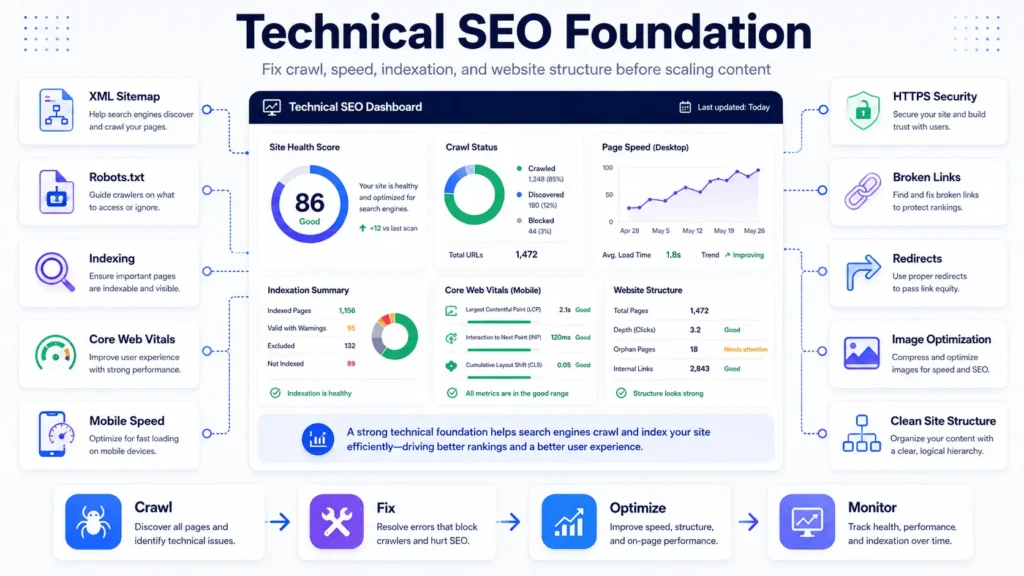
Content cannot compensate for a website that is hard to crawl, slow to render, or unstable on mobile. Technical SEO is the infrastructure layer of this small business SEO checklist.
Check the basics first:
- XML sitemap is clean and submitted in Google Search Console.
- Robots.txt does not block important pages.
- Important service pages are indexable.
- Redirects are intentional and not chained.
- Broken links are fixed.
- HTTPS is active across the full site.
- Core Web Vitals are monitored on key templates.
On WordPress, common technical problems come from bloated page builders, unused plugins, poor hosting, oversized images, missing object caching, excessive JavaScript, and plugin conflicts. WooCommerce sites add more complexity because product filters, cart fragments, checkout scripts, and order-related processes can slow down important pages.
For deeper implementation, review a dedicated technical SEO checklist for scalable website growth before publishing large batches of content.
Production Workflow Behind Technical SEO
A small business website still behaves like a production system. Hosting, caching, plugins, scripts, and database performance can affect loading speed, layout stability, forms, and checkout behavior.
Google’s own SEO starter documentation is useful for understanding how crawlability, page structure, and helpful content fit together.
On-Page SEO Checklist for Small Business Service Pages and Blogs
The on-page section of a small business SEO checklist should focus on clarity. Every page should answer one main search intent and guide the visitor toward a useful next step.
Review each important page for:
- One clear H1 heading.
- Logical H2 and H3 structure.
- SEO title that matches the page intent.
- Meta description written for CTR, not keyword stuffing.
- Descriptive URL slug.
- Internal links to relevant service pages and supporting resources.
- Image alt text that explains the visual naturally.
- FAQs that answer real sales and support questions.
For service businesses, content should include pricing context, process explanations, timeline factors, limitations, and trust signals. Generic claims do not build confidence. Useful pages explain audits, local ranking factors, technical fixes, reporting, content strategy, and conversion tracking.
If your site already has many posts, run a full SEO audit checklist to find duplicate content, keyword cannibalisation, weak pages, and indexing issues.
Local SEO Checklist for Small Business Visibility
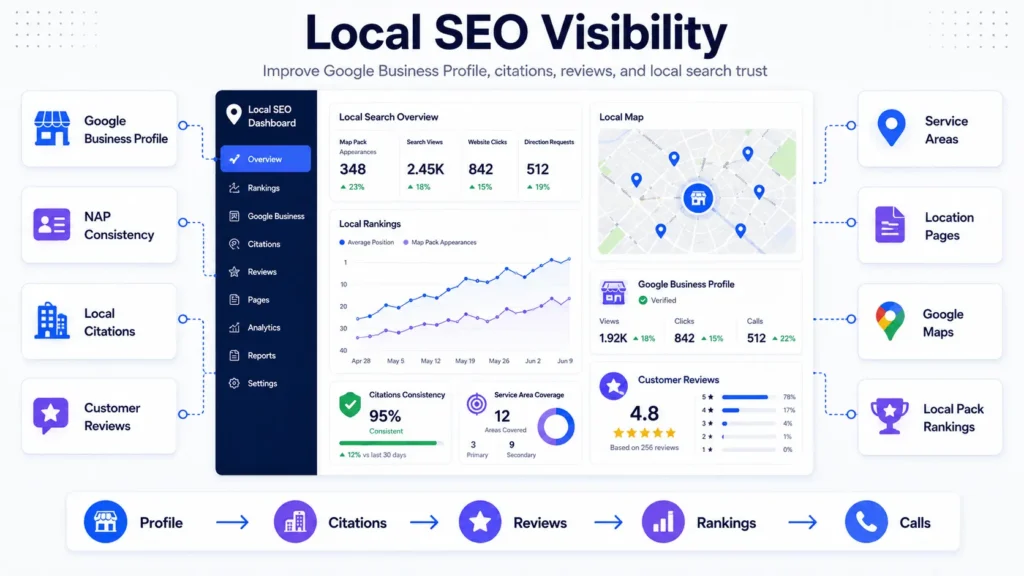
For location-based companies, the small business SEO checklist must include local SEO. Google Maps visibility, citations, reviews, and location relevance can produce qualified leads faster than broad informational traffic.
Start with Google Business Profile optimization. Confirm business name, address, phone number, categories, services, opening hours, photos, service areas, and website links. NAP consistency matters because conflicting listings make the business look less reliable across the web.
Local pages should not be thin city-name swaps. Good location content explains services, nearby customer needs, local buying behavior, service areas, and practical decision factors. For more depth, see local SEO for small business growth.
Small Business SEO Checklist for Reviews and Reputation
Reviews are not only social proof. They can improve trust, click-through behavior, and local conversions when they reflect genuine customer experiences.
Content Checklist That Supports Commercial Pages
Content marketing should build internal authority. A blog post should not exist only because a keyword has search volume. It should support a service page, answer a customer question, or capture a decision-stage query.
For example, a blog targeting small business SEO checklist can support pages for small business SEO services, local SEO, audits, and technical SEO. The internal linking structure helps Google understand topical relevance and helps users move from education to action.
If your business needs ongoing SEO execution, FiliCode’s SEO services for small business can support content structure, local visibility, technical improvements, and performance tracking.
Comparison Table: Basic SEO Tasks vs Scalable SEO Operations
| Area | Basic SEO Task | Scalable SEO Operation |
|---|---|---|
| Keyword Research | Choose keywords by search volume | Map keywords to intent, funnel stage, and service priority |
| Content | Publish blogs regularly | Build topic clusters that support commercial pages |
| Technical SEO | Run a one-time audit | Monitor crawl, speed, indexing, logs, and template performance |
| Local SEO | Create a Google Business Profile | Manage citations, reviews, location pages, and local conversion data |
| Reporting | Track rankings | Connect rankings to leads, calls, forms, bookings, and revenue signals |
Schema and Internal Linking Checklist
Structured data helps search engines understand page entities, services, locations, reviews, and business details. For small businesses, LocalBusiness and other relevant schema should be implemented accurately and only when the page content supports it.
Internal linking also needs discipline. Link from blogs to service pages, from service pages to relevant supporting articles, and from location pages to related services. Avoid orphan pages. Avoid using the same exact anchor text everywhere. Google should see a natural relationship between pages, not a forced pattern.
Image optimization also matters. Suggested alt text for this article could include “small business SEO checklist for technical and local search improvements” or “small business SEO checklist showing content, tracking, and website performance steps.”
SEO Tracking Checklist: GSC, Analytics, and Leads
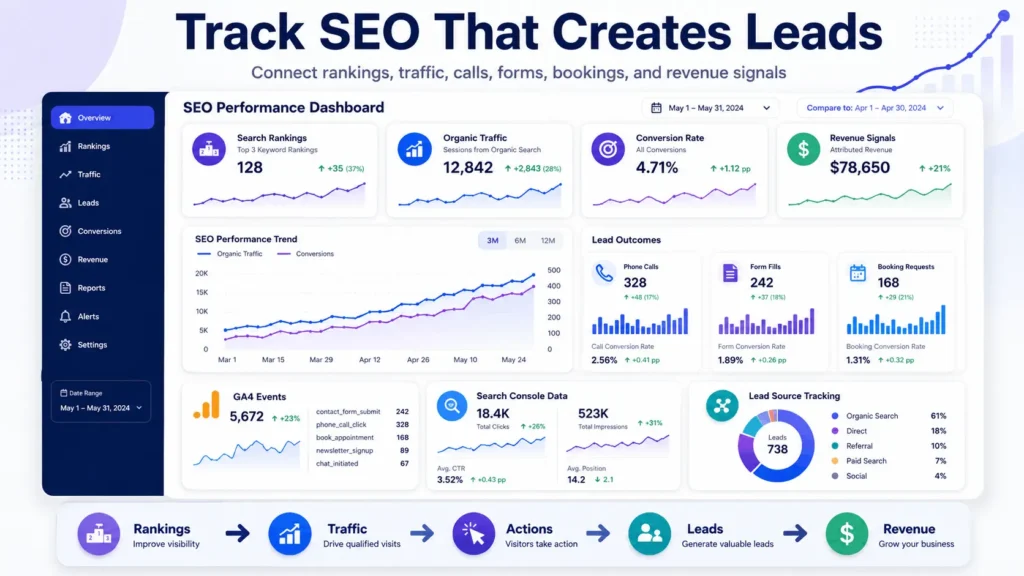
A small business SEO checklist is incomplete without measurement. Rankings alone do not show whether SEO is working. A page can rank and still fail commercially if the call-to-action is weak, the form breaks, or the wrong audience lands on the page.
Set up tracking for:
- Google Search Console queries and indexing data.
- Google Analytics 4 traffic and conversion events.
- Phone calls from organic search.
- Contact form submissions.
- Booking requests.
- Driving direction requests for local businesses.
- CRM lead source attribution.
Website Architecture Checks That Affect SEO
Platform decisions can affect SEO as a site grows. Poor structure, excessive plugins, or unnecessary complexity can make content, integrations, and performance harder to manage.
| Decision | Works Well When | Risk When Misused |
|---|---|---|
| WordPress | You need flexible content, service pages, SEO control, and editorial workflows | Too many plugins create speed, security, and maintenance problems |
| Headless WordPress | You need frontend performance, custom UX, or multi-channel content delivery | Development and maintenance become more complex |
| No-code tools | You need simple landing pages or quick validation | Scaling integrations, permissions, and SEO structure can become difficult |
| Custom SaaS platform | You need multi-tenant logic, subscriptions, RBAC, audit logs, and workflows | Requires stronger planning, testing, monitoring, and long-term support |
| Microservices | Teams need independent services, queues, APIs, and event-driven scaling | Operational overhead increases if the team is not ready |
Where AI Automation Fits Into Small Business SEO
AI automation can support keyword clustering, internal link suggestions, content briefs, CRM tagging, review-response drafts, and reporting summaries, but it should not replace human judgment.
AI workflows need validation. Avoid publishing pages, changing metadata, or updating schema automatically without human review and clear approval steps.
When Technical SEO Support Becomes Necessary
Technical support becomes relevant when simple SEO edits are no longer enough. Common signs include slow WordPress templates, plugin conflicts, poor tracking, duplicate service pages, weak Core Web Vitals, checkout issues, or broken CRM handoffs.
In those cases, SEO improvement may require template cleanup, caching, CDN optimization, structured data fixes, database cleanup, integrations, or long-term maintenance. FiliCode’s website support services can help when SEO performance depends on ongoing technical work.
30-Day Small Business SEO Checklist Execution Plan
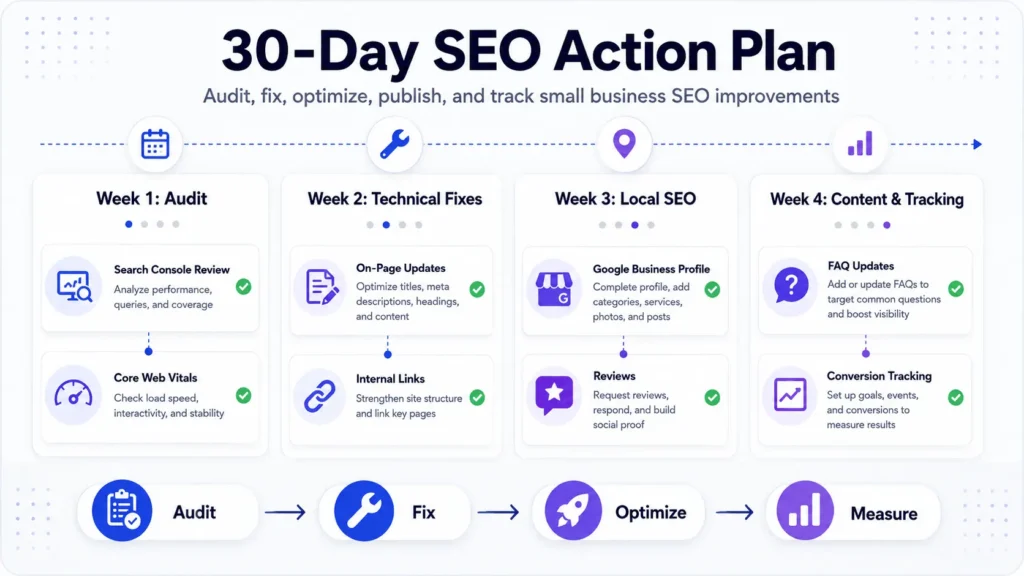
A practical small business SEO checklist should turn into action. Start with the areas that affect visibility and lead capture fastest.
Week 1: Audit and Baseline
Review Google Search Console, GA4, indexed pages, sitemap health, broken links, Core Web Vitals, rankings, and conversion tracking. Prioritize queries and pages with strong impressions, useful positions, and low CTR.
Week 2: Technical and On-Page Fixes
Fix titles, meta descriptions, headings, internal links, image alt text, redirects, slow templates, and crawl issues. Prioritize pages closest to revenue.
Week 3: Local SEO and Reputation
Update Google Business Profile, correct NAP consistency, improve citations, request reviews, and strengthen location pages.
Week 4: Content and Reporting
Publish supporting content, refresh weak pages, add FAQs, connect internal links, and create a monthly reporting view that includes traffic, rankings, leads, and conversion actions.
FAQs
How much does SEO cost for a small business?
Pricing depends on website condition, competition, locations, content needs, and technical complexity. A small business with a clean website may need focused monthly support, while a site with crawl issues, slow templates, and poor tracking needs a deeper technical cleanup first.
How long does a small business SEO checklist take to implement?
A basic small business SEO checklist can be reviewed in a few days, but proper implementation usually takes 30 to 90 days. Technical fixes, local citations, content updates, and reporting setup often require staged work.
Can SEO scale with WordPress?
Yes, WordPress can scale well when the site has clean templates, controlled plugins, optimized hosting, caching, CDN support, structured content, and proper maintenance. Problems usually come from poor architecture, not WordPress itself.
Do small businesses need technical SEO or only local SEO?
Most need both. Local SEO helps with maps, reviews, citations, and location relevance. Technical SEO makes sure the website loads fast, gets indexed, supports structured data, and captures leads reliably.
What are the biggest SEO mistakes small businesses make?
The most common mistakes are publishing disconnected blog posts, ignoring page speed, using duplicate location pages, failing to track conversions, neglecting Google Business Profile, and treating SEO as a one-time setup.
When should a business hire professional SEO support?
Professional support makes sense when rankings are stuck, traffic is not converting, technical issues keep returning, competitors are stronger, or the business needs a structured plan across content, local SEO, technical fixes, and reporting.
Conclusion: Turn the Small Business SEO Checklist Into Action
The value of a small business SEO checklist comes from consistent action: clear page structure, reliable technical performance, useful content, accurate local signals, clean analytics, and practical conversion tracking.
Warning signs are easy to spot. Rankings move but leads do not. Pages are indexed but not clicked. The website slows down after every plugin update. Location pages look the same. Forms fail silently. Reports show traffic but not revenue impact.
When those problems appear, adding more content is not enough. Review architecture, tracking, internal links, local visibility, and maintenance first. If the website becomes a bottleneck, stronger WordPress engineering, integrations, or ongoing technical support may be the next practical step.
For businesses that want a technical review before scaling SEO work, discuss your project with FiliCode and start with the areas that affect visibility, reliability, and qualified inquiries first.