








Contents
- Quick Summary: What decision-makers should prioritize
- 9 best graphic design portfolio websites and platform options
- Hosted vs owned graphic design portfolio websites
- How graphic design portfolio websites work in production
- Workflow architecture for graphic design portfolio websites
- Performance, media, SEO, and maintainability bottlenecks
- Monolith, headless, no-code, or custom: what works?
- What should a strong portfolio contain?
- Where Filicode fits when off-the-shelf platforms stop fitting
- Frequently asked questions
- How much do graphic design portfolio websites cost?
- How long does it take to build a graphic design portfolio website?
- Can graphic design portfolio websites scale?
- Is WordPress better than Behance or Dribbble for a portfolio?
- What is the migration risk when changing portfolio platforms?
- How many projects should a graphic design portfolio include?
- Conclusion: choose for ownership and operations, not only appearance
A portfolio can look polished and still fail under real business use. Slow image delivery, weak mobile layouts, limited SEO control, brittle contact forms, and platform lock-in all reduce the value of graphic design portfolio websites once they become part of a lead-generation workflow. The best choice is not the platform with the most templates; it is the one that matches your need for ownership, speed, discoverability, integrations, and maintenance.
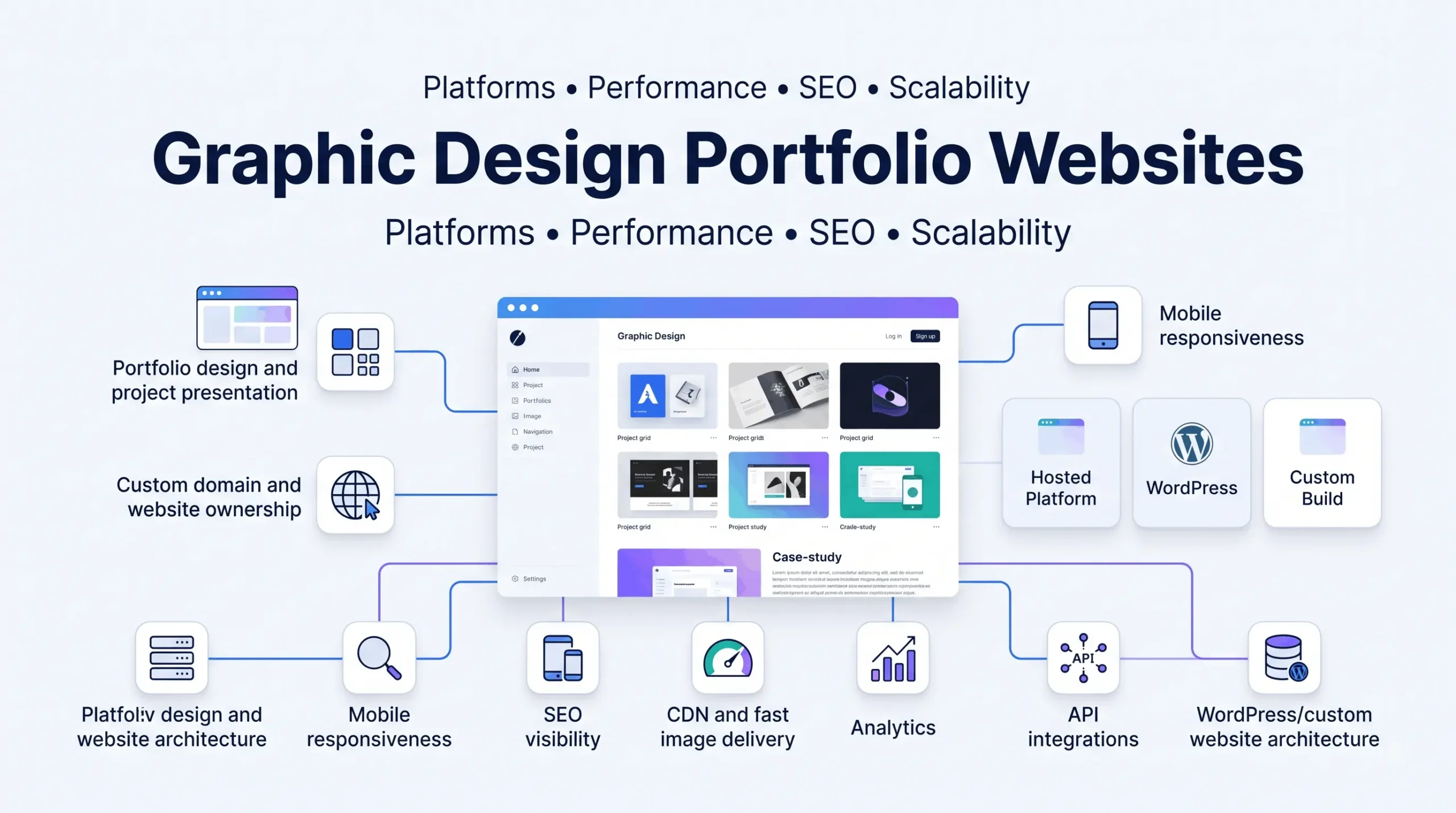
Graphic design portfolio websites are online systems for presenting design work, explaining process, building professional credibility, and converting visitors into clients, employers, or collaborators. A strong implementation combines visual presentation with fast media delivery, clear case studies, measurable conversion paths, and enough technical control to evolve without rebuilding the site every year.
Quick Summary: What decision-makers should prioritize
- Choose graphic design portfolio websites based on ownership, portability, performance, SEO control, and conversion workflow rather than template appearance alone.
- Community platforms such as Behance and Dribbble improve discovery, but an owned domain provides stronger control over branding, analytics, structured content, and lead capture.
- Image-heavy portfolios usually hit performance limits at the media layer before the database layer, so responsive images, compression, CDN caching, and disciplined upload sizes matter early.
- Hosted builders reduce maintenance overhead; self-hosted WordPress or custom builds create more flexibility but add deployment, security, plugin, and observability responsibilities.
- Headless architecture is useful when frontend flexibility or multi-channel delivery justifies it; for most portfolio sites, it adds operational complexity without solving the primary business problem.
9 best graphic design portfolio websites and platform options
The best graphic design portfolio websites are not identical because designers optimize for different outcomes. Recruiter discovery, freelance lead generation, brand ownership, ecommerce, and long-term SEO require different platform capabilities. The nine options below are compared by practical fit, ownership, extensibility, and production trade-offs rather than feature counts alone.
| Platform | Best fit | Main trade-off |
|---|---|---|
| Adobe Portfolio | Creative Cloud users needing a fast, simple portfolio | Limited extensibility compared with a full CMS |
| Behance | Community discovery and recruiter visibility | Weak ownership and conversion control |
| Dribbble | Short-form visual work and professional networking | Less suited to deep case studies |
| Wix | Fast no-code publishing | Platform constraints can appear as requirements grow |
| Squarespace | Design-led templates with managed hosting | Custom workflows are constrained by the platform |
| Webflow | High visual control with managed infrastructure | Complex builds require stronger implementation discipline |
| Portfoliobox | Portfolio-first site creation | Smaller ecosystem than general website platforms |
| Cargo | Experimental creative presentation | Not always ideal for structured business funnels |
| WordPress | Ownership, SEO, content, integrations, and extensibility | Requires maintenance and technical governance |
Other graphic design portfolio websites examples include Carbonmade, Coroflot, Fabrik, and DeviantArt. They can fit specific creative communities or lightweight publishing needs, but the same decision criteria still apply: who owns the domain, how work can be exported, how visitors discover it, and how easily the portfolio connects to the rest of the business.
Hosted vs owned graphic design portfolio websites
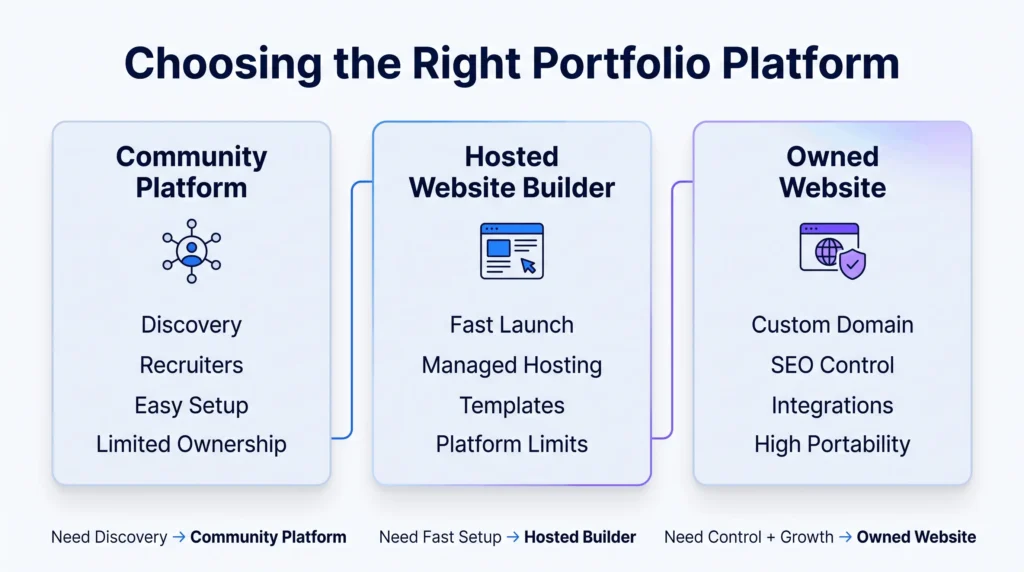
Hosted portfolio platforms are multi-tenant SaaS products. The provider manages infrastructure, SSL, updates, storage rules, and much of the frontend delivery. Support burden is lower, but customization, portability, billing, and integration depth remain bounded by the platform.
An owned website changes the control boundary. A custom domain name, CMS, analytics stack, SEO configuration, forms, CRM integration, ecommerce, and content model can be governed directly. For businesses that need a custom implementation rather than a profile-style portfolio, an experienced web design and development team can coordinate information architecture, visual design, performance, SEO, and technical implementation as one system.
| Feature | Hosted portfolio platform | Owned WordPress or custom site |
|---|---|---|
| Launch speed | Usually fast | Depends on design and engineering scope |
| Maintenance | Mostly vendor-managed | Owner or development team manages updates and hosting |
| SEO control | Platform-dependent | Broad control over metadata, schema, content, and technical SEO |
| Integrations | Limited to supported apps and APIs | Custom REST APIs, webhooks, CRM, analytics, and automation are possible |
| Portability | Export options vary | Higher when content and infrastructure are controlled |
| Operational cost | Predictable subscription, with feature limits | Hosting plus maintenance and engineering overhead |
How graphic design portfolio websites work in production
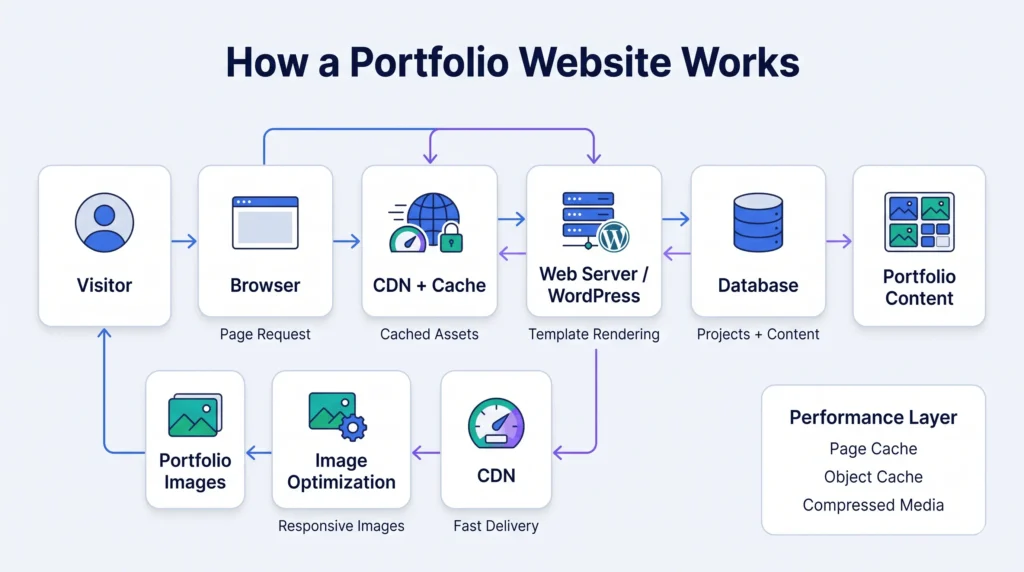
The visible portfolio grid is only the frontend layer. A production request typically moves from the visitor’s browser to DNS, a CDN or edge cache, then to the hosting origin or application. Static CSS, JavaScript, thumbnails, and responsive image variants should be served from cache whenever possible. The origin should do as little repeated work as possible.
For WordPress-based graphic design portfolio websites, projects are commonly modeled as posts, pages, or custom post types with structured fields for role, client, services, images, video, and outcomes. WordPress then queries the database, renders templates, and returns HTML. Full-page caching can bypass much of this path for anonymous traffic, while Redis object caching can reduce repeated database work on more dynamic installations.
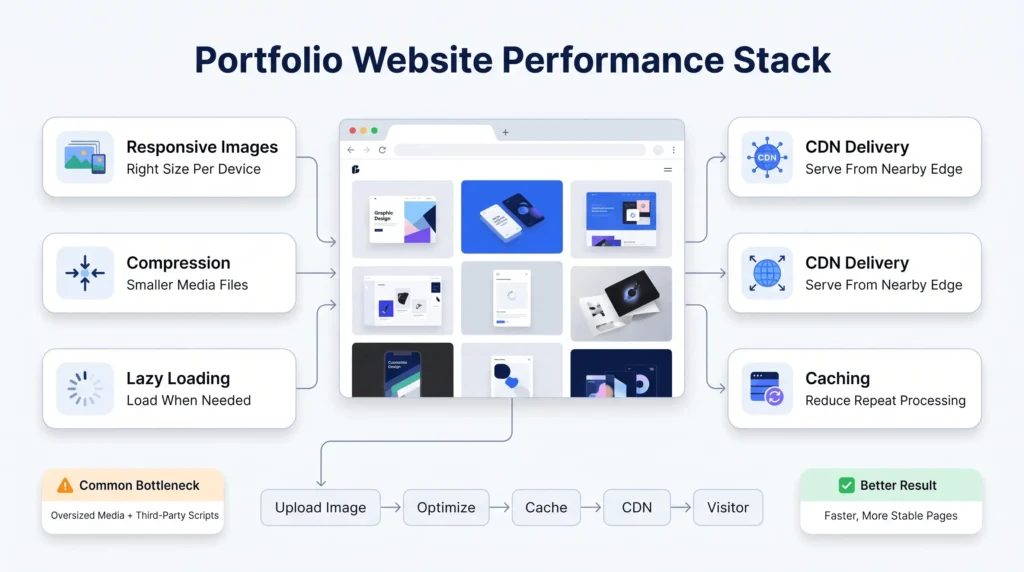
In production, the database is often blamed too early. On a portfolio site, oversized images, unoptimized video, third-party scripts, font loading, and poorly built galleries commonly degrade page load speed before database scaling becomes the first constraint. A website design and development approach should treat performance budgets as part of the design system, not as a cleanup task after launch.
Workflow architecture for graphic design portfolio websites
A credible lead workflow is more than a contact form sending email. The frontend validates obvious field errors, the backend validates again, applies spam controls, stores or forwards the request, and returns a deterministic success state. If a CRM or project-management platform is involved, the integration should use an API or webhook with logging, retry rules, and idempotency where duplicate submissions could create duplicate records.
For asynchronous work, a queue is safer than making the visitor wait for every downstream system. A form submission can be accepted first, then a background job can notify the CRM, send an email, and record analytics. In production, this fails when teams assume a webhook was delivered simply because the originating page returned HTTP 200. Delivery attempts, failures, and retries need to be observable.
Authentication and RBAC also matter when multiple people manage the portfolio. Designers may need content editing access without plugin, billing, or server permissions. Password-protected galleries should protect unreleased work at the application level, while admin accounts should use strong authentication and least privilege. Shared administrator credentials create avoidable audit and support problems.
Performance, media, SEO, and maintainability bottlenecks
Graphic design portfolio websites are unusually media-sensitive. High-resolution work has to remain sharp without forcing every mobile visitor to download desktop-sized assets. Responsive image markup, modern formats where supported, compression, lazy loading below the fold, and a content delivery network reduce transfer cost while preserving presentation quality.
Accessibility also affects implementation quality. Contrast, keyboard navigation, alternative text, meaningful link labels, and predictable focus behavior should be designed into templates. The Web Content Accessibility Guidelines provide a useful standards reference when evaluating interface decisions.
SEO visibility depends on more than a portfolio grid layout. Each project should have crawlable text that explains context, role, constraints, process, and outcome. A case study gives search engines and prospective clients more information than a wall of images. For teams refining conversion paths and interaction patterns, UI and UX design services are directly relevant because portfolio usability is part of how expertise is evaluated.
WordPress introduces its own maintenance realities: theme updates, plugin conflicts, PHP compatibility, backups, security hardening, and scheduled jobs. WP-Cron is traffic-driven by default, so time-sensitive background processing may need a real server cron or external scheduler. Technical debt often appears as overlapping plugins, undocumented custom hooks, and fragile deployment habits; database contention is less common at portfolio scale than avoidable query and media overhead. On higher-traffic builds, custom WordPress development can reduce plugin dependence and move critical behavior into controlled code and custom Gutenberg blocks.
Monolith, headless, no-code, or custom: what works?
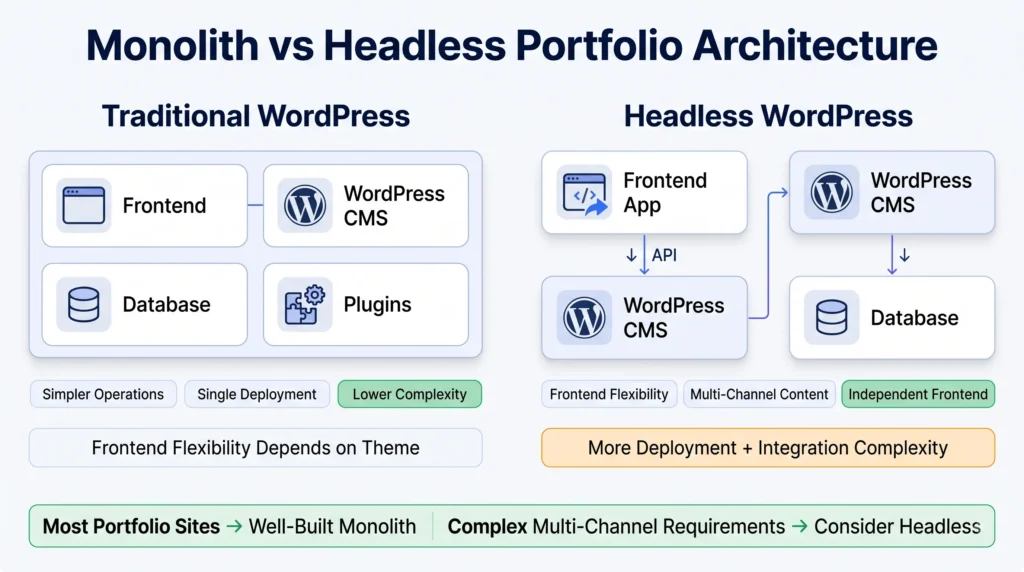
Most graphic design portfolio websites do not need microservices. A well-built monolith is easier to deploy, debug, secure, and maintain. Splitting a portfolio into separate content, media, search, authentication, and frontend services adds network failure modes, deployment coordination, and observability work that rarely creates proportional value at this scale.
Headless WordPress can be justified when the frontend needs highly custom interactions, multiple channels consume the same content API, or a team already operates a modern JavaScript delivery stack. The trade-off is real: preview workflows, caching, authentication, build pipelines, and deployment become more complex. Faster frontend potential does not automatically mean lower operational cost.
No-code tools are strongest when speed and low maintenance matter more than custom workflows. Engineered platforms become valuable when the portfolio must integrate with CRM automation, gated client areas, ecommerce, analytics pipelines, or a broader content strategy. Cheap development becomes expensive when every change requires a workaround, but custom engineering also creates maintenance obligations that should be budgeted from the start.
What should a strong portfolio contain?
The best graphic design portfolio websites examples usually make judgment easy. They show a focused selection of projects, explain the designer’s role, and expose enough process to prove that the final visual was not accidental. Five to twelve substantial case studies is often more useful than dozens of weak entries, although the right number depends on discipline and career stage.
- Lead with the work most aligned to the clients or roles you want next.
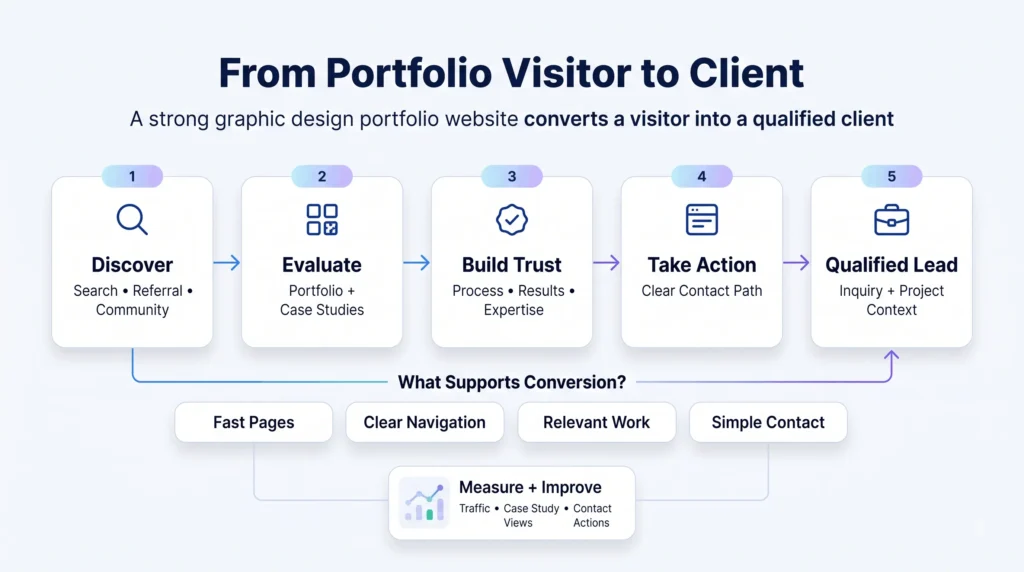
- Explain the problem, constraints, design decisions, and measurable or observable outcome.
- Show selected work-in-progress when it demonstrates reasoning rather than clutter.
- Use clear contact paths, analytics, and event tracking so the portfolio can be improved from evidence.
For freelance graphic design portfolio websites, conversion matters more than raw traffic. A visitor should understand services, fit, credibility, and the next step without hunting through navigation. This is where web design’s role in business growth becomes practical: a portfolio is part brand system, part sales interface, and part operational infrastructure.
Where Filicode fits when off-the-shelf platforms stop fitting
Hosted platforms are often the right starting point. The threshold for custom work appears when graphic design portfolio websites need business-specific data models, API integrations, controlled publishing workflows, WooCommerce or digital-product sales, private client areas, performance tuning, or automation that a builder cannot support cleanly.
Filicode’s relevant work spans custom software development, WordPress development, WooCommerce development, AI automation, API integrations, system architecture, SaaS development, and performance optimization. The useful question is whether architecture control will reduce recurring operational friction enough to justify ownership and maintenance.
For a WordPress route, cost should be evaluated as build plus lifecycle. Hosting, plugin licensing, security, backups, monitoring, content changes, and future integrations all affect total cost. A practical breakdown of WordPress website cost is more useful than comparing only the initial build quote.
Frequently asked questions
How much do graphic design portfolio websites cost?
Graphic design portfolio websites may use free tiers or monthly subscriptions, while a custom site adds design, development, hosting, and maintenance. Budget for the full lifecycle: domain, platform or hosting fees, premium extensions, backups, security, and future changes. Exact cost depends on integrations and content complexity.
How long does it take to build a graphic design portfolio website?
A simple hosted portfolio can be assembled in days once content is ready. A custom WordPress implementation commonly requires several weeks when discovery, design, responsive development, content migration, testing, analytics, and launch controls are included. Complex integrations or headless architecture extend the timeline.
Can graphic design portfolio websites scale?
Yes. Most portfolio sites scale well with page caching, CDN delivery, optimized images, disciplined plugins, and reliable hosting. Database scaling is usually not the first issue; media payloads, third-party scripts, and uncached dynamic features often become bottlenecks earlier.
Is WordPress better than Behance or Dribbble for a portfolio?
WordPress provides stronger ownership, SEO control, structured content, analytics, and integration flexibility. Behance and Dribbble provide community discovery with less operational overhead. Many designers use both: an owned website as the primary property and community profiles as distribution channels.
What is the migration risk when changing portfolio platforms?
The main migration risks are lost URLs, missing metadata, broken images, reduced search visibility, and incomplete content exports. Preserve URL mappings with redirects, export original media, recreate metadata, validate analytics, and crawl the new site before and after launch.
How many projects should a graphic design portfolio include?
A focused portfolio often works well with roughly 5 to 12 strong case studies, but quality and relevance matter more than a fixed count. Each project should demonstrate role, reasoning, execution, and outcome instead of functioning as an isolated image gallery.
Conclusion: choose for ownership and operations, not only appearance
The warning signs are operational: editors avoid updates because the workflow is fragile, image-heavy pages slow down, forms fail without visibility, SEO changes are blocked by the platform, integrations require manual copying, or migration feels impossible because the work is trapped in a vendor-specific structure. At that point, graphic design portfolio websites have become systems problems rather than template problems.
Custom development should be considered when those constraints affect revenue, recruiting, publishing speed, or support effort. Start by documenting the current bottleneck, required integrations, ownership requirements, performance targets, and maintenance capacity. The strongest graphic design portfolio websites are not the most technically elaborate; they are the ones whose architecture stays proportionate to the business they support.