
Contents
- Quick Summary:
- What Should a WordPress Web Development Agency Chicago Actually Deliver?
- How Does WordPress Architecture Affect Growth?
- Frontend, Backend, Database, and Queue Responsibilities
- WordPress Web Development Agency Chicago Project Workflow
- How a WordPress Web Development Agency Chicago Controls Delivery
- Production Workflows for Leads, Ecommerce, and Integrations
- WordPress, Headless, or a Separate SaaS Platform?
- Cheap Development vs Maintainable Engineering
- Performance, Technical SEO, and AI Search Visibility
- Where Filicode Fits When WordPress Becomes Operational Infrastructure
- Frequently Asked Questions
- How much does a wordpress web site development agency chicago team cost to hire?
- How long does a custom WordPress project take?
- Can WordPress scale for high traffic and complex operations?
- Can a WordPress Web Development Agency Chicago integrate CRM, ERP, and payment systems?
- What are the main risks during a WordPress migration?
- Does a custom WordPress website need ongoing maintenance?
- Conclusion: Build for the Operating Reality
A website can look polished and still create operational problems. Slow page rendering, fragile plugins, failed CRM sync, unreliable form delivery, and difficult content editing all increase cost after launch. A WordPress Web Development Agency Chicago businesses can trust should solve those system problems before adding visual complexity.
A strong agency designs WordPress as a maintainable business platform. That means clean theme architecture, controlled plugin usage, reliable integrations, measurable performance, secure access, and an editing workflow that marketing teams can use without breaking layouts. The result should support lead generation, content operations, ecommerce, and future product changes without requiring a rebuild every year.
Quick Summary:
- A scalable WordPress build starts with architecture, content models, integration requirements, and ownership rules before design production begins.
- Critical workflows such as lead routing, checkout, payments, and CRM synchronization need validation, logs, retries, and failure alerts.
- Performance depends on efficient code, database discipline, page caching, object caching, CDN delivery, and controlled third-party scripts.
- Headless WordPress is useful for specific application and multi-channel requirements, but it adds deployment, preview, caching, and maintenance complexity.
- The cheapest build is rarely the lowest-cost system when updates, plugin conflicts, security gaps, and undocumented custom code are included.
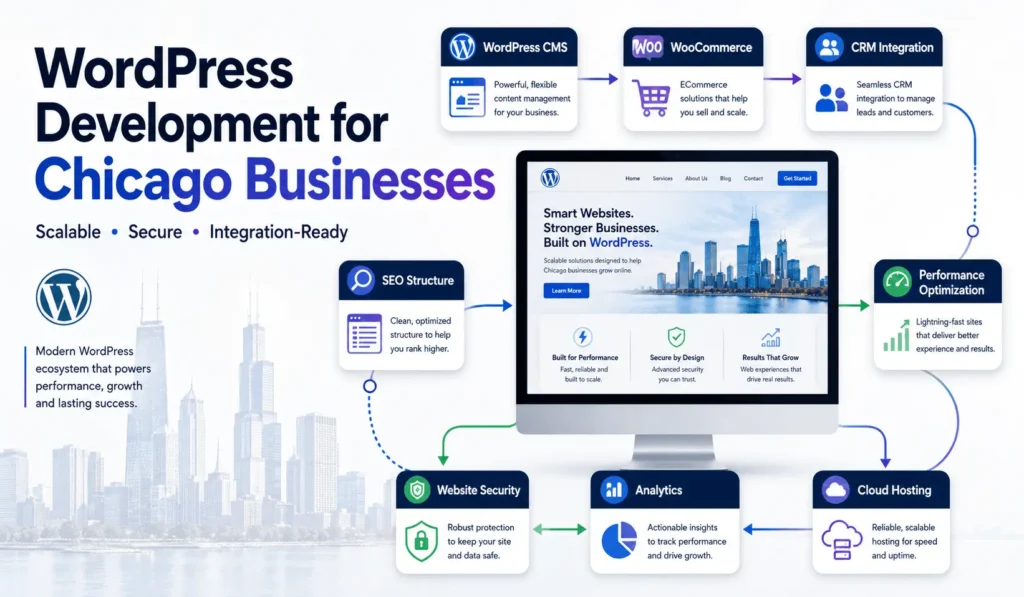
What Should a WordPress Web Development Agency Chicago Actually Deliver?
The deliverable is not a collection of pages. It is a working system that connects users, content, data, sales tools, analytics, and internal teams. A serious WordPress development partner in Chicago should define how each part behaves in production, not only how it appears in a design file.
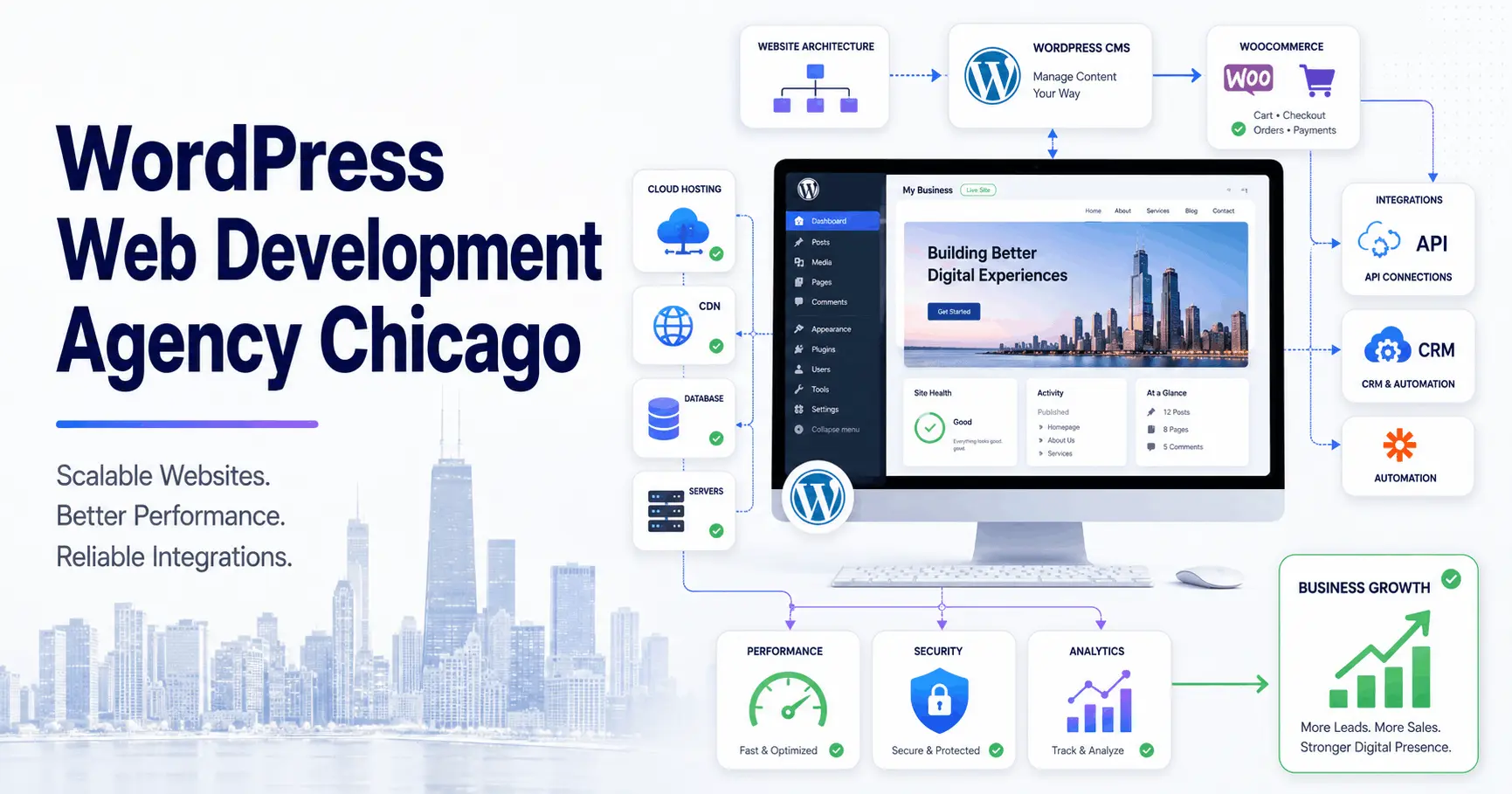
For a lead generation website, that includes page templates, reusable Gutenberg blocks, form validation, spam controls, CRM field mapping, campaign attribution, consent handling, notification rules, and a recovery path when an external service is unavailable. For WooCommerce, it also includes cart behavior, checkout states, payment webhooks, inventory updates, refunds, taxes, shipping logic, and order reconciliation.
The agency should also document what remains standard WordPress, what becomes custom code, and what should run outside WordPress. Commodity functions can stay plugin-based. Business-critical rules often belong in a custom plugin, integration service, or queue worker where they can be tested and monitored.
How Does WordPress Architecture Affect Growth?
WordPress begins as a monolithic application: routing, rendering, content management, plugins, and database access operate inside one platform. That model is efficient for many business websites because deployment and editorial workflows remain simple. Problems appear when every new requirement is added through another plugin or synchronous API call.
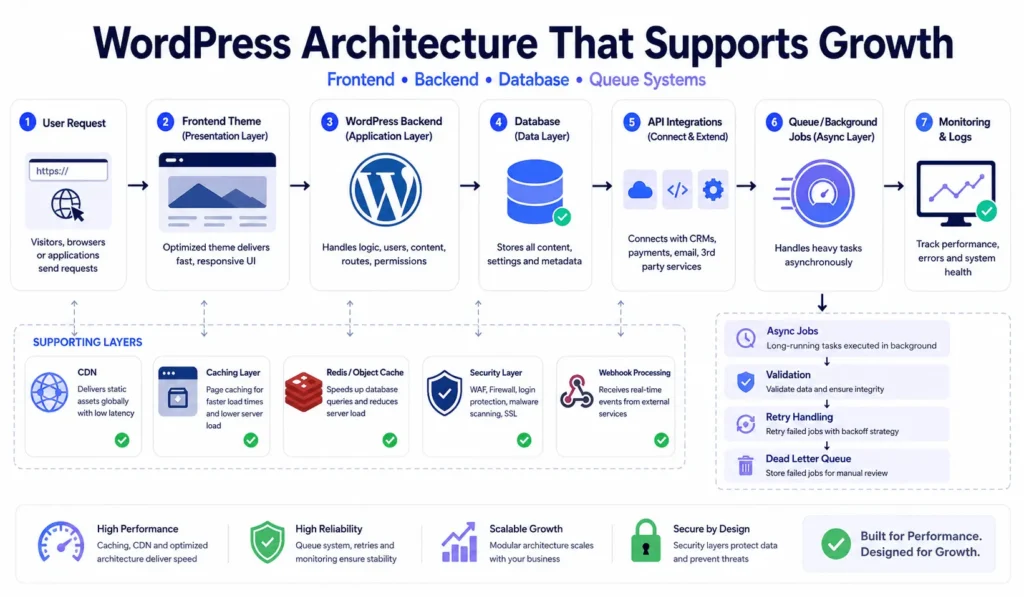
A maintainable architecture separates concerns without creating unnecessary infrastructure. Presentation logic belongs in the theme. Business rules belong in custom plugins or services. Long-running jobs such as imports, report generation, CRM synchronization, and bulk email preparation should run asynchronously rather than blocking a customer request.
Frontend, Backend, Database, and Queue Responsibilities
The frontend should validate basic input, render quickly, and avoid loading scripts that a page does not use. The backend must repeat validation, sanitize data, enforce permissions, write durable records, and trigger downstream work. The database should use indexed queries, predictable data models, and retention rules for logs, sessions, transients, and abandoned records.
Queue workers handle work that may be slow or unreliable. Each job needs an idempotency key so retries do not create duplicate leads, orders, invoices, or support tickets. A failed job should record the error, retry with limits, and alert an operator when human review is required. WordPress cron can schedule work, but traffic-dependent execution is unsuitable for time-sensitive processes unless it is connected to a real server cron or dedicated worker.
The official WordPress REST API documentation explains the platform interface used for structured application communication. In production, the API still needs authentication, rate controls, validation, logging, and version-aware integration design.
WordPress Web Development Agency Chicago Project Workflow
A reliable project workflow reduces ambiguity before code reaches production. Discovery should identify user journeys, content types, integrations, access roles, traffic patterns, reporting needs, migration risks, and non-functional requirements such as uptime, response time, recoverability, and security.
How a WordPress Web Development Agency Chicago Controls Delivery
- Architecture: define theme boundaries, custom plugins, APIs, data ownership, caching, background jobs, and hosting responsibilities.
- Content system: create reusable Gutenberg blocks, templates, custom fields, editorial permissions, and governance rules.
- Engineering: use version control, separate environments, code review, automated checks, and reversible database changes.
- Quality assurance: test forms, permissions, checkout, webhooks, redirects, analytics, accessibility, mobile behavior, and browser compatibility.
- Launch: prepare backups, DNS steps, rollback criteria, cache warming, monitoring, and post-release validation.
A website migration requires equal discipline. URLs, metadata, structured data, media, forms, analytics, and historical content must be mapped before cutover. The technical approach described in custom WordPress website development for scalable growth is useful because migration decisions affect future maintainability as much as launch accuracy.
Production Workflows for Leads, Ecommerce, and Integrations
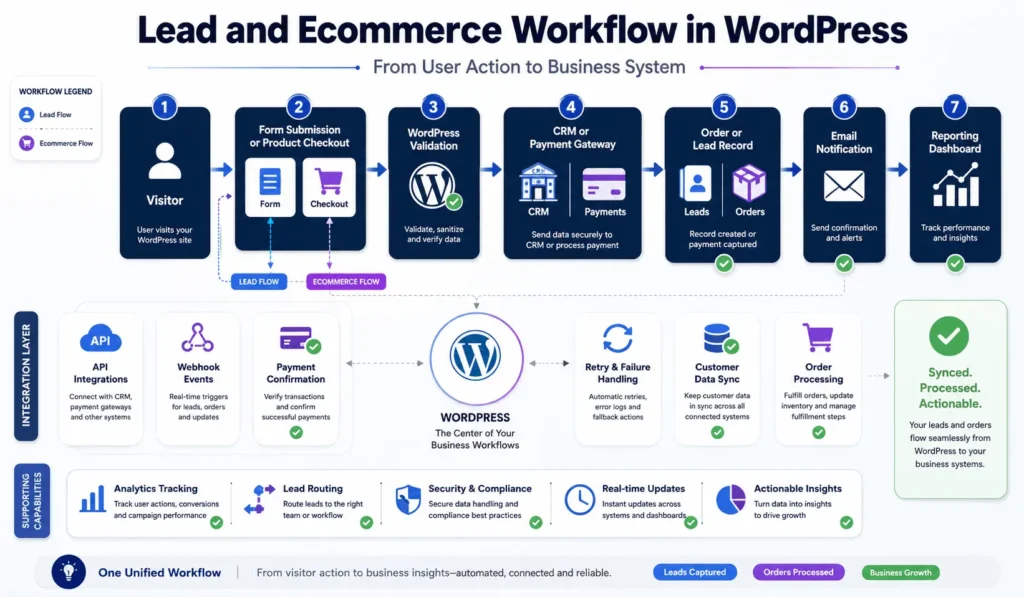
Consider a quote form connected to HubSpot or Salesforce. The browser validates required fields, but the server must validate again, store the submission first, and then dispatch the CRM request. If the CRM is unavailable, the lead remains in WordPress or a durable queue and retries later. The user receives a valid response without waiting for multiple external systems.
A WooCommerce checkout follows a stricter state model. The order may begin as pending, move to processing after confirmed payment, then complete after fulfillment. Payment gateways usually communicate final status through webhooks. Those callbacks must be signature-verified, logged, processed idempotently, and reconciled against gateway records. A browser redirect alone is not reliable proof of payment.
Inventory, ERP, shipping, and tax integrations introduce more failure points. Real-time calls are appropriate only when the customer must have an immediate answer. Everything else should use queued synchronization, backoff retries, dead-letter review, and dashboards that show stale or failed records. This is where a custom WordPress development approach becomes more valuable than adding unrelated plugins.
WordPress, Headless, or a Separate SaaS Platform?
Architecture should match the operating model. Traditional WordPress is usually the best choice for content-led websites, service businesses, and many WooCommerce stores. Headless WordPress makes sense when the same content must serve several applications, the frontend needs application-level interaction, or deployment independence is worth the additional complexity.
| Feature | Traditional WordPress | Headless WordPress |
|---|---|---|
| Editorial workflow | Native preview and publishing are straightforward | Preview and publishing require frontend integration |
| Performance model | Server rendering plus page and object caching | Frontend framework, API caching, and separate hosting |
| Operational complexity | One primary application and deployment path | Multiple repositories, deployments, and monitoring layers |
| Best fit | Marketing sites, publishing, service websites, many stores | Multi-channel content and application-like interfaces |
| Main risk | Plugin and theme bloat | Higher engineering and maintenance overhead |
A separate SaaS platform becomes appropriate when the product requires strong tenant isolation, subscription billing, granular RBAC, audit logs, real-time events, or complex domain logic that should not depend on WordPress request execution. WordPress can still manage public content while the application runs independently through secure APIs. Microservices should be introduced only when independent scaling, deployment, or team ownership justifies the added network, tracing, and operational overhead. WordPress Multisite fits centrally governed site networks, but it needs careful tenant boundaries, plugin governance, and deployment control.
Cheap Development vs Maintainable Engineering
Low-cost delivery often removes planning, testing, documentation, and post-launch responsibility. The site may work during a demo but become difficult to update because critical logic is placed inside a theme, plugins overlap, credentials are shared, and no one can explain how data moves between systems.
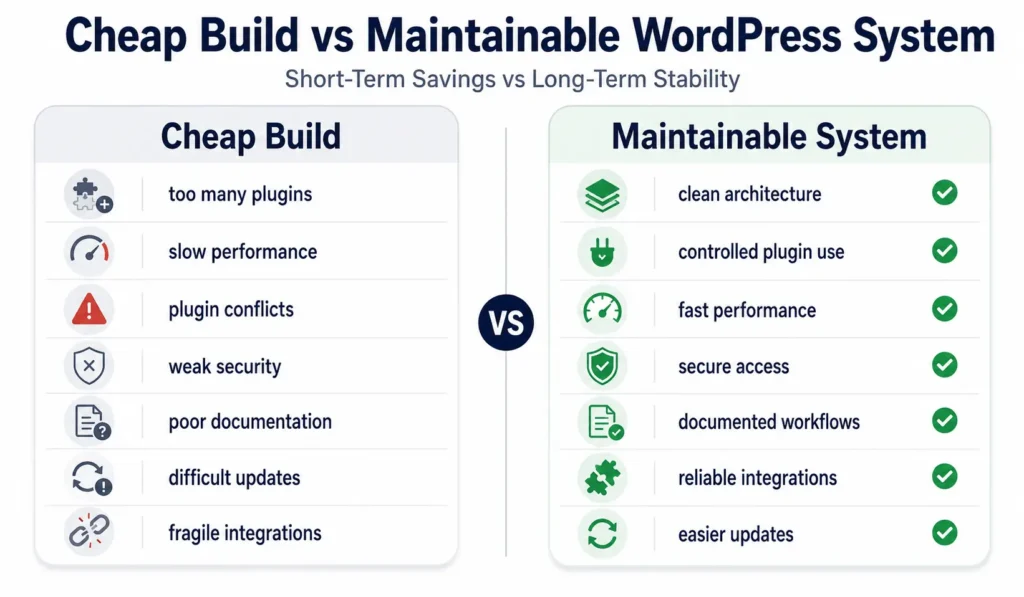
| Feature | Cheap Build | Maintainable System |
|---|---|---|
| Plugin strategy | Install a plugin for each request | Use proven plugins selectively and custom code for critical rules |
| Deployment | Edit production directly | Use staging, version control, review, backup, and rollback |
| Integrations | Synchronous calls with silent failures | Validation, queues, logs, retries, and alerts |
| Performance | Add a cache plugin after launch | Control queries, assets, CDN, object cache, and third-party scripts |
| Ownership | Undocumented code and unclear licenses | Documented codebase, access, dependencies, and handoff |
The best hiring questions focus on decisions and failure handling. Ask how the team handles plugin conflicts, database changes, broken webhooks, traffic spikes, credential rotation, and rollback. A portfolio shows presentation quality; a technical review shows whether the team understands production. This guide to choosing a good WordPress developer covers the operational signals worth checking.
Performance, Technical SEO, and AI Search Visibility
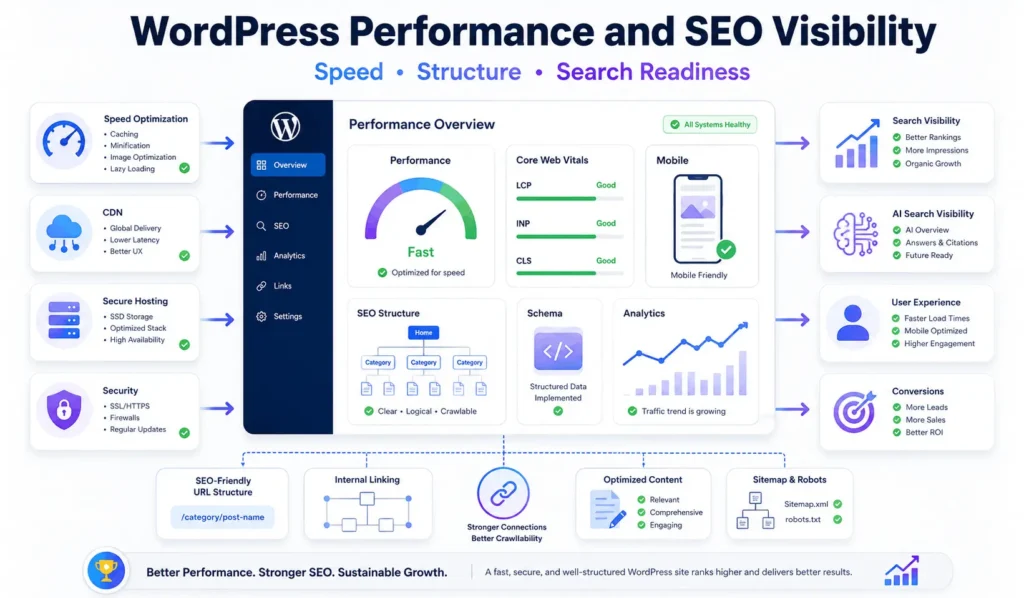
Website speed is an architectural outcome. Page caching reduces repeated rendering, Redis object caching reduces database work, a CDN serves static files closer to visitors, and image optimization limits payload size. These controls fail when a theme loads unnecessary assets, plugins issue expensive queries, or third-party scripts dominate the main thread.
Google describes Core Web Vitals as real-world measures of loading performance, interactivity, and visual stability in its Core Web Vitals guidance. A Chicago business site should measure field data, not rely only on a fast developer laptop or a single lab test.
Technical SEO also depends on crawlable architecture, stable URLs, logical internal links, clean heading structure, canonical rules, XML sitemaps, schema markup, and controlled indexation. Local SEO pages should represent real services and real geographic relevance rather than mass-produced neighborhood variants. A Google Business Profile, consistent business data, reviews, and locally useful content support visibility more safely than doorway pages.
AI search visibility follows the same quality principles. Clear definitions, self-contained answers, verified claims, named processes, and structured sections are easier for answer engines to interpret. Schema can clarify entities, but it cannot compensate for thin content or contradictory information.
Where Filicode Fits When WordPress Becomes Operational Infrastructure
Filicode works across WordPress development, WooCommerce engineering, custom software, API integrations, SaaS architecture, AI automation, performance optimization, and technical SEO. That combination is relevant when a website connects directly to sales, payments, support, reporting, or internal operations.
AI automation should be introduced with the same controls as any other integration. An orchestration layer should define prompts, tools, allowed actions, validation, confidence thresholds, human approval, fallbacks, and output monitoring. Customer support summarization may be low risk; changing account data, issuing refunds, or updating contractual records requires stronger authorization and human review.
Off-the-shelf tools remain useful when workflows fit their assumptions. Custom development becomes reasonable when teams repeatedly export data, correct failed syncs, duplicate work across systems, or avoid improvements because the platform is fragile. Architecture-focused decisions reduce future support cost by making failures visible and changes safer.
Frequently Asked Questions
How much does a wordpress web site development agency chicago team cost to hire?
Cost for a wordpress web site development agency chicago engagement depends on design scope, content models, WooCommerce requirements, integrations, migration complexity, performance targets, and ongoing support. A reliable estimate should follow technical discovery because a brochure site and an integration-heavy commerce platform carry very different implementation risks.
How long does a custom WordPress project take?
A focused business website may take several weeks, while a custom WooCommerce, membership, migration, or API-driven project can require several months. The timeline should include discovery, design, development, content preparation, integration testing, migration rehearsal, launch, and post-release validation.
Can WordPress scale for high traffic and complex operations?
Yes. WordPress can scale when the system uses disciplined plugin architecture, efficient database queries, full-page caching, Redis object caching, CDN delivery, asynchronous jobs, suitable hosting, and production monitoring. Scaling problems usually come from uncontrolled dependencies and synchronous workflows rather than WordPress alone.
Can a WordPress Web Development Agency Chicago integrate CRM, ERP, and payment systems?
A WordPress Web Development Agency Chicago can integrate CRM, ERP, payment, analytics, booking, and support systems through REST APIs, webhooks, custom plugins, and background workers. Reliable integrations require authentication, validation, idempotency, logs, retries, reconciliation, and alerts for failed records.
What are the main risks during a WordPress migration?
The main migration risks are changed URLs, lost metadata, broken redirects, missing media, incompatible plugins, incorrect structured data, damaged analytics, user account issues, and incomplete transactional data. A safe migration uses inventory, mapping, staging tests, backups, rehearsal, rollback criteria, and post-launch crawling.
Does a custom WordPress website need ongoing maintenance?
Yes. Ongoing maintenance should cover core and plugin updates, security review, backups, uptime checks, performance monitoring, integration logs, form testing, dependency compatibility, database cleanup, and release validation. Maintenance protects revenue workflows and reduces emergency repair costs.
Conclusion: Build for the Operating Reality
Warning signs are usually operational: pages slow down during campaigns, forms disappear, checkout becomes inconsistent, plugin updates create fear, data must be corrected manually, and teams cannot trust reports. At that point, another visual redesign will not solve the underlying problem.
A WordPress Web Development Agency Chicago decision should be based on architecture, failure handling, maintainability, and ownership. Start with a technical review of the current theme, plugins, hosting, database, integrations, analytics, security, and editorial workflow. Then separate quick fixes from structural work.
Custom development should be considered when off-the-shelf tools force repeated manual work or critical workflows cannot be monitored and tested. The practical next step is a scoped architecture plan that identifies what to keep, what to simplify, what to integrate, and what to rebuild before cost and risk increase further.