







Contents
- Quick Summary: What Decision-Makers Should Prioritize
- Which WooCommerce ERP Integration Approach Fits Your Store?
- What Is WooCommerce ERP Integration?
- How WooCommerce ERP Integration Works in Production
- WooCommerce ERP Integration Workflow from Checkout to ERP
- Inventory, Product, and Customer Synchronization
- Architecture Choices That Determine Reliability
- Monolith, Middleware, or Event-Driven Service
- APIs, Webhooks, Queues, and Scheduled Reconciliation
- HPOS, Plugin Architecture, and Database Load
- Top Platforms for WooCommerce ERP Integration
- Where WooCommerce ERP Integration Commonly Fails
- Security, Performance, and Operational Controls
- Implementation Plan for WooCommerce ERP Integration
- When Custom Engineering Becomes Necessary
- WooCommerce ERP Integration FAQs
- How much does WooCommerce ERP integration cost?
- How long does WooCommerce ERP integration take?
- Should we use WooCommerce ERP integration with iPaaS?
- Can WooCommerce ERP integration support real-time inventory?
- Is migration to a new ERP risky for WooCommerce stores?
- Does HPOS affect WooCommerce ERP integration?
- Build the Integration Around Operations, Not the Connector
WooCommerce ERP integration connects storefront activity with inventory, purchasing, accounting, fulfillment, and customer records. The hard part is keeping both systems accurate when payments fail, stock changes, refunds occur, APIs slow down, or warehouse updates overlap with checkout.
A dependable integration defines data ownership, processes changes asynchronously, validates payloads, and records failures for replay. Without those controls, automation moves errors faster and creates support work across ecommerce and back-office teams.
Quick Summary: What Decision-Makers Should Prioritize
- WooCommerce ERP integration should use explicit data ownership rules so product, inventory, order, customer, tax, and accounting records are not overwritten by competing systems.
- Real-time inventory sync needs queues, idempotency, retries, and monitoring; a direct synchronous API call during checkout is too fragile for critical operations.
- A pre-built connector is efficient for standard workflows, while iPaaS or custom API integration is safer when pricing, fulfillment, marketplaces, or approval rules are business-specific.
- HPOS compatibility must be tested across the connector, payment extensions, custom plugins, exports, and reporting tools before production activation.
- The integration should be treated as an operational product with ownership, logs, alerts, reconciliation, deployment controls, and a maintenance budget.
Which WooCommerce ERP Integration Approach Fits Your Store?
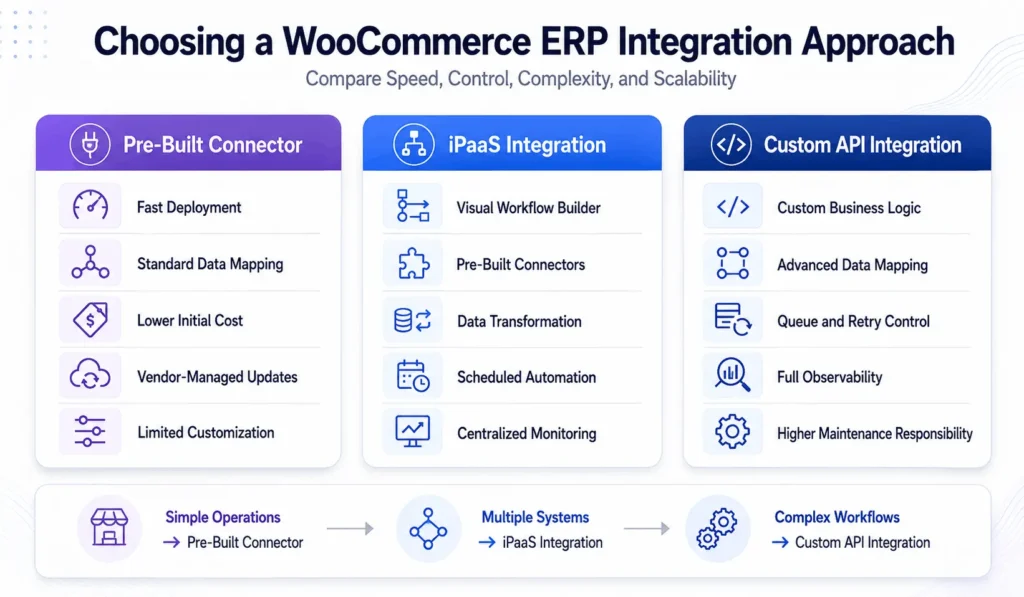
The first decision is architectural. Teams often select a connector by feature count, then discover it cannot represent their order states, warehouse rules, pricing, or financial model. WooCommerce ERP integration works best when the connection method matches volume, complexity, and operating capacity.
| Feature | Pre-Built Plugin or Connector | iPaaS or Custom Integration |
|---|---|---|
| Best fit | Standard catalog, order, customer, and stock flows | Complex pricing, warehouses, marketplaces, or approvals |
| Deployment speed | Faster when mappings already match | Slower because workflows and failure paths need design |
| Control | Limited to supported objects | Control over transformations, routing, retries, and observability |
| Maintenance | Vendor handles connector updates | Your team owns code, monitoring, and upgrades |
| Scaling limit | Can restrict high-volume or unusual processes | Scales further with disciplined engineering and operations |
There is no universally superior option. A custom integration introduces more engineering responsibility, while a connector introduces vendor dependency and configuration limits. A practical WooCommerce web design and engineering partner should assess the operating model before recommending either route.
What Is WooCommerce ERP Integration?
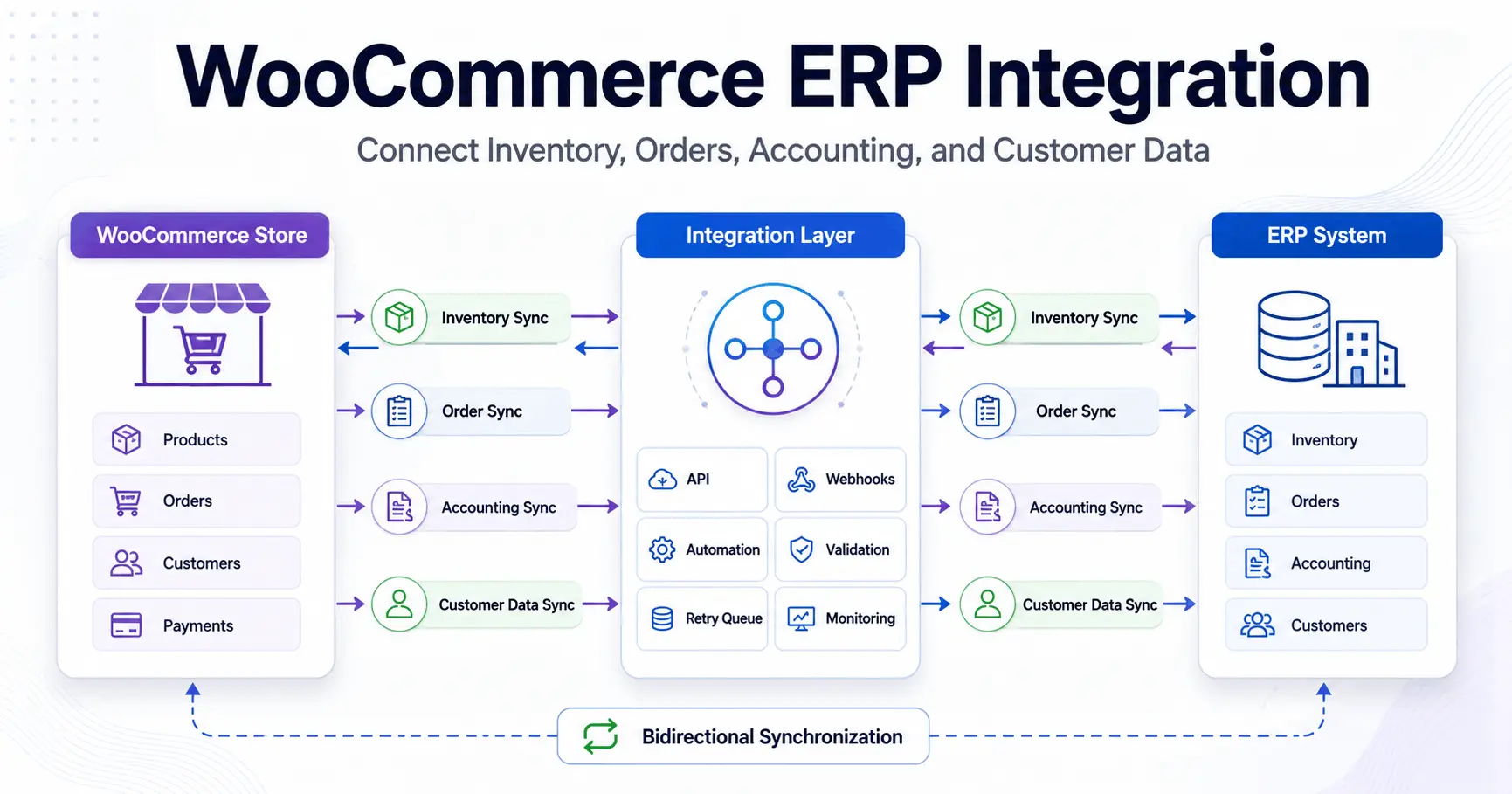
WooCommerce ERP integration is the controlled exchange of commerce data between WooCommerce and an enterprise resource planning platform. It commonly synchronizes products, prices, inventory, customers, orders, payments, refunds, invoices, shipments, and accounting references through APIs, webhooks, middleware, scheduled jobs, or a combination of these mechanisms.
The ERP is usually authoritative for stock, purchasing, cost, fulfillment, and finance. WooCommerce owns cart activity, checkout context, storefront content, and selected customer-facing states. The boundary must be documented because bidirectional sync without ownership rules creates loops, stale data, and silent overwrites.
How WooCommerce ERP Integration Works in Production
WooCommerce ERP Integration Workflow from Checkout to ERP
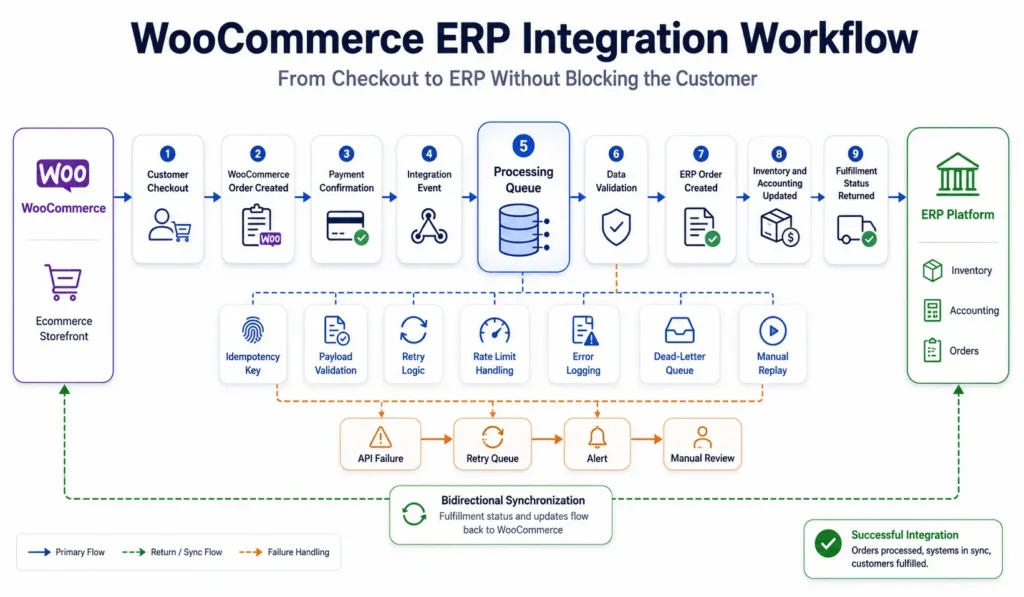
At checkout, WooCommerce validates the cart, calculates totals, creates the order, and contacts the payment gateway. Confirmation may arrive through a webhook later. The integration should not hold the customer response while waiting for the ERP. A hook should publish an event after the required WooCommerce state is committed.
A worker loads the order through supported WooCommerce APIs, maps it to the ERP contract, validates identifiers and totals, then submits the payload. It stores the remote reference on success. On failure, it records the response, classifies the error, and retries only temporary problems.
In production, duplicate deliveries are normal. Webhooks retry, workers restart, and users trigger manual resubmission. Every write needs an idempotency key based on the order, event type, and version. Otherwise, a timeout can create duplicate sales orders or invoices even when the first request succeeded.
Inventory, Product, and Customer Synchronization
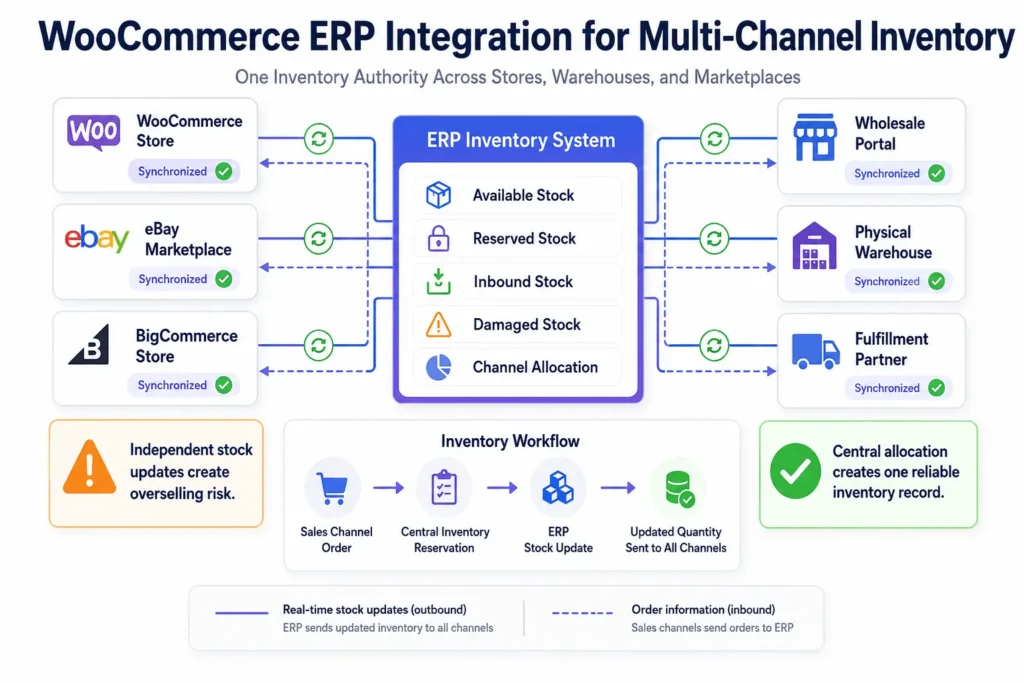
Inventory synchronization should separate available, reserved, damaged, inbound, and channel-allocated quantities where the ERP exposes them. Sending one generic stock number can oversell products when multiple stores, eBay listings, wholesale channels, or warehouses share inventory.
Product synchronization is usually slower. ERP-managed SKUs, costs, tax classes, and warehouse attributes can flow in batches, while marketing copy remains under ecommerce ownership. Customer data needs similar discipline because guest orders, duplicate emails, company accounts, and tax exemptions rarely align automatically.
For high-change catalogs, the integration benefits from the same controls described in real-time data synchronization strategies: change tracking, ordered events, conflict rules, reconciliation, and measurable data freshness.
Architecture Choices That Determine Reliability
Monolith, Middleware, or Event-Driven Service
A small store can keep WooCommerce ERP integration inside a WordPress plugin. This monolithic approach is simple to deploy and gives developers direct access to WooCommerce hooks. It becomes harder to operate when imports consume PHP workers, retries depend on WP-Cron, or multiple channels require different transformations.
Middleware moves orchestration outside WordPress. An iPaaS product can provide mappings, connectors, scheduling, and basic error handling. A custom service offers greater control over queues, versioning, rate limits, tenant isolation, and audit logs. Microservices make sense only when separate domains need independent scaling or ownership. Otherwise, they add deployment and observability overhead.
APIs, Webhooks, Queues, and Scheduled Reconciliation
The WooCommerce REST API documentation defines supported access to orders, products, customers, and related resources. Polling helps with recovery and bulk reads, while webhooks reduce delay. Queues absorb spikes and protect both platforms when an API reaches a rate limit or becomes unavailable.
Queues do not replace reconciliation. A scheduled job should compare paid orders, shipment states, refund amounts, and stock deltas. We have seen integrations report perfect job success while missing records because the source event was never created. Reconciliation detects that failure.
HPOS, Plugin Architecture, and Database Load
High-Performance Order Storage moves orders into dedicated tables and reduces dependence on posts and postmeta. Before enabling it, verify that the ERP connector and order extensions use WooCommerce data access methods rather than direct queries. The official HPOS guidance is the baseline for compatibility work.
Custom hooks should schedule jobs rather than make remote calls during checkout or admin requests. Action Scheduler is often more dependable than raw WP-Cron, though high-volume workloads may need external workers. Redis reduces repeated reads, and a CDN protects static assets. Neither fixes slow APIs, unindexed tables, or poor imports.
When an off-the-shelf extension cannot meet the contract, custom WooCommerce plugin development can isolate mapping logic, admin controls, retry actions, and compatibility checks without placing integration code in the theme.
Top Platforms for WooCommerce ERP Integration
The top platforms for WooCommerce ERP integration depend on accounting depth, inventory structure, manufacturing, international operations, and channel count. API coverage, rate limits, and connector quality matter more than popularity.
| Feature | Typical Strength | Integration Caveat |
|---|---|---|
| Acumatica | Distribution, financials, inventory, and configurable workflows | Acumatica integrations with WooCommerce require careful mapping of customers, warehouses, taxes, and order statuses. |
| NetSuite | Multi-entity finance, inventory, and enterprise operations | Governance limits, subsidiaries, and custom records complicate sync |
| Microsoft Dynamics 365 | ERP and CRM across Microsoft business systems | Data models and licensing vary by product |
| Odoo ERP | Modular inventory, sales, accounting, manufacturing, and CRM | Custom modules and versions affect compatibility |
| QuickBooks or Zoho Inventory | Accessible accounting and inventory for smaller teams | May not support advanced warehouse, manufacturing, or multi-entity needs |
WooCommerce ERP integration Acumatica designs commonly use a certified connector, iPaaS, or custom API layer. The right choice depends on whether standard entities are enough. Custom fields, project accounting, multiple warehouses, branch rules, or nonstandard fulfillment often require transformation logic beyond a basic connector.
For businesses selling through WooCommerce, eBay, or BigCommerce, each connector should feed a shared ERP or order-management source of truth. The ERP or order management layer should allocate inventory centrally, while adapters translate listings, fees, taxes, cancellations, and shipments. Multi-channel selling fails when connectors adjust stock independently without a shared reservation model.
Where WooCommerce ERP Integration Commonly Fails
Most failures come from ambiguous states, not unavailable APIs. A refunded payment may not mean the order is cancelled. A shipment may contain only part of an order. A valid WooCommerce SKU may still have no matching warehouse item.
- Missing idempotency creates duplicate orders, payments, or invoices after retries.
- Direct database queries break when HPOS or plugin schemas change.
- WP-Cron delays time-sensitive jobs on stores with low or irregular traffic.
- Unbounded imports consume PHP workers, database connections, and API quotas.
- Weak logging records an error message but omits the payload, correlation ID, attempt number, and affected record.
- Bidirectional updates create loops when both platforms treat the same field as authoritative.
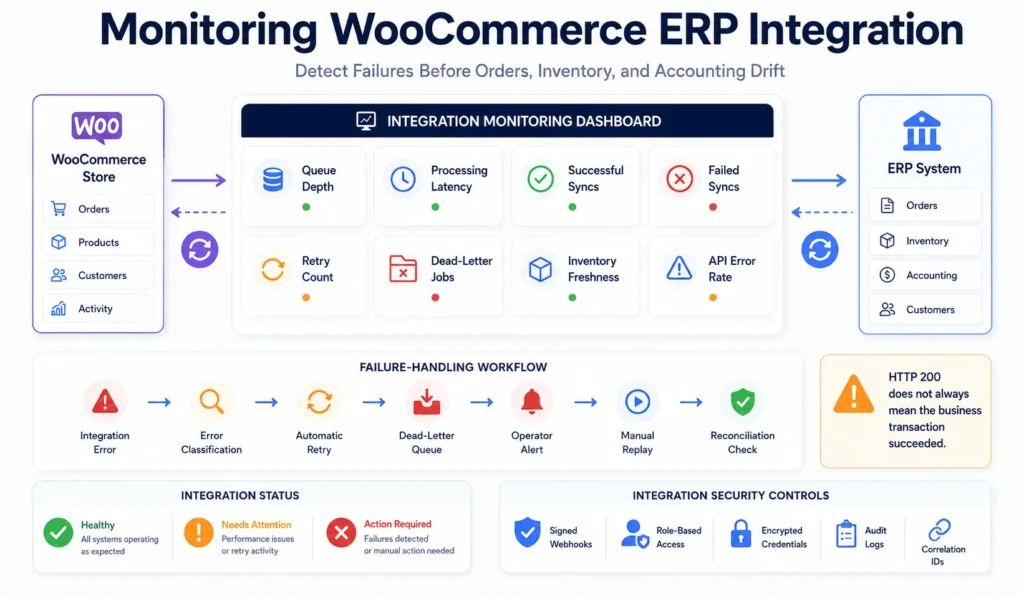
A common mistake is marking a job complete when the remote API returns HTTP 200. Some systems return a successful transport response with a business validation error inside the body. WooCommerce ERP integration software must validate the response contract, not only the status code.
Security, Performance, and Operational Controls
Store credentials outside source control, scope permissions, rotate secrets, and separate environments. Use TLS, signed webhooks where supported, and role-based access for replay, mapping changes, and financial actions. Admin tools should record who changed a mapping or retried a transaction.
Observability needs structured logs, correlation IDs, queue depth, latency, retry counts, dead-letter volume, error rates, and data freshness metrics. Alerts should identify actionable conditions. A brief outage may need retries; a queue growing for two hours needs an operator.
Headless WordPress can improve frontend delivery, but it does not remove back-office complexity. WooCommerce ERP integration remains a transaction system and should be monitored separately from page speed.
Implementation Plan for WooCommerce ERP Integration
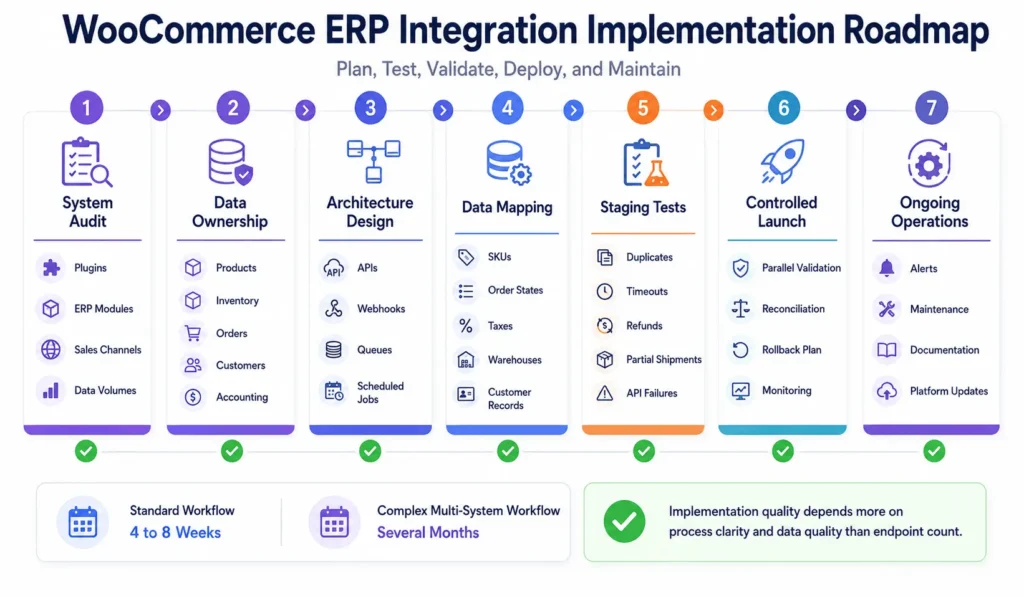
A controlled implementation starts with process discovery, not connector installation. Document order, inventory, accounting, refund, fulfillment, and manual exception workflows. Then define a canonical data model and ownership matrix.
- Inventory systems, extensions, custom tables, channels, credentials, and volumes.
- Define ownership, triggers, mappings, states, and acceptable delay.
- Test representative products, customers, taxes, discounts, refunds, and partial shipments in staging.
- Test rate limits, malformed data, duplicates, timeouts, outages, and replay.
- Separate historical migration from live synchronization so bulk loads cannot block orders.
- Validate in parallel before switching financial or fulfillment ownership.
- Prepare dashboards, alerts, reconciliation, support, rollback, and named owners.
A focused implementation may take four to eight weeks. Multi-warehouse, manufacturing, subscription, marketplace, or custom accounting projects often require several months. Timelines depend more on process clarity and data quality than on the number of API endpoints.
When Custom Engineering Becomes Necessary
Pre-built WooCommerce ERP integration services are appropriate when the business can adopt the connector’s supported workflow. Custom engineering becomes reasonable when teams repeatedly export CSV files, correct stock by hand, reconcile duplicate customers, re-enter orders, or build operational policy around connector limitations.
Filicode approaches these projects through system architecture, WooCommerce development, API integrations, performance optimization, SaaS tooling, and automation. Work may include extending a connector, building an integration service, adding operational dashboards, or creating controlled business automation workflows with validation and human approval for sensitive decisions.
The limitation of custom development is ownership. It needs tests, documentation, monitoring, deployments, and engineers who can respond to platform changes. A dedicated PHP engineering model can provide continuity, but it does not replace clear operational responsibility.
WooCommerce ERP Integration FAQs
How much does WooCommerce ERP integration cost?
WooCommerce ERP integration cost depends on connector licensing, data complexity, custom mappings, testing, and ongoing support. A standard connector setup may require days or weeks, while a custom multi-system integration can require several months of engineering and operational work.
How long does WooCommerce ERP integration take?
A focused WooCommerce ERP integration commonly takes four to eight weeks when products, orders, customers, and inventory follow standard workflows. Multi-warehouse, marketplace, manufacturing, subscription, or historical migration requirements can extend delivery to several months.
Should we use WooCommerce ERP integration with iPaaS?
WooCommerce ERP integration with iPaaS is useful when the platform already supports both systems and your mappings fit its transformation, retry, scheduling, and monitoring capabilities. Custom code is usually better when workflows require complex state management, unusual entities, or strict performance control.
Can WooCommerce ERP integration support real-time inventory?
Yes, but reliable real-time inventory requires event-driven updates, queue processing, idempotency, API rate-limit handling, and scheduled reconciliation. The practical target is controlled data freshness, not an unsupported promise that every system updates instantly.
Is migration to a new ERP risky for WooCommerce stores?
Migration risk is manageable when historical data, live synchronization, and cutover are treated as separate workstreams. Use staging tests, parallel validation, reconciliation reports, a rollback plan, and a defined freeze window for high-risk financial or inventory changes.
Does HPOS affect WooCommerce ERP integration?
Yes. HPOS changes how WooCommerce order data is stored, so connectors and custom plugins should use supported WooCommerce data access methods. Test order creation, updates, refunds, exports, reports, and synchronization before enabling HPOS on an established store.
Build the Integration Around Operations, Not the Connector
Warning signs include channel inventory differences, late accounting close, repeated data entry, ownerless failed jobs, manual refund repair, and risky platform updates. These are system limitations, not isolated administrative mistakes.
WooCommerce ERP integration should reduce uncertainty while preserving traceability. Document ownership, exceptions, transaction states, and reconciliation requirements. Consider custom development when standard mappings fail and manual correction, delayed fulfillment, or inaccurate reporting costs more than maintaining a controlled integration.
The next step is an architecture review covering data flows, plugin compatibility, API constraints, volume, security, ownership, and recovery. It should reveal whether configuration is enough or a maintainable custom system is justified.