







Contents
- Quick Summary: Shopify Developer Skills That Matter in 2026
- What Shopify Developer Skills Actually Mean
- Core Shopify Developer Skills Required for Storefront Work
- Shopify Theme Skills Checklist for Developers
- Advanced Shopify Developer Skills for APIs and Integrations
- Comparison Table: Basic vs Advanced Shopify Developer Skills
- Scalable Shopify Development Solutions for Growing Stores
- Shopify Developer Skills for Performance and SEO
- Shopify Developer Skills Requirements 2026: What Changed
- Operational Skills: Where Good Developers Protect Revenue
- Comparison Table: Cheap Development vs Maintainable Shopify Work
- Business and Strategic Shopify Developer Skills
- Shopify Developer Skills for Custom Apps and Automation
- How to Evaluate Shopify Developer Skills Before Hiring
- Where Filicode Fits in Shopify Development Work
- FAQ About Shopify Developer Skills
- What are shopify developer skills?
- What are the top Shopify developer skills for 2026?
- How much does it cost to hire a Shopify developer?
- How long does Shopify development take?
- Can Shopify scale for complex ecommerce operations?
- When should a store consider custom Shopify development?
- Which Shopify skills support long-term scalability?
- Conclusion: Shopify Developer Skills Should Reduce Operational Risk
A Shopify store starts to fail quietly before it fails visibly. Pages get slower after too many apps. Checkout logic becomes fragile. Inventory updates lag behind the warehouse. Marketing scripts affect Core Web Vitals. A small theme edit breaks product templates because nobody documented the previous customization.
That is where Shopify developer skills matter. These Shopify skills go beyond editing Liquid or installing an app. For a serious ecommerce operation, the developer needs to understand storefront performance, APIs, data flow, deployment risk, app dependencies, analytics, and the operational pressure behind a live revenue channel.
Quick Summary: Shopify Developer Skills That Matter in 2026
- Theme skills are only the starting point. A capable developer must understand Liquid, sections, blocks, JavaScript, accessibility, SEO structure, and performance impact.
- Shopify scalability depends on connected architecture. Scalable Shopify development solutions need clean data flow and failure handling across ERP, CRM, WMS, PIM, payment, shipping, and analytics systems.
- App management is a technical skill. Too many apps can create speed, checkout, tracking, and maintenance problems.
- Production discipline matters. Duplicate themes, staging workflows, Git, testing, rollback planning, and monitoring reduce costly launch mistakes.
- Business understanding improves technical decisions. Developers should understand conversion rate, average order value, fulfillment operations, and customer journey bottlenecks.
What Shopify Developer Skills Actually Mean
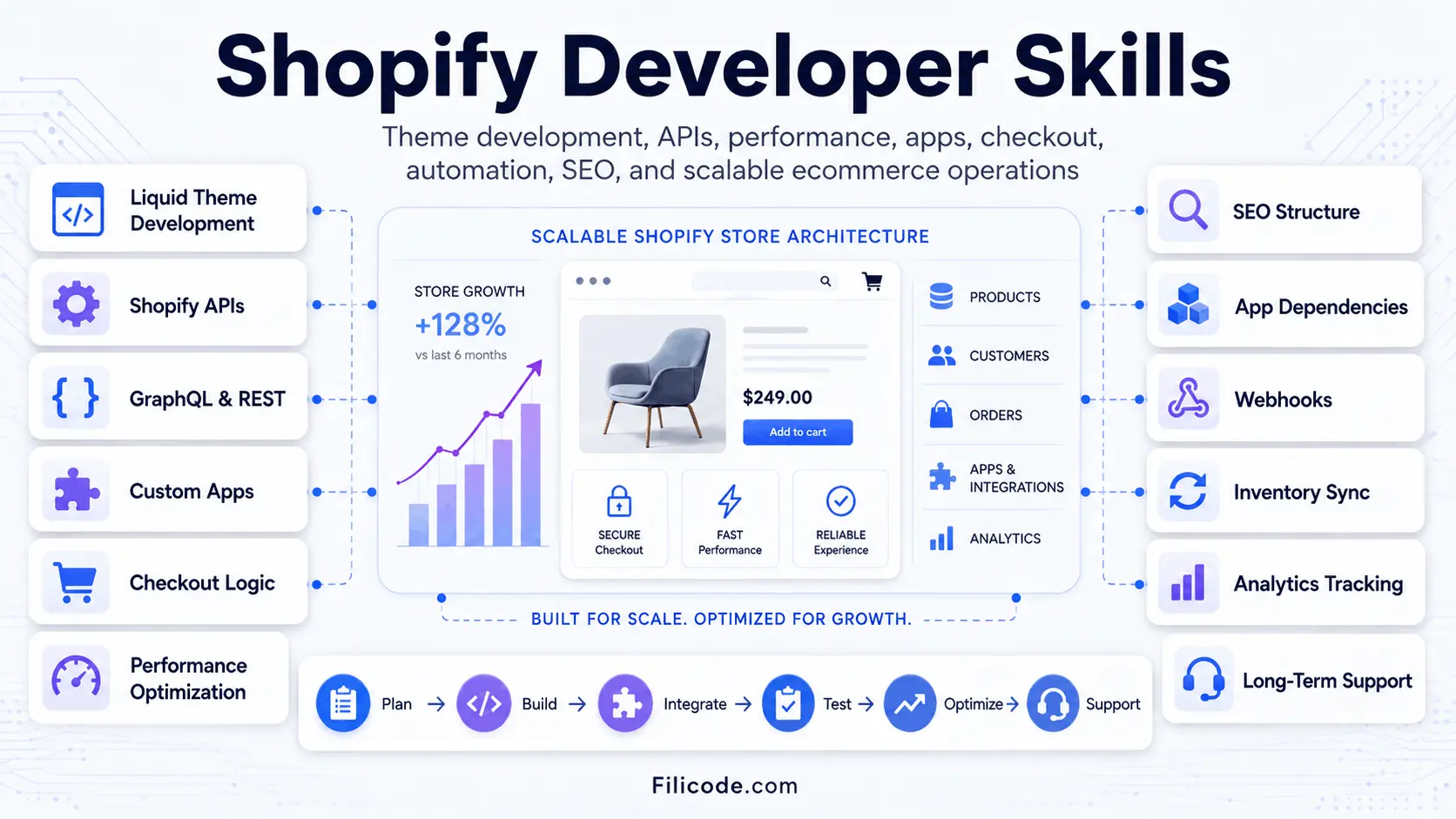
When people ask what Shopify developer skills are required, they usually expect a list of coding languages. That answer is incomplete. A Shopify developer needs platform knowledge, frontend engineering, API experience, ecommerce judgment, and the ability to protect a live store from unnecessary risk.
Shopify is a hosted ecommerce platform, but hosted does not mean simple. A merchant may use Shopify for product management, checkout, orders, inventory, analytics, marketing automation, and fulfillment workflows. A developer who only understands visual changes can help with small tasks, but may struggle when the store depends on several connected systems.
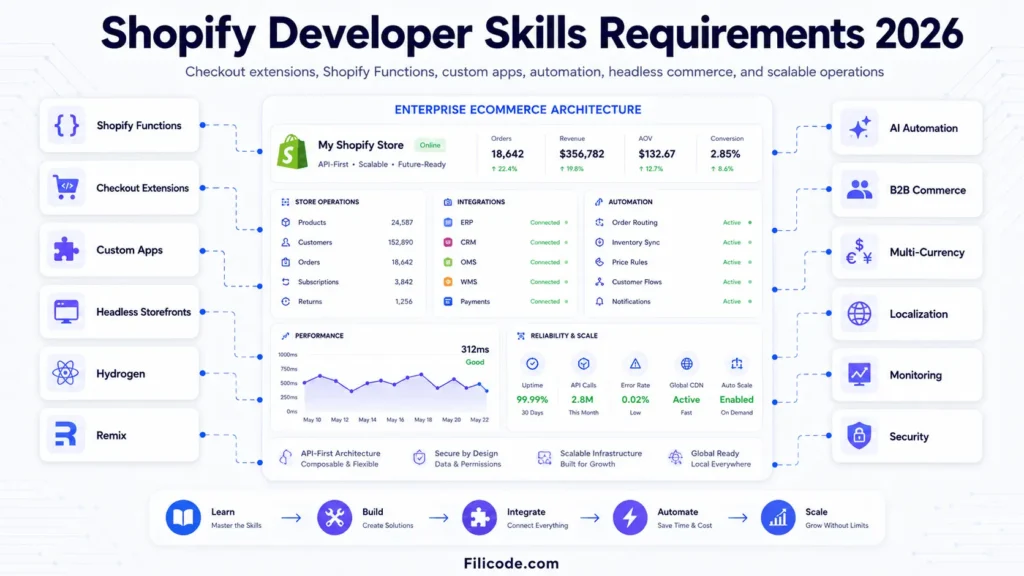
The foundation includes Liquid, HTML, CSS, JavaScript, JSON templates, Shopify theme architecture, and Shopify CLI. Stronger developers also understand GraphQL, REST APIs, webhooks, custom apps, checkout extensibility, Shopify Functions, and headless storefront options such as Hydrogen and Remix.
For a deeper look at how developer evaluation affects project quality, the related guide on how to hire Shopify developers for ecommerce projects is a useful next step.
Core Shopify Developer Skills Required for Storefront Work
The most visible work happens in the storefront, but the best storefront work is not just design implementation. It protects speed, content flexibility, SEO, and long-term maintainability.
Shopify Theme Skills Checklist for Developers
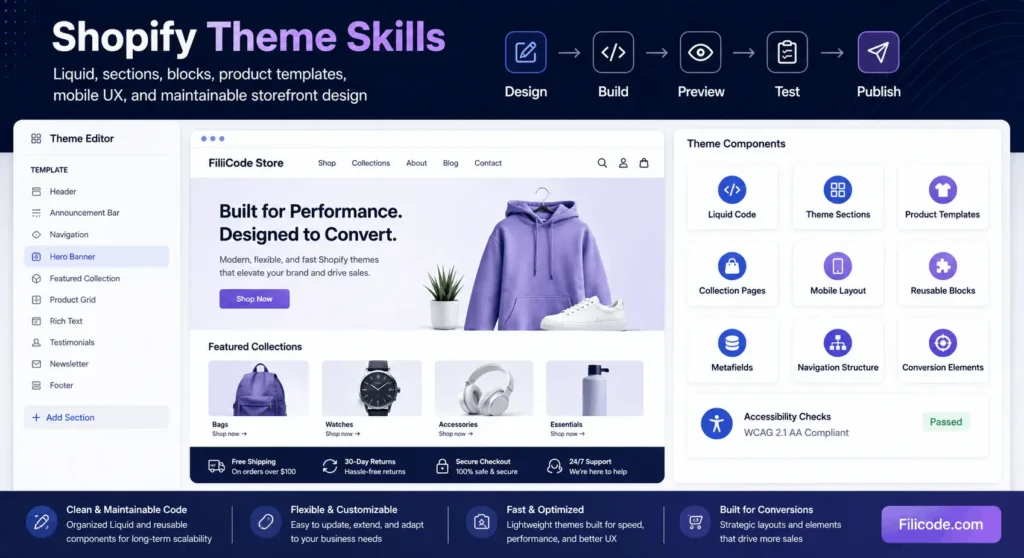
A theme developer should understand Liquid logic, reusable snippets, dynamic sections, theme settings, product templates, collection templates, metafields, localization, and responsive layouts. They should know when to build a reusable section instead of hardcoding content into one page.
Good theme work also respects merchant workflows. A store team should be able to update homepage banners, product information tabs, collection content, trust blocks, size charts, and promotional sections without calling a developer for every change.
Weak theme development usually creates hidden maintenance cost. The site may look correct at launch, but every campaign becomes difficult because content is trapped inside code.
Advanced Shopify Developer Skills for APIs and Integrations
Many Shopify projects become complex when the store needs to communicate with other systems. This is where shopify developer skills move beyond theme customization.
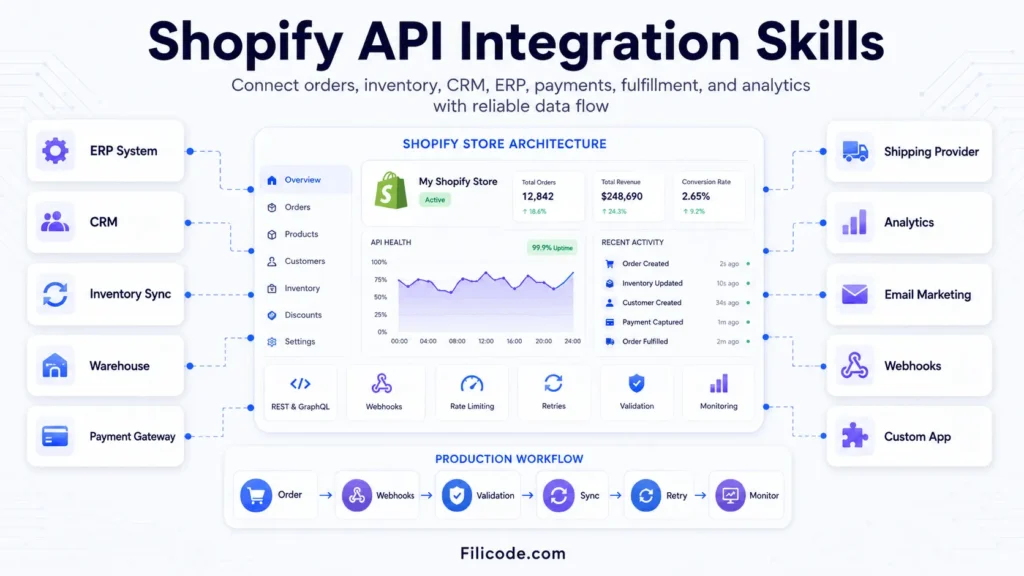
A production ecommerce workflow may look like this:
- A customer places an order through Shopify checkout.
- Shopify creates the order and triggers a webhook.
- A middleware service validates the payload and sends order data to an ERP or fulfillment system.
- The warehouse updates inventory after picking and packing.
- Tracking data returns to Shopify and triggers customer notifications.
- Analytics and CRM platforms receive clean event data for reporting and retention campaigns.
This workflow needs authentication, retries, logging, validation, rate-limit handling, and alerting. A basic API connection may work during testing, but fail under real order volume if the developer ignores webhook duplication, timeout behavior, or partial failure states.
Shopify’s own developer API documentation is worth reviewing because platform limits, authentication models, and API versions directly affect implementation decisions.
If the project involves ERP, CRM, inventory, payment, or custom data pipelines, API integration services for ecommerce systems become more relevant than simple theme editing.
Comparison Table: Basic vs Advanced Shopify Developer Skills
| Skill Area | Basic Developer | Advanced Developer |
|---|---|---|
| Theme editing | Changes layouts, colors, and simple Liquid templates | Builds reusable sections, clean theme settings, and maintainable templates |
| Performance | Compresses images and removes obvious clutter | Audits scripts, app impact, lazy loading, Core Web Vitals, and render-blocking assets |
| APIs | Connects simple apps or follows plugin instructions | Builds authenticated integrations with retries, logging, validation, and monitoring |
| Checkout | Understands standard checkout configuration | Works with approved checkout customization, Shopify Functions, and extension limits |
| Operations | Completes assigned development tasks | Understands inventory, fulfillment, reporting, support workflows, and launch risk |
| Maintenance | Fixes issues after they appear | Documents changes, tests releases, monitors errors, and reduces future support burden |
Scalable Shopify Development Solutions for Growing Stores
Scalable Shopify development solutions should support more products, traffic, orders, integrations, markets, and operational complexity without making the store fragile. Shopify scalability depends on clean theme architecture, controlled app usage, reliable data flows, and a development process that protects checkout, tracking, inventory, and fulfillment.
The most important Shopify skills for scalable growth include:
- Reusable Liquid sections and maintainable theme components
- Shopify theme skills for responsive and merchant-editable storefronts
- API, webhook, ERP, CRM, inventory, and fulfillment integrations
- Performance monitoring and third-party script control
- Checkout extensibility and Shopify Functions
- Testing, documentation, rollback planning, and error monitoring
A strong Shopify developer should also know when to use Shopify-native features, an established app, custom theme logic, or a custom application. The best technical approach supports future growth without adding unnecessary dependencies, duplicated systems, or long-term maintenance problems.
Shopify Developer Skills for Performance and SEO
Performance problems in Shopify often come from small decisions repeated over time. One app adds a tracking script. Another injects review widgets. A third modifies product forms. Marketing adds pixels. The theme loads oversized media. Nobody checks the combined impact.
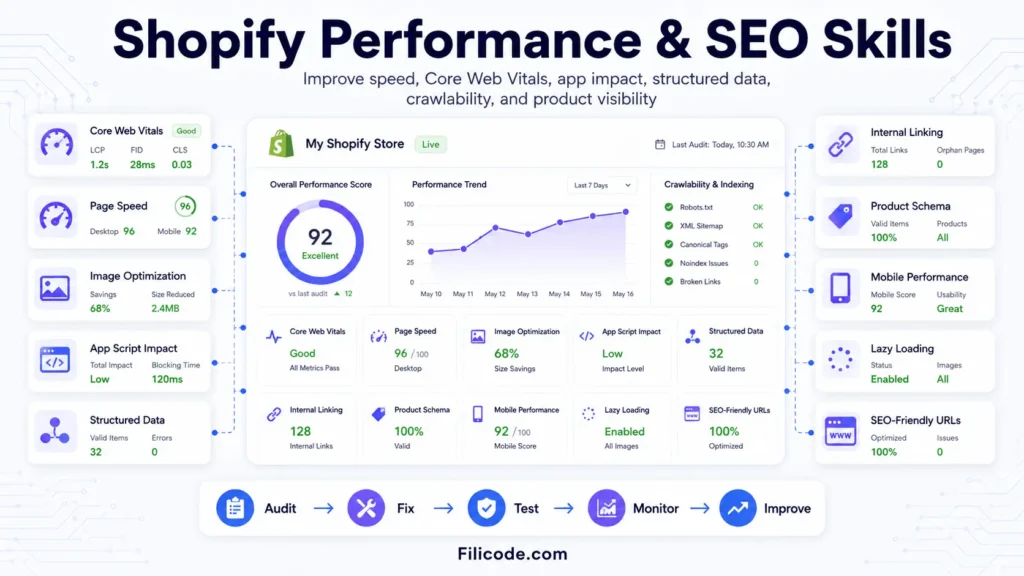
Strong shopify developer skills include performance diagnosis, not just speed plugin usage. A developer should know how to inspect Lighthouse reports, PageSpeed Insights, WebPageTest waterfalls, JavaScript execution cost, layout shifts, image loading, and third-party script behavior.
For SEO, the work includes clean heading structure, crawlable content, readable URLs, internal linking, structured data, canonical logic, product schema, collection page content, and image alt text. Shopify SEO is not only metadata. It is also architecture, performance, and content accessibility.
Stores planning content growth should also think about category depth, product relationships, and internal linking. The guide on ecommerce website structure for scalable online stores explains how structure affects search visibility and user flow.
Shopify Developer Skills Requirements 2026: What Changed
Shopify developer skills requirements 2026 are broader because modern stores are more connected. A developer may need to work with Shopify Plus, B2B commerce, subscription systems, multi-currency, localization, headless storefronts, automation, and custom checkout logic.
Developers should also understand platform direction. Legacy approaches may not be the best choice for new builds. Checkout customizations need to follow Shopify’s approved extension model. Custom storefronts need realistic planning around hosting, caching, routing, analytics, and content management.
AI automation is also entering merchant workflows. A store may use AI-assisted support, CRM automation, product content generation, review analysis, or internal operations agents. The developer does not need to turn every workflow into AI, but should understand validation, human approval, fallback logic, and monitoring when automation affects customer-facing operations.
Operational Skills: Where Good Developers Protect Revenue
Some of the most valuable shopify developer skills are not visible in screenshots. They show up during launches, migrations, bug fixes, and high-traffic periods.
A production-minded developer duplicates the active theme before editing. They preview changes on key templates. They test product variants, cart behavior, checkout handoff, discount logic, tracking events, forms, and mobile layouts. They avoid publishing unverified changes during peak sales windows.
For migrations, they check URL mapping, redirects, product data, customer records, order history, analytics continuity, and SEO risk. A careless migration can damage rankings, reporting, and customer trust. The Shopify migration checklist for SEO, data, and launch planning covers these risks in more detail.
Maintenance is not glamorous, but it protects the store. Theme updates, app reviews, broken tracking checks, error monitoring, documentation, and support workflows reduce the chance that a small issue becomes a revenue problem.
Comparison Table: Cheap Development vs Maintainable Shopify Work
| Decision | Cheap Short-Term Build | Maintainable Shopify Development |
|---|---|---|
| Theme customization | Hardcoded edits that are fast but difficult to update | Reusable components and merchant-editable settings |
| Apps | Adds apps for every requirement | Reviews app impact, overlap, data ownership, and speed cost |
| Integrations | Connects systems without robust error handling | Uses validation, retries, logs, alerts, and clear ownership |
| Testing | Checks only the page being changed | Tests cart, checkout, mobile, tracking, SEO, and key templates |
| Documentation | Relies on developer memory | Documents changes, dependencies, credentials, and release notes |
| Scaling | Solves today’s task only | Considers future campaigns, integrations, content, and operations |
Business and Strategic Shopify Developer Skills
Technical ability is easier to measure than judgment. But judgment is what keeps projects from becoming expensive patchwork.
A strong developer asks practical questions before writing code. How does the store team manage products? Which apps are business-critical? What happens if the ERP is down? Who owns analytics accuracy? Are there seasonal traffic spikes? Does the store need B2B pricing, wholesale workflows, local currency, or multi-location inventory?
These questions reveal whether the developer understands ecommerce operations. The best technical solution is not always the most complex one. Sometimes the right answer is a Shopify-native configuration. Sometimes it is a custom app. Sometimes it is removing three apps and replacing them with one maintainable workflow.
For businesses still evaluating platform direction, choosing the best ecommerce platform for a small business can help compare Shopify against other options before committing to custom development.
Shopify Developer Skills for Custom Apps and Automation
Custom Shopify apps are useful when the business process cannot be handled cleanly by theme code or off-the-shelf apps. This may include custom pricing logic, internal admin workflows, fulfillment rules, advanced reporting, approval flows, product sync, or merchant-specific automation.
A custom app requires backend development, authentication, database design, API permissions, webhook handling, and deployment planning. If the app affects orders, payments, or fulfillment, failure handling becomes critical.
For example, a webhook-based inventory sync should not assume every request succeeds. It needs to handle duplicate events, network failures, API rate limits, invalid SKUs, and delayed responses from the external system. Logs should show what happened. Alerts should notify the right person before customers notice the issue.
This is also where SaaS thinking helps. Admin tooling, RBAC, audit logs, tenant isolation, billing workflows, and operational dashboards may be needed if the app supports multiple stores or business units.
How to Evaluate Shopify Developer Skills Before Hiring
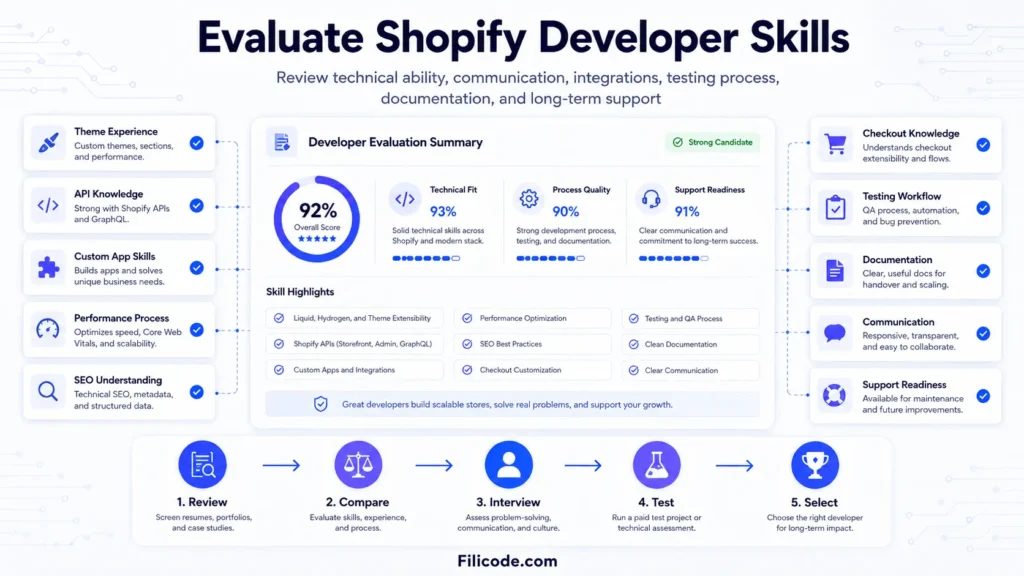
A portfolio is useful, but it does not prove production discipline. Ask how the developer handles theme deployment, app conflicts, Shopify API version changes, checkout limitations, speed audits, tracking validation, and rollback planning.
Good questions include:
- How do you test changes before publishing a Shopify theme?
- How do you decide between an app, custom theme logic, and a custom Shopify app?
- How do you handle webhook failures and duplicate events?
- How do you measure app impact on store performance?
- What documentation do you provide after launch?
The answers will show whether the developer works like a task executor or a technical partner. For growing stores, that difference matters.
Where Filicode Fits in Shopify Development Work
Filicode works on ecommerce systems where maintainability, integrations, performance, and operational reliability matter. That includes custom Shopify development, WordPress and WooCommerce development, API integrations, AI automation, SaaS architecture, and technical support for growing digital platforms.
Not every Shopify store needs heavy custom development. Many stores should start with a clean theme, well-chosen apps, strong content structure, and disciplined maintenance. Custom work becomes more valuable when the store outgrows standard workflows, depends on external systems, or starts losing time to manual operations.
For custom storefronts, theme work, app logic, or advanced ecommerce requirements, custom Shopify development services can support a more structured technical roadmap. For ongoing fixes, monitoring, and improvement cycles, website support services help reduce maintenance gaps after launch.
FAQ About Shopify Developer Skills
What are shopify developer skills?
Shopify developer skills are the technical and operational abilities needed to build, customize, integrate, optimize, and maintain Shopify stores. They include Liquid, theme architecture, APIs, webhooks, performance, SEO, testing, documentation, and ecommerce workflow understanding.
What are the top Shopify developer skills for 2026?
The top skills include Liquid, JavaScript, Shopify CLI, GraphQL, REST APIs, webhooks, checkout extensibility, Shopify Functions, performance optimization, app evaluation, SEO structure, and production testing.
How much does it cost to hire a Shopify developer?
Cost depends on scope. Small theme changes may be simple. Custom apps, migrations, checkout logic, API integrations, or Shopify Plus work require more planning, testing, and senior technical involvement.
How long does Shopify development take?
A focused theme improvement may take days. A migration, custom app, or integrated ecommerce workflow can take weeks or longer depending on data quality, third-party systems, testing needs, and launch risk.
Can Shopify scale for complex ecommerce operations?
Yes, but scaling depends on architecture. The store needs clean theme code, controlled app usage, reliable integrations, performance monitoring, and clear operational ownership.
When should a store consider custom Shopify development?
Custom development should be considered when standard apps create performance issues, manual work increases, integrations become unreliable, checkout requirements become more complex, or the store needs workflows that off-the-shelf tools cannot support cleanly.
Which Shopify skills support long-term scalability?
Shopify scalability depends on maintainable theme architecture, Liquid, JavaScript, APIs, webhooks, app evaluation, checkout extensibility, performance optimization, testing, monitoring, and operational documentation. Together, these Shopify skills help stores handle growth without creating fragile workflows.
Conclusion: Shopify Developer Skills Should Reduce Operational Risk
The real value of shopify developer skills is not only better code. It is fewer fragile workflows, cleaner launches, faster pages, safer integrations, clearer reporting, and a store team that can operate without constant technical friction.
Warning signs are easy to spot: too many apps doing overlapping jobs, slow product pages, broken analytics, manual inventory updates, checkout limitations, undocumented theme edits, failed sync jobs, or developers who avoid explaining trade-offs.
When those problems appear, custom development should be considered carefully. Start with an audit of theme code, app dependencies, performance, integrations, and operational workflows. Then decide what should stay native, what should be automated, and what deserves custom engineering.
If your Shopify store is becoming harder to maintain, integrate, or scale, you can discuss your project with Filicode and review the technical path before adding more short-term fixes.